Can I Take 2 Laptops Through Airport Security Safely
Yes, you can take 2 laptops through airport security without any issues in most cases. The TSA allows travelers to carry multiple laptops as long as they follow electronics screening rules and carry-on guidelines. You will need to remove each laptop from your bag for separate screening at the security checkpoint, so packing smart is essential. This guide covers everything you need to know about traveling with two laptops safely and stress-free.
Traveling with two laptops can feel stressful if you have never done it before. You might worry about airport security rules, getting stopped at the security checkpoint, or having your gear confiscated. The good news is that taking 2 laptops through airport security is perfectly fine in most situations. Millions of digital nomads and business travelers do this every single day. This guide will walk you through every rule, tip, and trick so you can breeze right through airport screening with confidence.
Whether you are a freelancer juggling two work machines or a student carrying a personal laptop alongside a work device, knowing the TSA rules for electronics makes all the difference. You will learn exactly what to expect at the security checkpoint, how to pack your bags the right way, and what common mistakes to avoid. Let us get into it.
Key Takeaways
- Two laptops are allowed: TSA and most international airports let you take 2 laptops through airport security without restrictions.
- Separate screening is required: Each laptop must come out of your bag and go into its own bin at the X-ray machine.
- TSA PreCheck helps: Enrolling in TSA PreCheck can save you time since you keep shoes and light jackets on.
- Battery rules matter: Spare lithium batteries must travel in carry-on luggage, not checked bags.
- Smart packing prevents delays: Use dedicated laptop sleeves and a well-organized carry-on to speed up screening.
- International rules vary slightly: Some countries have additional regulations, so always check local guidelines.
- Common mistakes cause hassle: Forgetting to remove laptops or overpacking your bag leads to extra screening.
📑 Table of Contents
- Can You Take 2 Laptops Through Airport Security?
- TSA Rules for Carrying Multiple Laptops
- How to Pack Two Laptops for Air Travel
- International Travel with Two Laptops
- Common Mistakes Travelers Make with Two Laptops
- Expert Tips for a Smooth Airport Screening Experience
- Key Takeaways
- Frequently Asked Questions
- Conclusion
Can You Take 2 Laptops Through Airport Security?
The short answer is yes. The Transportation Security Administration (TSA) allows passengers to carry multiple laptops in their carry-on luggage. There is no official limit on the number of laptops you can bring. You can take 2 laptops through airport security without any special permission or declarations.
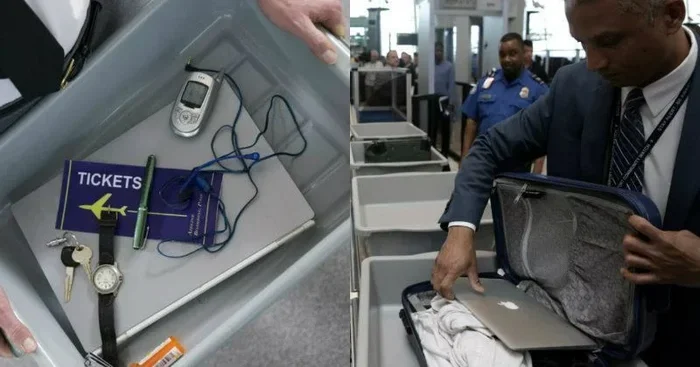
However, there are some important rules you need to follow. Both laptops must be removed from your bag and placed in a separate security tray for X-ray screening. This is the same rule that applies to tablets, large cameras, and other electronics. The purpose is simple: airport screening officers need a clear view of each device to check for hidden items or threats.
What the TSA Actually Says
The TSA website states that travelers should remove large electronics from carry-on bags. Any device larger than a smartphone needs to go into its own bin. Since a standard laptop fits this category, each one gets its own tray. This is not a rule designed to inconvenience you. It is a security measure that helps keep everyone safe on flights.
Here is what you need to remember about TSA rules for multiple laptops:
- Each laptop must be removed from your bag.
- Place each device in a separate screening bin.
- Do not stack laptops on top of each other in the tray.
- Keep them flat for the best X-ray machine reading.
- You may be asked to power on a laptop if requested.
Following these simple steps ensures a smooth electronics screening process every time you travel.
TSA Rules for Carrying Multiple Laptops
Understanding the specific TSA guidelines for laptops helps you prepare properly. Let us break down the most important rules you need to know before heading to the security checkpoint.
Laptop Size and Type Restrictions
The TSA does not restrict laptop sizes when it comes to how many you can carry. Whether you have a 13-inch ultrabook and a 17-inch gaming laptop or two identical 15-inch machines, both are allowed. The carry-on restrictions focus more on the overall size and weight of your bag rather than individual devices.
That said, keep in mind that airline carry-on luggage policies still apply. Most airlines allow one personal item and one carry-on bag. Your two laptops should fit comfortably inside these. If your bag is oversized or overweight, the airline may require you to check it, which changes the rules for lithium batteries.
Battery Regulations You Must Know
This is where things get important. Lithium-ion batteries power most modern laptops. The FAA and TSA have strict rules about spare batteries and battery regulations for air travel. The good news is that laptops installed in your carry-on bag are perfectly fine.
However, if you carry spare lithium batteries, they must travel with you in the cabin. You cannot pack spare batteries in checked luggage. The rule exists because lithium batteries can overheat and cause fires. Battery safety is taken very seriously at airport screening checkpoints.
Here are the key battery rules for traveling with two laptops:
- Laptops with built-in batteries are allowed in carry-on bags.
- Spare lithium batteries must be in your carry-on luggage.
- Each battery should be under 100 watt-hours for personal use.
- Batteries between 100 and 160 watt-hours need airline approval.
- Tape over battery terminals to prevent accidental activation.
As long as both laptops are fully assembled and you are not carrying loose battery packs, you will have no issues with TSA battery regulations.
How to Pack Two Laptops for Air Travel
Packing two laptops properly saves you time and stress at the security checkpoint. A well-organized bag makes the electronics screening process faster and reduces the chance of being flagged for additional screening.
Use Dedicated Laptop Sleeves
Every laptop deserves its own protective sleeve. This keeps them safe from scratches and bumps during transit. It also makes it easier to pull them out quickly when you reach the security tray. Look for sleeves with a rigid shell or thick foam padding for the best protection.
Pro tip: Use different colored sleeves for each laptop. This helps you grab the right one quickly and avoids confusion at the security checkpoint.
Choose the Right Carry-On Bag
Your bag choice matters a lot when traveling with two laptops. A backpack with a dedicated laptop compartment works great because you can access each device from the back panel without rummaging through everything. Suitcases with padded laptop pockets also work well.
Here are some packing tips for carry-on luggage with two laptops:
- Place each laptop in its own sleeve first.
- Store them in separate compartments if your bag has them.
- Do not stack heavy items on top of your laptops.
- Keep cables and chargers in a small organizer pouch.
- Leave enough room so you can remove laptops quickly at screening.
Quick Tips for Fast Screening
Traveling with two laptops does not have to slow you down. Here are some quick tips to speed up your airport screening experience:
- Wear slip-on shoes so you can quickly access your laptop bins.
- Keep your laptops near the top of your bag for easy removal.
- Use a TSA-friendly backpack with a laptop sleeve that folds flat.
- Prepare your bins before you reach the security checkpoint.
- Consider enrolling in TSA PreCheck for faster screening.
These small preparations make a huge difference, especially during busy travel days when security lines are long.
International Travel with Two Laptops
Taking 2 laptops through airport security is generally the same worldwide. However, some countries have additional rules that travelers should know about. If you are flying internationally, a little extra preparation goes a long way.
Country-Specific Electronics Rules
Most countries follow international aviation security standards that align with TSA guidelines. The European Union, Canada, Australia, and most Asian countries allow multiple laptops in carry-on luggage. The screening process is similar: remove each device and place it in a separate tray for X-ray screening.
Some countries may have stricter rules around certain types of electronics or battery sizes. For example, Saudi Arabia and some Middle Eastern airports have historically had additional screening procedures for electronics. Always check the local airport authority website before your trip if you are traveling to a less familiar destination.
Power Adapter and Voltage Considerations
When you are carrying two laptops across borders, do not forget about power adapters. Different countries use different plug types and voltage standards. A universal travel adapter solves this problem easily.
Most modern laptops support dual voltage (100-240V), so you do not need a voltage converter. Just bring the right plug adapter for your destination. Pack your power adapter in your carry-on bag alongside your laptops to avoid any issues with checked luggage regulations.
| Region | Plug Type | Voltage | Laptop Rule |
|---|---|---|---|
| United States | A/B | 120V | 2 laptops allowed, remove for screening |
| European Union | C/E/F | 230V | 2 laptops allowed, remove for screening |
| United Kingdom | G | 230V | 2 laptops allowed, remove for screening |
| Australia | I | 230V | 2 laptops allowed, remove for screening |
| Japan | A/B | 100V | 2 laptops allowed, remove for screening |
As you can see, the laptop carry rules are remarkably consistent across the globe. The main differences are in plug types and voltage, not in security screening.
Common Mistakes Travelers Make with Two Laptops
Even experienced travelers sometimes make mistakes when taking 2 laptops through airport security. Knowing what to avoid saves you time and frustration.
Forgetting to Remove Laptops from Bags
This is the number one mistake people make at the security checkpoint. You place your bag on the belt, walk through the scanner, and then get stopped because your laptop is still inside. This causes delays and holds up the line for everyone behind you.
To avoid this, make it a habit. Every time you approach the security tray, pause and pull out both laptops before placing your bag on the belt. After a few trips, it becomes second nature.
Overpacking Your Carry-On
When you carry two laptops, you tend to also bring extra cables, chargers, mice, and accessories. It is easy to overstuff your bag. An overpacked bag does not close properly and may trigger a manual inspection by TSA officers.
Keep your bag organized and only bring what you need. A well-structured bag with compartments for each device makes airport screening faster and smoother.
Not Knowing Your Airline’s Size Limits
The TSA allows multiple laptops, but your airline has its own carry-on size restrictions. If your bag with two laptops and all your gear is too large, the airline gate agent may ask you to check it. This means your laptops would go in the cargo hold, which is not ideal for lithium battery safety.
Check your airline’s carry-on luggage dimensions before you pack. Stick to a bag that meets the requirements to avoid last-minute surprises at the gate.
Expert Tips for a Smooth Airport Screening Experience
Travel professionals and frequent flyers know a few tricks that make taking 2 laptops through airport security effortless. Here are some expert-level tips to level up your travel game.
Enroll in TSA PreCheck
TSA PreCheck is a game-changer for anyone who travels regularly. For a one-time fee of $78, valid for five years, you get access to expedited screening lanes. The best part? You usually do not need to remove your shoes, belt, or light jacket. However, you still need to remove laptops and large electronics for screening.
With TSA PreCheck, you spend less time in line and less time at the security checkpoint. This makes managing two laptops much more convenient, especially during peak travel seasons.
Use a TSA-Approved Laptop Backpack
Some backpacks are designed specifically for airport screening. They have a clamshell design that opens flat like a suitcase, making it easy to access laptops without digging through everything. These bags often meet TSA requirements for checkpoint-friendly laptop bags.
When choosing a laptop bag for travel with two devices, look for these features:
- Padded compartments that fit each laptop snugly.
- A design that allows laptops to be removed quickly.
- Durable materials that protect your gear during transit.
- Enough room for chargers, adapters, and accessories.
- A comfortable strap system for easy carrying.
Arrive Early and Stay Calm
Sometimes delays happen even when you follow all the rules. A laptop might trigger additional screening, or the security checkpoint might be unusually busy. Arriving at the airport early gives you a buffer so you do not feel rushed or stressed.
Stay calm and cooperative if TSA officers ask you to do anything extra. A positive attitude goes a long way at the security checkpoint. Remember, the officers are just doing their job to keep everyone safe.
Keep Your Devices Charged
TSA officers may occasionally ask you to power on your laptop to verify it is a real device and not a disguised threat. If your battery is dead, this can lead to further inspection or even confiscation. Keep both laptops charged before your trip.
Carry a small portable charger or power bank in your carry-on bag to keep your devices topped up. Just make sure your power bank also follows lithium battery rules and stays under 100 watt-hours.
Key Takeaways
- Two laptops are allowed: TSA and most international airports let you take 2 laptops through airport security without restrictions.
- Separate screening is required: Each laptop must come out of your bag and go into its own bin at the X-ray machine.
- TSA PreCheck helps: Enrolling in TSA PreCheck can save you time since you keep shoes and light jackets on.
- Battery rules matter: Spare lithium batteries must travel in carry-on luggage, not checked bags.
- Smart packing prevents delays: Use dedicated laptop sleeves and a well-organized carry-on to speed up screening.
- International rules vary slightly: Some countries have additional regulations, so always check local guidelines.
- Common mistakes cause hassle: Forgetting to remove laptops or overpacking your bag leads to extra screening.
Frequently Asked Questions
Do I need to declare two laptops at customs?
In most cases, you do not need to declare personal laptops at customs unless you are bringing expensive equipment for commercial purposes. For personal use, two laptops are considered normal carry-on items. However, if you plan to sell or work with the devices in another country, check the destination country’s customs rules beforehand.
Can I put two laptops in a checked bag instead?
You can pack laptops in checked bags, but it is not recommended. Checked bags are handled roughly and are more susceptible to theft or damage. Additionally, spare lithium batteries must always travel in carry-on luggage, not checked bags. For battery safety and device protection, always carry your laptops in your carry-on.
Will taking two laptops trigger extra screening?
Not necessarily. Taking 2 laptops through airport security is routine and does not automatically trigger additional screening. However, if your bag is overstuffed or the X-ray image is unclear, TSA officers may open it for a closer look. Proper packing and following screening procedures minimize this risk.
Is there a weight limit for carry-on bags with two laptops?
The TSA does not set a weight limit for carry-on bags. However, individual airlines do. Most airlines allow carry-on bags up to 40 pounds. Two laptops plus accessories typically weigh between 8 and 15 pounds, leaving plenty of room. Always check your specific airline’s weight policy to avoid gate-check surprises.
Can I bring a laptop cooling pad or external monitor along?
Yes, you can bring a laptop cooling pad or an external monitor as part of your carry-on. These are considered electronics and must go through airport screening just like your laptops. A cooling pad is small and usually does not cause any issues at the security checkpoint.
Do I need a separate bag for each laptop at the security checkpoint?
No, you do not need separate bags. You simply place each laptop in its own slot in the security tray. You can pull both laptops from the same carry-on bag and lay them side by side in the trays. Just make sure they are not overlapping so the X-ray machine can get clear images of each device.
Conclusion
Taking 2 laptops through airport security is straightforward as long as you know the rules and prepare accordingly. The TSA allows multiple laptops in carry-on luggage, and the process is consistent across most international airports. Your key tasks are simple: remove each laptop for separate screening, pack smart with dedicated sleeves, and follow battery regulations for lithium-ion cells.
Avoid the common mistakes that slow travelers down, and consider enrolling in TSA PreCheck to make your experience even smoother. With the right preparation, traveling with two laptops becomes second nature. You will move through the security checkpoint with confidence and arrive at your destination ready to work or create without any hassle.
Now that you know exactly what to expect, you can pack your bags, grab both laptops, and head to the airport with complete peace of mind. Safe travels and happy computing!