Can I Text On Royal Caribbean Wi Fi And Stay Connected
Yes, you can text on Royal Caribbean Wi-Fi using messaging apps and shipboard internet packages. Royal Caribbean Wi-Fi lets you stay in touch with family and friends while sailing. Text messaging at sea works through onboard connectivity, but speeds and costs vary. Understanding your Wi-Fi packages and using the right messaging apps makes a big difference. Keep reading to learn everything about staying connected on your cruise.
Planning a cruise on Royal Caribbean? One of the first questions most travelers ask is whether they can stay connected while at sea. The short answer is yes. You can text on Royal Caribbean Wi-Fi and keep in touch with the people you care about. But the full story is a bit more detailed than that.
Modern cruise ships offer a range of connectivity options that let you send messages, share photos, and even make video calls. However, not all options are created equal. Some are fast and affordable, while others are slow or surprisingly expensive. Understanding how Royal Caribbean Wi-Fi works before you board can save you frustration and money.
This guide walks you through everything you need to know about texting on Royal Caribbean Wi-Fi. We cover the types of packages available, which messaging apps work best, and practical tips to help you stay connected on your cruise without breaking the bank. Whether you are sailing on the Wonder of the Seas or a newer vessel, this article has you covered.
Key Takeaways
- You can text on Royal Caribbean Wi-Fi: Messaging apps like iMessage, WhatsApp, and Facebook Messenger work with shipboard internet.
- Wi-Fi packages vary by ship: Royal Caribbean offers Basic, Standard, and Premium plans at different price points.
- Free texting options exist: Some messaging apps use less data and cost nothing extra through the ship’s portal.
- Speed depends on your package: Premium plans offer faster speeds for streaming and video calls.
- Cellular data at sea is expensive: Using your phone’s data roaming can lead to huge bills.
- Smart tips save money: Download content offline and use Wi-Fi calling when possible.
- Connectivity improves every year: Royal Caribbean invests in better shipboard connectivity with each new ship.
📑 Table of Contents
- Understanding Royal Caribbean Wi-Fi and Shipboard Connectivity
- Can You Text on Royal Caribbean Wi-Fi?
- Wi-Fi Packages and Pricing on Royal Caribbean
- Messaging Apps and Texting Options at Sea
- Tips for Staying Connected on Your Cruise
- Common Mistakes to Avoid When Texting on Cruise Wi-Fi
- Expert Insights on Cruise Ship Connectivity
- Key Takeaways
- Conclusion
Understanding Royal Caribbean Wi-Fi and Shipboard Connectivity
Royal Caribbean has invested heavily in cruise ship internet over the past few years. The company uses a mix of land-based towers and satellite technology to deliver internet at sea. This hybrid approach means you get better speeds when the ship is close to shore and satellite coverage when you are far out at sea.
The shipboard connectivity system works by connecting your device to the ship’s network, which then routes your data through the chosen internet source. Think of it like a giant Wi-Fi router floating on the ocean. The quality of your connection depends on several factors, including your location, the ship’s technology, and the package you choose.
How Does Ship Wi-Fi Work on a Cruise Ship?
When you connect to Royal Caribbean Wi-Fi, your device sends and receives data through the ship’s antennas. These antennas talk to satellites or cell towers on land. The ship’s system then distributes that connection to all passengers onboard.
Here is how it works in simple steps:
- You connect your phone or tablet to the ship’s Wi-Fi network.
- Your device sends a request to access a website or app.
- The ship’s system routes that request through satellite or land-based towers.
- The data comes back to the ship and reaches your device.
Because all passengers share the same internet bandwidth, speeds can slow down during peak hours. This is especially true on Royal Caribbean WiFi ships with thousands of guests all trying to browse at the same time.
Why Is Internet at Sea Different from Home Wi-Fi?
Home Wi-Fi uses a router connected to a nearby cable or fiber line. The distance is short, so speeds are fast and stable. Internet at sea relies on satellites that are thousands of miles away in orbit. This creates more latency and slower speeds compared to your home network.
Satellite technology has improved a lot in recent years. Royal Caribbean now uses advanced systems like Viasat and Starlink on newer ships. These provide much better ship Wi-Fi speed than older systems. But there is still a noticeable difference between land-based and at-sea internet.
Can You Text on Royal Caribbean Wi-Fi?
The big question most cruisers want answered is this: can I text on Royal Caribbean Wi-Fi? The answer is a clear yes. You can send and receive text messages while sailing, but the method you use matters a lot.
There are two main ways to text while cruising: through messaging apps that use the internet, or through your phone’s built-in texting system that relies on cellular networks. Let us break down both options so you know exactly what to expect.
Texting Through Messaging Apps
The easiest way to text on Royal Caribbean Wi-Fi is through internet-based messaging apps. These apps use your shipboard connectivity to send messages, just like they do at home. Here are the apps that work well:
- WhatsApp: Sends texts, voice messages, and makes calls over Wi-Fi. Very popular among cruisers.
- Facebook Messenger: Works well if you already use Facebook. Good for group chats.
- iMessage: Works between Apple devices over Wi-Fi. You can send texts, photos, and videos.
- Signal: A secure messaging app that works over any Wi-Fi connection.
- Telegram: Fast and reliable, great for sharing files and group messages.
These apps are the most reliable way to stay connected on your cruise. They do not depend on cellular towers, so they work anywhere on the ship as long as you have a Wi-Fi connection.
Traditional SMS Texting at Sea
Traditional SMS texting (the green bubble messages on iPhones or the standard text messages on Android) usually does not work through Royal Caribbean Wi-Fi. These messages rely on cellular networks, and when you are far from land, there is no cell tower to send them through.
Some ships have cell towers onboard that can boost signals from nearby land-based towers. This is called cell signal at sea, but it only works within a certain distance from shore. Once you are out in open water, traditional SMS will not work unless you pay for an expensive roaming plan.
If you want to send traditional texts, your best bet is to use Wi-Fi calling through apps like WhatsApp or FaceTime Audio. These use the internet instead of cellular networks, so they work through Royal Caribbean Wi-Fi no matter where your ship is sailing.
Wi-Fi Packages and Pricing on Royal Caribbean
Royal Caribbean offers several Wi-Fi packages to suit different needs and budgets. The prices and speeds vary depending on the ship and the package you choose. Here is a look at what is typically available:
| Package | Speed | Best For | Approx. Cost |
|---|---|---|---|
| Basic | Slow | Texting and email | Free – $10/day |
| Standard | Moderate | Social media and browsing | $15 – $25/day |
| Premium | Fast | Streaming and video calls | $30 – $50+/day |
Note: Prices vary by ship and voyage length. Always check the current pricing on the Royal Caribbean website or through the app before your trip.
Free Wi-Fi Options
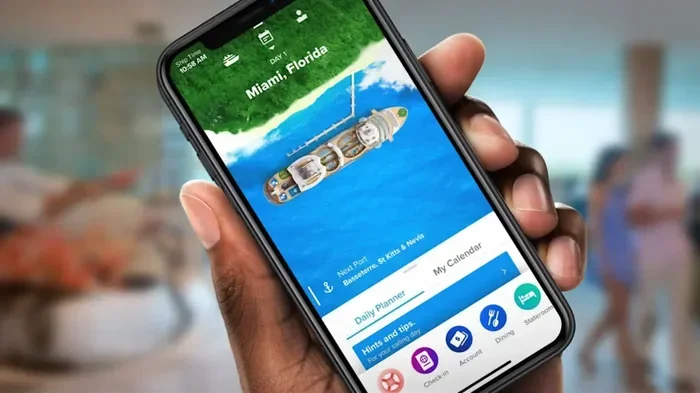
Royal Caribbean does offer some free Wi-Fi options. The most common is access through the Royal Caribbean app. You can use the app to send messages to other guests on the same ship for free. This is a great way to text while cruising without spending anything.
Some loyalty program members also get free or discounted Wi-Fi packages. If you are a Diamond or Platinum Crown & Anchor Society member, check your benefits before you sail. These perks can save you a significant amount of money.
How to Choose the Right Package
Choosing the right Wi-Fi package depends on how you plan to use the internet. Ask yourself these questions before you book:
- Do I just need to send quick text messages?
- Will I want to post on social media or share photos?
- Do I need to make video calls to family back home?
- Will I be working or streaming entertainment?
If you only need to send texts and check email, the Basic package or the free Royal Caribbean app option works great. If you want to stream movies or make video calls, the Premium package is worth the investment.
Messaging Apps and Texting Options at Sea
Not all messaging apps perform the same way on cruise ship internet. Some work great, while others can be frustrating. Here is a closer look at the best options for texting while cruising.
Best Messaging Apps for Royal Caribbean Wi-Fi
WhatsApp is the top choice for most cruisers. It uses very little data, works well on slower connections, and lets you send texts, voice messages, and make calls. It is also free to use, which makes it perfect for staying connected on your cruise.
iMessage is another excellent option if everyone in your group uses Apple devices. It works over Wi-Fi and does not cost anything extra. You can send texts, photos, videos, and even make voice or video calls through iMessage.
Facebook Messenger is a solid choice if you already have a Facebook account. It works well on Royal Caribbean Wi-Fi and supports group chats, voice calls, and video calls.
Apps to Avoid or Use Carefully
Some apps use a lot of data and can slow down your connection. Here are apps to be careful with:
- Video streaming apps: Netflix, YouTube, and Disney+ use a lot of bandwidth. They can slow down your connection for everyone.
- Large file sharing: Sending big files through apps like WeTransfer can eat up your data quickly.
- Auto-updating apps: Turn off auto-updates in your app store settings to save data.
Wi-Fi Calling vs. Data Messaging
Wi-Fi calling is different from data messaging. Wi-Fi calling lets you make phone calls using the internet instead of cellular towers. Some phones support this feature, and it works through Royal Caribbean Wi-Fi in certain situations.
However, Wi-Fi calling can be unreliable at sea because it depends on the ship’s system routing your call through the right channels. Data messaging apps like WhatsApp and iMessage are generally more reliable and easier to use on cruise ships.
Tips for Staying Connected on Your Cruise
Getting the most out of Royal Caribbean Wi-Fi is all about preparation. A few smart moves before and during your cruise can make a huge difference in your connectivity experience.
Download Content Before You Sail
One of the best tips for staying connected on your cruise is to download everything you need before you leave port. Download movies, music, maps, and any apps you might need. This way, you can enjoy entertainment even when ship Wi-Fi speed is slow or you do not want to pay for data.
Use Data-Saving Mode
Most smartphones have a data-saving mode that reduces how much data your apps use. Turn this on before you connect to Royal Caribbean Wi-Fi. It will help your messages load faster and keep your data usage low.
Connect During Off-Peak Hours
Shipboard connectivity slows down when everyone is online at the same time. The busiest times are usually in the evening when guests are in their cabins browsing and posting on social media. Try to send important messages during the morning or early afternoon when fewer people are online.
Check for Free Wi-Fi Zones
Some Royal Caribbean ships have designated free Wi-Fi zones or times when basic messaging is free. Check the daily schedule on the ship’s app or ask the crew about free connectivity hours. These windows can be perfect for sending messages without using your paid package.
Set Up Your Accounts Before the Trip
Make sure you log in to all your messaging apps before you leave home. This saves time and frustration when you are trying to connect to Royal Caribbean Wi-Fi for the first time. Also, update your apps before the trip to avoid large downloads while at sea.
Common Mistakes to Avoid When Texting on Cruise Wi-Fi
Many cruisers make avoidable mistakes when trying to text on Royal Caribbean Wi-Fi. Here are the most common ones and how to prevent them.
Relying on Free Wi-Fi for Everything
The free Royal Caribbean app messaging is great for chatting with other guests, but it does not replace a full internet package if you need to contact people on land. Do not count on free Wi-Fi for all your messaging needs.
Ignoring Data Roaming Charges
Using your phone’s cellular data at sea can result in data roaming cruise charges that are shockingly high. Always turn off cellular data roaming before you board unless you have a specific plan that covers it. Rely on Royal Caribbean Wi-Fi for all your internet needs.
Not Reading the Fine Print
Wi-Fi packages often have fair-use policies that limit how much data you can use at full speed. After you hit the limit, your speed drops significantly. Read the terms carefully so you are not surprised by slow speeds halfway through your voyage.
Forgetting to Update Your Phone
Running outdated software can cause connection problems and security issues. Update your phone’s operating system and all apps before your cruise. This ensures the best shipboard connectivity experience.
Assuming All Ships Have the Same Speed
Newer Royal Caribbean ships have much better internet technology than older ones. If fast and reliable connectivity at sea matters to you, consider sailing on one of the newer vessels. The difference in ship Wi-Fi speed is noticeable.
Expert Insights on Cruise Ship Connectivity
Industry experts say that cruise ship internet has come a long way in recent years. The shift from slow satellite connections to hybrid land-based and satellite systems has dramatically improved the experience for passengers.
“The biggest change we have seen is in speed and reliability,” says a cruise technology analyst. “Passengers can now do things on a cruise ship that were impossible just a few years ago, like video calling family back home or streaming live sports.”
Royal Caribbean continues to invest in better systems. The company has partnered with leading satellite providers to ensure that mobile plan cruise passengers get the best possible experience. As technology improves, we can expect even better text messaging at sea in the future.
One thing experts always recommend is to manage your expectations. Internet at sea will never be exactly like home internet. But with the right package and a few smart habits, you can absolutely stay connected on your cruise and share your adventures in real time.
Key Takeaways
- You can text on Royal Caribbean Wi-Fi: Messaging apps like WhatsApp, iMessage, and Facebook Messenger work through shipboard internet.
- Royal Caribbean Wi-Fi packages range from free to premium: Choose based on your needs and budget.
- Traditional SMS texting does not work at sea: Use internet-based messaging apps instead.
- Speed varies by package and ship: Premium plans offer the fastest ship Wi-Fi speed.
- Download content before you sail: This saves data and keeps you entertained during slow connections.
- Avoid cellular data roaming charges: Turn off data roaming and rely on Royal Caribbean Wi-Fi.
- Connectivity keeps improving: Newer ships have better technology for staying connected on your cruise.
Conclusion
So, can I text on Royal Caribbean Wi-Fi? Absolutely. The answer is yes, and there are more options than ever to keep in touch while you sail the seas. Whether you choose a free messaging option through the Royal Caribbean app or invest in a Premium Wi-Fi package, staying connected is entirely possible.
The key is to plan ahead. Understand your Wi-Fi packages, choose the right messaging apps, and follow the tips we shared to get the best experience. With a little preparation, you can text while cruising, share your vacation photos, and even make video calls to loved ones back home.
Royal Caribbean Wi-Fi has come a long way, and the company continues to improve its shipboard connectivity with each new ship. Your next cruise can be both relaxing and connected. Just remember to manage your expectations, use data wisely, and enjoy the journey.
Now that you know everything about texting on Royal Caribbean Wi-Fi, you are ready to sail with confidence. Pack your bags, download your favorite apps, and get ready for the cruise of a lifetime. Stay connected, stay safe, and most importantly, have an amazing time on the water.
Frequently Asked Questions
Can I use WhatsApp to text on Royal Caribbean Wi-Fi?
Yes, WhatsApp works great on Royal Caribbean Wi-Fi. It uses very little data and lets you send texts, voice messages, and make calls. Just connect to the ship’s Wi-Fi network and open WhatsApp as you normally would.
Is there free texting on Royal Caribbean?
Royal Caribbean offers free messaging through its app, which lets you chat with other guests on the same ship. For texting people on land, you need a paid Wi-Fi package or to use messaging apps that work over the internet.
Why is my text not sending on Royal Caribbean Wi-Fi?
This usually happens because traditional SMS texts need cellular networks, which are not available far from shore. Switch to an internet-based messaging app like WhatsApp or iMessage for reliable texting while cruising.
How much does Wi-Fi cost on Royal Caribbean?
Prices vary by package and ship. Basic plans start around $10 per day, Standard plans range from $15 to $25 per day, and Premium plans can cost $30 to $50 or more per day. Check the current pricing on the Royal Caribbean website.
Can I make phone calls using Royal Caribbean Wi-Fi?
Yes, you can make calls using apps like WhatsApp, FaceTime, or Skype over Royal Caribbean Wi-Fi. Traditional phone calls through your cellular provider are not reliable at sea and can result in high roaming charges.
Does Wi-Fi work in all areas of the ship?
Shipboard connectivity is available in most public areas and staterooms, but signal strength can vary. The fastest speeds are usually found in open areas away from crowded spaces. If you have trouble connecting, try moving to a different part of the ship.