Can My Body Interfere With Bluetooth and Wireless Signals
Yes, your body can interfere with Bluetooth and wireless signals. The water and salt in your body absorb radio frequency energy, which weakens Bluetooth connections. Understanding how body interference with Bluetooth works helps you troubleshoot connectivity issues and improve your wireless experience.
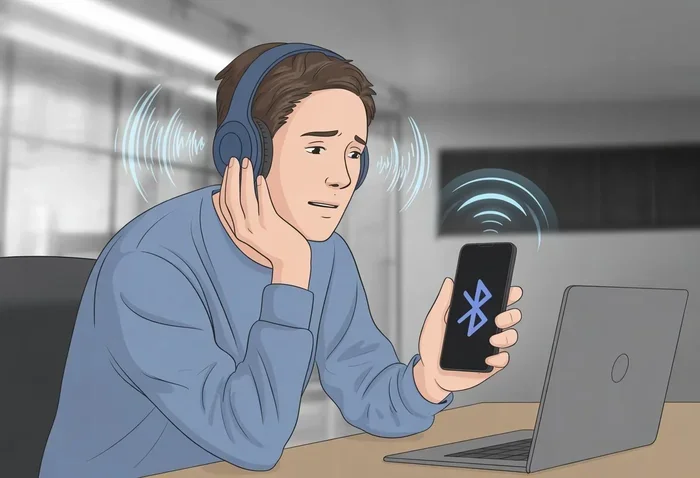
Have you ever been listening to music on your wireless earbuds and suddenly the audio cuts out? You turn your head, adjust your arm, and the signal comes back. It is frustrating, and it makes you wonder: can my body interfere with Bluetooth?
The short answer is yes. Your body can absolutely interfere with Bluetooth and other wireless signals. This is not a defect in your device. It is a natural result of how wireless technology works. Your body is made up of about 60% water, and water absorbs radio frequency energy. This absorption weakens the Bluetooth signal traveling between your device and its source.
Many people experience this issue with Bluetooth headphones, smartwatches, fitness trackers, and wireless speakers. The problem is more common than most realize. Understanding why it happens can save you a lot of frustration. It can also help you take simple steps to fix it.
In this article, we will explore the science behind body interference with Bluetooth. We will look at how your body composition, moisture levels, and positioning affect wireless signals. We will also share practical tips to reduce interference and keep your devices connected. Whether you are a fitness enthusiast, a music lover, or just someone who relies on wireless technology, this guide will help you understand and solve the problem.
Key Takeaways
- Your body absorbs Bluetooth signals: The water and electrolytes in your body can weaken or block radio frequency waves.
- Body composition matters: Higher water content and body mass can increase signal loss significantly.
- Moisture and sweat amplify interference: Wet skin absorbs more wireless energy than dry skin.
- Device placement is critical: Small changes in how you wear or hold Bluetooth devices can dramatically improve connectivity.
- Other factors also play a role: Walls, other electronics, and distance all contribute to Bluetooth signal problems.
- Newer Bluetooth versions handle interference better: Bluetooth 5.0 and above are more resilient to signal loss.
- Simple fixes work: Repositioning your device or adjusting your body posture can solve most connectivity issues.
📑 Table of Contents
- Why Does My Body Affect Bluetooth Signals?
- Common Bluetooth Interference Issues Caused by Your Body
- How Water in Your Body Affects Wireless Signals
- Tips to Reduce Body Interference With Bluetooth
- When to Worry About Bluetooth Signal Problems
- The Future of Bluetooth and Interference Solutions
- Conclusion
Why Does My Body Affect Bluetooth Signals?
Bluetooth uses radio frequency waves to transmit data between devices. These waves travel through the air at the speed of light. But they do not travel perfectly. Objects in their path can absorb, reflect, or block them. Your body is one of the biggest obstacles in the path of a Bluetooth signal.
How Bluetooth Signals Travel
Bluetooth operates on the 2.4 GHz frequency band. This is the same frequency used by Wi-Fi routers and microwave ovens. At this frequency, radio waves have a relatively short wavelength. Short wavelengths are more easily absorbed by materials that contain water. Since the human body is mostly water, it acts like a sponge for Bluetooth signals.
When you wear a Bluetooth device on your wrist or clip it to your shirt, the signal has to travel through or around your body. The further it has to travel through your tissue, the weaker it becomes. This is called signal attenuation. Attenuation simply means the loss of signal strength as it passes through a material.
The Science Behind Signal Absorption
Water molecules are excellent at absorbing electromagnetic radiation. This is a well-known fact in physics. Your body contains a high percentage of water, along with salts and minerals that make you even more conductive. When Bluetooth radio waves hit your body, the water molecules vibrate and absorb the energy. This converts the wireless signal into a tiny amount of heat.
The effect is small in terms of heat. You will not feel warm because of it. But the impact on the signal is real. Studies have shown that the human body can cause signal loss of up to 10 to 20 decibels at Bluetooth frequencies. That is enough to drop a connection entirely, especially if the signal was already weak.
Common Bluetooth Interference Issues Caused by Your Body
Not all body interference is the same. Different factors change how much your body affects your Bluetooth connection. Let us look at the most common issues people experience.
Hand and Body Position Effects
Where you hold your phone or where you place your device makes a big difference. If you are holding your phone in your left hand and your wireless earbuds are connected to it, your hand and head are in the signal path. This creates a natural barrier between the phone and the earbuds.
Try this experiment. Put your phone in your pocket and wear your Bluetooth headphones. Walk around. Now hold the phone in your hand between the headphones and your phone. Notice the difference? The change in position changes the signal path, and you may hear the audio cut in and out.
Sweat and Moisture Impact
If you exercise, you know that sweat changes everything. When you sweat, your skin becomes wet. Wet skin absorbs more Bluetooth signals than dry skin. This is why many people notice their Bluetooth connectivity issues get worse during workouts. The moisture on your body increases signal absorption.
Fitness trackers and smartwatches are especially affected by this. They sit directly on your skin, often on your wrist where sweat accumulates. The moisture creates a layer of water between the device and your body, which changes how the signal travels.
Body Composition and Signal Loss
Not all bodies are the same when it comes to wireless signal interference. Body composition plays a role. People with higher body fat percentage or more muscle mass may experience different levels of interference. This is because fat and muscle have different water content levels.
People with more muscle mass tend to have more water in their tissues. This means they may absorb more Bluetooth signals. On the other hand, people with higher body fat may experience less absorption because fat contains less water. However, the differences are usually small and not something to worry about in daily use.
How Water in Your Body Affects Wireless Signals
Water is the single biggest factor in how your body interferes with Bluetooth. Let us take a closer look at why water has such a strong effect on wireless signals.
Why Water Blocks Bluetooth
Water molecules have a unique property. They are polar molecules, meaning they have a positive end and a negative end. When radio waves pass through water, these molecules try to align themselves with the wave’s electric field. This movement absorbs energy from the wave and weakens the signal.
This is the same reason why you lose your cell phone signal in the shower or near a swimming pool. It is also why submarine communications are so challenging. Water is one of the most effective blockers of radio frequency energy. And since your body is mostly water, it naturally interferes with Bluetooth.
Body Composition and Signal Loss
Different parts of your body contain different amounts of water. Your brain is about 75% water. Your heart and kidneys are around 79% water. Even your bones contain about 31% water. Your blood is about 90% water. Every part of you that the Bluetooth signal passes through absorbs some of the energy.
This is why the position of your body relative to your devices matters so much. When the signal passes through your head, chest, or arm, it loses strength. The more tissue it passes through, the more signal is lost.
| Body Part | Water Content (%) | Signal Attenuation Effect |
|---|---|---|
| Brain | ~75% | High absorption |
| Heart | ~79% | High absorption |
| Muscle | ~75% | Moderate to high absorption |
| Fat Tissue | ~10% | Low absorption |
| Bone | ~31% | Moderate absorption |
| Blood | ~90% | Very high absorption |
| Skin | ~64% | Moderate absorption |
Tips to Reduce Body Interference With Bluetooth
The good news is that you can take simple steps to reduce how much your body affects your Bluetooth connection. Most of these tips are easy to follow and require no technical knowledge.
Best Practices for Better Connectivity
Here are some practical tips that can make a real difference in your Bluetooth experience:
- Keep devices on the same side of your body. If your phone is in your right pocket, wear your Bluetooth earbuds on your right ear. This shortens the signal path and reduces the amount of body tissue the signal has to pass through.
- Use a belt clip or armband. These accessories keep your phone closer to your Bluetooth device and away from the signal-blocking center of your body.
- Dry off before using Bluetooth devices during workouts. Wiping away sweat from your skin and the device can reduce moisture-related interference.
- Position your phone strategically. Place your phone on a table or shelf instead of keeping it in a deep pocket. The less obstruction between devices, the better the signal.
- Avoid wrapping your body in materials that block signals. Thick clothing, especially synthetic fabrics, can add to the interference problem.
Device Placement Strategies
Where you place your Bluetooth device can make or break your connection. Here are some placement strategies to consider:
- Keep the device elevated. Signals travel better when there is a clear line of sight between devices. Wearing your smartwatch higher on your wrist can help.
- Avoid placing devices behind your back. When your phone is behind you and your earbuds are in your ears, your body blocks the entire signal path.
- Use your non-dominant hand for phone calls. This keeps the phone away from the side of your head where your Bluetooth earpiece is located.
- Try different positions. Sometimes simply shifting your posture opens up a better signal path. Experiment to find what works best for you.
Quick Tips for Better Bluetooth Performance
Here are some quick wins you can try right now:
- Restart your Bluetooth device if you notice signal drops.
- Keep your firmware and software up to date.
- Reduce the number of wireless devices in the same area.
- Move away from microwaves and other 2.4 GHz devices.
- Check for physical obstructions like walls and furniture.
When to Worry About Bluetooth Signal Problems
Occasional signal drops are normal. They happen to everyone. But when should you be concerned? How do you know if the problem is your body or something else?
Normal vs. Abnormal Signal Loss
Normal signal loss happens when you move your body in a way that changes the signal path. For example, turning your head might cause a brief audio dropout. This is expected and nothing to worry about. Abnormal signal loss happens when your connection drops constantly, even when you are standing still and there are no obvious obstacles.
If you experience constant disconnections, it is worth investigating further. The problem might be your device, not your body. Old batteries, outdated firmware, or a damaged antenna can all cause similar symptoms.
Other Common Interference Sources
Your body is not the only thing that can interfere with Bluetooth. Here are other common sources of wireless connectivity issues:
- Wi-Fi networks: Both Bluetooth and Wi-Fi use the 2.4 GHz band. When your Wi-Fi network is busy, it can crowd out Bluetooth signals.
- Microwave ovens: These also operate at 2.4 GHz and can cause temporary interference.
- Other Bluetooth devices: In crowded areas like offices or concerts, many Bluetooth devices competing for the same space can cause problems.
- Walls and floors: Concrete, brick, and metal are strong signal blockers. The more walls between your devices, the weaker the connection.
- Distance: Bluetooth has a limited range, typically about 30 feet. Going beyond this range will cause disconnections regardless of your body position.
The Future of Bluetooth and Interference Solutions
Bluetooth technology is constantly improving. Newer versions are designed to handle interference better. Bluetooth 5.0 and above offer stronger signals, longer range, and better performance in crowded environments. Manufacturers are also developing new antenna designs and signal processing techniques to reduce the impact of body interference.
Some modern devices use multiple antennas and switch between them automatically. This helps maintain a connection even when your body blocks one antenna. Others use beamforming technology to direct the signal around obstacles, including your body.
While we may never eliminate body interference completely, the future looks promising. Each new generation of Bluetooth technology brings us closer to seamless wireless connections that work reliably no matter how we hold or wear our devices.
For now, the tips in this article can help you get the most out of your Bluetooth devices. Understanding that your body is a natural part of the signal equation is the first step. From there, small adjustments in how you use and position your devices can make a big difference.
Conclusion
Can my body interfere with Bluetooth? The answer is a clear yes. Your body absorbs and blocks Bluetooth signals because of its high water content. Your body composition, moisture levels, and positioning all play a role in how much interference you experience. But this knowledge is power. Once you understand how your body affects your wireless signals, you can take simple steps to minimize the problem.
Keep your devices positioned strategically. Stay aware of moisture and sweat during workouts. Use the tips shared in this article to improve your Bluetooth experience. Remember that occasional signal drops are normal and usually not a cause for concern. If problems persist, consider whether other interference sources or device issues might be at play.
Bluetooth technology continues to evolve, and future versions will handle interference even better. Until then, these practical strategies will help you stay connected. Enjoy your wireless devices with confidence, knowing exactly how your body affects your Bluetooth experience and what you can do about it.
Frequently Asked Questions
Can wearing a smartwatch on my wrist cause Bluetooth disconnections?
Yes, it can. Your smartwatch sits directly on your wrist, and your wrist has a lot of blood flow and moisture. This can absorb some of the Bluetooth signal. However, most modern smartwatches are designed to handle this. If you experience frequent disconnections, try adjusting the watch position or keeping your phone closer to the watch.
Does body fat affect Bluetooth signal strength?
It can, but only slightly. Fat tissue contains less water than muscle tissue, so it absorbs fewer Bluetooth signals. However, the difference is usually small and not noticeable in everyday use. Body composition alone is rarely the cause of major Bluetooth problems.
Why do my Bluetooth headphones keep cutting out when I move my head?
This happens because moving your head changes the path between your phone and your headphones. Your body, especially your head and neck, blocks the signal. When you turn, the signal path changes, and you may briefly lose connection. This is normal and very common with Bluetooth earbuds.
Does sweat really affect Bluetooth performance?
Yes, sweat can affect Bluetooth performance. Sweat adds moisture to your skin, and moisture absorbs Bluetooth radio waves more effectively than dry skin. This is why many people notice more connection issues during exercise or in hot weather. Wiping away sweat can help improve the signal.
Is Bluetooth interference worse in certain environments?
Yes, it can be. Crowded areas with many wireless devices, places with thick walls, and areas with lots of electronic equipment can all make Bluetooth interference worse. Your body adds to this effect. The more obstacles between your devices, the more likely you are to experience signal problems.
Can I reduce body interference with Bluetooth by changing my clothing?
Yes, you can. Thick or metallic clothing can block Bluetooth signals. Wearing thinner, breathable fabrics can help. Also, placing your phone in an outer pocket rather than a deep pocket reduces the amount of fabric and body tissue between your devices.
=== CONCLUSION ===
Can my body interfere with Bluetooth? Absolutely. Your body is a natural part of the wireless signal equation. The water, salts, and tissues in your body absorb and weaken Bluetooth signals in ways that are completely normal. Understanding this helps you troubleshoot problems and find simple solutions.
Use the tips in this guide to improve your Bluetooth experience. Pay attention to device placement, manage moisture levels, and be mindful of your body position. With these adjustments, you can enjoy reliable wireless connectivity in almost any situation. Share this article with friends who struggle with Bluetooth issues. They will thank you for the practical advice.