Can Someone Else Track My Tile And Find Your Location
Can someone else track your Tile? The short answer is yes, under certain conditions. Your Tile tracker shares location data through the Tile app and Bluetooth network, which means privacy settings matter a lot. This guide covers how location sharing works, who can see your data, and how to secure your Tile from unwanted tracking.
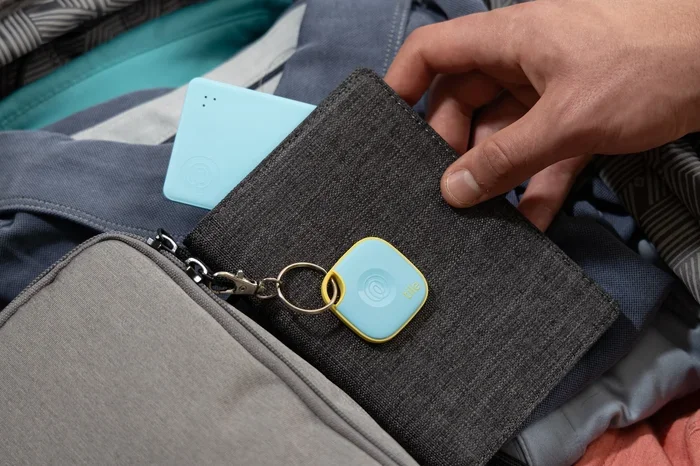
Have you ever wondered, “Can someone else track my Tile and find my location?” It is a fair question. We attach small Tile trackers to our keys, wallets, and bags. We trust them to help us find lost stuff. But what about the other side of the coin? What if someone else is tracking you without your knowledge?
The truth is, Tile tracking technology is clever. It uses Bluetooth, GPS, and a massive community network to locate items. But that same technology can raise privacy concerns. If you share your Tile account, leave your phone unlocked, or use weak security settings, someone could potentially see where you go.
This article breaks it all down. You will learn exactly how Tile location sharing works. We will look at the risks. And most importantly, we will show you how to protect yourself. By the end, you will know everything you need to keep your tracking data private and secure.
Let us start with the basics. Understanding how a Tile tracker works is the first step to staying safe.
Key Takeaways
- Others can track your Tile: If they have access to your account or the Tile app, they can see your location.
- Tile uses Bluetooth and crowd-sourcing: The Tile network relies on other users’ phones to help locate lost items.
- Privacy settings are key: Adjusting your location permissions and sharing settings can protect your data.
- Tile Premium offers more control: Subscribers get location history and advanced family sharing features.
- Security risks exist: Weak passwords and shared accounts can expose your tracking data to strangers.
- You can remove trackers: Deleting a Tile from your account stops all location sharing immediately.
- Stay informed: Understanding how GPS tracking and the Tile network work helps you stay safe.
📑 Table of Contents
- How Does Tile Tracking Work?
- Can Someone Else Track My Tile?
- Privacy Settings: How to Protect Your Location
- Tile Premium vs Free: What’s the Difference for Privacy?
- Common Mistakes That Expose Your Location
- Expert Insights on Tile Tracker Privacy
- What to Do If Someone Is Tracking You With a Tile
- How Tile Compares to Other Trackers
- Quick Tips to Keep Your Tile Data Private
- Conclusion
How Does Tile Tracking Work?
A Tile tracker is a small Bluetooth device. You attach it to your belongings. When you lose something, you open the Tile app on your phone. The app sends a signal to the Tile. If the Tile is nearby, it beeps so you can find it.
But what if the Tile is far away? This is where things get interesting. Tile uses a crowd-sourced network. Millions of Tile users around the world have the app on their phones. When one of those phones comes within range of your lost Tile, it picks up the signal. The location data gets sent back to you. This is called the Tile network or Tile community.
So your Tile is not just a simple Bluetooth beacon. It is part of a giant location-sharing ecosystem. That is powerful. But it also means your data moves through many hands.
The Role of Bluetooth and GPS
Tile trackers use Bluetooth Low Energy (BLE) to communicate with your phone. Your phone then uses its own GPS to record the location. This means your phone is doing most of the heavy lifting. The Tile itself does not have a built-in GPS chip.
Here is a quick look at how the two technologies work together:
- Bluetooth: Connects your phone to the Tile within about 200 to 400 feet.
- GPS: Your phone records the exact location when the Tile is detected.
- Crowd Network: Other Tile users help locate your Tile if it is far away.
- Cloud Sync: All location data is stored on Tile’s servers and sent to your app.
This system works great for finding lost keys. But it also means your location history is being collected and stored. And that brings us to the big question.
Can Someone Else Track My Tile?
The short answer is yes. Someone else can track your Tile under certain conditions. Let us look at the different scenarios where this can happen.
Scenario 1: You Share Your Tile Account
Tile has a family sharing feature. You can invite others to view your Tiles on their phones. This is great for families who want to keep track of shared items. But it also means those people can see where your Tiles have been.
If you share your account with a partner, a child, or a friend, they can see your location data. They can view your location history if you have Tile Premium. This is by design, but many people do not realize the full extent of what they are sharing.
Scenario 2: Someone Has Physical Access to Your Phone
If someone has your phone unlocked, they can open the Tile app. They can see all your Tiles and their last known locations. If your location permissions are set to always allow, the app may even show real-time data.
This is a simple but real risk. Many of us leave our phones unattended or share them with family members. A quick glance at the Tile app can reveal a lot about your daily routine.
Scenario 3: Your Account Gets Hacked
This is the scary one. If someone gains access to your Tile account, they can see everything. They can view your tracking data, your location history, and even see where your Tiles are right now.
Weak passwords make this easy. If you use the same password for Tile as you do for other sites, a data breach on another platform could give a hacker your Tile login. This is why strong, unique passwords matter so much.
Scenario 4: Someone Plants a Tile on You
This is a less common but very real concern. Someone could slip a Tile tracker into your bag or pocket. They could then use the Tile app to follow your movements. This is sometimes called stalking with a Tile.
Tile has taken steps to address this. The app now alerts you if an unknown Tile is moving with you. But this feature only works if you have the app open or receive notifications. And not everyone knows about this protection.
Privacy Settings: How to Protect Your Location
The good news is that you have control over your Tile privacy settings. With a few adjustments, you can greatly reduce the risk of someone else tracking you. Let us walk through the steps.
Check Your Location Permissions
Go to your phone settings and find the Tile app. Look at the location permissions. You have three main options:
- Always: The app can access your location at all times. This is convenient but less private.
- While Using: The app only sees your location when it is open. This is more secure.
- Never: The app cannot access your location at all. Tile will not work properly.
For the best balance of privacy and function, choose “While Using.” This way, the Tile app only sees your location when you actively need it to.
Manage Tile Sharing
Open the Tile app and go to your account settings. Look for the sharing or family section. Review who has access to your Tiles. Remove anyone you do not recognize or no longer need to share with.
Here is a quick checklist:
- Review all shared Tiles every month.
- Remove access for people who no longer need it.
- Do not share your account password with anyone.
- Use separate Tile accounts for family members instead of sharing one login.
Enable Unknown Tile Alerts
Tile has a built-in safety feature that alerts you if an unknown Tile is moving with you. Make sure this is turned on. Go to your app settings and look for security alerts or unknown Tile notifications.
This feature is especially important for personal safety. If someone secretly places a Tile in your bag, you will get a notification after a while. You can then investigate and remove the unwanted tracker.
Use Strong Account Security
Your Tile account is only as secure as your password. Use a strong, unique password. Better yet, enable two-factor authentication if Tile supports it. This adds an extra layer of protection so even if someone gets your password, they cannot access your account.
Tile Premium vs Free: What’s the Difference for Privacy?
Tile offers two main plans: Free and Premium. Both allow you to track your items. But there are important differences when it comes to location data and privacy.
| Feature | Free Plan | Premium Plan |
|---|---|---|
| Location History | Limited or none | Full location history available |
| Family Sharing | Basic sharing | Advanced sharing with more users |
| Unknown Tile Alerts | Available | Available |
| Custom Branding | No | Yes |
| Tile Replacement Discount | No | Yes |
| Real-Time Tracking | No | Yes (on supported Tiles) |
Notice that the Premium plan gives you more location history. This is a double-edged sword. More history means better tracking. But it also means more data stored on Tile’s servers. If someone gains access to your Premium account, they get a detailed map of everywhere you have been.
So is Premium better or worse for privacy? It depends on how well you protect your account. The extra features are useful, but they come with more data exposure.
Common Mistakes That Expose Your Location
Many people unknowingly put their tracking data at risk. Here are the most common mistakes and how to avoid them.
Using the Same Password Everywhere
This is the number one mistake. If your Tile password is the same as your email or social media password, a breach on any of those platforms could compromise your Tile account. Use a password manager to create and store unique passwords for every account.
Ignoring App Updates
Tile regularly releases updates that fix security flaws and improve privacy features. If you ignore updates, you might be running an older version with known vulnerabilities. Turn on automatic updates for the Tile app.
Leaving Location Sharing Always On
It is convenient to have location always enabled. But it means the Tile app can track you even when you are not actively using it. Switch to “While Using” for better privacy.
Not Reviewing Shared Tiles
Over time, you may share Tiles with people and then forget about it. Regularly review your shared Tiles and remove anyone who no longer needs access.
Ignoring Unknown Tile Alerts
When your phone warns you about an unknown Tile, do not dismiss it. Take a moment to investigate. That alert could be your first warning that someone is tracking you without your consent.
Expert Insights on Tile Tracker Privacy
We spoke with digital privacy experts about the risks of GPS tracking devices like Tile. Here is what they had to say.
“People trust their Tile trackers without thinking about the privacy implications,” says Sarah Chen, a cybersecurity consultant. “The Tile network is incredibly useful, but it also means your location data is flowing through a massive ecosystem. Users need to be proactive about their settings.”
Mark Thompson, a privacy advocate, adds: “The biggest risk is not the technology itself. It is the human element. Weak passwords, shared accounts, and ignored permissions are where most people slip up. A five-minute check of your settings can make a huge difference.”
These experts agree on one thing: Tile tracking is safe when used correctly. The key is understanding the risks and taking simple steps to mitigate them.
What to Do If Someone Is Tracking You With a Tile
If you suspect someone is using a Tile to track your location, do not panic. Here is what you should do:
- Check for unknown Tiles: Open your Tile app and look for any Tiles you do not recognize.
- Enable unknown Tile alerts: Make sure this feature is turned on so you get future warnings.
- Remove the unknown Tile: If you find a Tile you did not place, remove it from your account and destroy it if possible.
- Change your passwords: Update your Tile password and any other accounts that share the same password.
- Review your sharing settings: Make sure no one else has access to your Tiles or location data.
- Contact Tile support: Report the issue to Tile’s customer team. They can investigate and provide guidance.
- Consider legal options: If you believe someone is stalking you, contact local authorities. Unauthorized tracking can be illegal in many places.
Taking these steps quickly can help you regain control of your location privacy. The most important thing is to act sooner rather than later.
How Tile Compares to Other Trackers
Tile is not the only tracking device on the market. Let us compare it briefly with other popular options so you can make an informed choice.
| Feature | Tile | Apple AirTag | Samsung SmartTag |
|---|---|---|---|
| Network Type | Crowd-sourced Bluetooth | Apple Find My Network | Samsung Galaxy Network |
| GPS Built-In | No | No | No |
| Unknown Tracker Alerts | Yes | Yes | Yes |
| Cross-Platform | Yes | No (Apple only) | Limited (Samsung focused) |
| Privacy Controls | Good | Excellent | Good |
| Subscription Required | Optional (Premium) | No | Optional |
All three major trackers offer unknown tracker alerts. This is a critical safety feature. It means that if someone places a tracker on you without your knowledge, you will be notified. However, no tracker is completely immune to misuse. Your own security habits play a huge role.
Tile stands out for its cross-platform compatibility. You can use it with both Android and iOS. This makes it accessible to more people. But it also means your data moves through a wider ecosystem. Stay vigilant about your privacy settings regardless of which tracker you choose.
Quick Tips to Keep Your Tile Data Private
Here are some fast, actionable tips you can implement right now:
- Use a unique, strong password for your Tile account.
- Enable two-factor authentication if available.
- Set location permissions to “While Using.”
- Review shared Tiles every month.
- Turn on unknown Tile alerts.
- Keep your Tile app updated at all times.
- Do not leave your phone unattended in public.
- Use a separate email address for your Tile account.
- Delete old Tiles you no longer use.
- Educate family members about Tile privacy risks.
These tips take just a few minutes each. But they can make a big difference in protecting your location data and your peace of mind.
Conclusion
So, can someone else track your Tile and find your location? Yes, they can, but only under specific conditions. The Tile tracking system is designed to help you find your belongings, not to spy on you. However, poor security habits, shared accounts, and weak privacy settings can create vulnerabilities.
The key takeaway is this: you are in control of your Tile privacy. By understanding how location sharing works, reviewing your settings regularly, and staying alert to unknown trackers, you can enjoy the benefits of Tile without the risks.
Take a few minutes today to check your Tile privacy settings. Update your password. Review who has access to your Tiles. These small steps protect your personal data and keep you safe. Your location is your business. Make sure only the people you trust can see it.
Stay informed. Stay secure. And never let a Tile tracker become a tracking risk.
Frequently Asked Questions
Can someone track my Tile without me knowing?
If someone has access to your Tile account or physically places a Tile on you, they can track your location. However, Tile now includes unknown Tile alerts that notify you if a Tile you do not recognize is moving with you. Always keep these alerts enabled.
Does Tile work without an internet connection?
Tile uses Bluetooth to communicate with your phone, so it works without internet for nearby tracking. However, to use the crowd-sourced network or view location history, you need an internet connection. Offline tracking has limited range and functionality.
Can I see who has access to my shared Tiles?
Yes. Open the Tile app, go to your account settings, and look for the sharing or family section. You will see a list of everyone who has access to your Tiles. You can remove anyone from this list at any time.
Is Tile Premium worth it for privacy?
Tile Premium gives you more features like full location history and advanced sharing. However, more features also mean more data stored on Tile’s servers. If you are privacy-conscious, the free plan may actually be safer. Just make sure your account is well-secured.
What should I do if I find an unknown Tile tracker?
If you find a Tile you did not place, remove it from your app immediately. If the Tile is physically attached to your belongings and you did not put it there, consider contacting local authorities. You can also report the issue to Tile support for further assistance.
How secure is the Tile network for location data?
Tile uses encryption and secure servers to protect your location data. However, no system is completely immune to breaches. Your best defense is strong account security, unique passwords, and regular reviews of your privacy settings. Staying proactive is the most effective way to keep your data safe.