Can You Charge A Laptop Through USB Power Supplies
Yes, you can charge a laptop through USB, but it depends on the USB port type, power delivery support, and your laptop’s power requirements. Modern laptops with USB-C ports that support USB Power Delivery can be fully charged using a compatible USB charger or power bank. Older laptops may need special adapters or may not support USB charging at all.
Have you ever been stuck with a dead laptop battery and only a USB charger on hand? It is a frustrating situation that many of us have faced. The good news is that can you charge a laptop through USB is a question with a growing number of yes answers. Thanks to advances in USB technology, especially USB-C and USB Power Delivery, charging your laptop through a USB port is now more possible than ever before.
In this guide, we will walk through everything you need to know about USB laptop charging. We will cover how it works, what you need, the limitations, and the best ways to make it happen. Whether you are at home, in the office, or traveling, understanding USB charging can save you time and keep your laptop running.
Key Takeaways
- USB-C Power Delivery makes it possible: Modern laptops can charge through USB-C if the charger supports the right wattage and protocol.
- Not all USB ports can charge laptops: Standard USB-A ports lack the power needed for most laptops.
- Wattage matters a lot: Most laptops need 45W to 100W, and some need even more to charge properly.
- USB charging is slower than traditional chargers: Using a USB power supply may take longer than using the original laptop charger.
- Compatibility is key: Check your laptop’s USB charging specs before buying a USB charger or cable.
- Power banks work too: High-capacity USB-C power banks can charge laptops on the go.
📑 Table of Contents
- Understanding How USB Charging Works for Laptops
- Types of USB Ports and Their Charging Capabilities
- Can You Fully Charge a Laptop Through USB?
- Best USB Chargers and Accessories for Laptop Charging
- Common Mistakes When Charging Laptops Through USB
- Expert Tips for Faster and Safer USB Laptop Charging
- Final Thoughts
Understanding How USB Charging Works for Laptops
USB charging has come a long way from the early days of plugging in a keyboard or mouse. Today, USB ports can deliver enough power to charge a full-sized laptop battery. But not every USB connection can do this. The ability to charge depends on the USB standard, the port type, and the power delivery protocol your device supports.
Traditional USB-A ports were designed for data transfer and low-power devices like flash drives. They typically deliver only 2.5 watts to 5 watts of power. That is nowhere near enough to charge a laptop. A modern laptop needs anywhere from 45 watts to over 100 watts to charge effectively. So if you are wondering can you charge a laptop through USB using an old USB-A port, the short answer is usually no.
Things change dramatically with USB-C. This newer connector type supports much higher power levels through a technology called USB Power Delivery, or USB PD. USB PD can deliver up to 240 watts of power, which is more than enough for even the most power-hungry laptops. This is why most modern laptops now come with at least one USB-C port that doubles as a charging port.
What Is USB Power Delivery?
USB Power Delivery is a charging protocol built into the USB-C standard. It allows devices to negotiate the right amount of power they need. When you plug in a USB-C charger, the laptop and charger communicate to determine the safest and fastest charging rate. This negotiation happens automatically and ensures your device gets the right voltage and current.
USB PD comes in several power profiles. The most common ones for laptops are 45W, 65W, and 100W. Some high-end gaming laptops or workstations may need even more. The beauty of USB PD is that it is universal. You can use the same charger for your phone, tablet, and laptop, as long as they all support USB PD.
How Much Power Does Your Laptop Need?
Every laptop has a specific power requirement. You can usually find this on the original charger that came with your laptop. Look for the wattage rating printed on the charger brick or on the label. Common laptop chargers are rated at 45W, 65W, or 85W. Gaming laptops and mobile workstations often need 100W or more.
Here are some general guidelines:
- Ultrabooks and thin laptops: Usually need 45W to 65W to charge.
- Standard laptops: Typically require 65W to 85W.
- Gaming laptops: Often need 100W to 180W or more.
- Workstations: Can require 100W to 240W depending on the model.
If your USB charger cannot deliver enough wattage, your laptop may charge very slowly or not at all. In some cases, it might even lose battery while you use it, despite being plugged in. Always check the power requirements before relying on USB charging.
Types of USB Ports and Their Charging Capabilities
Not all USB ports are created equal when it comes to charging. Understanding the differences can help you avoid frustration and make the most of your USB charging setup. Let us break down the main types of USB ports you will encounter.
USB-A Ports
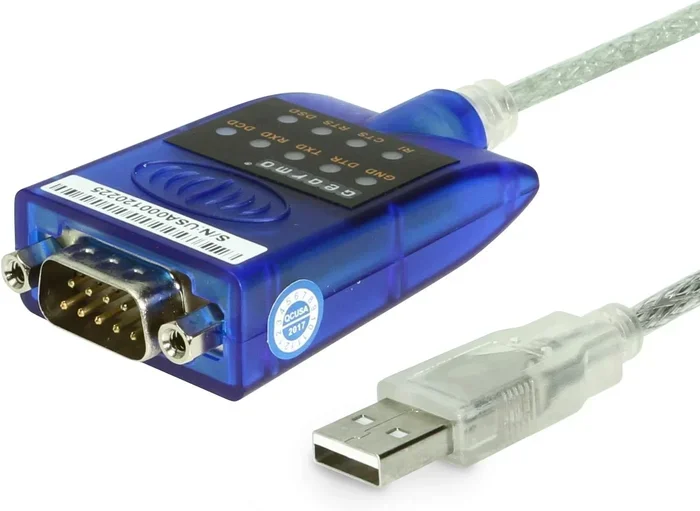
USB-A is the classic rectangular port found on older computers, chargers, and hubs. These ports were never designed for high-power charging. They max out at about 5 watts under the standard USB 2.0 or 3.0 specifications. That is enough to charge a phone slowly but far too weak for a laptop. If your laptop only has USB-A ports, you will need a special adapter or a proprietary charging solution.
USB-C Ports
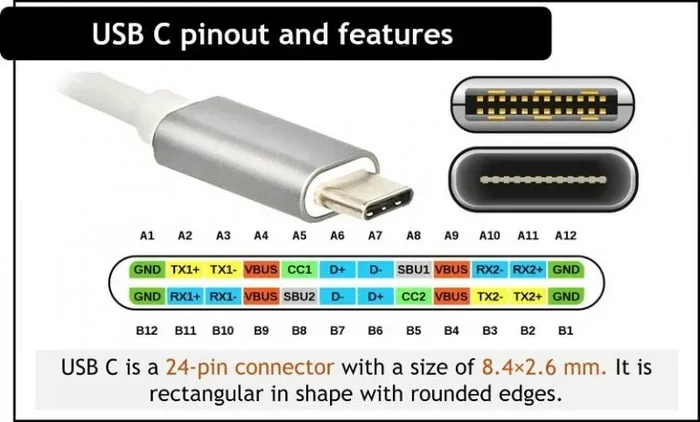
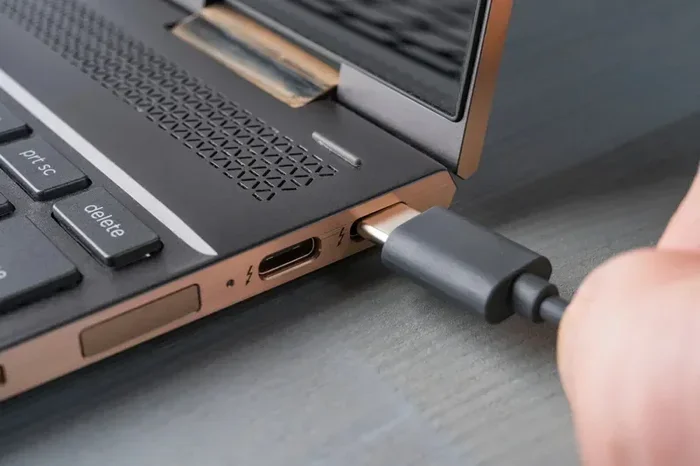
USB-C is the modern standard that supports high-speed data transfer and high-power charging. The small, reversible connector is now found on most new laptops, tablets, and phones. USB-C ports that support USB Power Delivery can charge laptops efficiently. However, not every USB-C port on every laptop supports charging. Some are data-only ports that cannot deliver power. Always check your laptop’s specs to confirm that the USB-C port supports charging.
Thunderbolt 3 and Thunderbolt 4 Ports
Thunderbolt 3 and Thunderbolt 4 use the USB-C connector but offer even more capabilities. These ports support USB PD charging and can deliver up to 100 watts of power. Many Thunderbolt docks and monitors also pass through charging, so you can charge your laptop while using a single cable. Thunderbolt ports are excellent for USB laptop charging because they combine speed, power, and versatility in one port.
USB-B and Other Port Types
USB-B and Mini-USB ports are mostly found on older printers and devices. They are not designed for laptop charging and should not be used for that purpose. If you see these ports on a device, they are for data transfer only and will not provide enough power to charge a laptop battery.
Can You Fully Charge a Laptop Through USB?
This is the big question, and the answer depends on several factors. In most cases, yes, you can fully charge a laptop through USB, but the speed and reliability vary. Let us look at the conditions that determine whether full USB charging is possible.
When USB Charging Works Well
USB charging works best when you have the right combination of equipment. Here are the conditions where you can expect full and efficient charging:
- Your laptop has a USB-C port that supports USB Power Delivery.
- You use a USB-C charger that meets or exceeds your laptop’s wattage requirement.
- You use a high-quality USB-C cable rated for the required power level.
- You are not running intensive applications while charging.
When all these conditions are met, USB charging can be just as effective as using the original charger. Many users have successfully replaced their bulky laptop chargers with compact USB-C power adapters.
When USB Charging Falls Short
There are situations where USB charging simply will not work or will be very slow. These include:
- Your laptop only has USB-A ports and no USB-C charging support.
- Your USB charger does not support USB Power Delivery.
- The wattage of your USB charger is too low for your laptop’s needs.
- You are using a damaged or low-quality cable.
- Your laptop is running power-hungry software or games while plugged in.
In these cases, you may see the battery percentage stay the same or even drop while the laptop is connected to the USB charger. This happens because the laptop is using more power than the USB port can supply.
Comparison: USB Charging vs. Traditional Laptop Chargers
| Feature | USB-C Charging | Traditional Charger |
|---|---|---|
| Wattage Range | Up to 240W (USB PD) | 45W to 240W |
| Portability | Very portable, one cable for all devices | Bulky, dedicated charger needed |
| Compatibility | Works with most modern laptops | Works with all laptops |
| Charging Speed | Fast when wattage matches | Consistently fast |
| Cost | Affordable USB-C chargers available | Proprietary chargers can be expensive |
| Versatility | Can charge phones, tablets, and laptops | Laptop-only |
As you can see from the table above, USB-C charging has many advantages. It is more versatile and portable than traditional chargers. However, traditional chargers still offer consistent performance across all laptop models. The best choice depends on your specific needs and laptop model.
Best USB Chargers and Accessories for Laptop Charging
If you want to start charging your laptop through USB, you need the right equipment. Not all USB chargers are created equal, and using the wrong one can damage your laptop or fail to charge it at all. Here are the key accessories to look for.
USB-C Chargers with Power Delivery
A good USB power supply is the foundation of any USB charging setup. Look for a charger that supports USB Power Delivery and offers the wattage your laptop needs. For most standard laptops, a 65W USB-C charger is a safe choice. For gaming laptops, consider a 100W or higher charger.
Popular brands like Anker, Belkin, and Apple make reliable USB-C chargers that support USB PD. GaN (Gallium Nitride) chargers are especially popular because they are compact and efficient. They deliver high wattage in a small form factor, making them perfect for travel.
USB-C Cables
The cable matters just as much as the charger. Not all USB-C cables can handle high power. Look for cables rated for USB Power Delivery and at least 60W or 100W depending on your needs. Cheap, uncertified cables may not support the required wattage and could even pose a safety risk.
USB-C Power Banks
For travelers and remote workers, a USB-C power bank is a lifesaver. High-capacity power banks with USB PD output can charge a laptop multiple times. Look for power banks with at least 65W output and a capacity of 20,000mAh or more. These portable chargers are perfect for situations where wall outlets are not available.
USB-C Docking Stations
A USB-C docking station can simplify your workspace by connecting your laptop to monitors, peripherals, and power through a single cable. Many docking stations support pass-through charging, which means they charge your laptop while connected to a power source. This is a great way to reduce cable clutter on your desk.
Common Mistakes When Charging Laptops Through USB
Even with the right equipment, people make mistakes that can cause slow charging, no charging, or even damage to their laptop. Here are the most common pitfalls to avoid.
Using the Wrong Cable
Not all USB-C cables are the same. Some cables are designed only for data transfer and cannot carry the high currents needed for laptop charging. Always use a cable that is rated for the power level you need. Check the cable specifications for its maximum wattage rating before relying on it for charging.
Ignoring Wattage Requirements
One of the biggest mistakes is buying a USB charger with too low a wattage. If your laptop needs 85W and you use a 45W USB charger, the battery will charge very slowly or not at all. Always match or exceed your laptop’s wattage requirement when choosing a USB charger.
Assuming All USB-C Ports Support Charging
Some laptops have multiple USB-C ports, but not all of them support charging. On some models, only one port is designed for power delivery, while the others are data-only. Check your laptop manual or the manufacturer’s website to find out which USB-C port supports charging.
Using Low-Quality or Uncertified Chargers
Cheap, uncertified chargers may not follow the USB Power Delivery standard properly. This can lead to inconsistent charging, overheating, or even damage to your laptop. Always buy from reputable brands and look for USB-IF certification on your charger and cables.
Expert Tips for Faster and Safer USB Laptop Charging
Want to get the most out of your USB charging setup? Here are some expert tips that can help you charge faster, safer, and more efficiently.
1. Check Your Laptop’s Charging Specifications
Before buying any USB charger, check your laptop’s charging specifications. Look for the recommended wattage, voltage, and current on the original charger or in the user manual. This information will guide you in choosing the right USB power supply.
2. Use GaN Chargers for Portability
Gallium Nitride (GaN) chargers are smaller, lighter, and more efficient than traditional silicon-based chargers. They generate less heat and can deliver high wattage in a compact design. If you travel frequently, a GaN charger is a great investment for USB laptop charging on the go.
3. Avoid Using Your Laptop While Charging via USB
While it is possible to use your laptop while it charges through USB, doing so with intensive tasks can slow down the charging process. If you need to charge quickly, close unnecessary applications and let the laptop focus on charging the battery.
4. Keep Your Cables and Ports Clean
Dust and debris in USB ports can interfere with the charging connection. Regularly clean your USB-C ports and cables with a soft, dry cloth. A good connection ensures consistent power delivery and safer charging.
5. Monitor Charging Temperatures
If your laptop or charger gets unusually hot during USB charging, unplug it and check for issues. Overheating can indicate a faulty charger, incompatible cable, or a problem with the laptop’s battery. Always use certified equipment to minimize the risk of overheating.
Final Thoughts
The answer to can you charge a laptop through USB is a confident yes for most modern laptops. With USB-C and USB Power Delivery becoming the standard, charging your laptop through a USB port is no longer a novelty. It is a practical, portable, and versatile solution that works for everyday use, travel, and emergencies.
Just remember to check your laptop’s compatibility, use the right wattage, and invest in quality cables and chargers. When you have the right setup, USB charging can replace the need for bulky traditional chargers entirely. It simplifies your life and keeps your devices powered up wherever you go.
Whether you are a student, a professional, or a frequent traveler, understanding USB laptop charging gives you more flexibility and freedom. Embrace the convenience of USB charging and enjoy a clutter-free, cable-simple workflow. Your laptop and your luggage will thank you.
Frequently Asked Questions
Can I charge any laptop through a USB-C port?
Not all laptops can be charged through USB-C. Only laptops with USB-C ports that support USB Power Delivery can charge via USB. Check your laptop’s specifications or the original charger to confirm whether USB-C charging is supported. Some laptops use USB-C only for data transfer and still require a proprietary charger for power.
How long does it take to charge a laptop through USB?
USB charging time depends on the wattage of your charger and your laptop’s battery size. A 65W USB-C charger can typically charge a standard laptop from 0% to 100% in about 2 to 3 hours. Using a lower-wattage charger will take longer, and in some cases, the laptop may not charge at all if the wattage is too low.
Do I need a special USB-C cable to charge my laptop?
Yes, you need a USB-C cable that supports USB Power Delivery and the required wattage. Not all USB-C cables can handle the high currents needed for laptop charging. Look for cables rated for at least 60W or 100W, depending on your laptop’s power requirements. Using an incompatible cable can result in slow charging or no charging at all.
Can a USB power bank charge a laptop?
Yes, a USB-C power bank with Power Delivery support can charge a laptop. You will need a power bank with at least 65W output and a high capacity, typically 20,000mAh or more. These portable chargers are great for travel and situations where wall outlets are not available. Keep in mind that charging a laptop from a power bank will drain the power bank quickly.
Is it safe to charge a laptop through USB?
Charging a laptop through USB is safe as long as you use certified equipment that matches your laptop’s power requirements. Always use USB-IF certified chargers and cables from reputable brands. Avoid cheap, uncertified chargers that may not follow the USB Power Delivery standard properly and could pose safety risks.
Can I use a phone charger to charge my laptop through USB?
Most phone chargers cannot charge a laptop because they lack the necessary wattage. Phone chargers typically deliver 5W to 18W, while laptops need at least 45W to 65W. However, some high-wattage USB-C chargers that support USB Power Delivery can charge both phones and laptops. Always check the charger’s wattage rating before using it for laptop charging.
=== CONCLUSION ===
Can you charge a laptop through USB? Absolutely. With the right USB-C charger, cable, and a laptop that supports USB Power Delivery, you can enjoy the convenience of charging your laptop through a simple USB connection. The key is understanding your laptop’s power needs and choosing equipment that meets or exceeds those requirements.
USB charging offers portability, versatility, and simplicity. It eliminates the need for multiple chargers and cables, making it easier to stay powered up on the go. By following the tips and avoiding the common mistakes outlined in this guide, you can make the most of your USB charging setup and keep your laptop running smoothly all day long.