Can You Fix A Laptop Motherboard Without Replacing It
Yes, you can fix a laptop motherboard in many cases without replacing the entire board. From blown capacitors to short circuits, several common issues have proven repair solutions that save you hundreds of dollars. This guide covers the most frequent motherboard problems, practical repair methods, and expert tips to help you decide whether a fix is worth the effort.
You are sitting at your desk, ready to work, and then it happens. Your laptop won’t turn on. The screen stays black. The fans don’t spin. Nothing. Your heart sinks because you know what this might mean. Your laptop motherboard could be failing.
But before you panic and start looking at replacement costs, let me ask you this. Have you ever wondered if you can fix a laptop motherboard without replacing the whole thing? The answer might surprise you. In many cases, the answer is yes. A motherboard repair is often possible, and it can save you a lot of money.
This guide will walk you through everything you need to know. We will cover the most common causes of motherboard failure, the repair options available, and how to decide if a fix makes sense for your situation. Whether you are a curious user or someone who wants to understand their options, this article has you covered.
Key Takeaways
- Many motherboard issues are repairable: Problems like blown capacitors, short circuits, and BIOS corruption can often be fixed without a full replacement.
- Chip-level repair is a real option: Skilled technicians can replace individual components on the circuit board for a fraction of the cost of a new board.
- Know when to stop: Some damage, like severe burn marks or cracked traces, may make replacement the smarter choice.
- Diagnosis comes first: Proper troubleshooting steps help you identify the exact problem before spending money on parts or labor.
- DIY has limits: Simple fixes like reflashing BIOS are doable at home, but complex soldering work usually needs a professional.
- Prevention matters: Good laptop care habits reduce the risk of future motherboard failure.
📑 Table of Contents
Understanding Your Laptop Motherboard
Before we dive into repairs, it helps to understand what a motherboard does. Think of it as the backbone of your laptop. Every other component connects to it. Your processor, RAM, storage drive, GPU, and even your keyboard all rely on the motherboard to work together.
What Does a Motherboard Do?
The motherboard is the main circuit board inside your laptop. It carries electrical signals between all the parts. It also distributes power from the battery and charger to every component. Without a working motherboard, your laptop is just a shell with useless parts inside.
Common Signs of Motherboard Failure
How do you know if your motherboard is the problem? Here are some telltale signs:
- Laptop won’t turn on at all even when plugged in
- Random shutdowns during use
- Burning smell coming from the laptop
- Visible burn marks or bulging components on the board
- USB ports or charging ports stop working
- Laptop freezes frequently or shows blue screen errors
- Fans run constantly even when the laptop is idle
- BIOS fails to load or keeps resetting
If you notice any of these symptoms, your motherboard might be involved. But don’t jump to conclusions just yet. Other components can cause similar issues. That is why proper motherboard troubleshooting is so important.
Common Causes of Motherboard Damage
Motherboards don’t just fail for no reason. There is almost always a cause behind the problem. Understanding what went wrong helps you decide the best path forward. Let us look at the most common culprits.
Power Surges and Electrical Spikes
One of the biggest enemies of any circuit board is unexpected power. A sudden surge from a lightning strike or a faulty charger can fry delicate components on your motherboard. The voltage regulator and other sensitive parts are especially vulnerable. Even a slightly incompatible charger can cause long-term damage over time.
Overheating
Laptops run hot. That is just the nature of packing so much power into a small space. But when cooling fails, the heat builds up fast. Over time, excessive heat can warp the board and damage solder joints. The GPU and CPU are usually the first to suffer, but the motherboard traces can also degrade.
Liquid Damage
Spilling water or coffee on your laptop is never a good idea. Liquids cause short circuits on the motherboard. Even after drying, mineral deposits can remain and continue to corrode the traces. This is one of the most common reasons people need laptop motherboard repair services.
Age and Wear
Nothing lasts forever. After several years of use, capacitors on the motherboard naturally degrade. They can bulge or leak. Old solder joints can develop hairline cracks. This type of wear and tear is normal, but it eventually leads to problems.
Physical Damage
Dropping your laptop or applying pressure to the chassis can crack the motherboard. Even a small impact can fracture internal traces. This kind of damage is harder to repair and often requires professional assessment.
Can You Fix A Laptop Motherboard Without Replacing It?
Now we get to the big question. Can you actually repair a motherboard instead of replacing it? The short answer is yes, in most cases. But the longer answer depends on what is wrong and how much damage has occurred.
Repairable Motherboard Issues
Many common motherboard problems can be fixed. Here are some of the most frequent issues that respond well to repair:
- Blown capacitors: These small components can bulge or leak over time. Replacing them is straightforward and affordable.
- Short circuits: Sometimes a simple short between traces can be fixed by cleaning or bridging the connection properly.
- BIOS corruption: If the firmware becomes corrupted, reflashing the BIOS can bring the board back to life.
- Failed voltage regulators: These can be replaced individually without swapping out the whole board.
- Cracked solder joints: Reflow soldering can fix cracks caused by heat or physical stress.
- Damaged power circuits: The charging circuit or power delivery components can often be repaired at the chip level.
Each of these issues falls under the umbrella of chip-level repair. This is a specialized repair approach where technicians work on individual components rather than replacing the entire board.
When Replacement Is the Better Option
Not every motherboard problem can be fixed. Here are situations where replacement makes more sense:
- Severe burn damage: If large sections of the board are charred or melted, repair is not practical.
- Cracked PCB traces: Deep cracks in the printed circuit board are difficult to repair reliably.
- Extensive liquid corrosion: If corrosion has eaten through multiple layers of the board, the damage is usually permanent.
- Multiple component failures: When several parts fail at once, the board may be too far gone.
- Outdated or obsolete boards: If replacement parts are no longer available, a new board might be your only option.
The key is getting a proper diagnosis first. A technician can examine the board and tell you whether repair is feasible. This saves you from spending money on a replacement when a fix would have worked.
How Motherboard Repair Works
Curious about what actually happens during a motherboard repair? Let me walk you through the process. It is more detailed than most people expect.
Step 1: Diagnosis
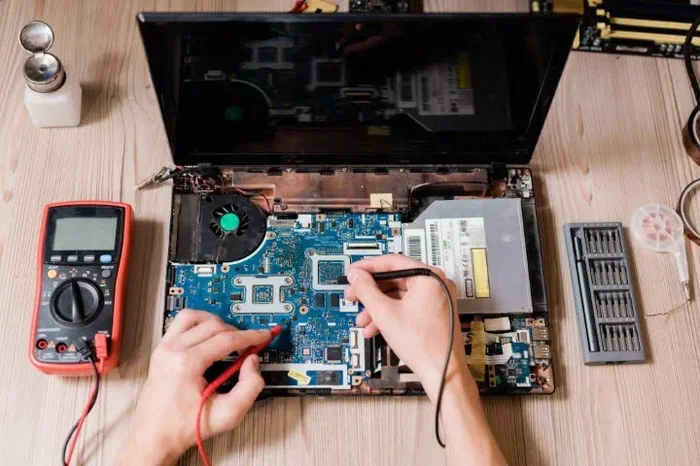
Every repair starts with finding the root cause. A technician uses diagnostic tools to test voltage, continuity, and signal flow across the board. They look for visible signs of damage like burn marks, bulging capacitors, or cracked components. This step is critical because fixing the wrong thing wastes time and money.
Step 2: Board Cleaning
Before any repair work begins, the board gets cleaned. Alcohol removes dust, grime, and any residue from old solder. This gives the technician a clear view of the board and helps prevent contamination during the repair.
Step 3: Component-Level Repair
This is where the real work happens. Using a soldering iron or hot air rework station, the technician removes damaged components and replaces them with new ones. For a blown capacitor, this might mean desoldering the old one and soldering in a matching replacement. For a failed IC chip, it requires more precision and skill.
Step 4: Testing
After the repair, the board gets tested thoroughly. The technician checks that all voltage rails are correct and that the board powers on properly. Sometimes this involves running the laptop for several hours to ensure stability.
Step 5: Reassembly and Final Check
Once the board passes testing, everything gets reassembled. The laptop is powered on one more time to confirm the fix worked. A good technician will also check that all peripherals function correctly.
DIY vs Professional Repair
You might be wondering if you can do this yourself. The answer depends on your skill level and the complexity of the problem.
What You Can Fix at Home
Some motherboard issues are simple enough for a confident DIYer. Here are a few you might be able to handle:
- Reflashing BIOS: If your BIOS is corrupted, you can often reflash it using a USB drive. This requires following the manufacturer’s instructions carefully.
- Cleaning corrosion: If you spot green or white residue on the board, a careful cleaning with isopropyl alcohol can help restore connections.
- Reseating components: Sometimes RAM or other modules become loose. Removing and reseating them can resolve power issues.
- Checking the power jack: A loose or damaged power jack can mimic motherboard failure. Inspecting and re-soldering the jack is sometimes all that is needed.
Quick Tips for DIY Repairs
- Always disconnect power before working on the board.
- Use an anti-static wrist strap to prevent static damage.
- Take photos before removing any components for reference.
- Work on a clean, well-lit surface.
- Invest in a basic soldering kit if you plan to do component-level work.
When to Call a Professional
For anything beyond basic troubleshooting, a professional is your best bet. Chip-level repair requires specialized equipment like microsoldering stations, BGA rework tools, and board testers. These tools are expensive, and learning to use them takes years of practice.
Also, one wrong move during a repair can turn a fixable problem into a dead board. A trained technician has the experience to handle delicate components safely.
Expert Insight
“Most people underestimate what a skilled technician can do with a damaged board. We see boards that owners thought were completely dead come back to life after a simple capacitor replacement or a trace repair. Always get a diagnosis before assuming the worst.” — Mark T., Certified Laptop Repair Technician with 12 years of experience
Cost of Repair vs Replacement
Money matters when deciding how to handle a broken motherboard. Let us break down the costs so you can make an informed decision.
Repair Costs
Professional motherboard repair typically costs between $100 and $350, depending on the complexity of the fix. Simple repairs like capacitor replacement fall on the lower end. More involved work like BGA chip repair or multi-component fixes cost more.
Replacement Costs
A new motherboard can cost anywhere from $200 to $800 or more. OEM boards from the laptop manufacturer tend to be pricier. Aftermarket or refurbished boards are cheaper but may come with compatibility risks.
Comparison Table
| Factor | Repair | Replace |
|---|---|---|
| Average Cost | $100 – $350 | $200 – $800+ |
| Time Required | 1 – 3 days | 1 – 5 days |
| Risk Level | Low to moderate | Low |
| Warranty | Usually 3 – 6 months | Usually 1 year |
| Longevity | Depends on damage | Full new board life |
| Data Safety | High (board stays in place) | High (same) |
As you can see, repair is often the more affordable option. But it is not always the right choice. If the repair cost approaches half the price of a replacement, you should weigh whether the laptop is even worth investing in anymore.
Preventing Future Motherboard Problems
The best repair is the one you never need. Taking care of your laptop goes a long way in protecting the motherboard. Here are some habits that help.
Keep Your Laptop Cool
Overheating is one of the biggest threats to motherboard health. Use a cooling pad if you work on your laptop for long hours. Clean the vents and fans regularly to prevent dust buildup. Replace thermal paste every couple of years to keep temperatures in check.
Use a Surge Protector
Plug your laptop into a surge protector or UPS (uninterruptible power supply). This shields your motherboard from electrical spikes that can cause irreversible damage. A cheap surge protector is a small investment compared to a fried board.
Avoid Liquids Near Your Laptop
Keep drinks away from your workspace. If a spill does happen, power off the laptop immediately, unplug it, and let it dry completely before turning it back on. The faster you act, the better your chances of avoiding permanent damage.
Handle With Care
Do not drop your laptop. Do not press on the keyboard when the lid is closed. Transport your laptop in a padded sleeve or case. Physical shocks are a leading cause of cracked PCBs and broken solder joints.
Keep Software Updated
Sometimes motherboard issues stem from software, not hardware. Keep your BIOS and device drivers updated. Manufacturers release firmware patches that fix bugs and improve stability. This simple habit can prevent many problems before they start.
Final Thoughts on Fixing a Laptop Motherboard
The question “can you fix a laptop motherboard” does not have a one-size-fits-all answer. But the truth is that most motherboard problems are repairable to some degree. Whether it is a simple capacitor swap or a complex chip-level repair, skilled technicians can work miracles on boards that owners thought were completely dead.
Your next step should be diagnosis. Do not assume the worst before you know what is actually wrong. Take your laptop to a trusted repair shop or try some basic troubleshooting yourself. You might be surprised at how affordable and straightforward the fix turns out to be.
Remember, a repaired motherboard can give your laptop years more life. Before you spend big on a replacement, explore the repair options available. Your wallet will thank you.
And if you are reading this because your laptop is acting up right now, do not lose hope. Start with the basics. Check your power supply. Look for visible damage. And then reach out to a professional if needed. The solution is almost always closer than you think.
Frequently Asked Questions
Is it worth repairing a laptop motherboard?
It depends on the repair cost and the age of your laptop. If the repair is under $300 and your laptop is otherwise in good shape, fixing the board is usually worth it. But if the repair costs more than half the value of a new laptop, replacement might make more sense.
How long does a motherboard repair take?
Most repairs take one to three days. Simple fixes like capacitor replacement can be done in a few hours. More complex chip-level repairs may take longer because of testing and quality checks involved.
Can liquid damage be repaired on a laptop motherboard?
Yes, in many cases. If you act quickly and do not power on the laptop after a spill, the chances of repair are good. A technician can clean the corrosion and replace damaged components. However, extensive corrosion may make the board unrecoverable.
How much does it cost to fix a short circuit on a laptop motherboard?
Short circuit repairs typically cost between $100 and $250. The price depends on how deep the short is and which components are affected. A simple trace repair is on the lower end, while multi-component damage costs more.
Can I fix my motherboard myself?
Simple fixes like cleaning corrosion or reflashing BIOS are doable at home. But component-level repair requires soldering skills and specialized tools. If you are not experienced with microsoldering, it is best to leave complex repairs to a professional.
What causes a laptop motherboard to fail?
The most common causes are power surges, overheating, liquid damage, age-related wear, and physical drops. Regular maintenance and careful handling can significantly reduce the risk of motherboard failure over time.
=== CONCLUSION ===
Fixing a laptop motherboard without replacing it is absolutely possible in the majority of cases. From blown capacitors to short circuits and BIOS corruption, many issues have proven repair solutions that cost a fraction of a full board replacement. The key is getting a proper diagnosis first so you know exactly what you are dealing with.
Whether you choose to DIY a simple fix or visit a professional for chip-level repair, the options are out there. Do not assume the worst just because your laptop stopped working. With the right approach, your motherboard can be back up and running without breaking the bank.