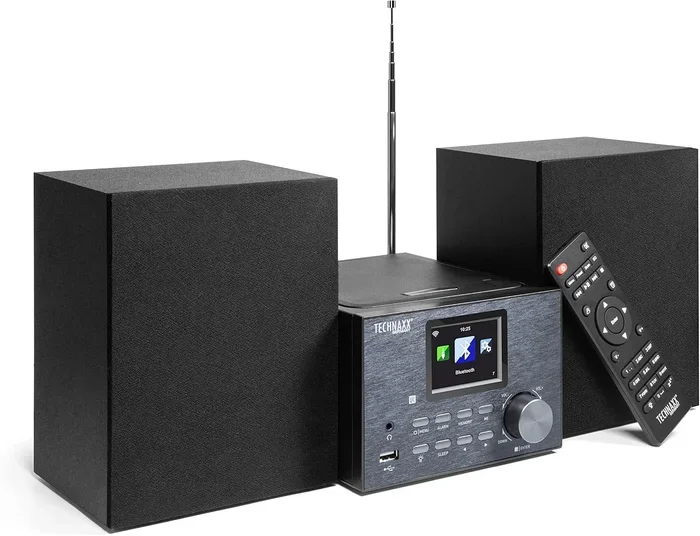
Can You Play Radio Through Bluetooth And Stream Music
Yes, you can play radio through Bluetooth and stream music wirelessly to almost any speaker, car stereo, or headphones. Whether you want to stream radio apps from your phone or connect a Bluetooth receiver to an older stereo, the process is simple and affordable. This guide covers every method, device option, and troubleshooting tip you need to get wireless audio working today.
Have you ever wanted to play radio through Bluetooth but didn’t know where to start? You are not alone. Thousands of people search for this every day, and the good news is that it is easier than you think. Whether you want to stream music from your phone to a speaker, bring wireless audio to your car, or connect an old stereo to modern tech, Bluetooth makes it possible.
The idea of wireless audio used to feel like science fiction. Today, it is a everyday reality. You can turn almost any speaker or radio into a Bluetooth device with a small adapter or a built-in feature. In this guide, we will walk you through every method, every device, and every tip you need to know. By the end, you will feel confident setting up your own Bluetooth radio streaming setup at home or in the car.
We keep things simple here. No jargon. No confusing tech talk. Just clear, practical steps that anyone can follow. So let us dive right in and explore how you can start streaming music wirelessly today.
Key Takeaways
- Bluetooth radio streaming works on most modern devices: phones, tablets, laptops, and smart speakers can all send radio audio wirelessly.
- A Bluetooth transmitter or receiver is often all you need: these small devices make older radios and stereos Bluetooth-compatible in minutes.
- Car owners have multiple options: from FM transmitters to built-in Bluetooth car kits, you can stream radio through your vehicle’s speakers easily.
- Common issues like lag or disconnection are fixable: simple steps like updating firmware or reducing distance solve most problems.
- Free and paid radio apps give you access to thousands of stations: streaming services make it easy to find music, news, and sports on the go.
- Bluetooth 5.0 offers better range and sound quality: newer devices deliver a stronger, more stable wireless connection.
- Setting up Bluetooth radio takes under 10 minutes: no technical skills are required for most setups.
📑 Table of Contents
- What Is Bluetooth Radio Streaming?
- How To Play Radio Through Bluetooth
- Benefits Of Streaming Radio Over Bluetooth
- Devices You Can Use For Bluetooth Radio
- Common Bluetooth Radio Problems And Fixes
- Expert Tips For The Best Bluetooth Radio Experience
- Can You Use Bluetooth Radio While Traveling?
- Conclusion
What Is Bluetooth Radio Streaming?
Bluetooth radio streaming means sending audio from one device to another without using wires. Instead of plugging your phone into a radio or speaker, you connect them wirelessly using Bluetooth technology. The radio signal travels through the air using short-range radio waves.
Think of it like this. Your phone or tablet acts as the music source. The Bluetooth device acts as a bridge. It sends the audio signal to your speaker, headphones, or car stereo. The whole process happens in seconds and without any cables.
The technology behind this is called the A2DP profile. It stands for Advanced Audio Distribution Profile. This is the standard that allows devices to stream high-quality audio over Bluetooth. Most devices made after 2010 support this profile. That means the chances are very good that your phone or tablet already has it built in.
You might hear terms like Bluetooth 5.0 or Bluetooth Low Energy. These refer to newer versions of the technology. Bluetooth 5.0 offers a longer range and better sound quality. It also uses less battery power. If you have a newer phone, it likely supports Bluetooth 5.0 or higher.
How To Play Radio Through Bluetooth
There are several ways to play radio through Bluetooth. The right method depends on what devices you have. Let us look at each option in detail.
Method 1: Using A Smartphone With A Bluetooth Speaker
This is the simplest way to get started. You need a phone, a Bluetooth speaker, and a radio app. Here is how it works.
- Turn on your Bluetooth speaker.
- Open the Bluetooth settings on your phone.
- Find the speaker in the list of available devices.
- Tap to pair the two devices.
- Open a radio app on your phone and start streaming.
That is it. Your phone sends the audio signal to the speaker wirelessly. You can control the volume from either the phone or the speaker. Most Bluetooth speakers have a range of about 30 feet. So you can move around your room freely while listening.
Many people also use their phone as a hands-free radio in the kitchen, garage, or backyard. The portability of phones makes this one of the most convenient options. You can carry your speaker anywhere and stream your favorite stations.
Method 2: Using A Bluetooth Transmitter For Older Radios
If you have an older radio or stereo that does not have Bluetooth, do not worry. You can still make it work. A Bluetooth transmitter is a small device that plugs into the audio output of your radio. It then sends the audio signal wirelessly to your Bluetooth speaker or headphones.
These transmitters are inexpensive. You can find them for under $20 online. They come with a 3.5mm audio cable or RCA connectors. You just plug the cable into the radio’s headphone jack or audio output. Then you pair the transmitter with your Bluetooth speaker or headphones.
This method works great for turning an old stereo into Bluetooth. It breathes new life into devices you might have otherwise thrown away. Many people use this setup in bedrooms, offices, and workshops.
Method 3: Using A Bluetooth Receiver In Your Car
Car owners have a few great options for streaming radio through Bluetooth. One popular choice is a Bluetooth receiver that plugs into your car’s AUX port or cigarette lighter. This small device receives the Bluetooth signal from your phone and plays it through your car’s speakers.
Another option is a Bluetooth transmitter for car. This works in the opposite direction. It takes the audio from your phone and sends it to your car’s FM radio frequency. You tune your car radio to a specific FM frequency, and the music plays through your car speakers.
Some newer cars come with built-in Bluetooth. If your car has this feature, you simply go to the Bluetooth settings, pair your phone, and start streaming. No extra devices are needed. Check your car’s manual to see if this feature is available.
Method 4: Using Smart Speakers Like Alexa
Smart speakers are another excellent way to play radio through Bluetooth. Devices like Amazon Echo can act as a Bluetooth speaker and stream radio from your phone. You can also ask Alexa to play specific radio stations using voice commands.
To use Alexa as a Bluetooth speaker, simply say “Alexa, pair Bluetooth.” Then go to your phone’s Bluetooth settings and connect. Once paired, any audio from your phone plays through the Echo speaker. It is a hands-free experience that works great in any room of your home.
Google Home and other smart speakers work similarly. Most modern smart speakers support Bluetooth pairing out of the box. This makes them a versatile option for wireless radio streaming.
Benefits Of Streaming Radio Over Bluetooth
There are many reasons to choose Bluetooth radio streaming over traditional methods. Here are the biggest advantages.
- No wires needed: You move freely around your home or car without being tethered to a device.
- Easy setup: Most Bluetooth connections take less than a minute to establish.
- Wide compatibility: Bluetooth works with phones, tablets, laptops, speakers, headphones, and car stereos.
- Portability: You can take your Bluetooth speaker anywhere and stream radio on the go.
- Cost-effective: Many Bluetooth adapters cost less than $20, making wireless audio affordable for everyone.
- Multi-device support: You can pair multiple devices and switch between them easily.
- Improved sound quality: Newer Bluetooth versions deliver clearer, richer audio than older wired connections.
The convenience factor alone makes Bluetooth streaming worth it. Imagine cooking dinner and being able to change the radio station from across the kitchen without touching the radio. Or driving to work and taking calls hands-free while listening to your favorite station. Bluetooth makes all of this possible.
Wireless music streaming also means no more tangled cords or worn-out cables. You get a clean, clutter-free setup that looks great and works even better.
Devices You Can Use For Bluetooth Radio
Not all Bluetooth devices are the same. Here is a look at the most popular options for streaming radio through Bluetooth.
Bluetooth Speakers
Bluetooth speakers are the most common choice for wireless radio listening. They come in all shapes and sizes. Some are small enough to fit in your pocket. Others are large enough to fill a room with rich, powerful sound.
Popular brands include JBL, Bose, and Sony. Many of these speakers offer waterproof designs, long battery life, and deep bass. If you want to listen to radio outdoors at the beach or pool, a waterproof Bluetooth speaker is a must-have.
Some speakers also support Bluetooth multipoint. This means you can connect to two devices at the same time. You might stream radio from your phone while your laptop plays music in the background.
Bluetooth Car Kits
For car owners, a Bluetooth car kit is a game-changer. These kits plug into your car’s power outlet and connect to your phone via Bluetooth. They transmit audio through your car’s speakers, giving you wireless radio streaming on the road.
Many car kits also include a built-in microphone for hands-free calling. This means you can answer calls safely while driving. The audio automatically pauses when a call comes in and resumes when you hang up.
Bluetooth Adapters For Home Stereos
If you have a home stereo system that does not have Bluetooth, a Bluetooth adapter is the easiest fix. These small dongles plug into the audio input of your stereo. They receive Bluetooth signals from your phone and play them through your speakers.
You can also make old Bose speakers Bluetooth with a simple adapter. This works for almost any brand of speaker or stereo. It is one of the most affordable ways to upgrade your audio setup.
Comparison Table: Bluetooth Devices For Radio Streaming
| Device Type | Price Range | Best For | Setup Time |
|---|---|---|---|
| Bluetooth Speaker | $15 – $200 | Home and portable use | Under 1 minute |
| Bluetooth Car Kit | $15 – $50 | Car audio and hands-free calls | 5 minutes |
| Bluetooth Transmitter | $10 – $30 | Older radios and stereos | Under 2 minutes |
| Bluetooth Receiver | $10 – $25 | Adding Bluetooth to any speaker | Under 2 minutes |
| Smart Speaker (Alexa/Google) | $30 – $100 | Voice-controlled radio streaming | 5 minutes |
As you can see, there is a Bluetooth solution for every budget. You do not need to spend a lot of money to enjoy wireless radio streaming.
Common Bluetooth Radio Problems And Fixes
Bluetooth technology is reliable, but sometimes things go wrong. Here are the most common issues and how to fix them.
Audio Lag Or Delay
Sometimes the audio lags behind the video or feels slightly delayed. This is called audio latency. It happens because Bluetooth takes a fraction of a second to transmit the audio signal.
To reduce lag, make sure both devices are close together. Avoid walls and obstacles between them. If you are using a car system, keep your phone in a central location. Updating your device’s firmware can also help reduce latency.
Connection Drops Frequently
If your Bluetooth connection keeps dropping, the first thing to check is distance. Bluetooth has a range of about 30 feet for most devices. Moving too far apart can cause disconnections.
Other causes include interference from Wi-Fi routers or other Bluetooth devices. Try turning off nearby devices that might be causing interference. Restarting both devices can also reset the connection and fix the problem.
Poor Sound Quality
If your audio sounds crackly or distorted, check the battery levels of both devices. Low battery can reduce audio quality. Also, make sure your devices are not too far apart. Walls and furniture can weaken the Bluetooth signal.
For the best sound quality, use devices that support Bluetooth 5.0 or higher. These devices use better audio codecs that deliver clearer, richer sound. If you are using a Bluetooth transmitter, look for one that supports aptX or LDAC codecs.
Device Will Not Pair
If your devices will not pair, try these steps:
- Turn Bluetooth off and on again on both devices.
- Remove the device from your Bluetooth list and try pairing again.
- Make sure both devices are in pairing mode.
- Restart both devices.
- Check if the device has reached its pairing limit. Some devices can only remember a certain number of paired devices.
Most pairing issues are temporary and easy to fix. A simple restart of both devices solves the problem about 80% of the time.
Expert Tips For The Best Bluetooth Radio Experience
Want to get the most out of your Bluetooth radio streaming? Here are some expert tips that make a big difference.
- Keep your devices updated: Software updates often include Bluetooth improvements that fix bugs and boost performance.
- Invest in Bluetooth 5.0 devices: The improved range and sound quality are worth the upgrade.
- Use a dedicated Bluetooth adapter: A separate adapter often performs better than built-in Bluetooth on older devices.
- Reduce Bluetooth interference: Keep your Bluetooth devices away from Wi-Fi routers and microwaves, which can cause signal disruption.
- Charge your devices fully: Low battery affects both connection stability and audio quality.
- Use high-quality audio apps: Apps like TuneIn, iHeartRadio, and Spotify offer excellent streaming quality and thousands of stations.
- Reset your Bluetooth connection regularly: Clearing old pairings keeps your connection fast and stable.
One of the best tips is to experiment with different Bluetooth codecs if your devices support them. Codecs like aptX and LDAC compress and transmit audio more efficiently. This results in better sound quality with less lag. Check your device specifications to see which codecs it supports.
Another pro tip is to name your Bluetooth devices clearly. When you have multiple Bluetooth devices in your home, it can get confusing. Naming them something like “Kitchen Speaker” or “Car Stereo” makes it easy to identify and connect to the right device every time.
Can You Use Bluetooth Radio While Traveling?
Yes! Bluetooth radio streaming works great while traveling. You can use a portable Bluetooth speaker to listen to radio in your hotel room, RV, or campsite. Many people also use Bluetooth car kits to stream radio during road trips.
If you are flying, you can use Bluetooth headphones to listen to radio apps during the flight. Just make sure your phone is in airplane mode and Bluetooth is turned on separately. Most airlines allow Bluetooth devices during the flight. Always check with your airline before using wireless devices on a plane.
For international travel, some countries have different regulations about Bluetooth devices. The technology itself works the same everywhere, but local laws may vary. A quick check before you travel can save you from any surprises.
Conclusion
Can you play radio through Bluetooth? Absolutely yes. The technology is simple, affordable, and works with almost any device you own. Whether you use a Bluetooth speaker at home, a car Bluetooth kit on the road, or a smart speaker like Alexa, streaming radio wirelessly has never been easier.
The methods we covered in this guide give you plenty of options. You can use a smartphone with a speaker, a transmitter for older radios, a receiver for your car, or a smart speaker for hands-free control. Each method has its own advantages, and all of them deliver great results.
Remember to keep your devices updated, reduce interference, and invest in Bluetooth 5.0 technology for the best experience. With these tips, you will enjoy wireless music streaming for years to come.
Now that you know how easy it is to stream radio through Bluetooth, there is no reason not to try it. Pick one of the methods above, gather your devices, and set up your wireless audio system today. You will wonder how you ever lived without it.