Can You Stream On Hotel Wifi Without Getting Blocked
Can you stream on hotel wifi without getting blocked? Yes, you absolutely can — but hotel networks often slow down or block streaming services on purpose. This guide walks you through the best methods, including using a hotel wifi VPN, adjusting settings, and choosing the right tools for buffer-free hotel wifi streaming.
You just checked into your hotel room after a long flight. You drop your bags, sink into the bed, and reach for your phone or laptop. Your first instinct? Fire up Netflix, Hulu, or YouTube and relax. But then it happens. The video won’t load. The screen keeps buffering. Or you get a stubborn error message telling you that streaming is not available on this network. Sound familiar?
If you have ever tried hotel wifi streaming and ended up frustrated, you are not alone. Millions of travelers face the same problem every day. Hotel wifi was never really built for heavy video streaming. And many hotels actively block or slow down streaming services to manage their hotel bandwidth limit and keep the network running for everyone.
But here is the good news. You can absolutely stream on hotel wifi without getting blocked. You just need the right tools, a few smart tricks, and a little patience. This guide covers everything you need to know. From understanding why hotels restrict streaming, to step-by-step solutions that actually work, we have you covered.
Whether you want to binge a show before bed, catch up on a movie, or video call family back home, this article will help you get it done. Let us dive in.
Key Takeaways
- Hotel wifi often blocks or throttles streaming: Most hotels use network management tools that limit bandwidth for video sites.
- A VPN is the #1 solution: It encrypts your traffic and helps you bypass hotel wifi restrictions easily.
- Mobile hotspots work as a backup: Your phone’s data plan can replace unreliable hotel internet for streaming.
- Lowering streaming quality helps: Reducing resolution from 4K to 1080p or 720p cuts bandwidth needs significantly.
- Avoid common mistakes: Using shared networks, ignoring router placement, and streaming during peak hours hurt your experience.
- Not all VPNs work on hotel networks: Choose a VPN with obfuscated servers and strong unblocking power for hotel wifi.
📑 Table of Contents
Why Hotel Wifi Makes Streaming Difficult
Before we get into solutions, it helps to understand the problem. Hotels run shared networks. That means dozens or even hundreds of guests connect to the same internet connection at the same time. This creates a lot of strain on the network. Here is why hotel wifi streaming often feels impossible.
How Hotel Networks Handle Traffic
Hotels use something called a captive portal. That is the login page you see when you first connect to hotel wifi. You type in your room number, click a button, and agree to terms. Behind the scenes, the hotel’s network is doing a lot of work.
The network assigns each device an IP address. It tracks how much data you use. And it applies rules about what kind of traffic is allowed. Streaming video uses a ton of data. So hotels often put limits on it. This is called hotel internet throttling. They slow down video traffic to keep the network fair for everyone.
Some hotels also use network management tools that detect streaming services. When they see you trying to access Netflix or YouTube, they may block the connection entirely. This is not personal. It is just how hotel networks are set up.
Why Hotels Block Streaming Content
You might wonder why hotels go through the trouble of blocking content. There are a few reasons:
- Bandwidth conservation: Hotels buy a fixed amount of internet speed. If one guest streams 4K video, it slows down the connection for everyone else.
- Legal liability: Hotels do not want guests using their network to access pirated or illegal content.
- Network stability: Heavy streaming can crash hotel routers and cause problems for other guests.
- Business agreements: Some hotels partner with cable TV providers and want guests to use the in-room TV instead.
Understanding these reasons helps you see why hotel wifi content blocked messages appear. It is not about you specifically. It is about how the hotel manages its network.
Common Streaming Problems On Hotel Wifi
Now that you know why hotels restrict streaming, let us talk about the specific problems you might run into. Recognizing these issues is the first step toward fixing them.
Slow Speeds And Constant Buffering
This is the most common complaint. You click play on a show, and the loading wheel just spins. Buffering happens because the hotel wifi streaming speed is too low. When many guests are online at the same time, speeds drop fast.
Evenings are usually the worst. After dinner, when everyone in the hotel is streaming or browsing, the network gets congested. If you try to watch something at 9 PM, you will likely face slower speeds than you would at 7 AM.
Blocked Websites And Error Messages
Sometimes, the hotel network simply blocks certain sites. You might see messages like “This content is not available on this network” or “Access denied.” These blocks are common on platforms like Netflix, Hulu, Disney+, and even some news websites.
The hotel’s hotel network restrictions often target streaming services specifically. Social media and basic browsing usually work fine. But video streaming gets flagged and blocked.
Geo-Restrictions Even When You Are In The Room
Here is a tricky one. Even if you can stream, you might not be able to access content from your home country. Streaming services use your IP address to determine what content is available. Since hotel wifi assigns you a local IP address, you may see a different library than what you are used to at home.
This is especially annoying if you travel internationally and want to watch shows from your home region. The hotel wifi streaming quality might be fine, but the content itself is wrong for your location.
Login Loops And Captive Portal Issues
Sometimes the hotel wifi login page gets stuck. You refresh it ten times, but it never connects. Or you log in successfully but cannot access any streaming sites. These hotel wifi not working issues are frustrating but usually fixable with a few simple steps.
How To Stream On Hotel Wifi Without Getting Blocked
Now for the part you have been waiting for. How do you actually stream on hotel wifi without running into blocks or terrible speeds? Here are the most effective methods, ranked from easiest to most advanced.
Use A VPN To Bypass Hotel Restrictions
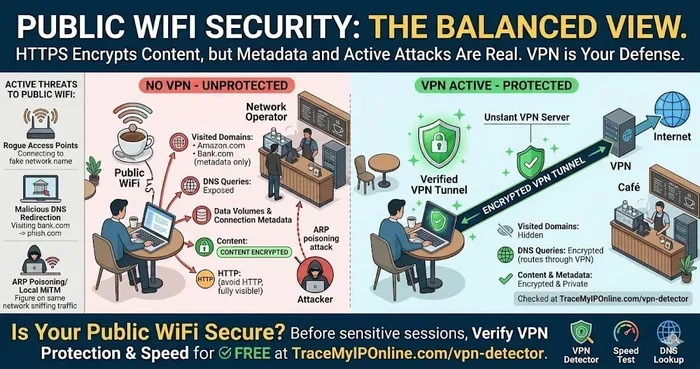
A hotel wifi VPN is hands-down the best tool for streaming on hotel networks. A VPN, or Virtual Private Network, encrypts your internet traffic and routes it through a server in another location. This makes it look like you are browsing from somewhere else.
Here is how it works in practice:
- Download a reliable VPN app on your phone, tablet, or laptop before your trip.
- Connect to the hotel wifi and open the login portal as normal.
- Launch the VPN app and connect to a server in your home country or any location you prefer.
- Open your streaming app or website and start watching.
The VPN hides your traffic from the hotel’s network management tools. The hotel cannot see that you are streaming video. And because your IP address changes, you also bypass hotel wifi content blocked restrictions. This is a game-changer for travelers who want to stream Netflix hotel wifi without any hassle.
Not all VPNs work well on hotel networks. Some hotels use advanced firewalls that detect and block known VPN traffic. Look for a VPN with obfuscated servers. These servers disguise VPN traffic as regular internet traffic, making them much harder to detect.
Try A Mobile Hotspot Instead
If the hotel wifi is just too slow or too restricted, your phone’s mobile data can save the day. Most smartphones can create a personal hotspot. You connect your laptop, tablet, or streaming device to your phone’s hotspot and use your cellular data plan.
This method works great when:
- The hotel wifi is extremely slow or completely blocked for streaming.
- You have a strong cellular signal at your hotel location.
- Your data plan has enough allowance for HD or 4K streaming.
Keep in mind that streaming uses a lot of data. A two-hour movie in HD can use 3 to 5 GB. If your phone plan has a limited data cap, monitor your usage carefully. Consider downloading content over Wi-Fi before switching to the hotspot for playback.
Use The Hotel’s Built-In Streaming Options
Many modern hotels now offer streaming apps built into their in-room smart TVs or tablets. These apps are pre-approved by the hotel’s network team. They work because the hotel has set up special access rules for them.
Check if your hotel room has a smart TV with Netflix, Hulu, or other streaming apps already installed. These often work without issues because the hotel has whitelisted them. It is not the same as using your own device, but it gets the job done.
Lower Your Streaming Quality Settings
This is a simple trick that many people overlook. If your hotel wifi is slow, try reducing the streaming quality. Instead of watching in 4K or Full HD, switch to 720p or even 480p.
Lower quality streams use much less bandwidth. You will still get a watchable experience, and you will avoid the constant buffering that ruins a good movie night. Most streaming apps let you adjust quality in the settings menu. Look for options like “Auto,” “High,” “Medium,” or “Data Saver.”
Stream During Off-Peak Hours
Timing matters a lot on hotel networks. If you want smoother streaming, try watching during early morning hours or late at night. Fewer guests are online, so the network has more capacity.
Early risers and night owls often enjoy the best hotel wifi streaming speed because the network is less congested. If you can adjust your viewing schedule, this alone can make a big difference without any extra tools.
Best VPNs For Hotel Wifi Streaming
Not every VPN performs well on restricted hotel networks. You need a VPN that can bypass advanced firewalls, offers fast speeds for video, and has servers in many locations. Here is what to look for.
Features That Matter For Hotel Networks
- Obfuscated servers: These hide the fact that you are using a VPN, which helps you get past hotel firewalls.
- Fast server speeds: Slow VPNs will make streaming painful. Choose a provider known for speed.
- Large server network: More servers mean more options and better chances of finding a working connection.
- Strong encryption: This keeps your data safe on potentially insecure hotel networks.
- Apps for all devices: Make sure the VPN works on your phone, laptop, tablet, and any streaming device you bring.
Popular VPNs that work well for hotel wifi streaming include ExpressVPN, NordVPN, and Surfshark. All three offer obfuscated servers, fast speeds, and easy-to-use apps. Test your VPN before you travel so you can troubleshoot any issues at home, not at the hotel.
Quick Tips For Better Hotel Streaming Performance
Here are some extra tips that can make your hotel wifi streaming experience much better:
- Restart your device after connecting to hotel wifi. This forces a fresh network connection and can resolve many issues.
- Forget the hotel network and reconnect. Sometimes this clears login glitches and resets your connection.
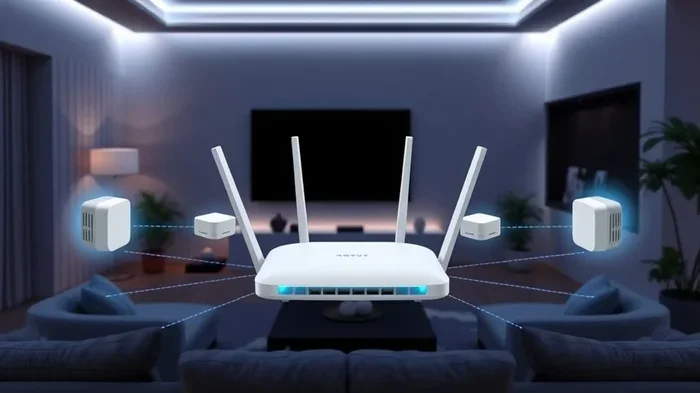
- Move closer to the router. Walls and distance weaken the signal. If possible, sit near the room’s wifi router or access point.
- Close background apps. Other apps using the internet can slow down your streaming. Close anything you are not actively using.
- Use an ethernet cable if available. Some hotel rooms have wired internet ports. A direct connection is always faster and more stable than wifi.
- Clear your browser cache before logging in. Old cached data can interfere with the hotel’s captive portal login.
Common Mistakes People Make When Streaming On Hotel Wifi
Avoid these mistakes to save yourself a lot of frustration:
- Using public wifi without protection: Hotel networks are public by nature. Without a VPN, your data is exposed. Always use a hotel wifi VPN for security and access.
- Ignoring the captive portal: Some people try to stream before completing the hotel’s login page. Always finish the login process first.
- Streaming on multiple devices at once: This divides the already limited bandwidth and makes everything slower.
- Assuming all hotels are the same: Luxury hotels often have better internet than budget motels. Research the hotel’s wifi reputation before booking if streaming matters to you.
- Not having a backup plan: Relying solely on hotel wifi is risky. Always have a mobile hotspot or downloaded content as a backup.
Expert Insights On Hotel Network Management
Hotel IT teams face a tough balancing act. They need to provide internet that guests expect while keeping the network stable for everyone. Understanding their perspective can help you work with the system instead of against it.
Most hotel networks use what is called Quality of Service or QoS settings. These settings prioritize certain types of traffic. Email and browsing get priority. Streaming video gets deprioritized. This is why your email loads fast but Netflix crawls.
Some hotels are now upgrading their networks to handle streaming better. The rise of remote work has pushed many hotels to improve their internet infrastructure. Business travelers need reliable, fast connections. And streaming is a big part of that demand.
If you are a frequent traveler, consider joining the hotel’s loyalty program. Members often get better internet access, including faster speeds or even dedicated bandwidth. It is a small perk that can make a big difference for hotel wifi streaming.
What To Do If Nothing Works
Sometimes, despite your best efforts, the hotel wifi simply will not let you stream. In these situations, here are your best alternatives:
- Download content before your trip: Load movies and shows onto your device while you still have good internet at home. You can watch offline during your stay.
- Use the hotel’s business center: Many hotels have business centers with better internet. These networks are often less restricted.
- Visit a nearby cafe or library: Public spaces often have free wifi with fewer restrictions than hotel networks.
- Call the front desk: Politely ask the hotel staff if they can whitelist a streaming service for your room. They may be able to help, especially at upscale properties.
Having a backup plan means you never have to miss out on your favorite shows, no matter where you are.
Final Thoughts
Can you stream on hotel wifi without getting blocked? Absolutely yes. The key is preparation. Download a good VPN before your trip. Understand how hotel networks work. Keep your streaming quality reasonable. And always have a backup plan ready.
Hotel wifi streaming does not have to be a headache. With the right approach, you can enjoy your favorite shows and movies from any hotel room in the world. The tools and tips in this guide will help you bypass restrictions, avoid buffering, and stream with confidence.
Next time you check into a hotel, do not let a slow or blocked connection ruin your downtime. Use these strategies, and you will be binge-watching in no time. Safe travels and happy streaming!
Frequently Asked Questions
Why does my hotel wifi block streaming sites?
Hotels block streaming sites to manage bandwidth and keep the network stable for all guests. Streaming video uses a lot of data, so hotels often restrict it to prevent one guest from slowing down the connection for everyone else.
Will a VPN work on all hotel wifi networks?
Most VPNs work on hotel networks, but some hotels use advanced firewalls that detect and block VPN traffic. Choose a VPN with obfuscated servers, as these disguise VPN traffic and are much harder for hotel networks to detect and block.
How much data do I need for streaming on hotel wifi?
Streaming quality determines data usage. HD streaming uses about 3 GB per hour, while 4K uses up to 7 GB per hour. Check your phone plan or hotel internet package to make sure you have enough data for your viewing habits.
Can I use a streaming stick like Chromecast or Roku on hotel wifi?
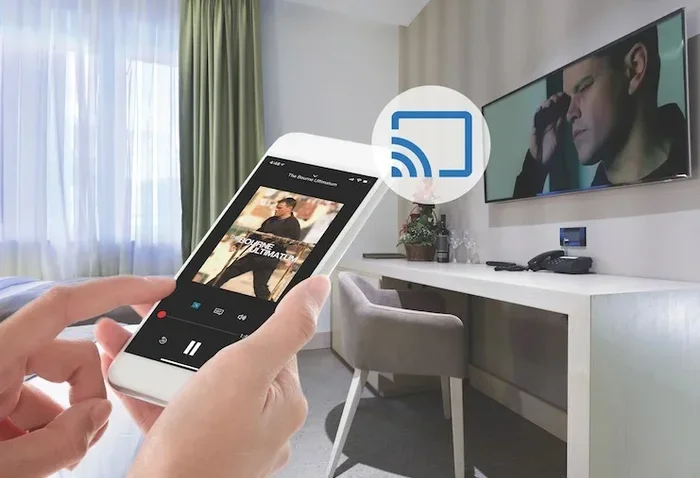
Yes, but you will need to connect the device to the hotel wifi through the captive portal first. Some hotel networks may still block certain streaming services on these devices, so a VPN router or mobile hotspot can help bypass those restrictions.
Is hotel wifi safe for streaming without a VPN?
Hotel wifi networks are public networks, which means your data can potentially be intercepted by others on the same network. Using a VPN encrypts your traffic and adds a layer of security, making it much safer for streaming and browsing on hotel wifi.
What is the best way to stream Netflix on hotel wifi?
The best way is to connect to the hotel wifi, launch a VPN, and then open Netflix. The VPN bypasses any blocks or throttling the hotel applies. If the VPN does not work, try lowering the streaming quality or switching to your phone’s mobile hotspot as an alternative.
=== META DESCRIPTION ===
Learn how to stream on hotel wifi without getting blocked. Our complete guide shares proven tips, VPN recommendations, and quick fixes for buffer-free streaming.
=== URL SLUG ===
can-you-stream-on-hotel-wifi-without-getting-blocked
=== SEO TITLE ===
Can You Stream On Hotel Wifi Without Getting Blocked
=== META TITLE ===
Stream On Hotel Wifi Without Getting Blocked (2025 Guide)
=== OPENING SUMMARY ===
Can you stream on hotel wifi without getting blocked? Yes, you absolutely can — but hotel networks often slow down or block streaming services on purpose. This guide walks you through the best methods, including using a hotel wifi VPN, adjusting settings, and choosing the right tools for buffer-free hotel wifi streaming. You will learn why hotels restrict video content, how to bypass those restrictions, and expert tips that make streaming on the road simple and reliable.
=== INTRODUCTION ===
You just checked into your hotel room after a long flight. You drop your bags, sink into the bed, and reach for your phone or laptop. Your first instinct? Fire up Netflix, Hulu, or YouTube and relax. But then it happens. The video won’t load. The screen keeps buffering. Or you get a stubborn error message telling you that streaming is not available on this network. Sound familiar?
If you have ever tried hotel wifi streaming and ended up frustrated, you are not alone. Millions of travelers face the same problem every day. Hotel wifi was never really built for heavy video streaming. And many hotels actively block or slow down streaming services to manage their hotel bandwidth limit and keep the network running for everyone.
But here is the good news. You can absolutely stream on hotel wifi without getting blocked. You just need the right tools, a few smart tricks, and a little patience. This guide covers everything you need to know. From understanding why hotels restrict streaming, to step-by-step solutions that actually work, we have you covered.