Can You Use A Arc Port As Regular HDMI for Your Display
Yes, you can use an ARC port as a regular HDMI for video and audio, but there are important differences to know. An HDMI ARC port handles both regular display signals and audio return channel features. Understanding how ARC works helps you avoid setup headaches and get the best performance from your home theater setup.
This is a comprehensive guide about Can You Use A Arc Port As Regular Hdmi.
Key Takeaways
- ARC ports work as regular HDMI: You can plug in any HDMI device and get full video and audio output from an ARC port.
- ARC adds audio return functionality: The port also sends TV audio back to a soundbar or receiver through a single cable.
- eARC offers better audio quality: Enhanced ARC supports newer formats like Dolby Atmos for a richer surround sound experience.
- HDMI-CEC controls multiple devices: One remote can manage all connected gear when ARC is active.
- Common issues are easy to fix: Most ARC problems come from cable type, TV settings, or device compatibility.
- Check your port labels carefully: Not every HDMI port on your TV supports ARC, so look for the ARC or eARC marking.
[FEATURED_IMAGE_PLACEHOLDER]
What Is an HDMI ARC Port?
An HDMI ARC port stands for Audio Return Channel. It is a special type of HDMI port found on most modern TVs, soundbars, and receivers. This port does two jobs at once. It carries regular video and audio signals to your display. And it sends audio from your TV back to an audio device like a soundbar or AV receiver.
The ARC feature was introduced with HDMI version 1.4. It was designed to simplify home theater setup cables. Before ARC, you needed a separate cable or an optical audio cable to send sound from your TV to your audio system. ARC eliminated that need. Now one cable handles both directions of audio and video.
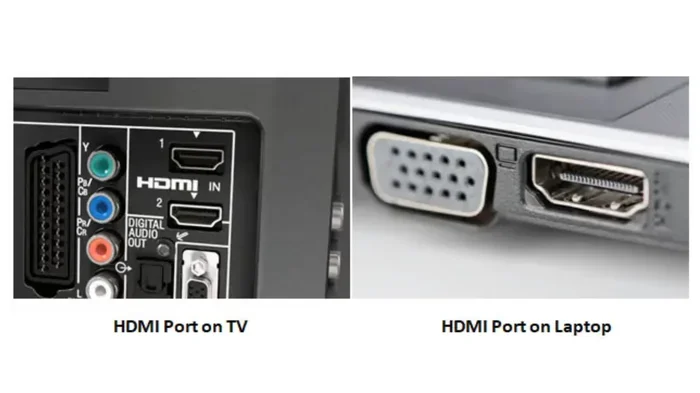
The port looks exactly like a regular HDMI port. It uses the same connector shape and size. This is why many people wonder if they can use it as a standard HDMI port. The short answer is yes. But there are some details you should understand first.
Most TVs made after 2012 include at least one ARC port. Some high-end models offer eARC, which stands for Enhanced Audio Return Channel. Both types work as regular HDMI ports for display purposes. They also add the audio return feature on top of standard HDMI functionality.
Can You Use an ARC Port as a Regular HDMI?
The simple answer is yes. You can absolutely use an ARC port as regular HDMI for your display. When you plug a device into an ARC port, it works just like a standard HDMI port for video and audio output. Your picture and sound will come through normally. The ARC feature simply adds an extra capability on top of the basic HDMI function.
Here is how it works in practice. Let us say you have a streaming box, a gaming console, or a Blu-ray player. You plug it into the ARC port on your TV. The device sends video and audio to your screen just like it would on any other HDMI port. You will not lose any picture quality or functionality. Everything works the same way.
But there is a catch. When the ARC feature is active, your TV may try to send audio back through that same port. This is called the audio return path. If your connected device is not designed to receive audio input, this can sometimes cause issues. For example, a simple monitor without speakers or audio input might not handle the return audio signal properly.
Most modern devices handle this without any problems. Your gaming console, streaming stick, or set-top box will work perfectly fine. The key is to understand what ARC does so you can use it wisely. You do not need to avoid ARC ports. You just need to know how they behave.
When ARC Might Cause Minor Issues
There are a few situations where using an ARC port as a regular HDMI might give you trouble. If you connect a device that does not support HDMI-CEC, the remote control features may not work. HDMI-CEC lets devices talk to each other through the HDMI connection. Without it, you might need multiple remotes to control different devices.
Another issue can happen with audio format conflicts. Some devices send audio in formats that your TV or sound system cannot decode. This can lead to no sound or distorted audio. Switching the audio format settings on your TV or device usually fixes this quickly.
Also, some older devices may not fully support the ARC handshake process. The handshake is how devices recognize each other and set up the connection. If the handshake fails, you might see a black screen or no audio. A simple power cycle of all devices usually resolves this.
How ARC and Regular HDMI Differ
It helps to understand the actual differences between an ARC port and a regular HDMI port. On the outside, they look identical. The same cable fits both ports. The same video and audio signals pass through. But under the hood, there is an extra communication channel in the ARC port.
This extra channel allows audio to flow in two directions. Regular HDMI only carries audio and video in one direction. That is from the source device to the display. ARC adds a return path for audio going from the TV back to the audio system. This is the core difference between the two.
Let us look at a quick comparison to make this clear.
| Feature | Regular HDMI | HDMI ARC |
|---|---|---|
| Video Output | Yes | Yes |
| Audio Output (Source to TV) | Yes | Yes |
| Audio Return (TV to Audio Device) | No | Yes |
| HDMI-CEC Support | Sometimes | Yes |
| Cable Required | One HDMI | One HDMI (same cable) |
| eARC Support | No | Yes (on eARC ports) |
| Port Appearance | Standard | Standard (labeled ARC) |
As you can see, the main added benefit is the audio return feature. Everything else about the display connection remains the same. This means using an ARC port as a regular HDMI port will not harm your setup in any way.
What About eARC?
eARC stands for Enhanced Audio Return Channel. It is the newer and better version of ARC. eARC supports higher bandwidth audio formats. This means you can get Dolby Atmos and DTS:X through your HDMI cable without needing extra connections. eARC also handles audio return more reliably than standard ARC.
eARC ports work as regular HDMI ports too. They carry the same video and audio signals. The only difference is the enhanced audio return capability. If your TV has an eARC port, you should use it whenever possible. It gives you the best of both worlds: full display functionality and premium audio return.
The device compatibility requirements for eARC are a bit stricter. Both your TV and your audio device need to support eARC for the best results. Check your device manuals or look for the eARC label on the port. If only one device supports eARC, the connection will fall back to standard ARC mode.
When to Use ARC vs Regular HDMI
Knowing when to use your ARC port versus a regular HDMI port helps you get the most out of your setup. Each port type has its best use cases. Let us break them down so you can make smart decisions about your port configuration.
Use your ARC port when:
- You want to connect a soundbar or home theater system and use the TV audio return feature.
- You have limited HDMI ports on your TV and want to save space.
- You want to control multiple devices with one remote using HDMI-CEC.
- You want to reduce cable clutter by using one cable for both audio and video.
- Your audio device supports ARC or eARC and you want the best audio quality.
Use a regular HDMI port when:
- You are connecting a device that does not need audio return, like a PC monitor.
- You are using an older device that does not support HDMI-CEC.
- You want to keep the ARC port free for your audio system.
- You are experiencing ARC-related issues and want a clean, simple connection.
In most real-world situations, using an ARC port as a regular HDMI port works perfectly fine. You do not need to worry about which port you choose. But if you have a dedicated home theater setup, it makes sense to reserve the ARC port for your audio system. This way you get the full benefit of the audio return channel.
How This Affects Your Home Theater Setup
If you are building a home theater setup, port choice matters more. Your soundbar or AV receiver should connect through the ARC or eARC port on your TV. This lets you get TV audio through your sound system without extra cables. Your other devices like game consoles and streaming boxes can use the regular HDMI ports.
This setup gives you the best of both worlds. You get clean audio from your TV through the ARC return path. And you get full HDMI functionality from all your other devices. It is the most organized and efficient way to wire a living room entertainment center.
Some people use an HDMI switch to expand their port options. An HDMI switch lets you connect multiple devices to one port. But not all switches support ARC properly. Make sure any switch you buy explicitly supports ARC or eARC if you need that feature. Check the signal passthrough specs before purchasing.
Setting Up Your ARC Port for Display Use
Setting up your ARC port is simple. Whether you are using it as a regular HDMI port or taking advantage of the audio return feature, the process is straightforward. Follow these steps to get everything working smoothly.
Step 1: Check your TV settings. Go to your TV settings menu. Look for the HDMI or sound settings section. Find the ARC or eARC option. Make sure it is turned on. Some TVs call this setting by different names. Look for terms like “HDMI Control,” “BRAVIA Sync,” or “SimpLink.” These are all names for HDMI-CEC, which works hand in hand with ARC.
Step 2: Use the right cable. You need a high-speed HDMI cable for ARC to work properly. Most modern HDMI cables support ARC. But if you are using a very old cable, it might not handle the audio return signal. A certified High Speed HDMI cable or Premium High Speed cable is your best bet. For eARC, you need an Ultra High Speed HDMI cable to handle the extra bandwidth.
Step 3: Connect your device. Plug your device into the ARC port on your TV. Then connect the other end to your device. Power on both devices. The TV should recognize the connection automatically.
Step 4: Set the audio output. Go to your TV sound settings. Change the audio output to HDMI ARC or eARC. This tells the TV to send audio through the ARC port instead of its built-in speakers. Your soundbar or receiver should now play the TV audio.
Step 5: Test the connection. Play some content on your TV. Check if both video and audio work. If you hear sound through your sound system, everything is set up correctly. If not, try unplugging the HDMI cable and plugging it back in. A simple reseat often fixes the issue.
Quick Tips for the Best Setup
- Always power on your TV before your audio device. This helps with the ARC handshake.
- Keep your HDMI cables as short as possible for the best signal quality.
- Update your TV firmware regularly. Manufacturers often fix ARC bugs in software updates.
- If you have audio sync issues, look for a “lip sync” or “audio delay” setting in your TV menu.
- Label your HDMI ports with tape or a tag so you remember which one is ARC.
Common Mistakes People Make with ARC Ports
Many users run into the same problems when using ARC ports. Knowing these mistakes helps you avoid them.
- Using the wrong HDMI port: Not every HDMI port on your TV is ARC-enabled. Check the label or your TV manual to find the right one.
- Forgetting to enable ARC in settings: Even if you plug into the ARC port, the feature stays off until you turn it on in the TV menu.
- Using an old or cheap HDMI cable: Low-quality cables can cause handshake failures and audio dropouts. Invest in a good certified cable.
- Not setting the audio output correctly: If your TV audio output is set to the built-in speakers, the ARC return path will not work.
- Ignoring HDMI-CEC settings: HDMI-CEC controls the ARC connection. If it is disabled, your devices may not communicate properly.
Troubleshooting Common ARC Port Issues
Even with the best setup, ARC issues can pop up. Here are the most common problems and how to fix them quickly.
No sound through your audio device: This is the most common ARC complaint. First, check that ARC is enabled in your TV settings. Then verify that your audio output is set to HDMI ARC. Try unplugging the HDMI cable and plugging it back in. A power cycle of both devices often solves this.
Video works but no audio: This usually means the audio format is not compatible. Go to your TV audio settings and change the output format to PCM or Auto. This forces the TV to send a universally compatible audio signal. Your audio device should then play it without issues.
HDMI-CEC remote control not working: Make sure HDMI-CEC is turned on in your TV settings. Each device brand uses a different name for this feature. Look for Anynet+, Bravia Sync, EasyLink, or Viera Link in your menus. Enable it on all connected devices.
Audio sync issues (lip sync): If the audio and video are out of sync, check for a lip sync or audio delay setting in your TV. Adjust it until the sound matches the picture. Some soundbars also have their own sync controls you can tweak.
ARC port not recognized by the TV: This can happen with older devices. Try updating the firmware on both your TV and the connected device. If that does not work, the device may simply not support ARC. In that case, use a regular HDMI port or an optical audio cable instead.
Intermittent audio dropouts: Loose connections cause this. Make sure the HDMI cable is firmly seated in both ports. Try a different HDMI cable if the problem continues. A cable that supports the ARC audio return bandwidth will give you a stable connection.
Remember that most ARC issues come down to settings, cables, or compatibility. You rarely have a hardware problem. Take the time to check each step in your setup. Nine times out of ten, a simple adjustment fixes everything.
Final Thoughts on Using ARC as Regular HDMI
Using an ARC port as regular HDMI is a completely valid choice. The port works just like any other HDMI port for your display needs. You get full video and audio output without any loss in quality. The ARC feature simply adds an extra audio return capability on top of the standard HDMI function.
Whether you are setting up a simple living room TV or a full-blown home theater, understanding ARC gives you more flexibility. You can use every HDMI port on your TV with confidence. You know that the ARC port will work for any device you plug into it. And when you need the audio return feature, it is already there waiting for you.
The key is to be aware of the differences and set up your devices correctly. Check your TV settings. Use the right cables. Understand what your devices support. With these basics in place, your ARC port will serve you well as both a regular HDMI port and an audio return channel.
Do not let confusion about ARC stop you from using your ports the way you need. The technology is designed to be simple and flexible. Once you understand how it works, you will wonder why you ever worried about it. Plug in, turn on, and enjoy your display with confidence.
For more details about how different systems handle HDMI and audio connections, check out our guide on advantages and disadvantages of proprietary operating systems. Understanding how device software affects your HDMI experience can help you troubleshoot issues more effectively.
Also, if you are setting up a network-connected entertainment system, you may want to learn about value-added networks for electronic communication. These insights can help you optimize how your devices share audio and video data across your home network.
FAQs
Can I plug any HDMI device into an ARC port?
Yes, you can plug any HDMI device into an ARC port. It works just like a regular HDMI port for video and audio output. The ARC feature only activates when both the TV and the audio device support it. If you connect a device that does not use the audio return feature, it will simply work as a standard HDMI connection.
Do I need a special cable for HDMI ARC?
No, you do not need a special cable for basic ARC. A standard high-speed HDMI cable works fine. For eARC, you need an Ultra High Speed HDMI cable to handle the higher bandwidth. Using a certified cable ensures a stable connection and avoids audio dropouts or handshake failures.
Will using an ARC port affect my video quality?
No, using an ARC port will not affect your video quality at all. The video signal passes through exactly the same way as on a regular HDMI port. ARC only adds an audio return channel. Your picture quality, refresh rate, and resolution remain unchanged regardless of which HDMI port you use.
Can I use ARC and regular HDMI at the same time on my TV?
Yes, you can use ARC and regular HDMI ports at the same time. Your TV can handle multiple HDMI connections simultaneously. You might use the ARC port for your soundbar and regular HDMI ports for your game console and streaming device. Each port works independently without interfering with the others.
Why is my ARC port not working even though it is enabled?
If your ARC port is enabled but not working, try a few basic fixes first. Unplug the HDMI cable and plug it back in. Power cycle both your TV and your audio device. Check that the audio output setting on your TV is set to HDMI ARC. If the problem persists, try a different HDMI cable or update your TV firmware.
What is the difference between ARC and eARC?
ARC stands for Audio Return Channel and eARC stands for Enhanced Audio Return Channel. eARC supports higher bandwidth audio formats like Dolby Atmos and DTS:X. It also handles audio return more reliably than standard ARC. Both work as regular HDMI ports, but eARC gives you better audio quality for your surround sound system.
Frequently Asked Questions
What is Can You Use A Arc Port As Regular Hdmi?
Can You Use A Arc Port As Regular Hdmi is an important topic with many practical applications.