Can You Use A Tablet As A Laptop Everything You Need To Know
Yes, you can use a tablet as a laptop, and it’s a game-changer for many users. A tablet with a detachable keyboard and the right apps handles work, study, and creativity with surprising ease. This guide covers tablet vs laptop differences, the best 2-in-1 laptop options, and practical tips to turn your tablet into a true laptop replacement.
Many people ask, Can You Use A Tablet As A Laptop, and the answer is a resounding yes. A tablet can handle most daily tasks, from email and browsing to creative work and light office jobs. With the right accessories and setup, a tablet becomes a powerful laptop replacement that fits in your bag.
But it’s not a simple yes or no. The experience depends on your needs, the tablet you choose, and the accessories you add. This guide walks you through everything from tablet vs laptop differences to the best 2-in-1 laptop options available today.
Key Takeaways
- Tablets can replace laptops for most everyday tasks like browsing, email, and document editing.
- Detachable keyboards and styluses turn a tablet into a versatile 2-in-1 laptop.
- Windows tablets offer full desktop app compatibility, while iPads and Android tablets excel in portability and touch-first apps.
- Tablet productivity depends heavily on the right accessories and workflow setup.
- Heavy tasks like video editing or coding still benefit from a traditional laptop.
- Battery life and portability are major wins for tablets over laptops.
- The best choice comes down to your specific needs, budget, and work style.
📑 Table of Contents
Can You Use A Tablet As A Laptop? The Full Breakdown
The short answer is yes. A tablet can do many things a laptop does, and it often does them better in terms of portability. But the way you use it changes everything. Let’s look at what makes a tablet work as a laptop.
The Core Concept
A tablet as a laptop means you use a touchscreen device with a keyboard and mouse to perform tasks traditionally done on a computer. You get a tablet operating system that supports apps, file management, and multitasking. The magic happens when you add a detachable keyboard and a stylus. Suddenly, your tablet feels like a laptop.
This setup is called a 2-in-1 laptop because it works as both a tablet and a laptop. You can detach the keyboard for reading or drawing, then attach it for typing emails. The flexibility is the main appeal.
Tablet vs Laptop: Key Differences
Understanding the differences helps you set the right expectations. Here are the main points.
- Portability: Tablets are lighter and thinner. A tablet for travel is much easier to carry than a laptop.
- Input methods: Laptops rely on a keyboard and trackpad. Tablets use touch, a stylus, and an optional keyboard.
- Operating systems: Laptops run full desktop OS like Windows or macOS. Tablets run mobile OS like iPadOS or Android, though Windows tablets blur this line.
- Performance: High-end laptops handle heavy tasks better. A tablet performance is great for everyday work but may struggle with demanding software.
- Battery life: Tablets often last longer on a single charge because of efficient mobile chips.
The Best Tablets That Can Replace a Laptop
Not all tablets are equal. Some are perfect laptop replacements, while others are better as media players. Here are the top choices for tablet for work.
iPad with Magic Keyboard
The iPad is the most popular iPad as laptop device. With the Magic Keyboard, it becomes a full typing machine. iPadOS supports trackpads, split-screen multitasking, and a huge app library. It’s ideal for tablet for students and professionals who need a tablet for note-taking and light office work.
Quick Tip: Get the iPad Air or iPad Pro for the best tablet performance. The base iPad works well for basic tasks.
Windows Tablets
Windows tablets like the Microsoft Surface Pro run full Windows 11. You get the exact same software as a laptop, including Microsoft Office, Adobe apps, and coding tools. This is the closest you can get to a true laptop replacement. It’s a favorite tablet for business and tablet for creativity.
Common Mistake: Forgetting that Windows tablets can be heavier than iPads. The Surface Pro with keyboard and cover is still portable, but it’s not as light as an iPad.
Android Powerhouses
Samsung Galaxy Tab S series and other Android tablets offer great tablet portability. They run desktop-mode features and support a keyboard and mouse. Android is great for tablet for browsing and media, and with apps like Samsung DeX, you get a laptop-like interface.
| Tablet | OS | Best For | Keyboard Included? |
|---|---|---|---|
| iPad Pro | iPadOS | Creativity, note-taking, media | Sold separately |
| Microsoft Surface Pro | Windows 11 | Full desktop apps, business | Sold separately |
| Samsung Galaxy Tab S9 | Android | Portability, DeX mode, browsing | Sold separately |
| iPad Air | iPadOS | Students, everyday productivity | Sold separately |
Must-Have Accessories for a Tablet Laptop Setup
A tablet alone is just a screen. The right accessories turn it into a tablet as laptop powerhouse. Here’s what you need.
Keyboards
A detachable keyboard is essential for typing emails and documents. Magic Keyboards for iPad feel great but cost extra. For Windows tablets, you can use any Bluetooth keyboard, but a slim cover keyboard saves space.
Expert Insight: Look for keyboards with trackpads. A trackpad makes navigation much faster than tapping the screen.
Stylus and Pen
A stylus for tablet is a game-changer for tablet for note-taking and drawing. The Apple Pencil and Samsung S Pen offer low latency and pressure sensitivity. You can annotate PDFs, sketch ideas, and sign documents naturally.
Other Essential Tablet Accessories
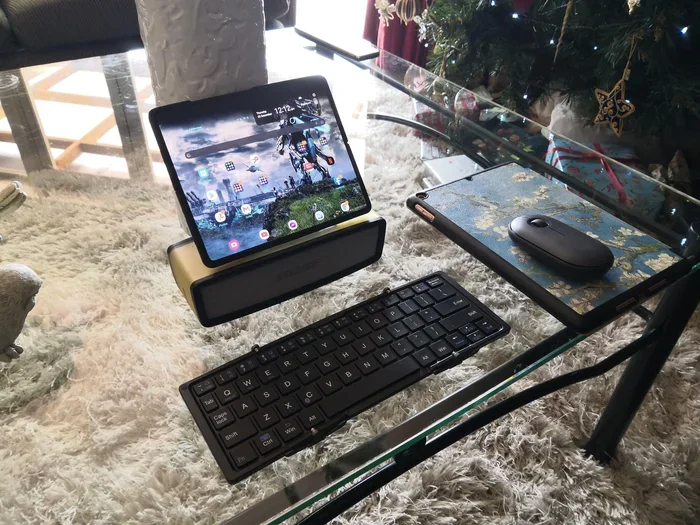
- Tablet stand: Holds your tablet at eye level for video calls or typing.
- External mouse: A Bluetooth mouse improves productivity and feels more like a laptop.
- Portable charger: Extends tablet battery life on the go.
- Cloud storage subscription: Keeps your files synced across devices.
Productivity: Getting Real Work Done on a Tablet
The big question is whether you can actually be productive on a tablet. The answer is yes, for most people. Here’s how to make it work.
Office Apps and Document Editing
Microsoft Office runs on iPadOS, Android, and Windows tablets. You can create, edit, and share Word docs, Excel sheets, and PowerPoint presentations. Google Docs and Docs by Dropbox are also excellent. For tablet for office work, these apps cover 90% of needs.
Quick Tip: Use a keyboard shortcut guide. Even on a tablet, shortcuts like Ctrl+C and Ctrl+V speed up your work.
Multitasking and Windows
Modern tablets support split-screen, slide-over, and picture-in-picture. You can have two apps open side by side. iPadOS Stage Manager and Samsung DeX offer desktop-like multitasking. You can even connect your tablet to an external monitor for a dual-screen setup.
File Management and Cloud Storage
Finding files on a tablet used to be hard. Now, apps like Files on iPadOS and the Samsung My Files app work just like a laptop file explorer. Pair this with cloud storage like Google Drive, OneDrive, or iCloud, and you have seamless access from any device.
Common Mistake: Relying only on local storage. Tablets have limited space compared to laptops. Use the cloud for everything you can.
Tablet for Business and Communication
A tablet for business handles email, calendar, video calls, and messaging with ease. Zoom, Microsoft Teams, and Slack all run great on tablets. You can join meetings with a simple tap. The tablet portability means you can take calls from anywhere in your home or office.
Limitations and When You Still Need a Laptop
Tablets are amazing, but they’re not perfect for everyone. Here are the areas where a traditional laptop still wins.
Heavy Tasks and Software Gaps
If you need to run specialized software, a tablet may fall short. Video editing with full Premiere Pro, 3D modeling, or complex coding environments often require a desktop OS. Some tablet apps are simplified versions of their desktop counterparts. For tablet for coding, you can use apps like Swift Playgrounds or Pythonista, but they’re not the same as a full IDE.
Tablet Performance Under Load
Tablets are designed for efficiency, not raw power. Sustained heavy workloads can cause thermal throttling. If you regularly run resource-intensive tasks, a laptop with a dedicated GPU is the better choice.
Keyboard and Ergonomics
Even with a detachable keyboard, typing on a tablet is less ergonomic than a laptop. The screen is attached to the keyboard, which means you can’t adjust the viewing angle independently. For long writing sessions, a laptop with a proper hinge feels better.
Final Verdict: Is a Tablet Your Next Laptop?
So, can you use a tablet as a laptop? Absolutely, for many people. If your work involves browsing, email, documents, note-taking, and light creativity, a tablet is a fantastic choice. It offers incredible tablet portability and a tablet battery life that lasts all day.
Choose an iPad if you value simplicity and a rich app ecosystem. Pick a Windows Surface if you need full desktop software. Go with a Samsung Android tablet if you want flexibility and a great screen. The right setup depends on your tablet for work style.
Start with a basic setup: tablet, keyboard, and stylus. Try it for a week. You might be surprised how much you can get done. A tablet as a laptop isn’t just a trend—it’s a practical shift in how we compute.
Frequently Asked Questions
Can a tablet really replace a laptop for work?
Yes, for most everyday tasks like email, browsing, document editing, and note-taking. If your work involves heavy software or coding, a laptop is still better. But for general productivity, a tablet with a keyboard can fully replace a laptop.
Which is better for students: a tablet or a laptop?
A tablet is often better for students because it’s lighter, more portable, and great for note-taking with a stylus. It handles research, reading, and writing assignments easily. A laptop is better for students in engineering or design who need specialized software.
Do I need a keyboard to use a tablet as a laptop?
A keyboard makes a huge difference. Without one, you’re limited to touch typing, which is slow for long documents. A detachable keyboard transforms your tablet into a true 2-in-1 laptop and makes tablet productivity much higher.
Is a Windows tablet the same as a laptop?
A Windows tablet runs the same operating system as a laptop, so it can run the same apps. It’s the closest thing to a laptop replacement. The main difference is form factor and sometimes slightly less powerful hardware.
How long does a tablet battery last compared to a laptop?
Tablets generally last longer because of efficient mobile processors and smaller screens. You can often get 10-12 hours of use on a tablet, while a laptop lasts 6-8 hours. This makes tablets great for tablet for travel and all-day use.
Can I connect a mouse and external monitor to a tablet?
Yes, most modern tablets support Bluetooth mice and can output to an external monitor via USB-C or wireless casting. This turns your tablet into a desktop-like workstation for tablet for business or multitasking at home.