Difference Between Video Cards and Graphics Cards Explained
Many people use the terms video card and graphics card interchangeably, but they are not always the same thing. A video card handles basic display output, while a graphics card is built for heavy rendering and gaming. Understanding this video card vs graphics card distinction helps you make smarter buying decisions for your computer.
If you have ever shopped for computer parts, you have probably seen the words “video card” and “graphics card” thrown around. They sound like the same thing. And in many cases, they are. But here is the thing. They are not always identical. There are real differences that matter. Especially if you are building a PC or upgrading an existing one.
This guide breaks down the difference between video cards and graphics cards in simple terms. You will learn what each one does, how they compare, and which one you actually need. No confusing jargon. No fluff. Just clear, practical information you can use right away.
Let us start from the top. Because once you understand the basics, everything else falls into place.
Key Takeaways
- Video cards and graphics cards are not always the same: A video card handles basic display tasks, while a graphics card is designed for complex rendering and gaming.
- A graphics card is more powerful: It has its own GPU, VRAM, and cooling system built for demanding workloads.
- Integrated graphics are built into the CPU: They work fine for everyday tasks but struggle with gaming and video editing.
- Your use case matters most: Casual users need a basic video card, while gamers and creators need a dedicated graphics card.
- Both cards connect through PCI Express slots: This is the standard interface on modern motherboards.
- VRAM makes a big difference: More video memory means smoother performance in graphics-heavy tasks.
- Upgrading your card boosts performance: A new graphics card can transform gaming and rendering speed.
📑 Table of Contents
What Is a Video Card?
A video card is a piece of hardware that sends images to your monitor. It is the bridge between your computer and your screen. Without it, you would not see anything on your display. Simple as that.
Video cards come in two main types. The first is integrated. This means the video processing is built right into the CPU or motherboard. The second type is a dedicated card that plugs into an expansion slot on the motherboard. Both handle the same basic job. They render images, text, and video for you to see.
How a Video Card Works
A video card takes data from your computer. It processes that data into visual signals. Then it sends those signals to your monitor through a cable. This happens dozens of times every second. That is why you see smooth motion on screen.
Basic video cards do not need much power. They do not have their own cooling fans or extra memory. They rely on the system memory and the CPU to do most of the heavy lifting. This is fine for everyday tasks. Browsing the web. Watching videos. Working on spreadsheets.
Who Needs a Video Card?
Most people do just fine with a basic video card. If you are not gaming or editing video, you probably do not need anything fancy. Built-in graphics that come with your CPU handle light workloads easily.
Here are some examples of what a basic video card handles well:
- Web browsing and email
- Streaming movies and TV shows
- Office work and document editing
- Basic photo viewing
- Running the operating system smoothly
So if your computer is just for everyday use, a simple video card or integrated graphics get the job done. No need to spend extra money.
What Is a Graphics Card?
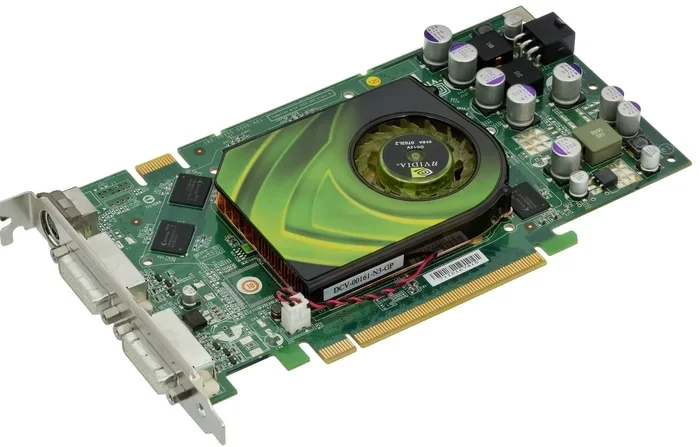
A graphics card is a more advanced version of a video card. It is designed to handle complex visual tasks. Think high-end gaming, 3D modeling, and video rendering. A graphics card has its own dedicated GPU, memory, and cooling system. This makes it much more powerful than a basic video card.
People often use the terms “graphics card” and “GPU” interchangeably. But technically, the GPU is the chip inside the graphics card. The card itself is the full package. It includes the GPU, VRAM, heat sink, fans, and the circuit board that connects everything.
How a Graphics Card Works
A graphics card does the same basic job as a video card. It turns data into images. But it does so much more. It processes millions of pixels at once. It handles complex 3D calculations in real time. And it does all of this without slowing down your CPU.
This is why a dedicated graphics card is so important for gaming. Modern games require massive amounts of graphical processing. A graphics card handles that load with ease. It also frees up your CPU to run other tasks in the background.
Who Needs a Graphics Card?
If you fall into any of these categories, a graphics card is a smart investment:
- Gamers: Modern games demand serious graphical power.
- Video editors: Rendering 4K and 8K video needs a powerful card.
- 3D artists and designers: Modeling and animation require dedicated rendering.
- Engineers and architects: CAD software runs much better with a dedicated GPU.
- Streamers: Encoding and broadcasting video in real time needs extra horsepower.
A graphics card transforms your computing experience. It makes everything visual faster, smoother, and more detailed.
Video Card vs Graphics Card: The Core Differences
Now that you know what each one does, let us look at the video card vs graphics card comparison head-on. There are several key differences that set them apart.
Processing Power
A basic video card relies on the CPU and system RAM. It does not have much processing power of its own. A graphics card has a dedicated GPU with thousands of cores. These cores handle graphical tasks independently and very fast.
Think of it this way. A video card is like a bicycle. It gets you where you need to go. A graphics card is like a sports car. It gets you there much faster and handles tough terrain with ease.
Memory
This is a big difference. A basic video card uses your system memory. It shares RAM with the rest of your computer. A graphics card has its own dedicated memory, called VRAM. This video memory is built specifically for handling graphics data.
More VRAM means better performance. It allows the card to store and process large textures, high-resolution images, and complex 3D scenes without breaking a sweat.
Cooling System
Video cards run cool because they do not work very hard. Graphics cards generate a lot of heat. That is why they come with their own cooling systems. These include heat pipes, large fans, and sometimes even liquid cooling setups.
Without proper cooling, a graphics card would overheat. And an overheated card performs poorly or shuts down entirely.
Price Range
Video cards are affordable. Many computers come with integrated graphics built in for free. A dedicated video card costs anywhere from $30 to $100. Graphics cards are a different story entirely. They can range from $150 all the way up to $1,500 or more for top-tier models.
Use Cases
Here is a simple breakdown of where each card shines:
- Video card: Office work, web browsing, media playback, basic tasks
- Graphics card: Gaming, video editing, 3D rendering, AI workloads, professional design
Comparison Table
| Feature | Video Card | Graphics Card |
|---|---|---|
| Processing Power | Basic | High |
| Dedicated Memory (VRAM) | No | Yes |
| Cooling System | Passive or none | Active with fans or liquid |
| Price Range | $30 – $100 | $150 – $1,500+ |
| Best For | Everyday tasks | Gaming, rendering, professional work |
| Power Consumption | Low | Moderate to High |
| Installation | Simple or built-in | Requires PCIe slot |
As you can see, the differences are clear. A video card handles basics. A graphics card handles the heavy lifting.
How They Work Together in Your PC
Both cards plug into your motherboard through a PCI Express slot. This is the standard connection for expansion cards in modern computers. The slot provides both data transfer and power to the card.
In a desktop PC, you can usually swap out your video card or graphics card. Just open the case, remove the old card, and slot in a new one. It is one of the easiest upgrades you can do. Even beginners can handle it with a screwdriver and a little patience.
Laptops are different. Most laptops use integrated graphics built into the CPU. Some higher-end laptops come with a dedicated graphics card soldered onto the motherboard. You cannot upgrade these easily. So if you are buying a laptop for gaming or creative work, choose the graphics card carefully from the start.
The good news is that most modern systems support both types. You can use integrated graphics for everyday tasks and switch to a dedicated graphics card when you need extra power. This is called switchable graphics, and it is very common in laptops.
Understanding the GPU Inside
The GPU, or graphics processing unit, is the brain of the card. In a basic video card, the GPU is simple and small. In a dedicated graphics card, the GPU is large, complex, and incredibly powerful.
GPU manufacturers like NVIDIA and AMD make the chips that go into graphics cards. Each company offers different tiers. Budget cards for casual users. Mid-range cards for solid gaming performance. And flagship cards for enthusiasts and professionals.
The GPU handles millions of calculations every second. It determines the color, brightness, and position of every pixel on your screen. That is a lot of work. And a powerful graphics card does it all without breaking a sweat.
How to Choose the Right Card for Your Needs
Choosing between a video card and a graphics card depends on what you do with your computer. Let us walk through some common scenarios.
For Casual Users
If you use your computer for browsing, email, and streaming, integrated graphics or a basic video card is all you need. You do not need to spend extra money on a dedicated graphics card. Your budget will thank you.
Most modern CPUs come with integrated graphics built right in. Brands like Intel and AMD both offer CPUs with strong onboard graphics. These handle everyday tasks perfectly well.
For Gamers
Gaming is where a dedicated graphics card really earns its keep. If you play modern games at high settings, you need a powerful graphics card. Look for one with at least 8GB of VRAM. This ensures smooth performance at 1080p and 1440p resolutions.
Popular choices include cards from NVIDIA’s GeForce RTX series and AMD’s Radeon RX series. These graphics cards deliver excellent frame rates and support advanced features like ray tracing and DLSS.
Here are some quick tips for gamers:
- Match your graphics card to your monitor’s resolution
- Check the recommended specs for the games you play
- Do not skimp on VRAM if you play modern titles
- Consider power supply requirements before buying
- Leave room in your budget for a good cooling setup
For Content Creators
Video editors, graphic designers, and 3D artists need serious graphical power. A high-end graphics card with lots of VRAM makes rendering faster and workflows smoother. It can cut export times in half or more.
If you work with large files or complex projects, invest in a professional-grade graphics card. Brands like NVIDIA offer workstation cards designed specifically for creative professionals. They may cost more, but the performance boost is worth it.
For Budget Builders
Not everyone has a big budget. That is okay. You can still build a capable PC without breaking the bank. A mid-range graphics card offers great value. It handles most games and creative tasks without the premium price tag.
Sometimes a used or previous-generation graphics card is the best deal. These cards still perform well and cost a fraction of the price of new flagships.
Common Myths About Video Cards and Graphics Cards
There is a lot of misinformation out there. Let us clear up some of the most common myths.
Myth 1: Video Cards and Graphics Cards Are the Same Thing
This is the biggest myth. They are similar, but not identical. A video card handles basic display output. A graphics card is built for heavy rendering and complex visual tasks. Understanding this difference helps you buy the right component.
Myth 2: You Need the Most Expensive Card for Good Gaming
Not true. You do not need a $1,500 graphics card to enjoy modern games. A mid-range card in the $300 to $500 range delivers excellent performance at 1080p and 1440p. Save your money for other upgrades if budget is a concern.
Myth 3: More VRAM Always Means Better Performance
VRAM matters, but it is not the only factor. A card with 12GB of VRAM but a weak GPU will still perform poorly. The GPU, memory bandwidth, and architecture all matter together. Look at the whole package, not just one spec.
Myth 4: Integrated Graphics Are Useless
Integrated graphics have come a long way. Modern CPUs with built-in graphics can handle light gaming and video editing just fine. They are not perfect for high-end workloads, but they are far from useless. For most everyday users, they are more than enough.
Frequently Asked Questions
Can I use a video card and a graphics card in the same PC?
Yes, you can. Some people use integrated graphics for everyday tasks and a dedicated graphics card for gaming or rendering. This setup is called hybrid graphics. It allows you to save power during light tasks and switch to the powerful card when needed. Most modern systems support this feature through software settings.
Do I need a graphics card if I only browse the internet?
No, you do not. A basic video card or integrated graphics handles web browsing perfectly fine. A dedicated graphics card would be overkill for this use case. Save your money and invest in other components like more RAM or a faster SSD instead.
What does VRAM stand for and why does it matter?
VRAM stands for Video Random Access Memory. It is the dedicated memory inside a graphics card. More VRAM allows the card to handle higher resolutions, more detailed textures, and more complex scenes. For gaming and content creation, having enough VRAM is essential for smooth performance.
How often should I upgrade my graphics card?
It depends on your needs and budget. Most gamers upgrade every three to five years. If you are a casual user, you may not need to upgrade at all. Watch for performance bottlenecks. If your card can no longer handle the games or software you use, it is time for an upgrade.
Are laptop graphics cards the same as desktop graphics cards?
They are similar but not identical. Laptop graphics cards are designed to be smaller and use less power. They usually perform slightly worse than their desktop counterparts with the same name. This is because of thermal and power constraints inside a laptop chassis. Desktop cards offer more raw performance for the same price.
What is the difference between NVIDIA and AMD graphics cards?
NVIDIA and AMD are the two major GPU manufacturers. NVIDIA cards are often praised for their ray tracing and AI features. AMD cards tend to offer strong value and competitive performance at lower price points. Both companies make excellent graphics cards. The best choice depends on your budget and specific needs.
Conclusion
The difference between video cards and graphics cards comes down to power, purpose, and price. A video card handles basic display tasks for everyday computing. A graphics card brings serious graphical horsepower for gaming, editing, and professional work.
Now you know what each one does. You understand the key differences. And you can make a confident choice when building or upgrading your PC. Think about what you actually need. Match your card to your workload. And do not overspend on features you will never use.
Whether you pick a simple video card or a powerful graphics card, the right choice is the one that fits your life. Do your research. Read reviews. And enjoy the experience of using a PC that works exactly the way you want it to.