Does The Light Bulb Security Camera Record All The Time
A light bulb security camera does not record all the time by default. Most models use motion detection or scheduled recording to save storage space. You can adjust settings to enable continuous recording if you want full coverage. Understanding how these devices work helps you get the most from your home surveillance setup.
Light bulb security cameras have become one of the most popular home surveillance tools in recent years. They look like ordinary light bulbs, but they pack a hidden camera inside. People love them because they are discreet, easy to install, and blend right into any room. But here is the big question most buyers ask: does the light bulb security camera record all the time? The short answer is no, not by default. Most of these smart devices are designed to record only when they detect motion or when you set a specific schedule.
In this article, we will dive deep into how light bulb security cameras work. We will explore their recording modes, storage options, Wi-Fi requirements, and privacy features. By the end, you will know exactly what to expect and how to get the best performance from your device. Whether you are new to smart home security or looking to upgrade your setup, this guide has you covered.
Key Takeaways
- Light bulb cameras offer hidden surveillance: They blend into everyday fixtures and keep your home watched without being obvious.
- Default recording is event-based: Most light bulb cameras only record when motion is detected to conserve storage.
- Continuous recording is possible: You can change settings to record 24/7 if your storage and Wi-Fi support it.
- Multiple recording modes exist: Scheduled, motion-triggered, and manual recording give you flexibility.
- Storage options vary: Cloud storage and local SD card options affect how much footage you can keep.
- Wi-Fi matters for performance: A stable connection ensures smooth recording and live streaming.
- Privacy settings are important: You can control when and where the camera records to protect your privacy.
📑 Table of Contents
- What Is a Light Bulb Security Camera?
- Does a Light Bulb Security Camera Record All the Time?
- Recording Modes Compared
- Storage Options for Light Bulb Cameras
- Wi-Fi and Connectivity Requirements
- Privacy and Security Considerations
- Tips to Get the Most Out of Your Light Bulb Security Camera
- Common Mistakes People Make with Light Bulb Cameras
- Expert Insights on Light Bulb Security Cameras
- Final Thoughts
What Is a Light Bulb Security Camera?
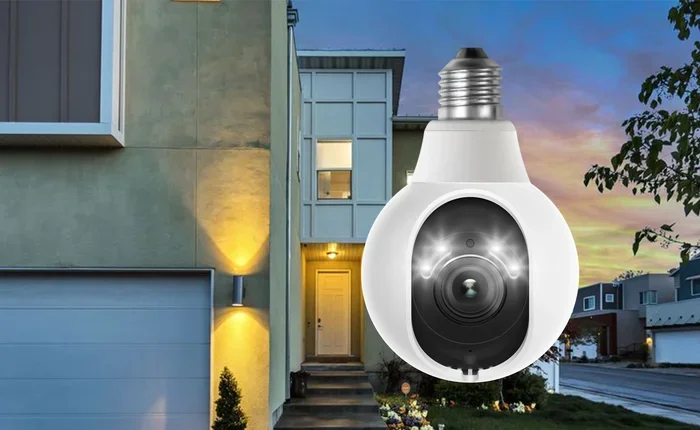
A light bulb security camera is a smart device that combines a functioning light bulb with a hidden camera. It screws into a standard light socket, just like any regular bulb. But inside, it has a small camera lens, a microphone, and sometimes a speaker. These cameras connect to your home Wi-Fi network and send video to your phone or a cloud server.
These devices are part of the growing smart home security market. They offer a unique advantage: they are completely hidden in plain sight. Guests and intruders will never notice them. This makes them perfect for hallways, living rooms, garages, and even porches.
How Do They Work?
Light bulb cameras use a small lens and sensor packed inside the bulb housing. When the light is off, the camera lens is often still active. The device connects to your Wi-Fi network and streams video to a companion app on your phone. You can view live footage, receive alerts, and review recorded clips from anywhere.
Most models use motion detection technology. This means the camera watches for movement and starts recording only when it senses something. Some advanced models also offer person detection, which can tell the difference between a person and a pet or a shadow. This helps reduce false alerts and saves storage space.
If you are curious about other types of hidden cameras, you might wonder can I use a game camera for home security. Game cameras and light bulb cameras serve similar purposes but work very differently. Game cameras are built for outdoor wildlife monitoring, while light bulb cameras are designed for indoor or covered outdoor use.
Does a Light Bulb Security Camera Record All the Time?
This is the most common question people ask, and the answer depends on your settings. By default, most light bulb security cameras do not record 24/7. They use event-based recording, which means they only capture footage when something triggers them. This could be motion, sound, or a specific schedule you set.
Default Recording Mode: Motion Detection
In the default mode, the camera stays in standby until it detects movement. When it senses motion within its field of view, it starts recording a short clip. These clips are usually 10 to 30 seconds long. After the motion stops, the camera goes back to sleep. This mode is great for saving storage space and battery life.
Motion detection is also energy-efficient. Since the camera is not constantly recording, it uses less data and less power. This means your Wi-Fi bandwidth is not overwhelmed, and your electricity bill stays low. For most homeowners, this default mode works perfectly fine.
Continuous Recording Mode
Some light bulb cameras allow you to switch to continuous recording mode. In this mode, the camera records non-stop, 24 hours a day, 7 days a week. This gives you complete coverage of everything happening in the room. However, there are trade-offs.
Continuous recording uses a lot of storage space. You will need a large SD card or a generous cloud storage plan. It also uses more Wi-Fi data, which can be a concern if you have a limited internet plan. If you are wondering about Wi-Fi requirements for security cameras, you might want to check can I have a security camera without Wi Fi for more information on offline options.
Scheduled Recording
Many light bulb cameras let you set a recording schedule. You can tell the camera to record only during certain hours. For example, you might set it to record from 8 PM to 6 AM when everyone is asleep. During the day, the camera stays off or only records when motion is detected.
Scheduled recording is a smart middle ground. It gives you coverage during the most vulnerable times without wasting storage on empty footage. You can adjust the schedule anytime through the companion app.
Recording Modes Compared
Understanding the different recording modes helps you choose the right setup for your needs. Here is a quick comparison of the most common modes found in light bulb security cameras.
| Recording Mode | How It Works | Storage Used | Best For |
|---|---|---|---|
| Motion Detection | Records when movement is detected | Low | Everyday home monitoring |
| Continuous Recording | Records 24/7 without stopping | High | Full coverage and evidence |
| Scheduled Recording | Records only during set hours | Medium | Nighttime or away coverage |
| Manual Recording | You start and stop recording | Varies | Quick checks and spot monitoring |
Each mode has its strengths. Motion detection is the most popular because it balances coverage with storage efficiency. Continuous recording is best for people who want every detail captured. Scheduled recording works well for those who only need coverage at specific times. Manual recording gives you full control but requires you to remember to start and stop.
Storage Options for Light Bulb Cameras
Where does all that footage go? Light bulb security cameras typically offer two main storage options: local storage and cloud storage. Each has its pros and cons.
Local Storage (SD Card)
Many light bulb cameras come with a microSD card slot. You insert the card into the bulb base, and the camera saves all recorded footage directly to the card. This means you do not need an internet connection to store videos. Local storage is also free once you buy the card.
However, SD cards have limited space. A 32GB card can hold a few hours of continuous footage. If you use motion detection, the same card will last much longer because the camera only records when something happens. You will need to periodically remove the card and transfer files to a computer or delete old clips to free up space.
Cloud Storage
Cloud storage sends your footage to an online server through your Wi-Fi connection. Most light bulb camera brands offer a free basic plan with limited storage and a paid plan with more space. Cloud storage is convenient because you can access your clips from anywhere using your phone.
The downside is that cloud storage often requires a monthly or yearly subscription. Some brands charge as little as $3 per month, while others can cost $10 or more. If you are concerned about subscription costs, local storage might be the better choice for you.
Which Storage Option Should You Choose?
If you want free, unlimited storage without monthly fees, go with an SD card. If you want easy access and backup in case the camera is stolen or damaged, choose cloud storage. Some users even use both, saving important clips to the cloud and keeping general footage on the SD card.
Wi-Fi and Connectivity Requirements
A light bulb security camera needs a stable Wi-Fi connection to work properly. Without Wi-Fi, you cannot view live footage, receive alerts, or access cloud storage. But how much Wi-Fi does a light bulb camera actually use?
Most light bulb cameras use very little bandwidth when they are in standby mode. They only consume significant data when they are actively recording or streaming live video. On average, a light bulb camera uses about 1 to 2 GB of data per month with motion detection enabled. Continuous recording can use 10 GB or more per month.
If you have a weak Wi-Fi signal in the room where you plan to install the camera, you might experience lag or dropped connections. Some cameras work with Wi-Fi extenders to boost the signal. You can also check can two wifi have the same ssid to learn how to optimize your home network for multiple devices.
It is also worth noting that some light bulb cameras support offline recording. Even without Wi-Fi, they can save footage to an SD card. However, you lose the ability to view live streams or receive remote alerts. If you are setting up a camera in a spot with unreliable internet, offline recording with local storage is a solid backup plan.
Privacy and Security Considerations
Because light bulb cameras are hidden, they raise some important privacy questions. You need to think about who can see the footage and where it is stored. Most reputable brands encrypt their data and require a password to access the app. However, no system is completely hack-proof.
Who Can See Your Footage?
If you share access with family members or a security monitoring service, they can view your camera feed. Some brands also allow you to grant temporary access to guests or contractors. Always review the privacy settings in the app and only share access with people you trust.
Where Is Your Data Stored?
Cloud-stored footage lives on servers owned by the camera manufacturer. Local footage stays on the SD card inside the bulb. If you are worried about data privacy, local storage gives you more control. You can also delete cloud recordings anytime and turn off cloud syncing in the app settings.
Legal Considerations
Recording in certain areas may be illegal depending on your location. Never record in places where people have a reasonable expectation of privacy, such as bathrooms or bedrooms. Always check your local laws before installing a hidden camera in your home or office.
Tips to Get the Most Out of Your Light Bulb Security Camera
Now that you understand how these cameras work, here are some practical tips to help you get the best performance.
- Place the camera strategically. Install it in a spot with a clear view of the area you want to monitor. Avoid placing it behind glass or in corners where the lens might be blocked.
- Use motion detection for everyday use. This saves storage and battery while still giving you alerts when something happens.
- Switch to continuous recording for critical areas. If you are monitoring a high-value area or want complete evidence coverage, continuous mode is worth the extra storage.
- Check your Wi-Fi signal strength. A weak signal leads to dropped connections and missed recordings. Use a Wi-Fi extender if needed.
- Regularly review and delete old footage. This keeps your storage free and ensures you always have the most recent clips available.
- Update the firmware regularly. Manufacturers release updates that fix bugs and improve security. Keep your camera up to date through the app.
- Use a strong password. Protect your camera feed from unauthorized access by using a unique, complex password for your account.
Common Mistakes People Make with Light Bulb Cameras
Even though light bulb cameras are easy to use, some common mistakes can reduce their effectiveness. Avoid these pitfalls to get the best results.
- Ignoring Wi-Fi strength: Placing the camera too far from the router leads to poor video quality and missed recordings.
- Not adjusting motion sensitivity: Setting sensitivity too high causes false alerts from shadows or insects. Too low means the camera misses real events.
- Forgetting to check storage: Running out of storage means the camera stops recording. Make it a habit to check your storage weekly.
- Skipping firmware updates: Old firmware can have security vulnerabilities and performance issues.
- Placing the camera in the wrong socket: Some sockets are not compatible with all bulb cameras. Check the size and type before purchasing.
Expert Insights on Light Bulb Security Cameras
Security experts recommend light bulb cameras as a great entry point for people new to home surveillance. They are affordable, easy to install, and require no wiring. However, experts also note that they are not a replacement for a full security system. For comprehensive protection, consider combining light bulb cameras with door sensors, window alarms, and a proper alarm system.
One expert tip is to use multiple light bulb cameras in different rooms. This creates overlapping coverage and reduces blind spots. Another tip is to pair your camera with a smart hub or speaker that can announce alerts aloud. This way, everyone in the house knows when motion is detected.
Final Thoughts
So, does a light bulb security camera record all the time? Not by default, but it can if you change the settings. Most cameras use motion detection or scheduled recording to save storage and data. You have full control over how and when the camera records. This flexibility is one of the biggest advantages of these smart devices.
Whether you want hidden home surveillance, a discreet way to monitor your property, or a simple upgrade to your smart home security, a light bulb security camera delivers. Just remember to set it up correctly, choose the right recording mode, and keep your storage and Wi-Fi in check. With the right setup, you will have peace of mind knowing your home is watched around the clock.
Take some time today to explore the settings on your camera or research the best model for your needs. A little effort goes a long way in keeping your home safe and secure.
Frequently Asked Questions
Do light bulb security cameras record audio?
Yes, most light bulb security cameras come with a built-in microphone and can record audio along with video. Some models also include a speaker for two-way communication. Check the product specifications to confirm audio features before purchasing.
Can a light bulb camera work without Wi-Fi?
Light bulb cameras need Wi-Fi for live streaming and cloud storage. However, many models can still record to an SD card without an internet connection. You will not receive remote alerts or live views, but the camera will continue saving footage locally.
How long can a light bulb security camera record on an SD card?
The recording time depends on the SD card size and the recording mode. A 32GB card can hold several hours of continuous footage or days of motion-detected clips. Larger cards like 64GB or 128GB will last significantly longer.
Is it legal to record with a hidden light bulb camera?
Laws vary by location. In most places, recording in your own home is legal. However, recording in areas where people expect privacy, like bathrooms or bedrooms, is often illegal. Always research your local laws before installing a hidden camera.
Can I view my light bulb camera footage from anywhere?
Yes, as long as you have an internet connection. Most light bulb cameras connect to a companion app on your phone. You can view live streams, receive alerts, and review recorded clips from anywhere in the world.
How do I know if my light bulb camera is recording?
Most light bulb cameras have a small LED indicator that shows when recording is active. You can also check the app to see the recording status. Some models send a notification to your phone every time a clip is recorded.