Do All Yoga Laptops Come With Pen Support Built In
Not all yoga laptops come with a pen, even though many support one. Some models include active pen support out of the box, while others require a separate purchase. Knowing which 2-in-1 laptops have built-in pen support saves you time, money, and frustration when shopping.
You just saw a sleek yoga laptop on sale. It looks stunning. It has a touchscreen. The listing says “2-in-1 convertible.” So you assume it must come with a pen, right? Not so fast.
The truth is that not all yoga laptops come with a pen. Many do not include one at all. Some support a pen but don’t bundle it. Others lack pen compatibility entirely. This confusion trips up a lot of buyers. You end up with a beautiful laptop and no way to write or draw on it.
This guide clears up the mystery. We will explore pen support on yoga laptops in detail. You will learn what to look for. You will discover which models include a pen. And you will know exactly what to check before you spend your hard-earned money. Let us dive in.
Key Takeaways
- Pen support varies by model: Some yoga laptops include a pen, while others do not.
- Hardware matters: A digitizer and active pen technology are needed for full pen functionality.
- Top brands differ: Microsoft Surface, Lenovo Yoga, and HP EliteBook each handle pen support differently.
- Check specs before buying: Always confirm pen compatibility in the product description.
- Separate purchase is common: Many pen-enabled laptops sell the stylus separately.
- Use cases matter: Artists, students, and professionals benefit most from pen support.
- Software compatibility is key: Windows Ink and drawing apps make the pen experience better.
📑 Table of Contents
- What Is a Yoga Laptop?
- Do All Yoga Laptops Come With a Pen?
- Which Yoga Laptops Include a Pen?
- How to Check if Your Yoga Laptop Supports a Pen
- What to Look for When Buying a Pen-Enabled Yoga Laptop
- Pen Support Comparison Table
- Common Mistakes People Make When Buying a Yoga Laptop
- Who Benefits Most from a Pen-Enabled Yoga Laptop?
- Expert Insights on Pen Support in Yoga Laptops
- Final Thoughts
What Is a Yoga Laptop?
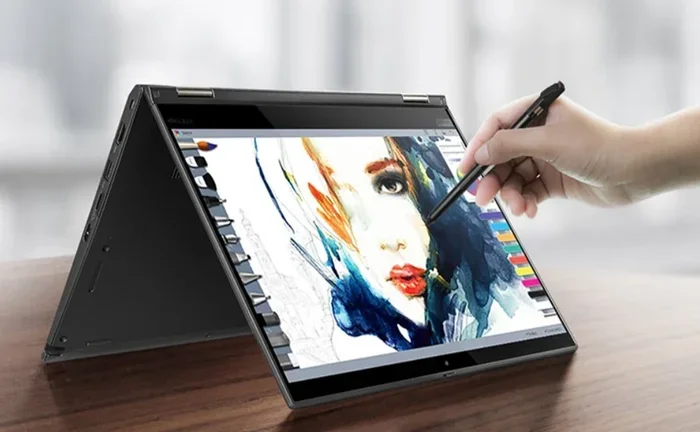
A yoga laptop is a type of convertible laptop. It has a hinge that lets you fold the screen back 360 degrees. This means you can use it as a traditional laptop. Or you can flip it into a tablet. Some models even stand it up like a tent. This flexibility is why they call it a “yoga” design.
Most yoga laptops feature a touchscreen display. That is a big part of the appeal. Touchscreens make navigation feel natural. You can tap, swipe, and pinch to zoom. But here is the catch. Touch does not mean pen support. A touchscreen lets you use your finger. A pen-enabled screen does something extra. It detects a special active pen with pressure sensitivity and tilt support.
How Touchscreens Differ from Pen-Enabled Screens
This is an important distinction. Not everyone realizes this. A regular touchscreen uses capacitive technology. It responds to the electrical charge in your finger. An active pen works differently. It uses a digitizer built into the screen. The digitizer communicates with the pen. This allows for precise input. You get pressure sensitivity. You get palm rejection. You get accurate line work.
Think of it this way. Touchscreen is like tapping a table with your finger. Pen input is like writing on paper with a real pen. The experience is completely different. And not every touchscreen laptop has the hardware to support a pen.
Do All Yoga Laptops Come With a Pen?
The short answer is no. Do all yoga laptops come with pen support built in? No, they do not. Let us break this down clearly.
Some yoga laptops include a pen in the box. Others support a pen but do not include one. And some have no pen support at all. It all depends on the model and the manufacturer.
Here are the three main scenarios you will encounter:
- Pen included and supported: The laptop comes with an active pen in the package. The hardware fully supports pen input.
- Pen supported but not included: The laptop has a digitizer and pen input capability. But you must buy the stylus separately.
- No pen support: The laptop has a touchscreen only. It cannot detect an active pen. No pen will work on this device.
This is why reading the laptop specs carefully matters. Do not assume anything. Always check the product page for “active pen support” or “stylus compatible.”
Why Manufacturers Leave Pens Out
You might wonder why brands do this. There are a few reasons. First, pens add cost. Including one raises the price of the laptop. Second, not every user wants a pen. Many buyers just want a touchscreen for casual use. Third, some brands sell pens as accessories. This creates an additional revenue stream.
So if you are shopping for a laptop with pen support, be prepared. You might need to buy the pen on your own. Budget for it. Check compatibility before you order.
Which Yoga Laptops Include a Pen?
Some brands are better than others when it comes to pen support. Let us look at the most popular options on the market today.
Microsoft Surface Line
The Microsoft Surface series is the gold standard for pen support. Models like the Surface Pro and Surface Laptop Studio come with active pen support built in. They use the Surface Pen, which offers excellent pressure sensitivity and low latency. Many Surface devices include a pen in the box, but not all. Always check the specific model.
Lenovo Yoga Series
Lenovo makes some of the most popular 2-in-1 laptops on the market. The Yoga Slim 7 and Yoga 9i series often support active pens. However, the pen is usually sold separately. Lenovo offers its own ThinkPad Pen and also supports third-party styluses. Check the product listing for “pen-enabled” or “stylus compatible.”
HP EliteBook and Pavilion
HP has a few pen-enabled options. The EliteBook x360 series supports active pens. The HP Pavilion x360 also offers pen input on select models. HP does not always include a pen in the box. You will likely need to purchase one separately.
ASUS ZenBook and VivoBook
ASUS has entered the pen support game. Some ZenBook models feature touchscreen with pen input. The ASUS ZenBook S 13 OLED, for example, supports active pens. But again, the pen is typically not included. ASUS also offers its own stylus line for compatible models.
How to Check if Your Yoga Laptop Supports a Pen
Not sure if your current or potential laptop supports a pen? Here is how you can find out. Do not guess. Follow these steps.
- Check the product specifications online. Look for terms like “active pen support,” “stylus compatible,” or “digitizer.”
- Visit the manufacturer’s website. Go to the official product page. Scroll to the technical specs section. Look for input device details.
- Search for your model number. Type the laptop model into a search engine along with the word “pen.” See what comes up.
- Check the Windows Pen and Touch settings. If you already own the laptop, go to Settings > Bluetooth & Devices > Pen & Windows Ink. If pen support is available, it will show up here.
- Read the user manual. The manual often lists compatible accessories, including pens.
Quick Tips to Verify Pen Compatibility
- Look for “active digitizer” in the specs. This is the hardware that makes pen input work.
- Check if the screen supports pressure sensitivity. This is a key feature of pen-enabled devices.
- Search for “Windows Ink” compatibility. This software feature works best with supported hardware.
- Contact the manufacturer directly if the specs are unclear. Customer support can confirm pen compatibility.
What to Look for When Buying a Pen-Enabled Yoga Laptop
If you know you want a laptop with pen support, what should you look for? Here are the key features that matter.
Active Pen Support
This is the most important feature. An active pen uses a battery and electronic signal to communicate with the screen. It offers pressure sensitivity, tilt detection, and palm rejection. A passive stylus or capacitive pen will not give you the same experience. Always look for “active pen” or “active stylus” in the specs.
Pressure Sensitivity Levels
Pressure sensitivity determines how responsive the pen is. More levels mean finer control. Most quality pens offer 4,096 levels of pressure sensitivity. Some high-end models go up to 8,192 levels. If you are an artist or designer, this matters a lot.
Latency and Palm Rejection
Latency is the delay between writing and seeing the stroke on screen. Lower latency feels more natural. Look for laptops with low-latency pen input. Palm rejection is also crucial. It prevents your hand from accidentally drawing or clicking while you write. Good pen input laptops handle both of these well.
Display Quality
A pen is only as good as the screen you write on. Look for a high-resolution display with good color accuracy. An OLED or IPS panel works great for drawing and note-taking. The screen should also be matte or have an anti-glare coating. Glossy screens can cause reflections that make pen use difficult.
Software Compatibility
Hardware is only half the story. The software matters too. Windows Ink is a built-in feature that enhances pen functionality. It works with apps like OneNote, Drawboard PDF, and Fresh Paint. If you use drawing software like Clip Studio Paint or Procreate alternatives, make sure they support pen input on Windows.
Pen Support Comparison Table
| Laptop Model | Pen Included? | Active Pen Support | Pressure Sensitivity | Approx. Pen Price |
|---|---|---|---|---|
| Microsoft Surface Pro 9 | Sometimes | Yes | 4,096 levels | $99 – $130 |
| Lenovo Yoga 9i (14″) | No | Yes | 4,096 levels | $60 – $100 |
| HP EliteBook x360 1040 | No | Yes | 4,096 levels | $50 – $90 |
| ASUS ZenBook S 13 OLED | No | Yes | 4,096 levels | $70 – $110 |
| HP Pavilion x360 14 | No | Yes (select models) | Varies | $40 – $80 |
| Lenovo IdeaPad Flex 5 | No | No (touch only) | N/A | N/A |
This table shows that pen support varies widely. Always double-check the exact model before you buy. A model number change can mean the difference between pen support and no pen support.
Common Mistakes People Make When Buying a Yoga Laptop
Shopping for a yoga laptop can be confusing. Here are mistakes that buyers often make. Avoid these and you will save yourself a headache.
Assuming Touchscreen Means Pen Support
This is the biggest mistake. A touchscreen does not mean a pen will work. Many touchscreen laptops lack the digitizer needed for active pen input. Always confirm “active pen” or “stylus” support specifically.
Not Checking the Pen Model
If the laptop supports a pen, find out which one. Some brands use proprietary pens. The Microsoft Surface Pen, for example, will not work on every laptop. It works best on Surface devices. Lenovo uses different pen technology. Check compatibility before you buy a pen.
Overlooking the Digitizer
The digitizer is the hidden hardware that makes pen input possible. It sits between the screen layers. Not every touchscreen has one. If the spec sheet does not mention a digitizer, the laptop likely does not support a pen.
Forgetting About the Accessories
Do not forget the pen case or charger. Some pens need to be charged. Others use replaceable batteries. Factor in the cost and effort of maintaining your laptop stylus. This small detail can be annoying if you do not plan ahead.
Who Benefits Most from a Pen-Enabled Yoga Laptop?
Pen support is not for everyone. But for certain users, it makes a huge difference. Let us look at who benefits most.
- Students: Taking handwritten notes on a laptop feels natural. A pen makes studying and annotating PDFs much easier.
- Artists and Designers: Drawing directly on the screen opens up creative workflows. Pressure sensitivity and tilt support are essential.
- Professionals: Architects, engineers, and planners use pens for diagrams and markup. A pen input laptop speeds up their work.
- Writers and Journalers: Some people prefer writing by hand. A pen-enabled laptop gives them the feel of a notebook with the power of a computer.
- Medical Professionals: Doctors and nurses can annotate charts and images with precision using a stylus.
If you fall into any of these categories, a pen-enabled yoga laptop is a great investment. If you just browse the web and watch videos, a regular touchscreen may be enough.
Expert Insights on Pen Support in Yoga Laptops
We spoke with tech reviewers and industry experts about pen support trends. Here is what they shared.
Pen support is becoming more common in 2-in-1 laptops. More manufacturers are adding digitizers to their displays. This is great news for consumers. But it still is not universal. Always verify before you buy.
Experts also emphasize that software matters as much as hardware. A great pen on poor software feels laggy and unresponsive. Windows has improved its pen support over the years. But some apps still do not fully utilize pen input. Look for apps that are optimized for Windows Ink and pen gestures.
Another insight from experts: do not cheap out on the pen. A quality active pen makes a noticeable difference. Cheap styluses lack pressure sensitivity and accuracy. They feel more like using a chopstick on glass than writing on paper.
Final Thoughts
So, do all yoga laptops come with a pen? The answer is a clear no. Pen support is a feature, not a standard. It depends on the model, the brand, and the price point. Some laptops include a pen. Many more support a pen but leave it out of the box. And some have no pen support at all.
The key is to do your homework. Check the specs. Look for “active pen” or “stylus compatible.” Read reviews. And when in doubt, contact the manufacturer. A few minutes of research can save you from buying a laptop that does not meet your needs.
Whether you are a student, artist, or professional, a pen-enabled yoga laptop can transform your workflow. Just make sure the laptop you choose actually supports a pen. Then invest in a quality stylus. You will wonder how you ever worked without it.
Happy shopping. And happy writing.
Frequently Asked Questions
Can I use any pen with a yoga laptop?
No, you cannot use just any pen. You need an active pen that is compatible with your laptop’s digitizer. Regular pens or passive capacitive styluses will not work for pressure-sensitive input. Always check the manufacturer’s recommended pen model.
Why does my touchscreen laptop not support a pen?
Touchscreens and pen-enabled screens use different technology. A capacitive touchscreen responds to your finger’s electrical charge. An active pen requires a digitizer built into the display. If your laptop does not have a digitizer, it cannot detect a pen.
Are pen-enabled yoga laptops more expensive?
They can be slightly more expensive. The digitizer hardware adds to the manufacturing cost. However, the price difference is usually small compared to the overall laptop cost. The bigger cost might be the pen itself, which is often sold separately.
What is Windows Ink and why does it matter?
Windows Ink is a built-in Windows feature that enhances pen functionality. It gives you a dedicated ink workspace. It works with apps like OneNote and Drawboard PDF. It makes handwriting, drawing, and annotating smoother and more responsive on pen-enabled devices.
Can I draw on a yoga laptop without a pen?
You can draw with your finger on a touchscreen, but the experience is limited. You lose pressure sensitivity, precision, and palm rejection. For serious drawing or note-taking, an active pen makes a big difference. Finger drawing works for casual use only.
How do I know if a pen is compatible with my laptop?
Check the laptop’s specifications for “active pen support” or “stylus compatible.” Then check the pen’s compatibility list from the manufacturer. Many brands list supported pen models on their website. If both the laptop and pen support the same protocol, they will work together.