Do Displayport To Hdmi Cables Exist For Modern Devices
Do DisplayPort to HDMI cables exist? Yes, they do, and they are essential for connecting modern devices with different ports. DisplayPort to HDMI cable options come in both active and passive forms, each serving a specific purpose. Whether you are hooking up a PC to a TV or a laptop to a monitor, the right cable makes all the difference. This guide covers everything you need to know about DisplayPort to HDMI connections in 2024 and beyond.
This is a comprehensive guide about Do Displayport To Hdmi Cables Exist.
Key Takeaways
- DisplayPort to HDMI cables do exist: Both active and passive options are widely available for modern devices.
- Active cables convert the signal: They contain built-in chipsets that translate DisplayPort output to HDMI input.
- Passive cables only work in one direction: They function when the source supports dual-mode DisplayPort.
- Resolution and refresh rate matter: Not all cables support 4K or 8K, so check specs before buying.
- USB-C and Thunderbolt add complexity: Many modern adapters use USB-C as the physical connector.
- Audio passthrough is standard: Most cables carry both video and audio signals simultaneously.
- Compatibility is key: Always verify your device supports the cable type before purchasing.
[FEATURED_IMAGE_PLACEHOLDER]
What Is a DisplayPort to HDMI Cable?
A DisplayPort to HDMI cable is a special adapter or cable that lets you connect a device with a DisplayPort output to a display with an HDMI input. Think of it as a translator between two different digital display languages. Your computer speaks DisplayPort, and your TV or monitor speaks HDMI. The cable bridges that gap so you get a clean picture and sound.
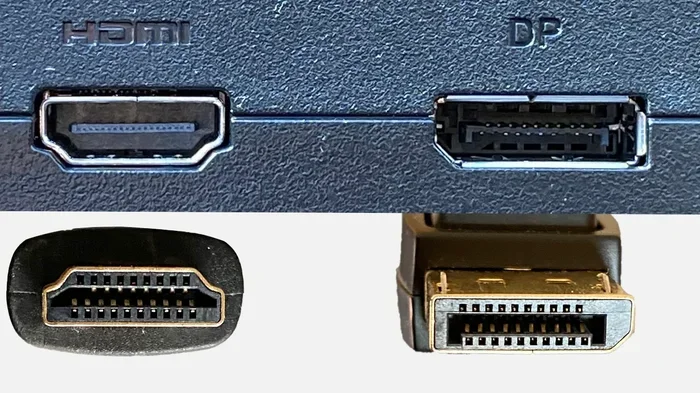
These cables are not the same as standard HDMI cables. A regular HDMI cable only connects to HDMI ports on both ends. A DisplayPort to HDMI cable has a DisplayPort connector on one side and an HDMI connector on the other. This design lets you plug a laptop, desktop, or gaming console straight into an HDMI-ready screen without needing extra adapters.
The technology behind these cables involves signal conversion. DisplayPort uses a different signaling method than HDMI. The cable or adapter must convert the digital signal from one format to the other. This process happens either inside the cable itself (active) or through the device’s port (passive). Understanding this difference is crucial when shopping for the right DisplayPort to HDMI connection for your setup.
Do DisplayPort to HDMI Cables Exist? The Short Answer Is Yes
Do DisplayPort to HDMI cables exist? Absolutely. They have been around for years and are widely available from dozens of brands. You can find them online, at electronics stores, and directly from monitor and cable manufacturers. The question people really ask is not whether they exist, but which type works best for their specific devices.
The DisplayPort to HDMI cable market has grown a lot in recent years. As more devices use different port types, the need for versatile connection options has skyrocketed. Gamers, remote workers, and home theater enthusiasts all rely on these cables daily. They solve a very real problem: how do you connect a DisplayPort-equipped device to an HDMI display without losing quality?
Here is what you should know about DisplayPort to HDMI cables for modern devices:
- They are widely available from major brands like Cable Matters, Belkin, and StarTech.
- They support multiple resolutions including 1080p, 1440p, 4K, and even 8K on premium models.
- They carry both video and audio through a single cable connection.
- They come in different lengths ranging from short 1-foot cables to 15-foot or longer options.
- They work with PCs, laptops, consoles, and media players that have DisplayPort outputs.
The real challenge is not finding one. It is finding the right one that matches your device’s capabilities and your display’s input options. That is where things like active versus passive cables, version compatibility, and bandwidth requirements come into play.
Why People Search for DisplayPort to HDMI Cables
Many users buy a new monitor or TV that only has HDMI inputs. Meanwhile, their PC or laptop only has a DisplayPort output. Without the right DisplayPort to HDMI cable, they are stuck. They cannot use their new display at full quality. This mismatch drives millions of searches every month. People want a simple, reliable way to bridge the gap between these two common port types.
Another big reason is gaming. High-refresh-rate gaming monitors often use DisplayPort for better bandwidth. But many people want to connect their gaming PC to a living room TV for a bigger screen experience. TVs almost always use HDMI. A quality DisplayPort to HDMI cable makes this connection possible without sacrificing frame rates or image quality.
Active vs. Passive DisplayPort to HDMI Cables
Not all DisplayPort to HDMI cables work the same way. The biggest distinction is between active and passive cables. Each type has its own use cases, advantages, and limitations. Knowing which one you need saves time, money, and frustration.
What Is an Active DisplayPort to HDMI Cable?
An active DisplayPort to HDMI cable contains built-in electronics. These tiny chipsets actively convert the DisplayPort signal into an HDMI signal as it travels through the cable. This conversion process is necessary because DisplayPort and HDMI use fundamentally different signaling protocols. The active chip handles the translation in real time.
Active cables work in both directions for signal conversion. You plug the DisplayPort end into your source device and the HDMI end into your display. The cable does all the heavy lifting. You get a plug-and-play experience with no extra software or drivers needed in most cases.
Active cables are the most versatile option. They work with virtually any device that has a DisplayPort output. They also tend to support higher resolutions and refresh rates because the onboard chip is designed to handle the conversion efficiently. If you want a reliable DisplayPort to HDMI connection for 4K gaming or professional work, an active cable is usually the way to go.
What Is a Passive DisplayPort to HDMI Cable?
A passive DisplayPort to HDMI cable does not contain any conversion electronics. Instead, it relies on the source device to output the signal in a compatible format. Some DisplayPort outputs support something called DisplayPort Dual-Mode (DP++). This feature allows the port to detect when an HDMI display is connected and output the signal in a format the display can understand.
Passive cables are simpler and often cheaper. They do not need power or internal chips. However, they only work when both the source device and the cable support dual-mode operation. If your device does not have DP++ support, a passive cable will not work at all.
Here is a quick comparison to help you decide:
| Feature | Active Cable | Passive Cable |
|---|---|---|
| Signal Conversion | Built into the cable | Handled by the source device |
| Compatibility | Works with almost all devices | Only works with DP++ devices |
| Pricing | Usually more expensive | Usually cheaper |
| 4K Support | Widely supported | May be limited |
| Power Requirements | Needs power (often from USB) | No power needed |
| Reliability | Very consistent | Depends on device support |
For most users, an active DisplayPort to HDMI cable is the safer choice. It works regardless of your device’s capabilities and delivers consistent results every time.
How to Choose the Right DisplayPort to HDMI Cable for Your Setup
Buying the right DisplayPort to HDMI cable depends on several factors. Not every cable is created equal, and choosing the wrong one can lead to frustrating results. Here is what you need to consider before making a purchase.
Check Your Device’s DisplayPort Version
DisplayPort comes in different versions, and each version supports different maximum resolutions and bandwidth levels. DisplayPort 1.2 can handle 4K at 60Hz. DisplayPort 1.4 adds support for HDR and higher refresh rates. DisplayPort 2.0 and 2.1 push the limits even further with 8K and beyond.
Your cable can only deliver what your device’s port supports. If you have a DisplayPort 1.2 output, no cable will magically give you 8K resolution. Check your device specifications first. Then choose a DisplayPort to HDMI cable that matches or exceeds those capabilities.
Consider Resolution and Refresh Rate Needs
What resolution does your display support? If you have a 1080p monitor, almost any DisplayPort to HDMI cable will work fine. But if you are using a 4K monitor or TV, you need a cable rated for that resolution. For gaming at high refresh rates like 144Hz or 240Hz, you need a cable with sufficient bandwidth.
Here are some general guidelines:
- 1080p at 60Hz: Most cables handle this easily. Even budget options work well.
- 1440p at 60Hz: Look for cables rated for DisplayPort 1.2 or higher.
- 4K at 60Hz: Requires DisplayPort 1.2 or better. Active cables are recommended.
- 4K at 120Hz or higher: Needs DisplayPort 1.4 or 2.0 with active conversion.
- 8K support: Only available on the newest DisplayPort 2.0 and 2.1 cables.
Look for HDR and Audio Support
Many modern displays support HDR (High Dynamic Range). HDR delivers brighter highlights, deeper blacks, and more vivid colors. Not all DisplayPort to HDMI cables support HDR passthrough. If HDR matters to your setup, look for cables specifically rated for HDR 10 or Dolby Vision support.
Audio passthrough is another important feature. Most DisplayPort to HDMI cables carry both video and audio signals. This means you can connect your PC to a TV and get sound through the TV speakers without a separate audio cable. Always confirm this feature if you plan to use the cable for audio as well.
Cable Length and Build Quality
Longer cables can sometimes signal quality. A 15-foot DisplayPort to HDMI cable may experience more signal loss than a 3-foot cable. For runs over 6 feet, consider an active cable with a built-in signal booster. Also, look for cables with good shielding and sturdy connectors. A well-built cable lasts longer and provides a more reliable connection.
Common Devices That Use DisplayPort to HDMI Connections
DisplayPort to HDMI cables are used across many devices and scenarios. Here are the most common situations where you will need one.
Desktop PCs and Workstations
Many desktop computers come with DisplayPort outputs on the graphics card. If you want to connect your PC to a TV or a monitor that only has HDMI inputs, a DisplayPort to HDMI cable is the simplest solution. This setup is popular among both office workers and content creators who need a large display for productivity or editing.
Gaming Consoles and PCs
Gaming PCs often use DisplayPort for the best performance. But many gamers want to connect their rig to a living room TV for a bigger screen. A high-quality DisplayPort to HDMI cable enables this setup. You get low input lag, high refresh rates, and crisp visuals on a large display. Some gamers also use these cables with capture cards for streaming.
Laptops with DisplayPort Outputs
Not all laptops have HDMI outputs anymore. Many ultrabooks and business laptops only offer USB-C or DisplayPort. If your laptop has a DisplayPort or USB-C with DisplayPort Alt Mode, a DisplayPort to HDMI cable lets you connect to any HDMI display. This is especially useful for presentations, conferences, and home office setups.
Home Theater and Media Centers
Some media PCs and home theater setups use DisplayPort for video output. A DisplayPort to HDMI cable connects these devices to your TV or projector. You get high-quality video and audio through a single cable. It is a clean, clutter-free solution for home entertainment.
Troubleshooting Common DisplayPort to HDMI Connection Issues
Even with the right DisplayPort to HDMI cable, you might run into issues sometimes. Here are the most common problems and how to fix them.
No Signal or Black Screen
If your display shows no signal, first check that both ends of the cable are firmly connected. A loose connection is the most common cause. Next, make sure your device is set to output through DisplayPort in its display settings. Sometimes the system defaults to the wrong output port.
If the problem persists, try a different DisplayPort to HDMI cable. A faulty cable can cause all kinds of issues. Also, test with a different display if possible to rule out a display problem.
No Audio Through HDMI
Video works but there is no sound? This is a common issue with DisplayPort to HDMI cables. In your operating system’s sound settings, make sure the HDMI output is set as the default audio device. Sometimes the system defaults to the DisplayPort audio output instead of passing it through to HDMI.
Resolution or Refresh Rate Not Correct
If your display looks blurry or the refresh rate is lower than expected, check your graphics card settings. Go into your GPU control panel and manually set the resolution and refresh rate to match your display’s capabilities. Also verify that your cable supports the resolution you are trying to use.
Flickering or Intermittent Signal
A flickering signal often points to a cable quality issue. Cheap cables with poor shielding can pick up electromagnetic interference. Invest in a well-reviewed DisplayPort to HDMI cable from a reputable brand. Also, avoid running display cables alongside power cables, as this can cause interference.
Expert Tips for Getting the Best DisplayPort to HDMI Experience
Expert Insight: Always buy from reputable brands when choosing a DisplayPort to HDMI cable. Cheap no-name cables often fail to support the resolutions and refresh rates they claim. A well-known brand ensures reliable signal conversion and consistent performance.
Keep your cable firmware and device drivers up to date. Some active cables require firmware updates for optimal compatibility with newer devices. Check the manufacturer’s website for any available updates. Also, when in doubt, go with an active cable. It is the most universally compatible option and works with almost every device combination you will encounter.
For the best results, match your cable’s bandwidth rating to your display’s capabilities. If you have a 4K 120Hz monitor, do not use a cable that only supports 4K at 60Hz. The extra cost of a higher-quality cable is worth the peace of mind and the performance gains.
Conclusion
Do DisplayPort to HDMI cables exist? Yes, and they are more important now than ever before. As devices continue to use different port types, these cables remain essential for creating seamless connections between your devices and displays. Whether you choose an active DisplayPort to HDMI cable or a passive one depends on your specific needs and device compatibility.
The key is to understand your setup. Check your device’s DisplayPort version, confirm your display’s input options, and choose a cable that supports your desired resolution and refresh rate. With the right DisplayPort to HDMI cable, you can connect any device to any display with confidence. The technology is mature, the options are plentiful, and the results are reliable. Take the time to pick the right cable, and you will enjoy a smooth, high-quality viewing experience every single time.
Frequently Asked Questions
Can I use a regular HDMI cable instead of a DisplayPort to HDMI cable?
No, a regular HDMI cable has HDMI connectors on both ends. It cannot connect to a DisplayPort output. You need a dedicated DisplayPort to HDMI cable or an adapter that has a DisplayPort connector on one side and an HDMI connector on the other.
Do DisplayPort to HDMI cables support audio?
Yes, most DisplayPort to HDMI cables carry both video and audio signals through a single cable. This means you can connect your PC to a TV and get sound through the TV speakers without needing a separate audio connection. Always check the product specs to confirm audio passthrough support.
Can I use a DisplayPort to HDMI cable for 4K gaming?
Absolutely, but you need the right cable. Look for a DisplayPort to HDMI cable rated for 4K resolution and at least 60Hz refresh rate. For high-refresh-rate 4K gaming at 120Hz or 144Hz, make sure the cable supports DisplayPort 1.4 or higher bandwidth. An active cable is recommended for the best results.
What is the difference between a DisplayPort to HDMI cable and an adapter?
A DisplayPort to HDMI cable is a single unit with a DisplayPort plug on one end and an HDMI plug on the other. An adapter is a small box or dongle that converts one port type to another. Cables are more convenient and neater, while adapters offer more flexibility for different setups.
Are USB-C to HDMI cables the same as DisplayPort to HDMI cables?
Not exactly. USB-C to HDMI cables use a USB-C connector on one end and HDMI on the other. They work when your device supports DisplayPort Alt Mode over USB-C. A dedicated DisplayPort to HDMI cable connects directly to a DisplayPort port. Both serve similar purposes but are used with different device types.
Do I need drivers for a DisplayPort to HDMI cable?
Most DisplayPort to HDMI cables are plug-and-play and do not require any drivers. Active cables with built-in conversion chips work automatically when you connect them. However, you may need to update your graphics card drivers for the best compatibility and performance with newer cable models.
=== CONCLUSION ===
DisplayPort to HDMI cables are real, widely available, and essential for modern setups. Whether you are connecting a desktop PC to a TV, a laptop to a monitor, or a workstation to a projector, the right DisplayPort to HDMI cable makes the process simple and reliable. Choose between active and passive options based on your device compatibility, pick the right resolution support for your display, and always buy from a reputable brand. With the tips and guidance in this article, you are now fully equipped to make the best choice for your connection needs. Start shopping with confidence and enjoy seamless, high-quality visuals on every display you use.