Do You Really Need An Ethernet Cable For Wifi Modem
You don’t always need an Ethernet cable for your WiFi modem, but it helps in many situations. A wired connection can boost your speed, reduce lag, and improve stability for gaming and streaming. However, most modern modems let you go fully wireless without any issues.
Do you really need an Ethernet cable for your WiFi modem? It’s a question many people ask when they set up their home network. The short answer is no, you don’t always need one. But the longer answer is more interesting, and it depends on what you want from your internet connection.
These days, WiFi modems are designed to work wirelessly right out of the box. You plug them in, turn them on, and connect your phone, laptop, or smart TV without ever touching a cable. But that doesn’t mean an Ethernet cable can’t help. In fact, it often does.
This guide will walk you through everything you need to know. We’ll cover when you need a wired connection, when you don’t, and how to make the best decision for your home setup. Whether you’re a casual browser or a hardcore gamer, you’ll find useful info here.
Key Takeaways
- Ethernet cables are not always required: Most WiFi modems work perfectly fine without a wired connection for everyday browsing and streaming.
- A wired connection improves stability: If you game online or stream in 4K, an Ethernet cable can make a big difference in performance.
- Your internet provider matters: Some ISPs require a wired setup during initial installation, even if you plan to go wireless later.
- Mesh systems reduce the need for cables: You can extend wireless coverage without running Ethernet cables through your walls.
- Setup is simple: Connecting an Ethernet cable to your modem takes just a few minutes and requires no technical skills.
- Security benefits exist: Wired connections are harder to intercept than wireless ones, adding a layer of protection.
- Future-proofing helps: Even if you don’t need a cable now, having Ethernet ports available gives you flexibility down the road.
📑 Table of Contents
- What Does an Ethernet Cable Do With a WiFi Modem?
- When You Don’t Need an Ethernet Cable
- When You Absolutely Need an Ethernet Cable
- Can You Use a WiFi Modem Without Any Cables at All?
- Pros and Cons of Using an Ethernet Cable With Your WiFi Modem
- Quick Tips for Getting the Best Out of Your WiFi Modem
- Common Mistakes People Make With Ethernet and WiFi Modems
- Expert Insights: What Network Professionals Recommend
- Final Thoughts: Do You Really Need That Ethernet Cable?
What Does an Ethernet Cable Do With a WiFi Modem?
An Ethernet cable connects your device directly to the modem or router. This creates a wired link that carries data faster and more steadily than a wireless signal. Think of it like a highway versus a dirt road. Both get you there, but one is smoother and faster.
When you plug an Ethernet cable into your modem, the data travels through the cable instead of through the air. This means fewer interruptions, lower latency, and more consistent speeds. Your WiFi signal still works, but the wired device gets priority in many cases.
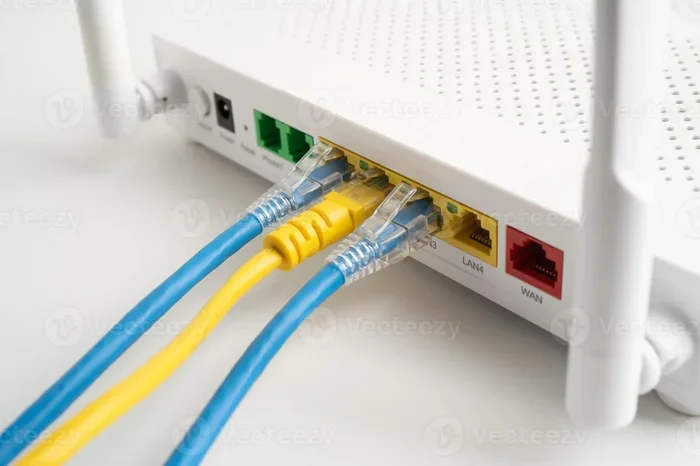
Most modems today have at least one Ethernet port built in. This port is usually labeled “LAN” or “Internet.” You can connect a computer, console, or smart device directly to it. The modem then shares that connection wirelessly with your other devices too.
How Wired and Wireless Connections Work Together
A WiFi modem handles both wired and wireless connections at the same time. You can plug in your desktop computer with a cable while your phone connects over WiFi. The modem manages both traffic types without any problem. This dual setup gives you the best of both worlds.
The wired connection handles devices that need stability and speed. The wireless connection handles the devices you move around the house. Together, they create a balanced network that works well for most households.
When You Don’t Need an Ethernet Cable
For many people, an Ethernet cable is completely unnecessary. If you browse the web, check email, scroll social media, and watch YouTube, a wireless connection is more than enough. Modern WiFi standards like WiFi 5 and WiFi 6 deliver speeds that match most internet plans.
Here are situations where you can skip the cable entirely:
- Light internet use: Browsing, email, and social media don’t need a wired connection.
- Small households: If you live alone or with one other person, WiFi handles everything easily.
- Mobile-first users: If most of your devices are phones and tablets, wireless is the way to go.
- Good WiFi coverage: If your modem is centrally located and your signal is strong everywhere, you’re set.
- Temporary setups: Renters or people who move often benefit from going cable-free.
Many internet providers now offer modem-router combos that work perfectly without any Ethernet cables. Brands like Netgear, TP-Link, and Motorola make units that deliver strong wireless signals right out of the box. You just set them up and forget about cables.
Some people also explore options like portable WiFi devices that eliminate the need for cables altogether. These are great for travel or as backup connections. They work independently of your home modem and give you internet on the go.
When You Absolutely Need an Ethernet Cable
There are clear situations where an Ethernet cable makes a real difference. If any of these sound like your situation, you should seriously consider using a wired connection.
Online Gaming
Gamers know that every millisecond counts. A wireless connection can introduce lag, packet loss, and jitter. These issues can make the difference between winning and losing a match. An Ethernet cable eliminates these problems by giving you a direct, stable path to your modem.
Most online games don’t need super fast speeds. They need consistent, low-latency connections. A wired Ethernet connection delivers exactly that. Even the best WiFi can’t match the reliability of a cable for competitive gaming.
4K Streaming and Large File Downloads
If you stream movies in 4K or download huge files regularly, a wired connection helps. These activities use a lot of bandwidth, and a wireless signal can struggle under heavy load. An Ethernet cable ensures you get the full speed of your internet plan every time.
Imagine you’re downloading a 50GB game update. Over WiFi, it might take hours with fluctuations along the way. Over Ethernet, it goes faster and steadier. The difference is especially noticeable during peak hours when your neighbors are also online.
Home Office and Video Calls
Working from home means you can’t afford dropped calls or frozen screens. An Ethernet connection keeps your video calls smooth and reliable. It also prevents your connection from dropping when someone else in the house starts streaming a movie.
If you’re on a conference call and your WiFi gets congested, your call quality suffers. A wired setup avoids this problem completely. It’s one of the best investments you can make for a productive home office.
Initial Modem Setup
Here’s something many people don’t realize. Your internet provider might require a wired connection during the initial setup. This is when you first activate your modem and configure your network. Even if you plan to go wireless afterward, you’ll need a cable for this step.
Some providers send a technician to set things up. Others let you do it yourself. In either case, having an Ethernet cable ready makes the process much smoother. You can connect your computer directly to the modem and access the settings panel without any WiFi configuration headaches.
Setting up a new modem is often easier with a wired connection. You can visit your provider’s setup page, enter your credentials, and configure your WiFi name and password. Once that’s done, you can unplug the cable and enjoy wireless freedom.
Can You Use a WiFi Modem Without Any Cables at All?
The answer is yes, in most cases. A WiFi modem can operate fully wirelessly once it’s set up. The modem connects to your internet source (like a fiber line or coaxial cable from your wall) and broadcasts a wireless signal. Your devices connect to that signal without any Ethernet cables in between.
However, “without any cables” is a bit misleading. The modem itself still needs a connection to your internet source. That connection is usually a cable, but it’s not an Ethernet cable. It could be a fiber optic line, a coaxial cable, or a phone line depending on your internet type.
What people really mean when they ask this question is whether they need an Ethernet cable to connect their devices to the modem. And the answer is no. WiFi handles that job perfectly well for most users.
If you’re curious about whether you can use a modem without a traditional internet setup, check out this article on buying your own modem and getting internet. It covers alternative setups and what you need to know before purchasing equipment.
Mesh WiFi Systems: Do They Need Ethernet Cables?
Mesh WiFi systems are becoming very popular. They use multiple units placed around your home to extend wireless coverage. The main question is whether these systems need Ethernet cables to work properly.
The short answer is no. Mesh systems communicate wirelessly with each other. You place the main unit near your modem and satellite units around your home. They create a seamless wireless network without any cables between them.
However, if you can run an Ethernet cable to your satellite units, the performance improves significantly. Wired backhaul (the connection between mesh units) is faster and more reliable than wireless backhaul. For most homes, wireless mesh works great. But for larger homes or spaces with thick walls, a wired connection between nodes makes a noticeable difference.
If you’re considering a mesh system, you might also want to look at connecting a mesh router to an existing router. This setup can extend your network without replacing your current equipment.
Pros and Cons of Using an Ethernet Cable With Your WiFi Modem
Let’s compare the two approaches so you can decide what works best for you.
| Factor | With Ethernet Cable | Without Ethernet Cable |
|---|---|---|
| Speed | Faster and more consistent | Fast but can fluctuate |
| Latency | Very low | Slightly higher |
| Stability | Excellent, no drops | Good, but can be affected by interference |
| Convenience | Less convenient, cable needed | Very convenient, connect anywhere |
| Device Mobility | Limited by cable length | Full freedom of movement |
| Setup Complexity | Slightly more setup | Simple plug-and-play |
| Security | Harder to intercept | More vulnerable to external threats |
| Cost | Cost of cable (usually low) | No extra cost |
As you can see, both approaches have strengths. The right choice depends on your specific needs and how you use your internet. Most households benefit from a mix of both wired and wireless connections.
Quick Tips for Getting the Best Out of Your WiFi Modem
Whether you use an Ethernet cable or not, these tips will help you get the best performance from your WiFi modem:
- Place your modem centrally. The closer you are to the modem, the stronger your signal. Put it in a central location in your home, preferably on a higher shelf.
- Keep it away from thick walls and metal objects. These block WiFi signals and weaken your connection. Avoid closets, cabinets, and behind TVs.
- Update your modem firmware. Manufacturers release updates that improve speed and security. Check for updates every few months.
- Change your WiFi channel. If your neighbors have similar WiFi networks, interference can slow you down. Switching to a less crowded channel can help.
- Restart your modem regularly. A simple restart clears temporary issues and refreshes your connection. Do it once a week for best results.
- Use a WiFi analyzer app. These free apps show you which channels are least congested. They help you optimize your setup without any guesswork.
Common Mistakes People Make With Ethernet and WiFi Modems
Avoid these common pitfalls that hurt your internet performance:
- Using a damaged cable: A frayed or bent Ethernet cable causes slow speeds and dropouts. Replace old cables every few years.
- Placing the modem in a corner: Corners limit signal spread. Central placement gives you the best coverage throughout your home.
- Ignoring the modem’s age: Old modems support outdated WiFi standards. If your modem is more than 5 years old, consider upgrading.
- Overloading a single connection: Even with Ethernet, too many devices on one connection can slow things down. Use your modem’s QoS settings to prioritize important traffic.
- Forgetting about security: Weak WiFi passwords let neighbors use your internet and slow down your connection. Always use WPA3 or WPA2 encryption.
Security is especially important in shared living spaces. If you live in an apartment or a densely populated area, your WiFi signal reaches beyond your walls. A strong password and proper encryption keep your network safe. You can also learn more about WiFi password security to understand the risks better.
Expert Insights: What Network Professionals Recommend
Network experts generally recommend having at least one Ethernet port available on your modem or router. Even if you don’t use it daily, it provides a reliable fallback for troubleshooting and high-performance tasks.
Many IT professionals suggest a hybrid approach. Connect your gaming console or desktop computer with a cable for the best performance. Let your phones, tablets, and smart home devices connect over WiFi. This balanced setup gives you speed where you need it and convenience everywhere else.
Professionals also emphasize the importance of your internet plan. No amount of cabling can make your internet faster than what your provider delivers. If you pay for 100 Mbps, a wired connection will get you close to that speed. A wireless connection might deliver 80-90 Mbps. Both are good, but the wired option is more predictable.
If you’re dealing with connection issues, sometimes the problem isn’t your cables or your modem. It could be your internet service itself. Running an internet speed test helps you identify whether the issue is with your local network or your provider’s service. This simple step saves a lot of troubleshooting time.
Final Thoughts: Do You Really Need That Ethernet Cable?
So, do you really need an Ethernet cable for your WiFi modem? For most everyday users, the answer is no. Your WiFi connection handles browsing, streaming, and casual use without any problems. You can set up your modem, connect wirelessly, and never look back.
But for gamers, remote workers, and heavy streamers, an Ethernet cable is a game-changer. It provides the stability, speed, and low latency that wireless simply can’t match. If you fall into any of these categories, spending a few dollars on a cable is one of the best upgrades you can make.
The smartest approach is to be prepared. Keep an Ethernet cable on hand even if you don’t need it today. You never know when you’ll want to connect a device directly, troubleshoot a problem, or set up a new piece of equipment. Having that cable ready saves time and frustration.
Your WiFi modem is designed to work both ways. It gives you the freedom to go wireless or wired depending on your needs. That flexibility is one of the best things about modern networking. Embrace it, and you’ll get the best of both worlds.
Whether you choose to use a cable or not, what matters most is that you enjoy a fast, reliable internet connection. Set up your modem the way that works for you, and don’t overthink it. The technology is built to be flexible, and that’s exactly how it should be.
Frequently Asked Questions
Can I use my WiFi modem without ever plugging in an Ethernet cable?
Yes, you can. Most WiFi modems work fully wirelessly once they’re set up. The modem connects to your internet source through a fiber, coaxial, or phone line, and then broadcasts WiFi for your devices. You only need an Ethernet cable if you want a wired connection for specific devices or during initial setup.
Will an Ethernet cable make my WiFi faster?
An Ethernet cable won’t directly make your WiFi faster, but it can improve overall network performance. When you connect a device via cable, it takes traffic off the wireless network. This frees up bandwidth for your WiFi devices, which can result in faster and more stable wireless connections.
How long should my Ethernet cable be for a modem setup?
There’s no fixed length, but 3 to 6 feet works for most setups. If your modem is far from your device, you can use a longer cable up to 100 feet without losing significant speed. Just avoid coils or kinks in the cable, as they can interfere with the signal.
Do I need a special Ethernet cable for my WiFi modem?
Not really. A standard Cat5e or Cat6 Ethernet cable works with most modems. Cat5e handles speeds up to 1 Gbps, which is more than enough for most internet plans. Cat6 supports even higher speeds and is a good choice if you want future-proofing.
Can I connect my phone to the modem with an Ethernet cable?
You can, but phones don’t usually have Ethernet ports. You would need a USB-to-Ethernet adapter or a special cable. For most people, connecting a phone over WiFi is much more practical and convenient. The wireless connection works great for mobile devices.
What happens if I plug an Ethernet cable into my modem but don’t have a router?
If your modem has a built-in router (which most do), you can connect a device directly via Ethernet and it will work. The modem handles both the internet connection and the WiFi broadcast. If you have a modem-only device without routing capabilities, you’ll need a separate router to share the connection across multiple devices.