Does Any WiFi Extender Work With Any WiFi Connection
Not every WiFi extender works with any WiFi router or connection. Compatibility depends on your router’s frequency band, WiFi standard, and the extender you choose. This guide breaks down what you need to know before buying a WiFi extender so you get the best results.
You just bought a WiFi extender because your signal keeps dropping in the bedroom. You set it up, plug it in, and… nothing happens. Or worse, it works but your internet speed tanks. Sound familiar?
The truth is, not every WiFi extender works with any WiFi connection. There are compatibility factors that most people don’t think about before making a purchase. And when you get it wrong, you waste money and end up frustrated.
This guide will walk you through everything you need to know. We will cover how WiFi extenders work, what makes them compatible (or incompatible), and how to pick the right one for your setup. By the end, you will know exactly what to look for and what to avoid.
Key Takeaways
- WiFi extenders are not universal: Some only work with specific routers or frequency bands.
- Check your WiFi standard: Look for 802.11ac or 802.11ax compatibility before purchasing.
- Dual-band and tri-band extenders offer more flexibility: They work with both 2.4 GHz and 5 GHz networks.
- Placement matters a lot: A poorly placed extender won’t fix dead zones no matter what model you buy.
- ISP-provided routers may limit options: Some ISP equipment creates compatibility issues with third-party extenders.
- Mesh systems are a modern alternative: They often work more seamlessly than traditional extenders.
- Always update firmware: Keeping your extender and router updated improves compatibility and performance.
📑 Table of Contents
- What Is a WiFi Extender and How Does It Work?
- Does Every WiFi Extender Work With Every Router?
- Compatibility Factors That Matter
- Types of WiFi Extenders and Their Compatibility
- How to Make Sure Your WiFi Extender Works With Your WiFi
- Common Problems and How to Fix Them
- What to Look for When Buying a WiFi Extender
- Final Thoughts
What Is a WiFi Extender and How Does It Work?
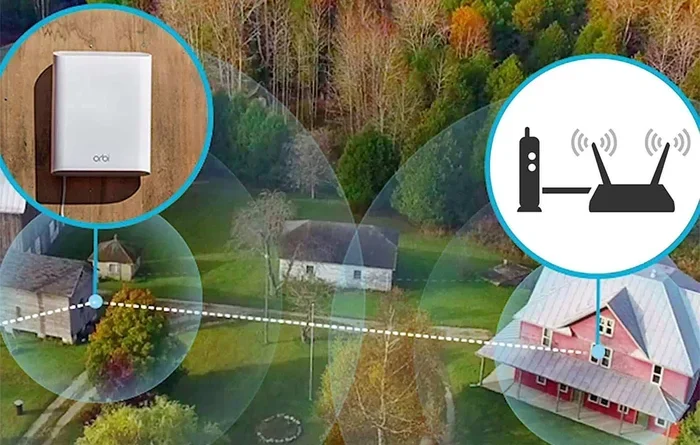
A WiFi extender is a device that boosts your existing wireless signal. It sits between your router and the area with weak coverage. Think of it like a relay runner. The extender receives the signal from your router, then sends it further out into your home.
Most extenders connect to your router wirelessly. They pick up the wireless signal and rebroadcast it. Some models connect through an Ethernet cable instead, which gives a more stable connection.
Here is how a typical setup works:
- Your router sends out a wireless signal in all directions.
- The extender picks up that signal from a certain distance.
- The extender then rebroadcasts the signal to areas your router cannot reach well.
- Your devices connect to the extended network and get better coverage.
Sounds simple, right? But here is where things get tricky. Not all routers and extenders speak the same language. Just like two people might not understand each other if they speak different languages, some routers and extenders cannot communicate properly.
Does Every WiFi Extender Work With Every Router?
The short answer is no. The longer answer is that it depends on several factors. Let us break them down.
WiFi Standards Matter
WiFi standards are like the rules that devices follow to talk to each other. The most common ones you will see are:
- 802.11n (WiFi 4) – Older but still works
- 802.11ac (WiFi 5) – Very common in modern routers
- 802.11ax (WiFi 6) – The newest standard
If your router uses WiFi 5 and you buy a WiFi 4 extender, you will still get a connection. But your speed will be limited to the older standard. It is like putting a garden hose on a fire hydrant. It works, but it does not perform well.
The best practice is to match your extender to your router’s standard. If you have a WiFi 6 router, get a WiFi 6 extender. This ensures you get the full speed and features.
Frequency Bands Play a Big Role
Most modern routers broadcast on two frequency bands: 2.4 GHz and 5 GHz. Some routers also use the 6 GHz band for WiFi 6E.
Here is what you need to know:
- 2.4 GHz travels farther but is slower. It also deals with more interference from other devices.
- 5 GHz is faster but has a shorter range. It is great for streaming and gaming in the same room.
A basic extender might only support one band. If it only works on 2.4 GHz, it will not extend your 5 GHz network. This is a common compatibility issue that catches people off guard.
Always check whether the extender supports dual-band or tri-band before you buy. Dual-band extenders work with both 2.4 GHz and 5 GHz networks. Tri-band extenders add an extra band for even better performance.
Can I Buy A Wi Fi Booster Instead?
Some people use the term “booster” and “extender” interchangeably. They are similar but not always the same. A Wi-Fi booster is a general term for any device that strengthens your wireless signal. Extenders, repeaters, and boosters all fall under this umbrella. But the internal technology can differ, which affects compatibility.
When shopping, focus on the specs rather than the marketing name. Look for dual-band support, the right WiFi standard, and enough bandwidth for your needs.
Compatibility Factors That Matter
Several factors determine whether a WiFi extender will work with your specific setup. Let us look at each one closely.
Your Internet Service Provider’s Equipment
Some ISPs provide combo devices that act as both a modem and a router. These devices can be tricky. They sometimes use proprietary settings that limit what third-party extenders can do.
For example, if your ISP uses a router in bridge mode, you might face extra setup steps. In some cases, you may need to put the ISP router in bridge mode first before the extender can connect properly.
Here are a few tips if you use ISP equipment:
- Check your ISP’s website for compatible extender lists.
- Contact your ISP’s support team before buying an extender.
- Consider putting your ISP router in bridge mode to improve compatibility.
Security Protocols and Encryption
Your router uses a security protocol to protect your network. The most common ones are WPA2 and WPA3. Your extender must support the same protocol to connect.
Most modern extenders support both WPA2 and WPA3. But older or cheaper models might only support WPA2. If your router uses WPA3 exclusively, an older extender might not connect at all.
Always check the extender’s specs for security protocol support. This is one of the most overlooked compatibility factors.
Bandwidth and Speed Ratings
WiFi extenders have speed ratings, just like routers. You might see numbers like AC1200, AC1900, or AX3000. These numbers tell you the maximum speed the extender can handle.
Here is a simple rule: your extender should match or exceed your router’s speed rating. If your router is AC1900 and your extender is AC1200, the extender becomes a bottleneck. Your speed will drop to the extender’s maximum.
| Router Speed | Extender Speed | Result |
|---|---|---|
| AC1900 | AC1900 | Full speed maintained |
| AC1900 | AC1200 | Speed drops to AC1200 |
| AX3000 | AX3000 | Full WiFi 6 speed |
| AX3000 | AX1800 | Speed limited to AX1800 |
The table above shows why matching your speeds matters. A slower extender will limit your entire network’s performance.
Types of WiFi Extenders and Their Compatibility
Not all extenders are built the same. Different types work better with different setups. Let us look at the main options.
Plug-In WiFi Extenders
These are the most popular type. You plug them directly into a wall outlet. They are small, affordable, and easy to set up. Most plug-in extenders are dual-band, which means they work with both 2.4 GHz and 5 GHz networks.
Plug-in extenders work with most standard routers. They are a good choice for homes with mixed WiFi standards. If you have an older router, a plug-in extender is usually a safe bet.
Desktop WiFi Extenders
Desktop extenders look like small boxes. They sit on a desk or shelf and usually have external antennas. These tend to offer better range and performance than plug-in models.
Desktop extenders are more compatible with advanced routers. They often support the latest WiFi standards and have more processing power. If you have a high-performance router, a desktop extender is a great match.
Mesh WiFi Systems
Mesh systems are a newer approach. Instead of one extender, you get multiple nodes that work together. They create a single, seamless network throughout your home.
Mesh systems are highly compatible with modern routers. They often work best when you use the same brand for your router and mesh nodes. For instance, Google WiFi can be set up as an access point in certain configurations, which shows how brand-specific compatibility can work.
Mesh systems are not traditional extenders, but they solve the same problem. They are worth considering if you have a large home or persistent dead zones.
Range Extenders vs. WiFi Repeaters
People often confuse range extenders with WiFi repeaters. They are similar but work slightly differently:
- Range extenders create a new network name (SSID) that you switch to manually.
- WiFi repeaters repeat the existing signal without changing the network name.
Both types can work with any router, but repeaters tend to lose more speed because they use the same radio to receive and send data. Extenders are generally more efficient.
How to Make Sure Your WiFi Extender Works With Your WiFi
Now that you know what affects compatibility, here is a step-by-step process to make sure everything works.
Step 1: Check Your Router’s Specs
Look at the back of your router or check the manual. Write down the following:
- WiFi standard (WiFi 4, 5, or 6)
- Frequency bands supported (2.4 GHz, 5 GHz, or both)
- Speed rating (like AC1900 or AX3000)
- Security protocol (WPA2 or WPA3)
Step 2: Match the Extender to Those Specs
Now go shopping for an extender that matches or exceeds these specs. If your router is WiFi 5 and dual-band, get a WiFi 5 dual-band extender. This is the easiest way to ensure compatibility.
Do not assume that a more expensive extender is always better. Match it to your actual needs and your router’s capabilities.
Step 3: Place the Extender in the Right Spot
Even the best extender will fail if you place it poorly. The golden rule is to put it halfway between your router and the dead zone. Not too close, not too far.
If you place it too close to the router, it has nothing to extend. If you place it too far, it cannot pick up a strong enough signal to rebroadcast.
Also, keep the extender away from thick walls, metal objects, and appliances like microwaves. These things interfere with the wireless signal and reduce performance.
For larger homes, you might want to consider extending your WiFi to 200 feet away with a more powerful extender or a mesh system instead of a single unit.
Step 4: Update Firmware After Setup
Once you set up the extender, check for firmware updates. Manufacturers release updates that fix bugs and improve compatibility. An outdated extender might not work well even if it was compatible when you first bought it.
Most extenders have a mobile app or web dashboard where you can check for updates. Make this a habit every few months.
Common Problems and How to Fix Them
Even with the right extender, you might run into issues. Here are the most common problems and their solutions.
The Extender Shows Connected But No Internet
This usually happens when the extender cannot reach the router’s signal strongly enough. Try moving the extender closer to the router. Also check that you entered the correct WiFi password during setup.
Slow Speeds After Connecting
Slow speeds often mean the extender is on a different band than your router. Make sure both devices use the same frequency band. Also check if your extender supports the same WiFi standard as your router.
The Extender Keeps Disconnecting
Interference is the most common cause. Other WiFi networks, baby monitors, and cordless phones can all interfere with the 2.4 GHz band. Try switching to the 5 GHz band if your extender supports it.
If none of these fixes work, the extender might simply be incompatible with your router. In that case, you may need to return it and try a different model.
What to Look for When Buying a WiFi Extender
Here is a quick checklist to help you make the right choice:
- WiFi standard: Match it to your router (WiFi 5 or WiFi 6 recommended).
- Dual-band support: Make sure it works with both 2.4 GHz and 5 GHz.
- Speed rating: Equal to or higher than your router’s rating.
- Security protocol: Must support WPA2 or WPA3.
- Number of devices: Consider how many devices you need to connect.
- Brand reputation: Stick with well-known brands for better support and updates.
- Ease of setup: Look for models with simple apps and clear instructions.
Taking a few minutes to check these factors before you buy can save you a lot of headaches later. A WiFi extender is only as good as its compatibility with your setup.
Final Thoughts
The answer to “does any WiFi extender work with any WiFi” is not a simple yes or no. Compatibility depends on your router’s standard, frequency bands, speed rating, and security settings. When you take the time to match these factors, you get a smooth, fast connection everywhere in your home.
Start by checking your router’s specifications. Then shop for an extender that matches or exceeds those specs. Place the extender correctly, update the firmware, and you will be good to go.
A WiFi extender is a simple and affordable way to eliminate dead zones and boost your wireless coverage. Just make sure you pick the right one for your setup. Do your homework before you buy, and you will enjoy a stronger, more reliable internet connection in every room of your home.
Frequently Asked Questions
Can I use any WiFi extender with my ISP router?
Most WiFi extenders work with ISP routers, but some ISP combo devices use proprietary settings that can cause issues. Check your ISP’s compatibility list or contact their support team before buying an extender.
Will a WiFi 6 extender work with a WiFi 5 router?
Yes, it will work. However, the speed will be limited to the WiFi 5 standard. You will not get the full benefits of WiFi 6 unless both the router and extender support it.
Do I need a dual-band extender for a dual-band router?
Yes, if you want to extend both the 2.4 GHz and 5 GHz networks. A single-band extender will only extend one band, which limits your options and can slow down your connection.
Why is my WiFi extender not working even though it connects?
This usually happens when the extender is too far from the router or there is too much interference. Try moving the extender closer to the router and away from walls and electronic devices.
Can I connect a WiFi extender to any wall outlet?
You can plug an extender into most wall outlets, but the outlet should be in a central location between your router and the weak signal area. Avoid outlets near metal objects or behind furniture for the best results.
Is a mesh WiFi system better than a traditional extender?
Mesh systems are generally better for larger homes because they create a seamless network with multiple nodes. Traditional extenders are more affordable and work well for smaller spaces or single dead zones.