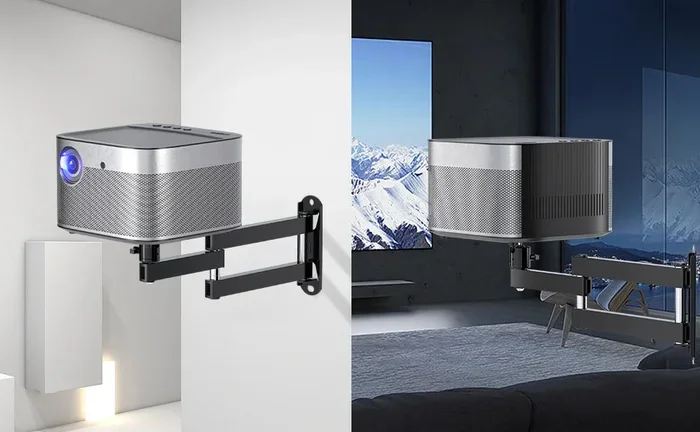
Does Your Projector Mount Need To Be On A Wall Stud
A projector mount does not always need to be on a wall stud, but mounting on a stud provides the strongest and safest hold. Drywall alone can support lightweight projectors with the right anchors, but heavier units demand stud mounting for stability. This guide walks you through when stud mounting is essential, what alternatives exist, and how to install your projector securely.
Does your projector mount need to be on a wall stud? This is one of the most common questions people ask before hanging their projector. The short answer is: it depends on your projector weight and your wall type. But the full answer is much more interesting. Let us break it all down so you can mount your projector with total confidence.
When you are setting up a home theater or a presentation space, your projector mounting choice matters a lot. A loose or poorly mounted projector can fall, get damaged, or even injure someone. That is why understanding projector mount basics is so important. You want a setup that looks great and holds tight for years.
# Why Projector Mounting Location Matters
Your projector is not a lightweight gadget. Most units weigh between 5 and 15 pounds. Some professional models go even heavier. That weight puts real stress on your walls, especially over time. Gravity pulls down constantly, and vibrations from the projector fan can loosen a weak mount.
Mounting on the right surface prevents accidents. A falling projector can crack the lens, damage the housing, or shatter on the floor. Worse, it could hit someone below. So where you place the mount is not just about aesthetics. It is about safety and long-term performance.
## What Is A Wall Stud And Why Does It Matter
A wall stud is the vertical framing member inside your wall. Most homes in the US use 2×4 or 2×6 wooden studs spaced 16 inches apart. These studs are the backbone of your wall structure. They are what give your walls real strength.
When you screw into a stud, you are anchoring into solid wood. That wood can hold a lot of weight. A single stud can support 80 to 100 pounds or more when using the right screws. This makes stud mounting the gold standard for heavy electronics like projectors.
Drywall alone is much weaker. It is just a thin layer of gypsum board. Without reinforcement, drywall cannot hold much weight on its own. That is why wall stud mounting is so important for heavy devices.
## When You Should Mount Your Projector On A Stud
You should mount your projector on a stud whenever possible. Here are the situations where stud mounting is strongly recommended.
### Heavy Projectors Over 10 Pounds
If your projector weighs more than 10 pounds, do not trust drywall alone. The weight will slowly pull the mount out of the wall. You will notice sagging, tilting, or even complete failure over time. Mounting on a stud ensures the weight goes into the solid frame of your wall.
### Long-Term Installations
If you plan to leave your projector mounted for months or years, stud mounting is the way to go. Temporary setups can use drywall anchors. But permanent installations need the strength of a stud. Over time, vibration and gravity wear down anchors in drywall.
### Ceiling Mounts Near Wall Edges
If you are mounting near the edge of a wall or on a ceiling, studs become even more critical. Edge areas have less drywall support. Hitting a stud in these spots gives you a solid anchor point that can handle both weight and vibration.
## What Happens If You Do Not Mount On A Stud
So what if you cannot find a stud or do not want to drill into one? You have options. But you need to understand the risks.
### Drywall Anchors Can Work For Light Projectors
If your projector is lightweight, under 10 pounds, drywall anchors can do the job. Plastic expansion anchors, self-drilling anchors, and toggle bolts all offer different levels of hold. Toggle bolts are the strongest drywall anchor option. They spread the weight across a larger area behind the wall.
However, even the best drywall anchor has limits. It cannot match the holding power of a screw driven into a stud. Over time, anchors can loosen, especially with daily use and projector vibrations.
### The Risk Of Wall Damage And Falls
Mounting a heavy projector on drywall without a stud is risky. The mount can slowly pull out of the wall. You might notice the projector tilting downward. In the worst case, it can fall completely. This can crack your projector, damage your wall, and even hurt someone standing below.
I have seen people use multiple anchors in hopes of extra support. While this helps a little, it is not a substitute for a proper stud mount. The wall itself is not designed to hold that kind of weight without structural support.
## Alternative Mounting Options When You Cannot Use A Stud
What if your wall has no accessible studs? Or what if you are mounting on a special surface like a drop ceiling or concrete? You still have choices.
### Toggle Bolts And Molly Bolts
Toggle bolts are one of the best alternatives to stud mounting. They have wings that expand behind the wall, distributing the load. You can find toggle bolts at any hardware store for just a few dollars. They can hold 25 to 50 pounds depending on the size and wall type.
Molly bolts work similarly but use a different expansion mechanism. They are great for medium-weight loads. Both options are easy to install and remove if needed.
### Ceiling Mounts With Joist Support
If you are mounting from the ceiling, look for ceiling joists. These are the horizontal framing members in your ceiling. They work the same way as wall studs. A ceiling mount that hits a joist will hold much more securely than one relying on drywall alone.
Use a stud finder to locate joists in the ceiling. Many modern stud finders detect both wood and metal framing. Once you find the joist, you can mount your bracket directly into it for a rock-solid hold.
### Projector Mounting Brackets With Weight Ratings
Not all mounting brackets are created equal. When shopping for a mounting bracket, check the weight rating. The bracket should support at least twice the weight of your projector. This gives you a safety margin and ensures long-term stability.
Some brackets come with built-in stud detection guides. They show you exactly where to drill for maximum support. This is a great feature if you are new to projector installation.
## Step-By-Step Guide To Mounting A Projector On A Stud
Ready to mount your projector on a stud? Follow these steps for a safe and secure installation.
### Step 1: Find The Stud
Use a stud finder to locate the studs in your wall. Run the stud finder horizontally along the wall where you plan to mount. The device will beep or light up when it detects a stud. Mark the edges of each stud with a pencil.
If you do not have a stud finder, you can look for subtle clues. Electrical outlets are often attached to studs. Knock on the wall and listen for a solid sound versus a hollow one. These methods are not as precise but can help in a pinch.
### Step 2: Choose Your Mounting Bracket
Select a bracket that matches your projector’s mounting holes. Most projectors use standard VESA mounting patterns. Check your projector manual for the VESA size. Common sizes include 75x75mm and 100x100mm.
Make sure the bracket is rated for your projector’s weight. If your projector is 12 pounds, get a bracket rated for at least 24 pounds. This extra capacity gives you a buffer for safety.
### Step 3: Position The Bracket And Mark Drill Holes
Hold the bracket against the wall and align it with the stud. Use a level to make sure it is straight. Mark the drill holes on the wall with a pencil. Double-check that your marks line up with the stud center.
For ceiling mounts, use a laser level to project a straight line across the ceiling. This makes alignment much easier and ensures your projector will hang level.
### Step 4: Drill And Install The Mount
Drill pilot holes into the stud at your marked positions. Use screws that are long enough to penetrate the stud by at least 1.5 inches. Wood screws work great for wooden studs. For metal studs, use self-tapping metal screws.
Tighten the screws firmly but do not overtighten. Overtightening can strip the wood or crack the bracket. Once the bracket is secure, give it a firm tug to test the hold. It should not move at all.
### Step 5: Attach The Projector And Adjust
Hang your projector onto the bracket and lock it in place. Adjust the tilt and angle to center the image on your screen. Most projector mounts allow for vertical and horizontal adjustment. Take your time to get the perfect alignment.
If you want to learn more about adjusting projector placement, you can check out how to mount your projector off center for creative flexibility.
## Common Mistakes To Avoid When Mounting A Projector
Even experienced DIYers make mistakes. Here are the most common ones to watch out for.
### Skipping The Stud Finder
Many people skip using a stud finder and just guess where the studs are. This is a risky move. If you miss the stud, your mount will not hold properly. Always use a stud finder and verify your findings before drilling.
### Using The Wrong Screws
Not all screws are equal. Drywall screws are designed for drywall, not for holding heavy loads into studs. Use wood screws or machine screws rated for structural use. The wrong screw can snap under weight and cause your projector to fall.
### Ignoring Projector Ventilation
When you mount your projector, make sure the vents are not blocked. Projectors generate heat and need airflow to cool properly. A blocked projector can overheat and shut down or suffer internal damage. Leave clearance around all sides of the unit.
### Forgetting About Cable Management
Loose cables hanging from your projector look messy and can pull on the mount over time. Use cable ties or cable channels to keep wires neat and secure. This also reduces the risk of someone tripping over them.
## Expert Tips For A Secure Projector Setup
Here are some pro tips that make a real difference in your projector mounting experience.
Use two studs whenever possible. A mount that spans two studs is far more stable than one anchored to a single stud. This distributes the weight and prevents the bracket from twisting.
Add a safety cable. Even with a solid mount, attach a safety cable to your projector. This cable catches the projector if the mount ever fails. It is a cheap insurance policy that can save your projector from a deadly fall.
Check your wall type. Different walls need different mounting strategies. Brick, concrete, and drywall all require different anchors and techniques. Identify your wall material before you start drilling.
Consider a drop ceiling mount. If you have a drop ceiling in your office or basement, you can use special drop ceiling projector mounts. These clamp onto the ceiling tiles and do not require drilling into the structure above. They are perfect for rental properties where you cannot modify walls.
If you are exploring projector setup options, you might also want to read about using a projector instead of a TV for a bigger, more immersive viewing experience.
## Quick Tips For Projector Mount Success
Here are some quick tips to keep in mind as you plan your projector setup:
- Always check the weight of your projector before buying a mount.
- Use a level to ensure your projector hangs straight.
- Test the mount with a gentle tug before fully trusting it.
- Keep the projector away from direct light sources that can cause glare.
- Make sure the throw distance matches your room size.
- Use a stud finder every single time, even if you think you know where the studs are.
- When in doubt, consult a professional installer for heavy or complex setups.
# Conclusion
So, does your projector mount need to be on a wall stud? In most cases, yes. Stud mounting gives you the strongest, safest, and most reliable hold for your projector. It is especially important for heavier units and long-term installations. But if you have a lightweight projector and cannot access a stud, drywall anchors and toggle bolts can work as alternatives.
The key is to match your mounting method to your projector weight and wall type. Never guess when it comes to structural support. Take the time to find the right anchor points, use the correct hardware, and test your setup before relying on it.
A properly mounted projector gives you years of worry-free entertainment. You will enjoy sharp images, stable performance, and the peace of mind that comes from a job done right. Whether you are building a home theater or setting up a presentation room, your projector mount is the foundation of everything. Get it right, and your setup will shine.
If you want to explore more about projector setups, check out whether you can use black cloth as a projector screen for a budget-friendly viewing solution.
Key Takeaways
- Stud mounting is the safest option: It prevents falls and damage to your projector and walls.
- Drywall anchors work for lighter projectors: Units under 10 pounds can often be mounted without a stud.
- Toggle bolts and molly bolts are great alternatives: They offer strong hold in drywall when a stud is not available.
- Ceiling mounts have different rules: You may need to hit ceiling joists instead of wall studs.
- Always use a stud finder: It saves time and prevents unnecessary wall damage during installation.
- Projector weight matters most: Heavier projectors absolutely need stud support for long-term safety.
Frequently Asked Questions
Can I mount a projector on drywall without a stud?
Yes, but only for lightweight projectors under 10 pounds. Use heavy-duty toggle bolts or molly bolts for the best hold. Keep in mind that drywall alone is not as strong as a stud mount and may loosen over time.
How do I find a wall stud for my projector mount?
Use a stud finder and run it along the wall where you plan to mount. You can also look for electrical outlets, which are typically attached to studs. Tapping the wall and listening for a solid sound can also help locate studs.
What happens if my projector falls because of a bad mount?
A falling projector can crack the lens, damage internal components, or break the housing entirely. It can also injure someone below. This is why proper mounting on a stud or with strong anchors is so important for safety.
Can I use a ceiling mount instead of a wall mount?
Yes, ceiling mounts are a great option for many setups. Just make sure you anchor into a ceiling joist for the strongest hold. Ceiling mounts work well in rooms with high ceilings or where wall space is limited.
Do I need special screws for mounting on a stud?
Yes, use wood screws or machine screws rated for structural loads. Drywall screws are not strong enough to hold a projector on a stud. Check your bracket instructions for the recommended screw type and length.
Is it worth hiring a professional to mount my projector?
If you are uncomfortable with drilling or unsure about wall structure, hiring a professional is a smart move. A pro can ensure your mount is secure, level, and safely anchored. It is especially worth it for expensive or heavy projectors.