Does Wifi Antenna Orientation Matter for Stronger Signal
Does Wifi Antenna Orientation Matter for stronger signal? Yes, it absolutely does. The way you position your router’s antennas can make or break your WiFi signal strength and overall wireless coverage. This guide explains exactly how antenna placement impacts your network and what you can do to fix weak spots.
Have you ever noticed that your WiFi signal drops in certain rooms? You might blame the router, but the real culprit could be something much simpler. The orientation of your WiFi antenna plays a huge role in how well your wireless signal travels through your home.
Many people set up their router and forget about it. They never think about how the antennas are pointed. Yet, a small change in antenna placement can transform your WiFi performance. It can turn a frustrating dead zone into a strong, reliable connection. If you have ever wondered whether does wifi antenna orientation matter, the short answer is a clear yes.
This guide breaks down everything you need to know. You will learn how WiFi antennas work, the best ways to position them, and simple mistakes to avoid. By the end, you will have the confidence to boost your signal strength without buying new equipment.
Key Takeaways
- Antenna orientation directly affects signal direction and strength. A simple tilt can eliminate dead zones.
- Vertical antennas work best for multi-floor coverage. They push signal up and down through your home.
- Angling antennas at 45 degrees can improve horizontal reach. This is ideal for single-floor setups.
- Placement near walls or metal objects weakens your WiFi. Keep the router in an open, central spot.
- Upgrading to high-gain antennas can boost range significantly. Check if your router supports external antennas.
- Regularly checking antenna positioning can prevent weak spots. A quick adjustment takes only seconds.
📑 Table of Contents
Why Does Antenna Orientation Matter for Your WiFi Signal?
Your router’s antennas are not just decorative. They are the engines that push wireless signals out into your space. The direction they point determines where the signal goes and how strong it is when it arrives. Understanding this helps you make smarter choices about router positioning.
How WiFi Signals Travel from Your Router
WiFi signals radiate outward from the antenna in a specific shape. Most home router antennas are omnidirectional. This means they send signal in a circle, like a donut. The signal spreads horizontally but is weaker directly above and below the antenna.
If you point your antennas straight up, the signal spreads outward across a single floor. This works well for homes with multiple floors because the signal can reach up and down through the ceilings. However, if you live in a single-story house, pointing them straight up can waste signal above the roofline. You want that energy to spread out across your living space instead.
The orientation of the antenna controls the shape of this radiation pattern. A small tilt can shift where the strongest signal goes. This is why does wifi antenna orientation matter so much for everyday use.
The Role of Antenna Radiation Patterns
Every antenna has a radiation pattern. Think of it as a map of where the signal is strongest. For a typical dipole antenna, the pattern looks like a balloon stretched around the middle. The signal is strongest at the sides and weakest at the tips.
When you mount your router’s antenna vertically, the signal spreads out in a horizontal circle. When you tilt it, that circle tilts with it. This is a powerful tool. You can aim the strongest part of the signal toward the areas where you need it most. Whether it is a home office or a living room couch, antenna placement lets you target your wireless connectivity.
Some routers come with directional antennas. These focus the signal into a narrow beam, like a flashlight. They are great for pointing signal across a long hallway or toward a backyard. But for most homes, omnidirectional antennas offer the best all-around WiFi coverage.
Best Practices for Router Antenna Positioning
Now that you understand the basics, let us look at the best ways to position your router antennas. These tips apply to most home setups and can make a big difference in your daily WiFi performance.
Vertical vs. Horizontal Placement
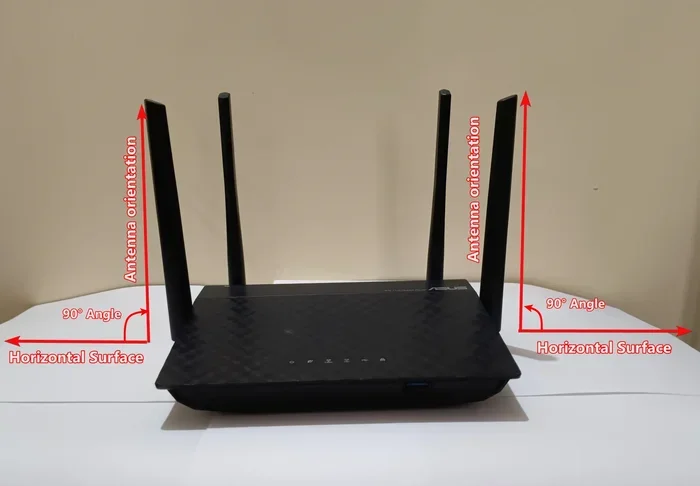
For a single-story home, keeping antennas vertical is usually fine. The signal spreads out in all directions across your floor. But if you have a multi-story house, you might want to adjust them.
Place one antenna straight up and another at a 45-degree angle. This creates a mix of vertical and horizontal coverage. The vertical antenna pushes signal up and down the stairs, while the angled one spreads it along the floor. This simple trick can fill in dead zones on different levels.
Never point all antennas in the same direction. If they all lean to one side, you create a blind spot on the opposite side. Spread them out for balanced signal strength.
Angling Antennas for Multi-Floor Coverage
Multi-story homes need a different approach. The goal is to get signal to reach up and down. A common mistake is to point all antennas toward the ceiling. This sends most of the energy straight up, missing the rooms on the same floor.
Instead, try the 45-degree angle method. Point each antenna slightly outward and upward. This sends signal both horizontally along the floor and vertically toward the next level. You will notice stronger WiFi signal in rooms above and below the router.
If you have a router with three antennas, position them at different angles. One straight up, one at 45 degrees, and one flat. This creates a three-dimensional coverage pattern that reaches every corner of your home network.
Quick Tips for Antenna Adjustment
- Start with all antennas vertical. This gives you a baseline signal.
- Tilt one antenna at a time. Check signal strength in weak spots after each change.
- Use a WiFi analyzer app. It shows you real-time signal strength on your phone.
- Avoid sharp angles. A gentle tilt works better than a sharp bend.
- Check your antenna type. Some antennas are fixed, while others can be adjusted. Know what you have before you adjust.
Common Mistakes That Weaken Your WiFi
Even with perfect antenna orientation, poor habits can ruin your WiFi performance. Avoid these common mistakes to keep your wireless signal strong and stable.
Placing the Router Too Close to Walls
Walls absorb WiFi signals, especially thick ones with rebar or metal lath. If your router sits right against a wall, the signal has to fight through it before reaching your devices. This weakens the signal strength and creates slow zones.
Move your router to a central location in your home. A living room shelf or a desk in a hallway works well. The more open space around the router, the better the signal can spread. This is a key part of router placement that many people overlook.
Ignoring Interference from Other Devices
Other electronics can interfere with your wireless connectivity. Microwaves, baby monitors, and even Bluetooth devices operate on similar frequencies. They can cause noise that weakens your WiFi signal.
Keep your router away from these devices. If you have a 2.4 GHz band, interference is more common because many household devices use that frequency. Switching to the 5 GHz band can help, but it has a shorter range. You can learn more about band selection by reading how to force your phone to use 2.4 GHz WiFi for better range when needed.
Using Too Many Signal Boosters
Some people buy multiple signal boosters to fix weak spots. While boosters can help, too many can create a messy network with conflicting names and slow speeds. A better first step is to fix your antenna orientation and placement.
Before you buy any extra equipment, try adjusting your antennas. You might find that a simple repositioning solves the problem entirely. This saves money and keeps your network clean.
When to Consider Upgrading Your Antennas
Sometimes the built-in antennas on your router are not enough. If you live in a large home or have thick walls, you might need a boost. Upgrading your antennas can be a cost-effective way to improve WiFi coverage without replacing the whole router.
High-Gain Antennas for Better Range
High-gain antennas focus the signal more tightly. They can send WiFi signal farther than standard antennas. This is useful if you need to reach a backyard office or a detached garage.
Before buying, check if your router has detachable antennas. Many routers have a removable antenna connector. You can unscrew the stock antenna and screw on a high-gain one. This simple swap can double your WiFi range in the right direction.
If you are considering an upgrade, you might want to learn more about adding antennas to your setup. Check out this guide on can I add an antenna to my WiFi router for step-by-step instructions.
External vs. Internal Antennas
Internal antennas are hidden inside the router. They look sleek but offer less flexibility. You cannot adjust their direction. External antennas, on the other hand, let you point them exactly where you need the signal.
For most users, external antennas are the better choice. They give you control over antenna orientation and make it easy to experiment with placement. If your router only has internal antennas, you might consider a WiFi extender or a mesh system instead.
Quick Tips for Maximum Signal Strength
Here are a few fast tips you can apply right now. These small changes can lead to big improvements in your wireless signal.
- The 45-Degree Rule: Angle your antennas at 45 degrees for balanced floor and stair coverage.
- Keep It Central: Place the router in the middle of your home, away from corners.
- Elevate the Router: Put it on a shelf or mount it on a wall. Signals travel better when they are not blocked by furniture.
- Avoid Metal Objects: Metal shelves, mirrors, and appliances can block WiFi signals. Give your router breathing room.
- Restart Regularly: A quick restart can clear up temporary signal interference and refresh your wireless connectivity.
- Check Antenna Connections: Loose antennas can cause weak spots. Make sure they are snug and secure.
Even with the best antenna setup, some homes have areas that are hard to reach. If you find that adjusting your antennas does not solve the problem, you may want to explore other options. For instance, smart home devices like a thermostat or a speaker need a strong connection too. You can read how to connect your air conditioner to WiFi for tips on ensuring stable connections for all your devices.
Conclusion
So, does wifi antenna orientation matter? The answer is a resounding yes. The way your router antennas point controls where your WiFi signal goes and how strong it is when it gets there. A few simple adjustments can eliminate dead zones, improve wireless performance, and give you a better internet experience throughout your home.
Start by checking your current antenna position. Try the vertical, angled, and 45-degree methods we covered. Move your router away from walls and interference sources. If you still need more reach, consider upgrading to high-gain antennas or adding a signal booster.
Remember, a strong home network starts with smart placement. You do not need expensive gear to get better results. Just a little attention to antenna orientation can make a world of difference. Take a few minutes today to adjust your antennas, and you will feel the impact on your WiFi performance tomorrow.
Frequently Asked Questions
Does wifi antenna orientation matter for 5GHz networks?
Yes, it matters for both 2.4GHz and 5GHz bands. The 5GHz signal has a shorter range and is more easily blocked by walls. Proper antenna orientation helps push the 5GHz signal where you need it most, reducing dead spots in your home.
Can I use a signal booster instead of adjusting my antennas?
You can, but adjusting antennas should come first. A booster adds cost and complexity. Many users find that simply repositioning their router antennas solves weak signal issues without any extra equipment.
What is the best angle for router antennas in a two-story house?
For a two-story house, try pointing one antenna straight up and the other at a 45-degree angle. This spreads signal both horizontally on each floor and vertically between floors, giving you balanced WiFi coverage throughout the home.
Does the router antenna orientation affect WiFi speed?
Yes, it can. When your antenna points away from your device, the signal weakens. A weaker signal means slower speeds and more disconnects. Correct orientation ensures your device receives the strongest possible signal, which supports faster speeds.
Should I buy a router with external antennas for better orientation control?
If you care about flexibility, external antennas are a great choice. They let you adjust the antenna placement and angle to suit your home layout. Internal antennas are fixed, which limits your ability to optimize signal strength.
Can I use my phone to test WiFi signal strength after adjusting antennas?
Absolutely. You can use a WiFi analyzer app on your phone to measure signal strength in different rooms. Walk around your home after adjusting the antennas and compare the readings. This helps you find the best orientation for your setup.