Does Wimius Projector Have Bluetooth Audio Streaming
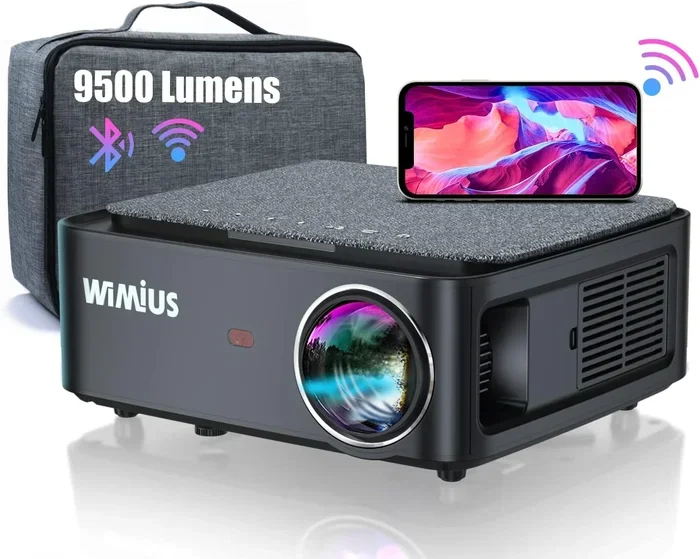
The Wimius projector supports Bluetooth connectivity, allowing you to stream audio wirelessly to speakers, headphones, and soundbars. This feature makes it easy to create a clutter-free home theater setup without relying on cables. Whether you are watching movies, gaming, or presenting, Bluetooth audio streaming on the Wimius projector delivers convenience and flexibility for everyday use.
Wimius projectors have become a popular choice for home entertainment. They offer bright displays, compact designs, and affordable pricing. But one question keeps coming up from buyers and users alike: does Wimius projector have Bluetooth audio streaming? The short answer is yes. But there is more to it than just a simple yes or no.
In this guide, we will walk you through everything you need to know about Bluetooth connectivity on Wimius projectors. You will learn how to pair devices, what to do when things go wrong, and how to get the best wireless audio experience. Whether you are a movie lover, a gamer, or someone who uses a projector for work, this article has you covered.
Key Takeaways
- Bluetooth Support: The Wimius projector includes built-in Bluetooth for wireless audio streaming to compatible devices.
- Easy Pairing: Connecting Bluetooth speakers or headphones to your Wimius projector takes only a few simple steps.
- Multiple Device Options: You can pair with Bluetooth speakers, soundbars, headphones, and even car audio systems.
- Common Issues Exist: Audio latency, connection drops, and pairing failures are common but fixable.
- Wired Alternatives Available: If Bluetooth is not an option, you can use USB cables or AUX ports for audio output.
- Firmware Updates Help: Keeping your Wimius projector updated improves Bluetooth performance and stability.
📑 Table of Contents
- What Is the Wimius Projector?
- Does Wimius Projector Have Bluetooth?
- How to Connect Bluetooth to Your Wimius Projector
- Bluetooth Audio Streaming Features and Benefits
- Common Bluetooth Issues and How to Fix Them
- Wimius Projector Bluetooth vs. Wired Audio Connections
- Can You Use Wimius Projector Bluetooth with Any Speaker?
- Expert Tips for the Best Bluetooth Audio Experience
- Final Thoughts
What Is the Wimius Projector?
The Wimius projector is a portable mini projector designed for home and portable use. It supports multiple input sources, including HDMI, USB, and Wi-Fi. These projectors are known for their compact size and decent image quality. They are often used for movie nights, presentations, and outdoor screenings.
One of the standout features of the Wimius lineup is its wireless capability. Many models come with built-in Wi-Fi and Bluetooth. This means you can stream content directly from your phone or tablet. You can also connect wireless speakers without any extra cables. If you prefer wired connections, you can also use a USB cable to link your devices.
The Wimius projector lineup includes several models. Each model may have slightly different features. Some support Bluetooth 5.0, which offers a stronger and more stable connection. Others may use older Bluetooth versions. Always check the specific model specifications before purchasing.
Does Wimius Projector Have Bluetooth?
Yes, most Wimius projectors come with built-in Bluetooth. This allows you to connect the projector to wireless speakers, headphones, and soundbars. The Bluetooth feature turns your projector into a full wireless home theater system. You no longer need to run audio cables across your room.
Bluetooth audio streaming on the Wimius projector works by sending audio signals wirelessly to a paired device. The projector acts as the source, and your Bluetooth speaker or headphones act as the output. This is incredibly useful for people who want a clean, cable-free setup.
How Bluetooth Works on Wimius Projectors
The Bluetooth module inside the Wimius projector handles wireless audio transmission. When you enable Bluetooth in the settings, the projector becomes discoverable. Your speaker or headphones can then find it and pair with it. The process is simple and does not require any extra apps in most cases.
Here is a quick look at how Bluetooth audio works on these projectors:
- The projector sends audio signals via Bluetooth.
- The paired device receives the signal and plays the sound.
- Audio quality depends on the Bluetooth version and the speaker capabilities.
- Most Wimius models support Bluetooth 4.0 or higher.
If you are wondering about compatibility, most modern Bluetooth speakers work seamlessly. You can also connect Bluetooth headphones for private listening. This is great for late-night movie sessions without disturbing anyone. Similar to Samsung TVs, Wimius projectors allow you to use Bluetooth headphones for private audio.
How to Connect Bluetooth to Your Wimius Projector
Setting up Bluetooth on your Wimius projector is straightforward. You do not need any special tools or technical skills. Follow these steps to get your wireless audio working in minutes.
Step-by-Step Pairing Guide
- Turn on your Wimius projector and go to the Settings menu.
- Find the Bluetooth option in the network or audio settings.
- Toggle Bluetooth to On. The projector will start searching for devices.
- Turn on your Bluetooth speaker or headphones and set them to pairing mode.
- Select your speaker or headphones from the list on the projector screen.
- Wait for the connection to complete. You will hear a confirmation sound.
- Start playing audio or video and enjoy wireless sound.
It really is that simple. Most users complete the pairing process in under two minutes. If your device does not show up, make sure it is in pairing mode and within close range.
Quick Tips for Better Bluetooth Connections
- Keep your Bluetooth speaker within 10 feet of the projector for the best signal.
- Remove any obstacles between the projector and the speaker.
- Turn off other Bluetooth devices nearby to avoid interference.
- Restart both devices if the connection fails.
- Update your Wimius projector firmware to the latest version.
If you have older speakers like Bose, you can make them Bluetooth capable too. This is a great way to reuse speakers you already own with your Wimius projector.
Bluetooth Audio Streaming Features and Benefits
Bluetooth audio streaming on the Wimius projector offers several practical benefits. Let us explore what makes this feature so useful for everyday entertainment.
Wireless Freedom
The biggest advantage of Bluetooth is the freedom it gives you. No more tangled cables. No more stretching an AUX cord across the room. You can place your Bluetooth speaker anywhere in the room and enjoy high-quality sound. This is especially helpful for outdoor movie nights or casual gatherings.
Multiple Device Support
Most Wimius projectors can remember multiple paired devices. This means you can switch between your phone, tablet, and laptop without re-pairing every time. The projector stores a list of previously connected devices for quick access.
Improved Sound Quality
While the Wimius projector has built-in speakers, they are often small and limited. Connecting a Bluetooth speaker or soundbar dramatically improves the audio. You get deeper bass, clearer vocals, and a more immersive sound experience. This makes watching movies and playing games much more enjoyable.
Private Listening with Headphones
Bluetooth headphones are a great companion for Wimius projectors. You can watch late-night movies without waking up the family. This is also useful in office or shared spaces where you do not want to disturb others.
Common Bluetooth Issues and How to Fix Them
Bluetooth technology is reliable, but it is not perfect. Users sometimes face connection problems with their Wimius projectors. Here are the most common issues and how to solve them.
Bluetooth Not Showing Up on the Projector
If the Bluetooth option is missing, try restarting the projector. Also check if the firmware is up to date. Some models may require you to enable Bluetooth in a hidden settings menu. Refer to your user manual for specific instructions.
Audio Lag or Latency
Audio lag happens when the sound does not match the video. This is a common issue with Bluetooth connections. To reduce latency, move the speaker closer to the projector. You can also try reducing the number of Bluetooth devices in the area. Some Wimius models support low-latency Bluetooth codecs, which help minimize this problem.
Paired Device Keeps Disconnecting
If your Bluetooth speaker keeps disconnecting, the signal may be weak. Move the devices closer together. Also check if the speaker battery is low, as low battery can cause unstable connections. Restarting both devices often fixes this issue as well.
Cannot Find the Speaker in the Device List
Make sure the speaker is in pairing mode. The light on the speaker should flash to indicate it is ready to connect. Also make sure the speaker is not already connected to another device. Bluetooth devices can only be paired with one source at a time in most cases.
For more troubleshooting tips, you can also explore how to download Bluetooth drivers on your PC if you use a computer as your media source.
Wimius Projector Bluetooth vs. Wired Audio Connections
While Bluetooth is convenient, it is not the only way to get audio from your Wimius projector. Let us compare the two options so you can decide what works best for you.
| Feature | Bluetooth | Wired (AUX/USB) |
|---|---|---|
| Convenience | Very high, no cables needed | Moderate, requires cables |
| Audio Quality | Good, depends on speaker | Excellent, stable signal |
| Range | Up to 30 feet | Limited by cable length |
| Setup Time | Quick pairing | Plug and play |
| Interference | Possible from other devices | None |
| Best For | Casual use, portability | Home theater, quality focus |
Many users prefer Bluetooth for its simplicity. But if you want the best possible sound quality, a wired connection is hard to beat. A good approach is to use Bluetooth for everyday use and switch to wired when you want premium audio. You can also use a Bluetooth adapter on your TV if your projector lacks built-in Bluetooth.
Can You Use Wimius Projector Bluetooth with Any Speaker?
The short answer is yes. Most Bluetooth speakers are compatible with the Wimius projector. Whether you use a portable Bluetooth speaker, a desktop speaker, or a soundbar, the pairing process is the same. The projector uses standard Bluetooth protocols, so it works with virtually any Bluetooth-enabled audio device.
You can even connect your phone to the projector via Bluetooth and use the phone as a remote control. This gives you full flexibility over what plays and how it sounds. The same Bluetooth pairing logic applies whether you are connecting to car speakers or home audio systems.
Here are some speaker types that work well with Wimius projectors:
- Portable Bluetooth speakers like JBL and Anker
- Desktop speakers with Bluetooth support
- Soundbars for enhanced movie audio
- Bluetooth headphones for private listening
- Car Bluetooth speakers for outdoor use
Expert Tips for the Best Bluetooth Audio Experience
Want to get the most out of your Wimius projector’s Bluetooth feature? Here are some expert tips that make a real difference.
- Keep your firmware updated. Manufacturers often release updates that improve Bluetooth stability and audio quality.
- Use a dedicated Bluetooth transmitter. If your projector has weak Bluetooth, an external transmitter can boost the signal.
- Place the speaker at ear level. This improves sound direction and reduces audio reflections in the room.
- Avoid walls and obstacles. Bluetooth signals weaken through walls and large objects.
- Reduce connected devices. Too many Bluetooth devices in the same space can cause interference.
- Use a high-quality speaker. The audio quality is only as good as the speaker you connect to the projector.
These small adjustments can transform your viewing experience. You will notice clearer sound, fewer disconnections, and better overall performance from your Wimius projector.
Final Thoughts
The Wimius projector does have Bluetooth audio streaming, and it works well for most users. The feature is easy to use, supports a wide range of devices, and adds a lot of convenience to your entertainment setup. Whether you are watching a movie, playing games, or giving a presentation, Bluetooth audio streaming makes the experience more enjoyable and flexible.
While Bluetooth has its limitations, such as occasional audio lag and range constraints, the benefits far outweigh the drawbacks for most people. With the right setup and a quality Bluetooth speaker, your Wimius projector can deliver impressive wireless sound. Keep your firmware updated, follow the pairing tips in this guide, and you will be enjoying wireless audio in no time.
If you are exploring projector options, also consider how you can use a projector instead of a TV for a bigger and more immersive viewing experience. And for outdoor fun, check out if your projector works for Halloween movie nights and events. The Wimius projector with Bluetooth gives you the freedom to set up your entertainment anywhere, anytime.
Frequently Asked Questions
Does every Wimius projector model have Bluetooth?
Most Wimius projector models include built-in Bluetooth, but not all of them. Always check the specifications of your specific model before purchasing. Some older or budget models may not have Bluetooth support.
Can I connect multiple Bluetooth devices to my Wimius projector at once?
Most Wimius projectors can only connect to one Bluetooth device at a time. However, many models remember previously paired devices and allow quick switching between them. For multi-device setups, consider using a Bluetooth transmitter.
Why is there audio lag when using Bluetooth with my Wimius projector?
Audio lag happens because Bluetooth has a slight delay in transmitting audio signals. This is normal and affects most wireless connections. Moving the speaker closer to the projector and reducing interference can help minimize the lag.
Can I use Bluetooth headphones with my Wimius projector?
Yes, you can pair Bluetooth headphones with your Wimius projector just like any other Bluetooth speaker. This is perfect for private listening during late-night movie sessions or in shared spaces.
How do I update the Bluetooth firmware on my Wimius projector?
Go to the Settings menu on your Wimius projector and look for the System Update or Firmware Update option. Connect the projector to Wi-Fi and follow the on-screen instructions. Keeping your firmware updated improves Bluetooth performance.
What should I do if my Wimius projector will not pair with any Bluetooth device?
First, restart both the projector and the Bluetooth device. Make sure Bluetooth is enabled on the projector and the speaker is in pairing mode. If the issue persists, reset the projector to factory settings and try again. You can also check if other Bluetooth devices in the area are causing interference.