How Can I Listen To Music Throughout My Entire House
Want to enjoy your favorite tunes in every room? Listening to music throughout your house is easier than ever with modern wireless technology. You can set up a whole-home audio system using Wi-Fi speakers, Bluetooth adapters, or smart home hubs. This guide covers the best methods, tips, and products to help you build a seamless multi-room music experience without complicated wiring.
Key Takeaways
- Wi-Fi multi-room systems like Sonos and Amazon Echo offer the best whole-house music experience with synchronized playback.
- Bluetooth adapters can retrofit older speakers and stereos to work wirelessly with your phone or tablet.
- Smart home hubs let you group rooms and control music using voice commands through assistants like Alexa or Google Home.
- Wired solutions like multi-zone amplifiers still deliver the highest audio quality for dedicated music lovers.
- Streaming services like Spotify, Apple Music, and Amazon Music make it easy to play the same or different songs in each room.
- Setting up audio zones gives you flexibility to play music where you want it without disturbing other areas of the house.
📑 Table of Contents
- How Can I Listen To Music Throughout My Entire House?
- Option 1: Wi-Fi Multi-Room Speaker Systems
- Option 2: Bluetooth Speakers and Adapters
- Option 3: Smart Home Hubs and Voice Control
- Option 4: Wired Multi-Zone Audio Systems
- Option 5: Streaming Services and Apps
- Tips for Setting Up Whole-Home Music
- Common Mistakes to Avoid
- Final Thoughts
How Can I Listen To Music Throughout My Entire House?
Music makes a house feel like a home. Whether you are cooking in the kitchen, working in the living room, or unwinding in the bedroom, having your favorite tunes follow you from room to room is a game changer. Listening to music throughout your house used to require expensive wiring and complex setups. Not anymore.
Today, there are more options than ever to bring whole-home audio into your life. You can use wireless speakers, smart home devices, Bluetooth adapters, or even multi-zone amplifier systems. Each method has its own strengths. Some focus on convenience. Others focus on sound quality. The best choice depends on your budget, your home setup, and how much control you want over your music.
In this guide, we will walk you through every major option. You will learn how each system works, what it costs, and which setup fits your needs best. By the end, you will know exactly how to build a music system that fills every room in your home with great sound.
Why Whole-Home Music Matters
Music is more than background noise. It sets the mood. It boosts your energy. It helps you relax after a long day. When you can play music anywhere in your home, you get to control the atmosphere of every room. Morning coffee tastes better with jazz. Dinner parties feel more lively with the right playlist. Even chores feel less tedious when you have good music playing.
A whole-home music system also adds value to your living space. Smart speakers and wireless audio setups are increasingly expected in modern homes. Buyers love homes with built-in music capabilities. So investing in a multi-room audio system is not just about enjoyment. It is also a smart home upgrade.
Option 1: Wi-Fi Multi-Room Speaker Systems
The most popular way to listen to music throughout your house is with a Wi-Fi multi-room speaker system. These systems use your home Wi-Fi network to connect multiple speakers in different rooms. You control them all from one app on your phone or tablet.
How Wi-Fi Multi-Room Systems Work
Each speaker connects to your home Wi-Fi network. You group them together using a companion app. Once grouped, you can play the same song in every room or choose different songs for different rooms. This is called creating “audio zones.” Some systems also let you adjust the volume of each speaker independently.
The biggest advantage of Wi-Fi systems is range. Because they use your wireless network, they can reach every corner of your home. You do not need to stand near a speaker to control it. You can be in your bedroom and change the music in your backyard.
Popular Wi-Fi Multi-Room Brands
Several brands lead the market in whole-home audio. Here are the most well-known options:
- Sonos: Sonos is one of the most respected names in multi-room audio. Their speakers deliver excellent sound quality. The Sonos app is easy to use. You can group rooms, set timers, and even pair Sonos speakers with your TV for a home theater experience.
- Amazon Echo (Alexa): Echo devices are affordable and voice-controlled. You can ask Alexa to play music in any room or group of rooms. The sound quality varies by model, but the Echo Studio offers surprisingly good audio for its price.
- Google Nest Audio: Google Nest speakers work well with the Google Home app. They offer solid sound and integrate smoothly with other Google smart home devices.
- Apple HomePod: HomePod speakers are designed for Apple users. They deliver rich, detailed sound and work seamlessly with Apple Music and Siri.
Pros and Cons of Wi-Fi Systems
- Pros: Easy to set up, great range, supports multiple rooms, voice control available, no need for Bluetooth pairing in every room.
- Cons: Requires a stable Wi-Fi connection, some systems can be pricey, depends on your internet speed for streaming.
Option 2: Bluetooth Speakers and Adapters
Bluetooth is another great way to spread music around your home. Bluetooth speakers are portable and easy to use. You can move them from room to room. But Bluetooth has a limited range, usually about 30 feet. This means you need a speaker in or near each room you want to hear music in.
Using Bluetooth Speakers Room by Room
The simplest approach is to buy a Bluetooth speaker for each room. Place one in the kitchen, one in the living room, one in the bedroom. Each speaker connects directly to your phone. The downside is that you can only play one song at a time from one speaker. You cannot group them to play the same track together unless you buy speakers that support multi-room Bluetooth pairing.
Some newer Bluetooth speakers do offer grouping features. Brands like JBL and Bose have models that let you pair multiple speakers together. This is a step up from basic single-speaker setups. But the range and stability still depend on Bluetooth technology.
Bluetooth Adapters for Existing Speakers
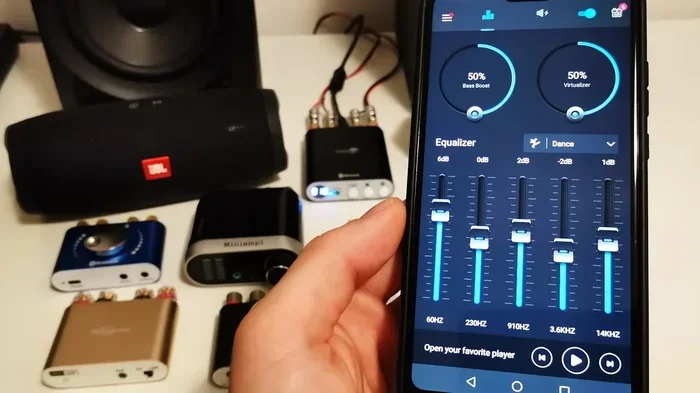
If you already have good speakers or a stereo system, you do not need to buy new ones. A Bluetooth adapter can make them wireless. You plug the adapter into your speaker or stereo. Then you pair your phone with the adapter. This is a budget-friendly way to add wireless music to any room.
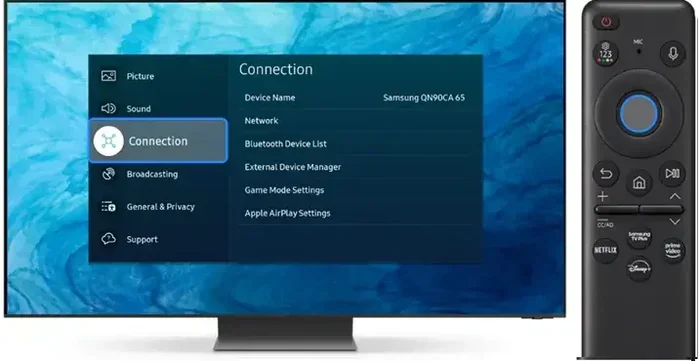
You can also use a Bluetooth adapter on your TV to stream music from your phone to your television speakers or connected sound system. This works well for casual listening in the living room or bedroom.
Another smart option is to turn your stereo into Bluetooth using a Bluetooth transmitter. These small devices plug into the audio output of your stereo and broadcast a Bluetooth signal. Your phone or tablet can then connect and stream music wirelessly. It is one of the easiest upgrades you can make for whole-home audio.
Pros and Cons of Bluetooth Solutions
- Pros: Affordable, portable, easy to set up, works with existing speakers, no Wi-Fi needed.
- Cons: Limited range, cannot always group speakers, audio quality may be lower than Wi-Fi, you need to manually connect each time.
Option 3: Smart Home Hubs and Voice Control
Smart home hubs take whole-home music to the next level. Devices like Amazon Echo, Google Nest Hub, and Apple HomePod act as central control points. You can group speakers by room, by floor, or by zone. Then you use your voice to play music anywhere in the house.
Creating Music Zones with Voice Commands
Most smart home systems let you create custom groups. For example, you can create a group called “Downstairs” that includes your kitchen, living room, and dining room speakers. When you say “Alexa, play jazz in the downstairs,” all those speakers play the same music at the same time.
You can also create a group called “Upstairs” for bedrooms and bathrooms. This way, everyone in the house can enjoy different music at the same time. Your kids can listen to pop in their room while you enjoy classical in the master bedroom.
Voice control makes the whole experience hands-free. You do not need to grab your phone or open an app. Just speak a command and the music starts. This is especially convenient when your hands are busy cooking or cleaning.
Integrating Music with Smart Home Routines
Many smart home platforms let you build routines around music. You can set a routine that plays the news every morning at 7 AM in the kitchen. Or you can create an evening routine that dims the lights and plays relaxing music in the living room at sunset. These small automations make your home feel smarter and more connected.
You can also integrate music with other smart devices. For example, when someone rings your doorbell, your smart speaker can pause the music. When the doorbell stops, the music resumes. These integrations make the whole-home audio experience feel seamless.
Option 4: Wired Multi-Zone Audio Systems
For the best audio quality, a wired multi-zone system is hard to beat. These systems use physical cables to connect speakers throughout the house to a central amplifier or receiver. They are more permanent and require more setup. But they deliver consistent, high-quality sound in every room.
How Multi-Zone Amplifiers Work
A multi-zone amplifier has multiple outputs. Each output connects to a pair of speakers in a different room. You can control the volume of each zone independently. Some systems even let you play different sources in different zones. You could be listening to the radio in the kitchen while someone plays music from their phone in the living room.
These systems work well for larger homes or for people who prioritize sound quality above all else. The wired connection ensures no signal loss or interference. The audio is clean and full-range, just like a dedicated home theater system.
When to Choose a Wired System
Wired systems are ideal in these situations:
- You are building or renovating a home and can run speaker wires behind walls.
- You are an audiophile who cares about the highest possible sound quality.
- You want a system that does not depend on Wi-Fi or Bluetooth connections.
- You have a large home with many rooms that need coverage.
One thing to keep in mind is that wired systems are not portable. You cannot move a wired speaker from room to room easily. But for a permanent installation, they are incredibly reliable.
Option 5: Streaming Services and Apps
No matter which hardware you choose, you need a way to access your music. Streaming services make this easy. Most whole-home audio systems work with popular platforms like Spotify, Apple Music, Amazon Music, and YouTube Music.
Choosing the Right Streaming Service
Each streaming service has its own strengths for whole-home listening:
- Spotify: Great for playlists and social sharing. You can use Spotify Connect to send music directly to compatible speakers without using your phone as a middleman.
- Apple Music: Excellent sound quality and deep integration with HomePod and Apple devices. Apple also supports multi-room audio through the Home app.
- Amazon Music: Works seamlessly with Echo devices. Amazon Music Unlimited offers a vast library and HD audio quality.
- YouTube Music: Good for music videos and covers. It integrates with Google Nest speakers and works through the Google Home app.
Many of these services also support group casting. This means you can send music from your phone to multiple speakers at once. It is a simple way to fill your entire house with music from a single source.
Tips for Setting Up Whole-Home Music
Setting up a system to listen to music throughout your house does not have to be complicated. Here are some practical tips to make the process smooth.
Start with One Room and Expand
Do not try to set up your entire house at once. Start with one or two rooms. Get comfortable with the system. Then add more speakers over time. This approach keeps costs manageable and helps you learn what works best for your home.
Check Your Wi-Fi Coverage
Wi-Fi-based systems need a strong and stable connection in every room. If your Wi-Fi signal is weak in certain areas, consider adding a mesh Wi-Fi system or a Wi-Fi extender. A strong network ensures uninterrupted music playback everywhere.
Think About Speaker Placement
Where you place your speakers matters a lot. For the best sound, place speakers at ear level when you are standing or sitting in the room. Avoid tucking them behind furniture or in closed cabinets. Open spaces let the sound spread more naturally.
Use Ethernet When Possible
If your router is near a speaker location, consider using an Ethernet cable instead of Wi-Fi. Wired connections are more stable and can improve audio quality, especially for high-resolution music streams.
Consider Your Budget
Whole-home audio systems range from budget-friendly to premium. A basic Bluetooth speaker setup can cost under $100. A full Sonos multi-room system can run several hundred dollars or more. Set a realistic budget and choose the option that gives you the best experience within that range.
Common Mistakes to Avoid
Even with the best system, mistakes can happen. Here are common pitfalls to watch out for:
- Ignoring Wi-Fi limitations: Bluetooth has a short range. Do not expect it to reach every room in a large house.
- Buying cheap speakers just to save money: Low-quality speakers produce poor sound. You will be disappointed. Invest in speakers that match your audio expectations.
- Not testing the system before installing: Set up your speakers in one room first. Make sure the sound and connectivity are good before committing to a whole-house installation.
- Overcomplicating the setup: Start simple. You can always add more features later. Do not get overwhelmed by all the options.
- Forgetting about power outlets: Make sure each speaker location has a nearby power outlet. Battery-powered speakers help, but they need regular charging.
Final Thoughts
Listening to music throughout your entire house is one of the most rewarding home upgrades you can make. Whether you choose a Wi-Fi multi-room system, Bluetooth speakers, a smart home hub, or a wired multi-zone setup, the goal is the same: to fill your home with music that matches your mood and your moment.
The best system is the one that fits your lifestyle. If you love simplicity and voice control, go with a smart speaker setup. If you want the best sound quality, invest in a Wi-Fi system or a wired multi-zone amplifier. If you are on a budget, start with a Bluetooth adapter and a few portable speakers.
Music has a way of making spaces feel alive. With the right setup, every room in your house can become a place where you love to be. Start small, experiment, and build a system that makes your home feel truly musical.
And remember, you can always use a Bluetooth adapter on your TV to add wireless music to your living room. Or turn your stereo into Bluetooth for instant wireless streaming in any room that has a speaker system already in place. The options are flexible, and you can grow your system over time as your needs evolve.
Now that you know the different ways to bring music into every corner of your home, it is time to take the first step. Pick a room. Pick a system. Press play. Your whole-house music experience starts today.
Frequently Asked Questions
What is the easiest way to listen to music in every room?
The easiest way is to use Wi-Fi smart speakers like Amazon Echo or Google Nest. You set them up in each room, group them in the app, and control everything with your phone or voice commands. No wiring or technical expertise is required.
Can I use Bluetooth to play music in multiple rooms at once?
Standard Bluetooth only connects to one speaker at a time. However, some speaker brands offer multi-room Bluetooth pairing. For a more reliable multi-room experience, Wi-Fi speakers are the better choice. They are designed to sync across rooms seamlessly.
Do I need a special app to control whole-home music?
Most systems come with their own app. Sonos has the Sonos app. Amazon Echo uses the Alexa app. Google Nest uses the Google Home app. These apps let you group rooms, adjust volumes, and choose what music plays where.
Is a wired multi-zone system better than wireless?
Wired systems offer superior sound quality and reliability. They do not depend on Wi-Fi or Bluetooth. But they require professional installation and permanent wiring. For most homes, a good Wi-Fi system provides excellent sound with much less hassle.
How much does it cost to set up whole-house music?
Costs vary widely. A basic Bluetooth speaker setup can start under $50. A mid-range Wi-Fi system with two or three speakers runs $200 to $500. A premium multi-room setup with many speakers can cost $1,000 or more. You can always start small and expand later.
Can I play different music in different rooms?
Yes. Most whole-home audio systems support independent playback. You can set each room or group of speakers to play a different song. This is perfect for households where different people want to listen to different music at the same time.