How Do I Access Free Wifi On The Go With These Tips
Accessing free wifi on the go is easier than you think. With the right tools and knowledge, you can stay connected anywhere without draining your data plan. This guide covers practical ways to find and use free wifi networks wherever you travel.
Staying connected is no longer a luxury. It is a daily need. Whether you are traveling for work, running errands, or exploring a new city, having internet access makes life so much easier. But paying for data everywhere adds up fast. That is why accessing free wifi is a skill everyone should have.
Free wifi is all around you. You just need to know where to look and how to connect safely. In this guide, we will walk you through every practical way to get online without spending a penny. From public spaces to carrier networks, we have you covered.
Key Takeaways
- Free wifi is everywhere: Libraries, cafes, malls, and public spaces offer free internet access.
- Carrier wifi networks help: Xfinity and AT&T provide widespread free wifi access for their customers.
- You don’t always need a router: Learn how to get wifi without traditional equipment.
- Security matters: Always protect your data when using public wifi networks.
- Hotspot apps make it easy: Apps can help you locate and connect to free wifi instantly.
- Plan ahead: Knowing where to look saves time and keeps you connected on the go.
📑 Table of Contents
- Why Free Wifi Matters for Everyday Life
- Where to Find Free Wifi Near You
- How to Access Free Wifi on the Go
- Staying Safe on Free Wifi Networks
- Tips to Boost Your Free Wifi Signal
- Free Wifi Options for Travelers
- Common Mistakes to Avoid with Free Wifi
- Quick Tips for Everyday Free Wifi Use
- Final Thoughts
Why Free Wifi Matters for Everyday Life
Internet access keeps you productive and entertained. When you are away from home, staying offline can feel isolating. You cannot check emails, stream music, or navigate new places. Free wifi solves all of that without hurting your wallet.
Data plans have limits. Once you hit your cap, speeds drop or extra charges kick in. Free wifi on the go lets you save your data for when you really need it. It also means you can browse, stream, and video call without worrying about usage.
Who Benefits Most from Free Wifi
Almost everyone benefits from free internet access. Travelers save money on roaming charges. Students stay connected on campus. Remote workers find cafes and libraries perfect for their setups. Even casual users appreciate the convenience of free internet while running daily errands.
Where to Find Free Wifi Near You
Finding free wifi is simpler than most people realize. Many businesses and public spaces offer it as a perk. Here are the best places to look for a free wifi hotspot near you.
Coffee Shops and Restaurants
Most coffee shops and fast food chains offer free wifi to customers. Chains like Starbucks, McDonald’s, and Dunkin Donuts are known for this. You do not even need to buy anything, though making a purchase is always polite.
Local cafes and independent restaurants often provide free wifi too. Just look for a network name posted on a sign or ask the staff. This is one of the easiest ways to get free internet while enjoying a meal or a drink.
Public Libraries
Libraries are hidden gems for free wifi access. Most public libraries offer completely free internet to visitors. You often do not even need a library card to connect to their wifi network.
Libraries also provide a quiet, comfortable environment. This makes them ideal for working or studying. Many libraries offer extended hours, so you can visit after work or on weekends.
Shopping Malls and Retail Stores
Large shopping malls often have free wifi throughout their corridors. Retail stores like Target, Walmart, and Apple Stores also offer guest wifi. Next time you are shopping, check your phone for available networks.
Airports and Transit Stations
Airports are packed with free wifi options. Most major airports offer free internet for a limited time. Some airports provide unlimited access, while others require you to watch a short ad or sign up with an email.
Transit stations and bus terminals often follow the same pattern. If you are waiting for a flight or a train, you can easily find a free wifi network to stay productive.
How to Access Free Wifi on the Go
Knowing where to find free wifi is only half the battle. You also need to know how to connect and get the most out of each network. Here are practical steps to access free wifi wherever you are.
Turn on Your Wifi and Let Your Phone Search
The simplest step is also the most overlooked. Turn on your phone’s wifi setting and let it scan for available networks. Your device will automatically detect nearby networks. You can then select one and connect with just a tap.
Make sure your phone is set to “Show Available Networks” in the wifi settings. This ensures you never miss a nearby connection. On most phones, you can access this from Settings > Wifi or Settings > Network & Internet.
Use Wifi Finder Apps
Wifi finder apps are incredibly useful tools. They scan for nearby networks and show you which ones are free. Some apps even display passwords for password-protected networks that are publicly shared.
Popular options include Wifi Map, Wifinity, and Free Wifi Finder. These apps build on community data, so millions of users contribute to their databases. They are a great way to find free wifi on the go without guessing.
Check Your Carrier’s Free Wifi Network
Many mobile carriers offer their own free wifi networks. These networks cover large areas and are available to customers. Let us look at two major examples.
Xfinity Wifi: If you are a Comcast or Xfinity customer, you have access to thousands of hotspots nationwide. You can also connect to Xfinity hotspots even without being a customer in some cases. To learn more about connecting to Xfinity wifi outside your home, check out our guide on Can I Connect To Xfinity Wi Fi Away From Home.
AT&T Wifi: AT&T provides free wifi access at many public locations. Their network extends to airports, hotels, and retail locations. You can connect to AT&T hotspots as a guest or through your AT&T account. For details on accessing AT&T wifi from anywhere, see our article on Can I Connect To Att Wi Fi Anywhere.
Get Wifi Without a Router at All
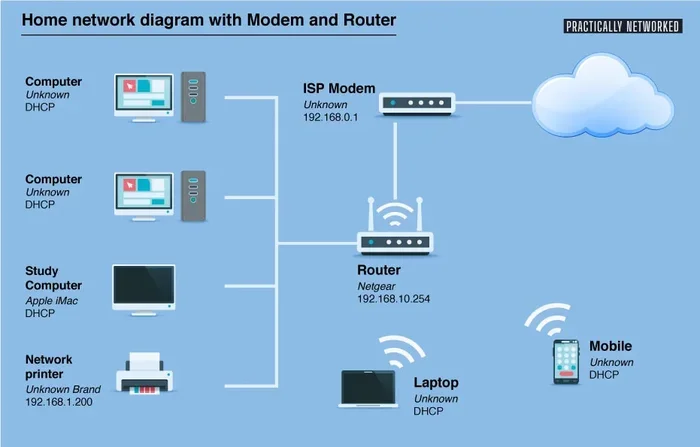
Did you know you can access wifi even without a traditional router? Several methods let you connect to the internet without one. This is especially helpful when you are on the move.
One option is using a mobile hotspot from your phone. Another is connecting through public wifi networks that do not require a router on your end. You can also explore Can I Get Wi Fi Without A Router to understand all the available options.
Use Your Phone as a Hotspot
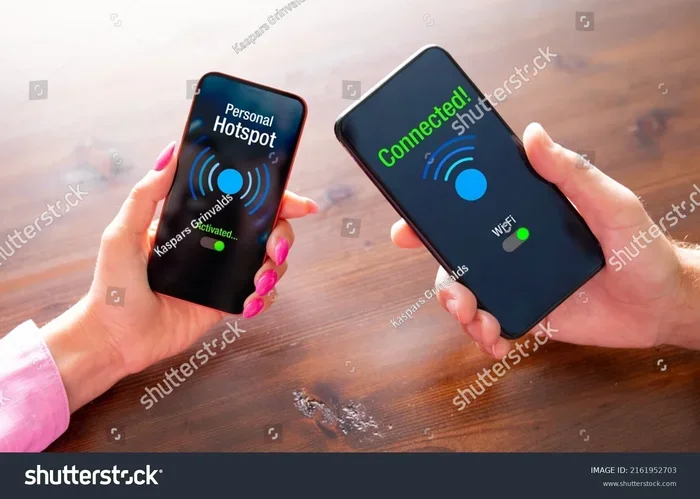
If you have a generous data plan, turning your phone into a hotspot is a smart move. You can share your cellular connection with laptops, tablets, and other devices. This works anywhere you have cellular signal.
To set this up, go to Settings > Personal Hotspot on your phone. Toggle it on and set a strong password. Keep in mind that this uses your data allowance. For unlimited hotspot options, check out our guide on Can I Get Unlimited Hotspot.
Staying Safe on Free Wifi Networks
Free wifi is wonderful, but it comes with risks. Public networks are not always secure. Hackers can intercept your data on open networks. Protecting yourself should be a top priority every time you connect.
Use a Virtual Private Network (VPN)
A VPN encrypts your internet traffic. It creates a secure tunnel between your device and the internet. Even on public wifi, your data stays private and protected.
Popular VPN services include NordVPN, ExpressVPN, and ProtonVPN. Many offer free tiers that work well for basic browsing. Always turn on your VPN before connecting to any public network.
Avoid Sensitive Transactions
Do not access your bank account or enter credit card details on free public wifi. Wait until you are on a secure network. If you must transact, use your mobile data or a VPN for protection.
Forget Networks After Use
After you leave a location, forget the wifi network on your device. This prevents your phone from auto-connecting to networks you no longer need. It also stops your phone from broadcasting your connection history to others nearby.
Turn Off Auto-Connect
Many phones have an auto-connect feature for saved networks. Turn this off in your wifi settings. Auto-connecting to unknown networks can expose you to security risks without you even realizing it.
Tips to Boost Your Free Wifi Signal
Sometimes you find a free wifi network, but the signal is weak. A weak connection leads to slow speeds and frustration. Here are simple tips to improve your free wifi experience.
Move Closer to the Router
Distance is the biggest enemy of wifi signals. The farther you are from the router, the weaker your connection. Try sitting closer to the access point in cafes, libraries, or airports.
Even moving to a different seat can make a big difference. Walls, furniture, and other obstacles block wifi signals. Find a clear line of sight to the router whenever possible.
Use a Wifi Signal Booster
A wifi signal booster or extender amplifies your connection. It picks up a weak signal and rebroadcasts it at higher strength. This is helpful when you are in a large space with spotty coverage.
Some boosters plug directly into a wall outlet. Others are portable and battery-powered. These devices can transform a weak free wifi connection into a reliable one.
Switch Between 2.4 GHz and 5 GHz
Many public wifi networks offer both 2.4 GHz and 5 GHz bands. The 2.4 GHz band has a longer range but slower speeds. The 5 GHz band is faster but covers a shorter distance.
If you are far from the router, switch to 2.4 GHz for better reach. If you are close, use 5 GHz for faster speeds. You can learn more about managing these bands in our guide on Can I Force My Phone To Use 2 4 Ghz Wifi.
Close Unused Apps and Tabs
Background apps consume bandwidth and slow down your connection. Close any apps you are not actively using. Turn off automatic updates and cloud syncing while on free wifi.
This simple step can dramatically improve your browsing speed. It also helps your phone battery last longer when you are away from a charger.
Free Wifi Options for Travelers
Traveling presents unique challenges for staying connected. Hotel wifi can be expensive. Roaming charges add up quickly. But travelers have plenty of options for free wifi on the go.
Hotel Lobbies and Lounges
Many hotels offer free wifi in their lobbies and business centers. Even if your room wifi is paid, the lobby is often free. Arrive early or grab a coffee in the hotel cafe to access the network.
Airline and Airport Wifi
Several airlines now offer free wifi on select flights. Airlines like JetBlue and Southwest have made significant strides in this area. Airport lounges also provide free high-speed internet for members and guests.
Citywide Free Wifi Programs
Many cities have launched free wifi programs in public spaces. Parks, plazas, and downtown areas often have city-sponsored networks. Check the local government website for your destination city before you travel.
International Free Wifi Options
Traveling abroad? Many countries offer free wifi in tourist areas. Some airlines and hotels provide international wifi packages at no extra cost. You can also rent a portable wifi device or look into local telecom options at your destination.
Common Mistakes to Avoid with Free Wifi
Avoiding mistakes keeps you safe and connected. Here are the most common errors people make when using free wifi networks.
- Connecting to fake networks: Hackers sometimes create fake networks with similar names. Always verify the network name with the venue staff.
- Ignoring security settings: Never skip security prompts or ignore certificate warnings. These exist to protect you.
- Leaving wifi on all the time: This drains your battery and connects you to networks you do not need. Turn it off when not in use.
- Sharing sensitive files: Disable file sharing and AirDrop when on public networks. This prevents unauthorized access to your files.
- Not having a backup plan: Free wifi is not always available. Always carry a backup option like cellular data or a portable hotspot.
Quick Tips for Everyday Free Wifi Use
Keep these quick tips in mind for a smooth free wifi experience every day:
- Always carry a portable charger. Wifi usage drains battery fast.
- Download offline maps and content before you leave home.
- Use light browsers like Opera Mini for slower connections.
- Set your phone to data saver mode when on free wifi.
- Bookmark your favorite free wifi spots for quick access.
- Keep your wifi password manager updated with new connections.
- Restart your phone if a network connection seems unstable.
Final Thoughts
Accessing free wifi on the go is a practical skill that saves money and keeps you connected. From coffee shops to carrier networks, opportunities are everywhere. The key is knowing where to look and how to stay safe while doing it.
Use the tips in this guide to make the most of every free wifi connection. Carry a VPN, manage your data wisely, and always verify the network you are joining. With the right approach, you will never have to worry about running out of internet again.
Stay connected, stay safe, and enjoy the freedom of free wifi on the go. The world is online, and now you know exactly how to get there without spending a dime.
Frequently Asked Questions
Is Free Wifi Safe to Use?
Free wifi can be safe if you take the right precautions. Always use a VPN to encrypt your connection. Avoid accessing sensitive accounts like banking on public networks. Stick to well-known venues like libraries and cafes where you can verify the network name.
How Can I Find Free Wifi When Traveling?
Use wifi finder apps like Wifi Map or Wifinity to locate nearby networks. Check your carrier’s hotspot map for free access points. Visit hotels, airports, and public libraries, which commonly offer free internet to travelers.
Can I Get Wifi Without a Router?
Yes, you can access wifi without owning a router. Public networks, carrier hotspots, and mobile hotspots all provide wifi without a personal router. You can explore our article on Can I Get Wi Fi Without A Router for more methods.
Why Is My Free Wifi So Slow?
Free wifi is often slow because many people share the same network. Distance from the router also matters. Try moving closer to the access point, closing unused apps, and switching to the 2.4 GHz band for better range and stability.
Do I Need an Account to Access Free Wifi?
Some free wifi networks require you to sign up with an email or create a guest account. This is common at airports, hotels, and retail stores. However, many cafes, libraries, and parks offer completely open access with no login required.
How Do I Prevent My Phone from Connecting to Random Free Wifi?
Go to your phone’s wifi settings and turn off auto-connect or ask to join features. Manually select networks instead of letting your phone connect automatically. This gives you full control over which networks you join and keeps you safer online.
=== CONCLUSION ===
Accessing free wifi on the go is easier than you think. With the tips in this guide, you can stay connected anywhere without spending extra money. From finding hotspots to staying safe online, you now have everything you need to make the most of free internet access.
Remember to always protect your data with a VPN. Verify network names before connecting. And keep these strategies in mind every time you are away from home. Free wifi is a powerful tool, and now you know exactly how to use it wisely.