How Do I Choose A Digital Projector For Home Theater
Choosing a digital projector for your home theater doesn’t have to be overwhelming. This guide walks you through everything you need to know, from brightness and resolution to throw ratio and budget-friendly options. You’ll learn how to match the right projector to your room size, viewing habits, and entertainment goals.
So you want to build a home theater setup, and you’re thinking about getting a digital projector. Smart move. A projector can turn any room into a cinematic experience, and the prices have come down a lot in recent years. But with so many options out there, it can feel like you’re drowning in specs and numbers.
Here’s the good news. Choosing the right digital projector is actually simpler than it looks. Once you understand a few key factors, the decision becomes a lot clearer. This guide breaks everything down into plain language so you can walk into a store or shop online with confidence.
Whether you’re a movie buff, a sports fan, or someone who wants to level up movie nights with family, this guide has you covered. We’ll talk about brightness, resolution, throw distance, connectivity, and budget. By the end, you’ll know exactly what to look for and what to avoid.
Key Takeaways
- Brightness matters most: Your room lighting determines how many lumens you need for a clear picture.
- Resolution affects detail: 1080p is the sweet spot for most home theaters, but 4K offers stunning clarity.
- Throw ratio sets your placement: It tells you how far the projector needs to be from the screen.
- Budget options exist: You can find solid projectors at various price points without sacrificing quality.
- Connectivity is key: Make sure your projector supports the devices you want to use.
- Lamp life impacts long-term cost: LED projectors last much longer than traditional lamp models.
📑 Table of Contents
Understand Your Room and Lighting First
Before you look at any projector specs, take a hard look at the room where you plan to set it up. This is the single most important step because it shapes every other decision you’ll make. A projector that works great in a dark basement might look washed out in a bright living room.
Measure Your Room Size
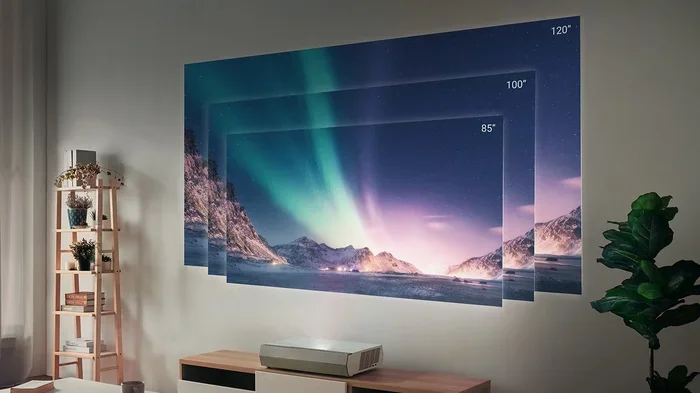
Grab a tape measure and figure out how far the projector will sit from the wall or screen. This distance determines the image size you’ll get. A projector placed close to the wall gives you a smaller image, while one placed farther away creates a bigger picture. If you have a small room, a short throw projector might be your best bet.
Check Your Room Lighting
Do you watch movies with the lights on or off? This matters a lot. Rooms with lots of natural light or bright overhead lighting need a brighter projector. Dark rooms give you more flexibility and let you save money on lower-lumen models.
Here’s a quick rule of thumb. For a completely dark room, 1,500 to 2,000 lumens works well. For a room with some ambient light, aim for 2,500 to 3,500 lumens. If your room gets a lot of sunlight during the day, you’ll want 4,000 lumens or more.
Consider Your Screen or Wall
You don’t necessarily need a fancy projector screen, but the surface you project on matters. A plain white wall works fine for most setups. Some people use a black cloth for projector setups to boost contrast and reduce glare. A dedicated projector screen gives you the best results, but it’s not required to get started.
Brightness: Lumens Explained Simply
Brightness is measured in lumens, and it’s one of the first specs you’ll see when shopping for a digital projector. But lumens can be confusing because manufacturers use different testing methods. Here’s what you actually need to know.
What Are Lumens?
Lumens measure how much light the projector outputs. Higher lumens mean a brighter image. But brighter isn’t always better. If your room is dark, a super bright projector can actually look harsh and wash out the colors.
ANSI Lumens vs. LED Lumens
Watch out for this. Some brands list “LED lumens” or “light source lumens” instead of “ANSI lumens.” ANSI lumens are the industry standard and give you a more accurate comparison. If a projector lists 3,000 LED lumens but only 1,500 ANSI lumens, that’s a big difference. Always look for ANSI lumens when comparing models.
Quick Brightness Guide
- Under 1,500 lumens: Best for dedicated home theaters with blackout curtains.
- 1,500 to 2,500 lumens: Works well in rooms with dimmed lighting.
- 2,500 to 3,500 lumens: Good for living rooms with some ambient light.
- Over 3,500 lumens: Ideal for bright rooms or spaces with windows.
Resolution: How Sharp Is Your Picture?
Resolution determines how much detail your projector can display. You’ve probably heard terms like 720p, 1080p, and 4K. Here’s what they mean in plain English.
720p vs. 1080p vs. 4K
720p is the entry-level option. It works fine for casual viewing and smaller screens. 1080p is the current sweet spot for most home theaters. It delivers crisp, detailed images at a reasonable price. 4K projectors offer incredible sharpness, but they cost significantly more.
For most people, a 1080p digital projector hits the perfect balance between quality and price. You’ll notice 4K improvements on very large screens, but for screens under 100 inches, 1080p looks fantastic.
Native vs. Supported Resolution
Some projectors claim to support 4K but actually use a 1080p chip with upscaling. This is called “supported” or “enhanced” 4K. Native 4K means the projector has a true 4K chip and delivers full resolution without upscaling. Native 4K projectors cost more but look noticeably better.
If you want the best picture quality without breaking the bank, look for a native 1080p projector. It will serve you well for years to come.
Throw Ratio and Placement Options
Throw ratio is one of the most overlooked specs when choosing a projector, but it’s incredibly important. It determines how far the projector needs to be from the screen to produce a specific image size.
What Is Throw Ratio?
Throw ratio is the distance from the projector to the screen divided by the screen width. A projector with a 1.5:1 throw ratio needs to be 1.5 feet away for every foot of screen width. A lower ratio means you can place the projector closer and still get a big image.
Short Throw vs. Long Throw
Short throw projectors sit close to the screen and produce large images from a short distance. They’re great for small rooms or if you want to avoid shadows on the screen. Long throw projectors need more space but are often more affordable and offer higher brightness.
If you’re short on space, look for a short throw projector with a ratio under 1.0. These can produce a 100-inch image from just a few feet away. This is especially useful if you have kids or pets who might walk in front of the projector.
You should also think about placement flexibility. Some projectors are ceiling-mounted, while others sit on a table. Make sure the model you choose supports your setup. If you’re mounting it off center, check whether the projector has keystone correction to fix any image distortion.
Connectivity and Compatibility
A projector is only as good as its ability to connect to your devices. You need to make sure it works with your TV box, gaming console, streaming stick, or laptop.
HDMI Ports
HDMI is the gold standard for projector connections. Look for at least two HDMI ports so you can connect multiple devices without unplugging and replugging cables. HDMI 2.0 or higher supports 4K content and higher refresh rates.
USB and Wireless Options
Some projectors include USB ports for media playback or firmware updates. Wireless connectivity is a nice bonus that lets you stream content without extra cables. A few models even support Bluetooth for audio output to speakers or soundbars.
One popular setup involves using a streaming device like a Roku. If you’re wondering whether this works with a projector, the answer is yes. You can absolutely use a Roku with a projector to access all your favorite streaming apps.
Audio Built In vs. External Speakers
Most built-in projector speakers are just okay. They work for casual viewing, but if you want a true theater experience, you’ll want to connect external speakers. Some projectors have a 3.5mm headphone jack or Bluetooth for easy audio connection.
Budget and Long-Term Costs
Projectors come in a wide range of prices, from a few hundred dollars to several thousand. Setting a realistic budget helps you narrow down your options quickly.
What You Can Expect at Different Price Points
- Under $300: Basic projectors with lower brightness and 720p resolution. Good for casual use and kids’ rooms.
- $300 to $700: Solid 1080p projectors with decent brightness. This is the sweet spot for most home theaters.
- $700 to $1,500: Higher brightness, better color accuracy, and smart features built in.
- Over $1,500: 4K projectors with premium image quality, laser light sources, and advanced features.
Don’t Forget Replacement Costs
The upfront cost is only part of the equation. Traditional lamp projectors need bulb replacements every 2,000 to 5,000 hours, which can cost $100 to $300 per bulb. LED projectors last much longer and don’t require frequent replacements. If you’re tired of changing bulbs, consider upgrading to an LED projector for lower maintenance costs.
Warranty and Support
Always check the warranty before buying. A good warranty gives you peace of mind and protects your investment. Look for at least a one-year warranty, and check whether the brand offers easy customer support if something goes wrong.
Common Mistakes to Avoid
Buying a projector is exciting, but it’s easy to make mistakes that cost you money and frustration. Here are some common pitfalls to watch out for.
Ignoring Room Lighting
Buying a low-lumen projector for a bright room is the fastest way to end up with a disappointing picture. Always match the brightness to your room conditions.
Focusing Only on Price
The cheapest projector might save you money upfront but cost you more in the long run with poor image quality and frequent replacements. Spend a little more for a reliable model.
Forgetting About Placement
Not every projector works in every room. Measure your space before you buy and make sure the throw ratio fits your setup. If you’re mounting it, confirm the ceiling height and distance work with the projector’s specs.
Skipping the Test
If possible, see the projector in action before you buy. Visit a store or watch review videos that show real-world image quality. Specs on paper don’t always tell the full story.
Expert Tips for the Best Experience
Once you’ve picked your digital projector, a few extra steps can make a huge difference in your viewing experience.
First, invest in a decent screen. You can use a white wall, but a proper projector screen improves brightness and color accuracy significantly. Second, position the projector at the correct height and distance. A projector mounted too high or too low can distort the image. If you’re setting it up off-center, you can mount your projector off center with the right adjustments and keystone correction.
Third, manage your cables neatly. Loose cables create trip hazards and look messy. Use cable ties or a cable management box to keep things tidy. Finally, clean the projector filter regularly. Dust buildup can cause overheating and shorten the lifespan of your device.
One last tip: don’t run the projector continuously for hours on end. Give it breaks to cool down, especially if you’re using a lamp-based model. This simple habit can extend your projector’s life significantly.
Conclusion
Choosing a digital projector for your home theater is all about understanding your room, your needs, and your budget. Start with the basics: brightness, resolution, and throw ratio. Then consider connectivity, placement, and long-term costs. Avoid the common mistakes that trip up first-time buyers, and you’ll end up with a setup you’ll love for years.
The best projector is the one that fits your specific situation. There’s no single “best” model for everyone. Take your time, do your research, and trust what you see and hear rather than just relying on numbers on a spec sheet. With the right projector, your living room can feel like a real cinema.
Now that you know what to look for, you’re ready to start shopping. Happy viewing, and enjoy your new home theater setup.
Frequently Asked Questions
What brightness do I need for a home theater projector?
For a dark room, 1,500 to 2,000 lumens is usually enough. If your room has some ambient light, go for 2,500 to 3,500 lumens. The key is matching brightness to your room lighting conditions so you get a clear, comfortable picture.
Is 1080p good enough for a projector?
Absolutely. 1080p is the sweet spot for most home theaters. It delivers sharp, detailed images at a reasonable price. You only need 4K if you have a very large screen or are a serious quality enthusiast.
Can I use a projector in a room with windows?
Yes, but you’ll need a brighter projector with at least 3,500 lumens to overcome the ambient light. You might also want to use blackout curtains or a projector screen with a high-gain surface to boost image quality.
How far should the projector be from the screen?
This depends on the throw ratio and the screen size you want. Check the projector’s specs for the recommended throw distance. Short throw projectors can produce a large image from just a few feet away, while long throw models need more space.
Do I need a special screen for a digital projector?
No, a plain white wall works fine for most setups. However, a dedicated projector screen improves brightness, color accuracy, and overall image quality. A black cloth for projector use can also help reduce glare and boost contrast in certain setups.
How long does a projector lamp last?
Traditional lamp projectors last about 2,000 to 5,000 hours before needing a replacement bulb. LED projectors can last 20,000 hours or more, which means years of use without changing a light source.
=== FOOTER ===
Looking for more projector tips? Check out our guide on using a Roku with a projector to get the most out of your streaming setup.