How Do I Add Bluetooth to My Existing Speakers at Home
Adding Bluetooth to your existing speakers is one of the easiest and most affordable ways to modernize your home audio setup. You can use a Bluetooth adapter or transmitter to turn any wired speaker into a wireless streaming device in minutes. This guide walks you through every method, from budget options to premium solutions, so you can enjoy wireless audio without buying new speakers.
There is something really satisfying about pulling out your phone and streaming music directly to your speakers without any wires getting in the way. If you have a solid set of existing speakers sitting around your home, you do not need to replace them just to enjoy wireless audio. Adding Bluetooth is a simple upgrade that brings your entire music library right to your speaker system.
Whether you have a vintage stereo, a desktop set of computer speakers, or a pair of bookshelf speakers, you can make them Bluetooth-capable with the right approach. This guide covers every method you can use, from budget-friendly adapters to dedicated transmitters. By the end, you will know exactly what to buy, how to set it up, and how to get the best sound quality from your wireless connection.
Key Takeaways
- Bluetooth adapters are the simplest and cheapest way to add wireless capability to most speaker systems.
- Bluetooth transmitters work great for speakers with aux inputs and give you more flexibility in placement.
- Older speakers can easily be upgraded with the right adapter, preserving your existing audio quality.
- Paired devices typically stay connected within a 30-foot range, making home use very convenient.
- Quick tips like keeping firmware updated and minimizing interference help maintain a stable connection.
- Common mistakes like ignoring codec support can hurt your audio quality, so choose wisely.
- You do not need to buy all new equipment — a small add-on device transforms your setup instantly.
📑 Table of Contents
- Why You Should Add Bluetooth to Your Existing Speakers
- Bluetooth Adapters: The Easiest Solution
- Bluetooth Transmitters for Your Speaker Setup
- Making Older Speakers Bluetooth-Ready
- Step-by-Step Setup Guide
- Maximizing Your Wireless Audio Experience
- Expert Insights on Adding Bluetooth to Speakers
- Final Thoughts
Why You Should Add Bluetooth to Your Existing Speakers
Most people already own perfectly good speakers that just lack wireless capability. Throwing them away and buying a new smart speaker set does not make sense financially or environmentally. Adding Bluetooth gives your old speakers a new lease on life and opens up a world of convenience.
The Joy of Wireless Audio
Wireless audio lets you control your music from across the room. You can pause, skip, or adjust volume right from your phone or tablet. There are no cables to trip over, no need to physically connect devices, and you can easily switch between different phones or tablets whenever you want. It is a small upgrade that changes how you listen to music every single day.
What You Need Before You Start
Before you dive in, check what kind of inputs your speakers have. Most older speakers use a standard 3.5mm aux jack or RCA inputs. Some newer models may have USB ports. Knowing your speaker’s input options helps you pick the right Bluetooth solution. You will also want to make sure your phone or music source supports Bluetooth pairing, which virtually all modern devices do today.
Bluetooth Adapters: The Easiest Solution
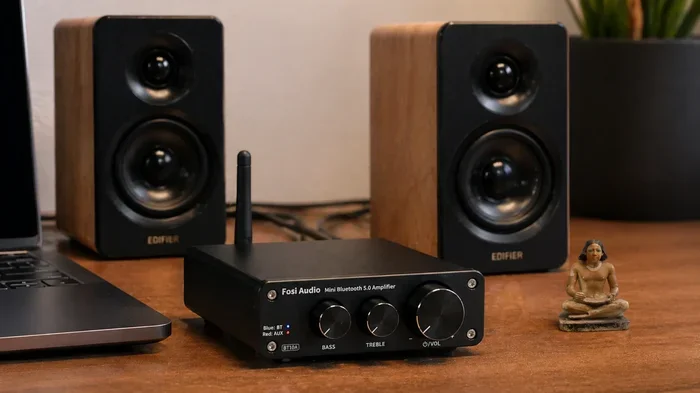
A Bluetooth adapter is the simplest way to add wireless capability to your speakers. These small plug-and-play devices connect to your speaker’s audio input and pair with your phone or tablet over Bluetooth. They are affordable, easy to set up, and work with almost any speaker system that has a standard audio input.
How Bluetooth Adapters Work
A Bluetooth adapter receives the wireless audio signal from your phone and converts it into an analog audio signal that your speakers can play. You plug the adapter into your speaker’s aux port or RCA input, power it on, and pair it with your device. The whole process usually takes less than two minutes, and once paired, the adapter stays connected automatically.
Most adapters use Bluetooth 5.0 or newer, which offers a stable connection and a range of about 30 to 50 feet. This means you can leave your phone in another room and still stream music without interruption. Some adapters also support aptX or LDAC codecs, which improve audio quality over standard Bluetooth streaming.
Choosing the Right Adapter
Not all Bluetooth adapters are the same, and picking the right one makes a big difference. Here are the key factors to consider:
- Bluetooth version: Look for Bluetooth 5.0 or higher for the best range and stability.
- Codec support: Adapters that support aptX or AAC deliver better sound quality than basic SBC-only models.
- Input type: Make sure the adapter matches your speaker’s input — 3.5mm, RCA, or USB.
- Power source: Some adapters plug into a wall outlet, while others draw power from the USB port.
- Price range: Good adapters start around $15 and go up to $60 for premium models.
If you want to explore how adapters work with other devices, you can check how to use a Bluetooth adapter on my TV — the same principles apply to speakers.
Bluetooth Transmitters for Your Speaker Setup
A Bluetooth transmitter is another excellent option for adding wireless capability to your speakers. While adapters plug into the speaker side, transmitters connect to the audio source instead. This gives you more flexibility, especially if your speaker system does not have a convenient input for an adapter.
Setting Up a Bluetooth Transmitter
Setting up a Bluetooth transmitter is straightforward. You plug the transmitter into the audio output of your source device — this could be a TV, computer, or music player. Then you pair the transmitter with your Bluetooth speaker or use it to send audio wirelessly to a receiver connected to your speakers.
One popular use case is connecting a Bluetooth transmitter to a car audio system. If you have ever wondered how to make your car radio Bluetooth-capable, a transmitter is the go-to solution. You can learn more about using a Bluetooth transmitter for my car in a related guide on our site.
Transmitter vs Adapter: What Is the Difference?
People often confuse Bluetooth transmitters and adapters, but they serve different purposes. A Bluetooth adapter plugs into the speaker and receives wireless audio from a source device. A Bluetooth transmitter plugs into the source device and sends wireless audio to a speaker or receiver. The choice depends on where you have available inputs and what you want to achieve.
For most home speaker setups, a Bluetooth adapter is the simpler choice. You just plug it into the speaker and pair your phone. A transmitter works better when you want to send audio from one source to multiple Bluetooth speakers or when your speaker lacks a convenient adapter input.
Making Older Speakers Bluetooth-Ready
Older speakers, including vintage stereo systems and classic bookshelf models, can absolutely be upgraded with Bluetooth. The process is the same whether you have a 30-year-old stereo or a five-year-old set of computer speakers. The key is finding the right adapter or transmitter that matches your speaker’s input type.
Retrofitting Classic Speaker Systems
Retrofitting a classic speaker system is a fun weekend project. Start by identifying the audio input on your speaker. Most classic systems use RCA inputs, which look as red and white circular ports on the back of the unit. You can buy a Bluetooth adapter with RCA outputs that plugs right into those ports.
If your classic system only has a 3.5mm input, you are in luck. Nearly every Bluetooth adapter supports a 3.5mm connection. The adapter is small enough to hide behind or beside the speaker, keeping the classic look intact while adding modern wireless capability.
For those with older Bose systems specifically, there are dedicated guides on making my old Bose speakers Bluetooth that go into more detail on compatible adapters and setup tips.
Tips for Preserving Audio Quality
One common concern when adding Bluetooth to older speakers is whether the sound quality will suffer. The good news is that modern Bluetooth codecs deliver excellent audio quality. To get the best results, follow these tips:
- Choose an adapter that supports aptX or AAC codecs for higher fidelity audio.
- Keep your speaker and source device close together during initial pairing for a strong connection.
- Avoid placing the adapter near Wi-Fi routers or microwaves, which can cause interference.
- Use a high-quality aux cable between the adapter and speaker if possible.
- Update the adapter firmware if the manufacturer provides updates for better performance.
If you are curious about how Bluetooth stereo systems work overall, you might also enjoy our guide on how to turn my stereo into Bluetooth, which covers additional methods for stereo setups.
Step-by-Step Setup Guide
Now that you know your options, here is a detailed walkthrough for setting up Bluetooth on your existing speakers. Follow these steps and you will be streaming wirelessly in no time.
Pairing Your Devices
Start by plugging your Bluetooth adapter or transmitter into your speaker’s audio input. Power on the adapter and put it into pairing mode. On your phone or tablet, open the Bluetooth settings and look for the adapter in the list of available devices. Tap on it to connect.
Once paired, play a song on your phone. You should hear it coming through your speakers immediately. If you do not hear anything, check the volume on both your phone and your speaker. Sometimes the adapter needs a few seconds to establish the connection fully.
Most adapters remember your device after the first pairing, so you only need to do this setup once. The next time you turn on the adapter, it will automatically reconnect to your phone.
Troubleshooting Common Issues
Sometimes things do not work perfectly the first time. Here are common issues and how to fix them:
- No sound coming through: Check that the adapter is plugged into the correct input and that the speaker volume is turned up.
- Intermittent connection: Move your phone closer to the adapter and remove any obstructions between the devices.
- Delay or lag in audio: This is normal with some Bluetooth connections. Switching to an adapter that supports aptX Low Latency can help.
- Device will not pair: Turn off Bluetooth on your phone, wait 10 seconds, and turn it back on. Then try pairing again.
- Adapter keeps disconnecting: Make sure the adapter is fully charged or plugged into a power source.
Maximizing Your Wireless Audio Experience
Once your Bluetooth setup is working, there are a few things you can do to get the most out of it. These small adjustments make a big difference in sound quality and daily convenience.
Best Practices for Better Sound
Position your adapter near the speaker for the strongest signal. If you are using a transmitter, keep it away from other electronic devices that might cause interference. Using high-quality audio files or streaming at a higher bitrate also helps your speakers sound their best over a Bluetooth connection.
Consider the placement of your speakers too. Even the best Bluetooth setup will sound weak if the speakers are tucked behind furniture or pressed against a wall. Give your speakers some breathing room and point them toward the listening area for the fullest sound.
Keeping Your Connection Stable
A stable Bluetooth connection comes down to a few simple habits. Keep your source device within range of the adapter or transmitter. Avoid crowded Wi-Fi environments when possible, as 2.4 GHz Wi-Fi signals can interfere with Bluetooth. If you have multiple Bluetooth devices in your home, make sure your speaker adapter is not trying to connect to the wrong one.
Regularly check for firmware updates for your Bluetooth adapter or transmitter. Manufacturers often release updates that improve connectivity and audio quality. A quick update can solve problems you did not even know you had.
Quick Tips
- Keep your Bluetooth adapter firmware updated for the best performance.
- Use a dedicated Bluetooth adapter for each speaker if you have a multi-speaker setup.
- Turn off Bluetooth on devices you are not actively using to reduce interference.
- Store your adapter in a cool, dry place to extend its lifespan.
- Label your paired devices so you can quickly identify which one is connected.
Common Mistakes to Avoid
Even with a simple setup, people make mistakes that hurt their experience. Avoid these common pitfalls:
- Buying the wrong input type: Double-check your speaker’s input before purchasing an adapter.
- Ignoring codec support: A cheap adapter without codec support will deliver noticeably worse audio quality.
- Placing the adapter too far from the speaker: Keep the adapter as close to the speaker as possible for the best signal.
- Not updating firmware: Firmware updates fix bugs and improve performance, so always check for them.
- Expecting perfect audiophile quality: Bluetooth adds a small amount of compression. For casual listening, the difference is barely noticeable.
Expert Insights on Adding Bluetooth to Speakers
From an audio engineering perspective, adding Bluetooth to existing speakers is one of the smartest upgrades you can make. Modern Bluetooth codecs like aptX HD and LDAC deliver audio quality that is nearly indistinguishable from a wired connection for most listeners. The convenience of wireless streaming far outweighs any tiny loss in audio fidelity for everyday use.
Audio experts also recommend looking for adapters that support multiple codecs. This gives you flexibility to connect to different devices and get the best possible sound from each one. A good Bluetooth adapter is a long-term investment that enhances your entire listening experience without replacing a single speaker.
If you are planning to add Bluetooth to a car audio system, the same principles apply. You can find dedicated solutions for vehicles as well. Check out our guide on how to make my car radio Bluetooth capable for more details on automotive setups.
Final Thoughts
Adding Bluetooth to your existing speakers is one of the most rewarding and budget-friendly tech upgrades you can do at home. Whether you choose a Bluetooth adapter or a transmitter, the process is simple, fast, and delivers immediate results. You get wireless streaming, greater convenience, and a modern audio experience without spending money on a whole new speaker system.
The key is to pick the right device for your speaker’s input type and your listening needs. Consider codec support, range, and build quality when making your choice. Once set up, you will wonder how you ever listened to music any other way. Your existing speakers deserve this upgrade, and now they have it.
Take a few minutes today to check your speaker inputs and find the perfect Bluetooth adapter. You will be streaming your favorite playlists wirelessly before you know it. It is a small change that makes a big difference in how you enjoy music at home every single day.
Frequently Asked Questions
Can I add Bluetooth to any speaker?
Most speakers with a standard audio input like a 3.5mm jack or RCA ports can be upgraded with a Bluetooth adapter or transmitter. If your speaker has no audio input at all, adding Bluetooth is not possible without modifying the internal electronics, which is not recommended for most users.
Does adding Bluetooth reduce audio quality?
Modern Bluetooth codecs like aptX and LDAC deliver excellent audio quality that is very close to wired connections. You may notice a slight difference compared to a direct wired connection, but for everyday listening, the quality is more than good enough. The convenience of wireless streaming far outweighs any minor quality difference.
How far can I move away from my speakers with Bluetooth?
Most Bluetooth adapters and transmitters have a range of 30 to 50 feet in open spaces. Walls and obstacles can reduce this range. For home use, this distance is more than enough to move around your living room, kitchen, or bedroom while staying connected.
Do I need to buy a new speaker to get Bluetooth?
Absolutely not. You can add Bluetooth to your existing speakers with a simple adapter or transmitter. This saves you money and keeps your current speakers out of the landfill. It is a much smarter and more affordable approach than buying an entirely new wireless speaker system.
How long does it take to set up a Bluetooth adapter?
The setup process typically takes about two to five minutes. You plug in the adapter, put it in pairing mode, connect from your phone, and you are done. Most adapters remember your device after the first pairing, so future connections are instant.
Can I connect multiple speakers to one Bluetooth adapter?
A single Bluetooth adapter connects to one speaker at a time. If you want to stream to multiple speakers, you will need a separate adapter for each speaker or a multi-point Bluetooth transmitter. Some advanced adapters also support speaker grouping, but this depends on the model you choose.
=== CONCLUSION ===
Adding Bluetooth to your existing speakers is a simple, affordable upgrade that transforms how you listen to music at home. Whether you pick a Bluetooth adapter or a transmitter, you can have wireless streaming working in just a few minutes. You do not need to be tech-savvy, and you do not need expensive equipment to get great results.
Start by checking your speaker inputs, pick the right adapter for your setup, and follow the simple pairing steps in this guide. You will be enjoying wireless audio from your favorite speakers in no time. The upgrade is well worth the small investment, and your listening experience will never be the same.