How Do I Add Bluetooth To My Old Car With These Tips
Adding Bluetooth to your old car is easier than you think and doesn’t require a costly mechanic. You can use a Bluetooth transmitter, upgrade your car radio, or install a Bluetooth adapter to enjoy wireless music streaming and hands-free calling. This guide walks you through every option with clear, step-by-step advice.
Do you love your old car but hate that it lacks modern features like wireless music streaming? You are not alone. Many drivers hold onto their vehicles for years, and those older models often come with outdated stereos that simply don’t connect to smartphones. The good news is that adding Bluetooth to an old car is one of the easiest and most affordable upgrades you can make. Whether you want to stream playlists, take calls hands-free, or just ditch the tangled aux cords, there is a solution for you. In this guide, we will walk you through every method, from budget-friendly transmitters to full stereo replacements, so you can get your car connected in no time.
The process is simpler than most people expect. You do not need to be a tech expert or spend hundreds of dollars. With the right approach, your old car can feel almost brand new when it comes to audio connectivity. Let us dive into the best ways to make it happen.
Key Takeaways
- Bluetooth transmitters are the cheapest and easiest way to add wireless connectivity to any old car stereo.
- Upgrading your car radio to a Bluetooth-compatible model gives you the best sound quality and features.
- DIY Bluetooth kits let you retrofit your existing system without replacing the whole unit.
- Hands-free calling becomes possible once you add Bluetooth, improving safety on the road.
- Multiple budget options exist ranging from under $20 to around $150 for full upgrades.
- Compatibility checks matter before buying any device for your specific car model.
- Installation is simple for most options and can be done in under 30 minutes at home.
📑 Table of Contents
Why Add Bluetooth to Your Old Car?
Before we get into the how, let us quickly talk about the why. There are several compelling reasons to add wireless connectivity to an older vehicle. First, it makes your daily commute more enjoyable. You can stream music from Spotify, Apple Music, or any app on your phone without wires. Second, it improves safety. Hands-free calling lets you stay connected without taking your eyes off the road. Third, it increases the resale value of your car. Buyers love modern features, and a Bluetooth-ready stereo is a big selling point.
Here are the key benefits in a quick list:
- Wireless music streaming from any smartphone
- Hands-free calling for safer driving
- No more tangled cables or aux cord hassle
- Better sound quality with modern Bluetooth codecs
- Easy phone pairing with most devices
- Affordable upgrade compared to buying a new car
Now that you know why this upgrade matters, let us explore the different methods available.
Method 1: Use a Bluetooth Transmitter for Your Car
This is by far the simplest and most popular option. A Bluetooth transmitter for car plugs into your existing stereo and sends audio wirelessly from your phone. It is like giving your old stereo Bluetooth powers without replacing a single part.
How Does a Bluetooth Transmitter Work?
The device connects to your car stereo through an AUX input, FM frequency, or even a cassette adapter if your car still has one. It receives audio from your phone over Bluetooth and sends it to your car speakers. Setup usually takes less than five minutes.
Here is what you need to do:
- Plug the transmitter into your car’s power outlet or AUX port.
- Pair your phone with the transmitter through Bluetooth settings.
- Tune your car radio to the transmitter’s FM frequency (if using FM mode).
- Start playing music on your phone and enjoy.
Best Bluetooth Transmitter Features to Look For
Not all transmitters are created equal. When shopping, look for these features:
- Multipoint pairing so two phones can connect at once
- Built-in microphone for hands-free calls
- USB charging port to charge your phone while driving
- Wide frequency range to avoid radio interference
- Quick reconnect so it pairs automatically with your phone
Most quality transmitters cost between $15 and $50. They are a fantastic budget option that delivers real results. If you want to learn more about using one specifically, check out our guide on using a Bluetooth transmitter for your car.
Method 2: Make Your Car Radio Bluetooth Capable
If you want a more permanent and higher-quality solution, consider making your car radio Bluetooth capable. This involves either replacing the head unit or adding an internal Bluetooth module. It is a bigger project than a transmitter, but the results are worth it.
Option A: Replace the Head Unit
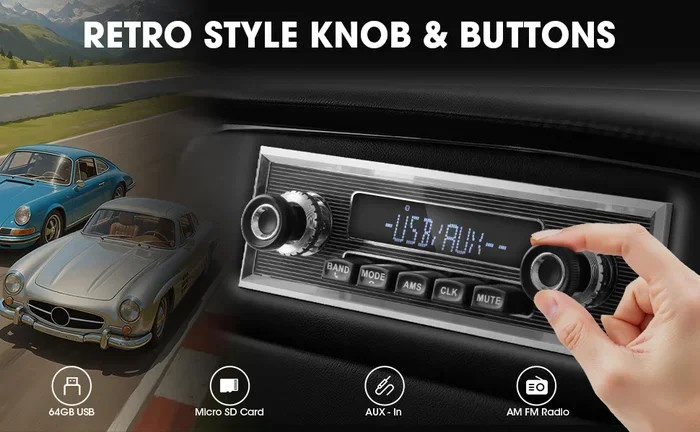
Swapping out your old stereo for a new Bluetooth-compatible head unit is the gold standard. Modern units offer crystal-clear audio, touchscreen controls, Apple CarPlay, Android Auto, and of course, seamless Bluetooth connectivity. The cost ranges from $100 to $300 for the unit, plus installation if you do not DIY it.
Here are the steps involved:
- Check your car’s dashboard size and wiring harness
- Purchase a compatible replacement head unit
- Remove the old stereo using a removal kit
- Wire the new unit into your car’s electrical system
- Pair your phone and test all features
This option works best if your current stereo is truly outdated or broken. For a detailed walkthrough on this process, see our article on making your car radio Bluetooth capable.
Option B: Add a Bluetooth Audio Module
Some car audio shops can install a small Bluetooth receiver module inside your dashboard. This module connects to your existing stereo’s wiring and adds Bluetooth functionality without replacing the whole unit. It is a middle-ground solution that keeps your original stereo looking intact.
The pros of this approach include:
- Clean factory look preserved in your dashboard
- Better sound quality than FM transmitters
- No extra cables visible in your car
- Built-in amplification for louder, clearer audio
Method 3: Turn Your Car Radio Into Bluetooth
Another popular approach is to turn your car radio into Bluetooth using an adapter or retrofit kit. This method works well for cars that have a standard stereo system but no wireless capabilities. You essentially add a Bluetooth layer on top of your existing setup.
There are a few ways to accomplish this:
- Bluetooth FM adapter that broadcasts to a vacant FM frequency
- Bluetooth AUX adapter that plugs directly into the aux port
- Bluetooth cassette adapter for cars with tape decks
- Bluetooth SD card adapter for stereos with SD card slots
Each method has its strengths. FM adapters are the most universal but can suffer from slight audio quality loss. AUX adapters provide the best sound but require an aux input on your stereo. For a deeper look at converting your specific setup, read our guide on turning your car radio into Bluetooth.
Quick Comparison of Methods
| Method | Cost Range | Sound Quality | Installation Difficulty | Best For |
|---|---|---|---|---|
| Bluetooth Transmitter | $15 – $50 | Good | Very Easy | Budget upgrades |
| Head Unit Replacement | $100 – $300 | Excellent | Moderate | Full stereo overhaul |
| Bluetooth Module Install | $50 – $150 | Very Good | Moderate | Keeping factory look |
| FM Adapter | $10 – $30 | Fair | Very Easy | Quick temporary fix |
| AUX Adapter | $15 – $40 | Good | Easy | Cars with aux input |
Step-by-Step Installation Guide
No matter which method you choose, there are some universal steps that apply. Let us walk through a general installation process that covers most scenarios.
Step 1: Check Your Car’s Compatibility
Before buying anything, look at your current stereo. Does it have an AUX input? What kind of connection ports does it offer? If your car has an AUX port, an AUX Bluetooth adapter is your simplest path. If it only has FM radio, a Bluetooth FM transmitter makes the most sense. Taking five minutes to check now saves you from buying the wrong product later.
Step 2: Choose Your Device
Once you know what your car supports, pick the right device. Read reviews, compare features, and set a budget. Remember that the cheapest option is not always the worst, and the most expensive is not always the best for your needs. Focus on what matters most to you, whether that is sound quality, call clarity, or ease of use.
Step 3: Install and Pair
Follow the manufacturer’s instructions for installation. Most Bluetooth transmitters and adapters plug and play. For head unit replacements, you may need basic tools and a wiring diagram specific to your car model. Always disconnect your car battery before working on electrical connections for safety.
After installation, pair your phone by going to your Bluetooth settings, finding the device name, and entering the PIN if prompted. Most modern devices use simple PINs like 0000 or 1234.
Step 4: Test Everything
Play music, make a test call, and check the volume levels. Make sure the audio cuts out properly when you end a call. Test the range by walking around your car with your phone. A thorough test before hitting the road ensures everything works smoothly.
Common Mistakes to Avoid
Adding Bluetooth to your old car is straightforward, but some common pitfalls can cause frustration. Here are mistakes to watch out for:
- Buying without checking compatibility. Not all transmitters work with all stereos. Always verify your car’s input options first.
- Choosing the cheapest transmitter. Ultra-budget models often have poor range, static, and weak microphones. Spending a little more gets you much better performance.
- Ignoring firmware updates. Some Bluetooth devices need firmware updates for optimal performance. Check the manufacturer’s website after purchase.
- Placing the transmitter poorly. If you use an FM transmitter, place it close to your radio antenna for the clearest signal. Avoid hiding it deep in the center console.
- Forgetting to charge the device. Many Bluetooth transmitters run on battery or USB power. A dead transmitter means no connectivity. Keep it charged.
Expert Tips for the Best Bluetooth Experience
Want to get the most out of your new Bluetooth setup? Here are some pro tips from experienced car audio enthusiasts:
- Keep your phone close. Bluetooth works best within 30 feet. Keep your phone in a cupholder or mount near the stereo for the strongest connection.
- Clear paired devices regularly. If your transmitter connects to old devices automatically, clear the pairing list and start fresh.
- Use high-quality audio files. Bluetooth streaming works best with files encoded at 320kbps or higher for the clearest sound.
- Update your phone’s Bluetooth drivers. Occasionally, phone software updates improve Bluetooth performance and stability.
- Consider a mount and charger combo. A phone mount with a built-in USB charger keeps your device powered and within range while driving.
These small adjustments make a big difference in day-to-day use. Your Bluetooth setup will feel seamless and reliable with just a little fine-tuning.
Final Thoughts
Adding Bluetooth to your old car is one of the smartest upgrades you can make. It transforms your driving experience, keeps you connected safely, and brings your vehicle into the modern era. Whether you choose a simple Bluetooth transmitter, a full head unit replacement, or a Bluetooth adapter for your existing stereo, the process is well within reach for any car owner.
The best part is that you can start enjoying wireless music streaming and hands-free calling today. You do not need a mechanic, a big budget, or advanced technical skills. Pick the method that fits your car and your needs, follow the steps in this guide, and you will be streaming in no time. Your old car deserves modern convenience, and now it can have it.
Frequently Asked Questions
Can I add Bluetooth to any old car?
Yes, you can add Bluetooth to virtually any old car. The method depends on what inputs your current stereo has. Most cars made after 2005 have an AUX port, which makes adding Bluetooth very simple with a transmitter or adapter. Even older cars with cassette decks or only FM radio can be upgraded using the right adapter.
How much does it cost to add Bluetooth to a car?
The cost ranges from about $15 for a basic Bluetooth FM transmitter to $300 or more for a full head unit replacement. Most drivers find that a $20 to $50 Bluetooth transmitter offers the best value for money. A mid-range Bluetooth audio module installation typically costs between $50 and $150.
Will adding Bluetooth affect my car’s sound quality?
It depends on the method you choose. Bluetooth FM transmitters may introduce slight static or audio compression. AUX Bluetooth adapters and head unit replacements provide much better sound quality. For the best audio experience, a Bluetooth-compatible head unit or a dedicated Bluetooth audio module is the way to go.
Can I make hands-free calls with a Bluetooth car transmitter?
Yes, most Bluetooth car transmitters come with a built-in microphone that supports hands-free calling. You can answer calls directly through the transmitter and use your car speakers to hear the caller. The microphone quality varies by model, so look for one with noise cancellation for clearer calls.
How long does it take to install a Bluetooth device in a car?
A Bluetooth transmitter or AUX adapter takes about 5 to 10 minutes to set up. Replacing a head unit may take 30 minutes to an hour if you are comfortable with basic car electronics. Installing a Bluetooth module through a professional shop typically takes about an hour. Most DIYers can complete the job without any special tools.
Is Bluetooth safe to use while driving?
Yes, Bluetooth is designed to be a safe driving tool. It allows hands-free calling and voice control of your music, which keeps your hands on the wheel and eyes on the road. Many countries and states now require hands-free devices for phone use while driving, making Bluetooth a legal and smart choice.