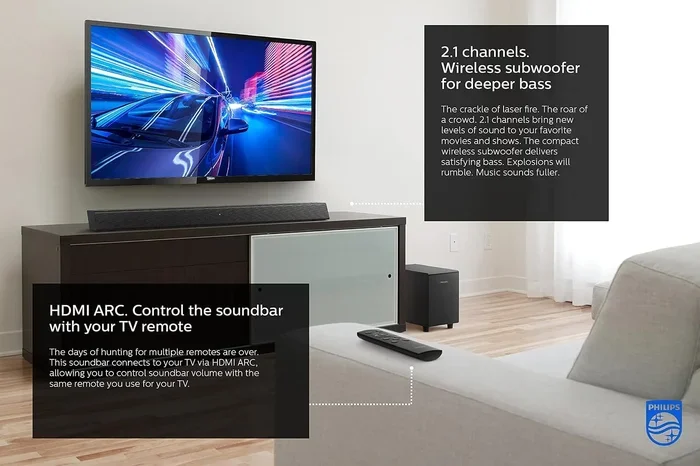
Can You Connect A Soundbar To A Tv Wirelessly Easily
Yes, you can connect a soundbar to a TV wirelessly using Bluetooth, Wi-Fi, or built-in wireless protocols. This guide covers every method you need, from pairing a wireless soundbar to fixing common connection issues. You will learn how to enjoy wireless audio without messy cables in under 10 minutes.
Have you ever watched a movie on your TV and thought the sound just was not good enough? You are not alone. Many people upgrade their TV picture but ignore the audio side of things. That is where a soundbar comes in. A soundbar can completely transform your viewing experience with deeper bass, clearer dialogue, and richer overall sound.
But here is the big question. Can you connect a soundbar to a TV wirelessly? The short answer is yes. You absolutely can. In fact, wireless connections have become the go-to method for most people. No more crawling behind the TV to plug in cables. No more tangled wires. Just a simple, clean setup that delivers great wireless audio straight to your ears.
In this article, we will walk you through every way to connect a soundbar to your TV without wires. We will cover Bluetooth, Wi-Fi, and even some clever workarounds for older TVs. By the end, you will know exactly how to set up your wireless soundbar and get the best possible sound from your home entertainment system.
Key Takeaways
- Bluetooth is the most common wireless method: Most modern soundbars and TVs support Bluetooth pairing out of the box.
- Wi-Fi streaming offers better range and quality: Wi-Fi connected soundbars can stream music and handle multi-room audio setups.
- HDMI ARC and optical are wired alternatives: These deliver the best audio quality but require a cable connection.
- Wireless adapters solve compatibility issues: A simple Bluetooth transmitter can make older TVs work with wireless soundbars.
- Audio lag is a common problem: You can fix it by adjusting settings on your TV or using low-latency modes.
- Setup is simple and fast: Most wireless connections take less than 10 minutes to complete.
📑 Table of Contents
- Why Go Wireless With Your Soundbar Setup?
- How to Connect A Soundbar To A TV Wirelessly
- Comparing Wireless Soundbar Connection Methods
- Common Problems and How to Fix Them
- Expert Tips for the Best Wireless Audio Experience
- Quick Tips for a Smooth Setup
- Is a Wireless Connection Right for You?
- Conclusion
Why Go Wireless With Your Soundbar Setup?
Before we dive into the how, let us talk about the why. There are many reasons people choose a wireless connection over a wired one. Understanding these benefits will help you make the best choice for your setup.
Cleaner Aesthetics and Less Clutter
A wireless setup looks amazing. Your TV stand stays neat and tidy. There are no cables running across the floor or tangled behind your entertainment center. This is one of the biggest reasons people choose Bluetooth soundbar options. You get a clean, minimalist look that makes your living room feel more spacious.
Easy Installation
Setting up a wireless soundbar is incredibly simple. Most systems pair in just a few steps. You do not need any technical skills or special tools. If you can connect your phone to a speaker, you can connect a soundbar to your TV. The whole process usually takes less than 10 minutes.
Flexibility and Placement Options
With a wired connection, your soundbar must sit close to your TV. A wireless setup gives you freedom. You can place the soundbar on a different shelf, mount it on the wall, or even move it to another room. This flexibility is a huge advantage for people who like to rearrange their furniture or rent their homes.
Future-Proofing Your Entertainment System
Wireless technology keeps getting better. Newer wireless soundbar models support the latest Bluetooth and Wi-Fi standards. This means better range, higher quality audio, and fewer connection drops. Investing in a wireless setup now means your system will stay relevant for years to come.
How to Connect A Soundbar To A TV Wirelessly
Now let us get into the actual setup. There are several ways to establish a wireless connection between your soundbar and TV. Each method has its own strengths. Let us go through them one by one.
Method 1: Bluetooth Connection
Bluetooth is the most popular way to connect a soundbar to a TV wirelessly. Almost every modern soundbar and smart TV supports Bluetooth. The process is straightforward and works with most devices.
Here is how to do it step by step:
- Turn on your soundbar and put it in pairing mode. Most soundbars have a dedicated Bluetooth button or a Bluetooth option in their settings menu.
- Go to your TV settings and find the Bluetooth or Audio Output section.
- Select the option to search for available devices.
- Choose your soundbar from the list of detected devices.
- Wait for the pairing to complete. You should hear a confirmation sound from the soundbar.
Once paired, your TV audio will stream directly to the soundbar. You can control the volume using either the TV remote or the soundbar remote. Some models also support audio streaming from your phone, so you can play music through the soundbar even when the TV is off.
Method 2: Wi-Fi Connection
Wi-Fi is another excellent option for a wireless soundbar setup. While Bluetooth is great for short-range connections, Wi-Fi offers a longer range and more stable performance. Many premium soundbars now include built-in Wi-Fi for streaming and multi-room audio.
To connect via Wi-Fi:
- Make sure both your TV and soundbar are connected to the same Wi-Fi network.
- Open the soundbar settings app on your phone or use the soundbar remote to access network settings.
- Select your Wi-Fi network and enter the password.
- On your TV, go to the audio output settings and select the soundbar as the output device.
Wi-Fi connections are ideal for people who want to stream music from services like Spotify or Apple Music through their soundbar. The audio quality is generally better than Bluetooth because Wi-Fi can handle more data. This means richer sound and less compression.
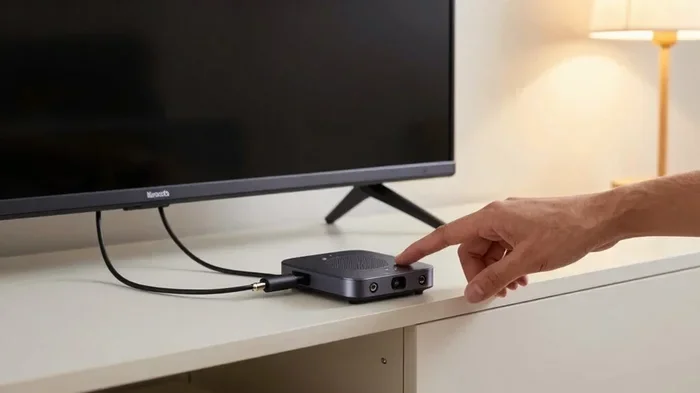
Method 3: Using a Wireless Audio Transmitter
What if your TV does not have Bluetooth or Wi-Fi built in? Do not worry. You can still enjoy a wireless connection with a simple accessory. A wireless audio transmitter plugs into your TV and sends the audio signal to your soundbar.
Here is how it works:
- Plug the transmitter into your TV audio output (usually optical or 3.5mm jack).
- Pair the transmitter with your soundbar using Bluetooth.
- The transmitter sends audio to the soundbar without any wires between them.
This method is perfect for older TVs or for situations where you want more flexibility. Wireless transmitters are affordable and widely available. They are a great solution if you want to add wireless capabilities to an older setup.
Comparing Wireless Soundbar Connection Methods
Not all wireless connections are the same. Each method has different strengths and weaknesses. Let us compare them so you can choose the best option for your needs.
| Feature | Bluetooth | Wi-Fi | Wireless Transmitter |
|---|---|---|---|
| Audio Quality | Good | Excellent | Good |
| Range | 30 feet | Whole home | 30-50 feet |
| Setup Difficulty | Very Easy | Easy | Easy |
| Latency | Moderate | Low | Moderate |
| Cost | Free | Free | $20-$50 |
| Multi-Room Support | No | Yes | No |
| Works With Older TVs | Only if TV has BT | Only if TV has Wi-Fi | Yes |
As you can see, each method has its place. Bluetooth is the easiest and most accessible. Wi-Fi delivers the best quality and range. A wireless transmitter is the most versatile option for older TVs.
Common Problems and How to Fix Them
Wireless connections are generally reliable, but sometimes issues pop up. Here are the most common problems people face when setting up a wireless soundbar and how to solve them.
Audio Lag or Delay
Audio lag is when the sound does not match the picture on screen. You see lips move, but the voice comes a split second later. This is one of the most frustrating issues with wireless audio. The good news is it is usually easy to fix.
Try these solutions:
- Enable low-latency mode on your soundbar if it has one. Many modern soundbars have a game mode or low-latency setting that reduces delay.
- Adjust the audio sync in your TV settings. Most smart TVs have an audio delay or sync adjustment option.
- Move closer to the soundbar if you are using Bluetooth. Distance can increase latency.
- Use Wi-Fi instead of Bluetooth for a more stable and lower-latency connection.
Connection Drops Frequently
If your soundbar keeps disconnecting, it can be very annoying. This usually happens because of interference or distance. Here is what you can do:
- Make sure nothing is blocking the signal between the TV and soundbar.
- Move other wireless devices away from the setup. Microwaves, baby monitors, and other Bluetooth devices can cause interference.
- Update the firmware on both your TV and soundbar. Manufacturers often release updates that fix connection issues.
- If you are using Wi-Fi, make sure your router is close enough to both devices.
No Sound After Pairing
Sometimes the connection works but you still hear no sound. This is usually a simple settings issue. Check that your TV audio output is set to the soundbar. Also make sure the soundbar volume is not muted or turned all the way down. A quick restart of both devices often solves this problem too.
Expert Tips for the Best Wireless Audio Experience
Want to get the most out of your wireless soundbar setup? Here are some expert tips that make a real difference.
Place Your Soundbar Correctly
Even with a perfect wireless connection, placement matters. Place your soundbar directly in front of your listening position. If it has a front-facing sound output, make sure nothing is blocking the speakers. A clear line of sight between the soundbar and your listening area gives you the best audio quality.
Keep Firmware Updated
Manufacturers regularly release firmware updates that improve performance and fix bugs. Check for updates every few months. Most soundbars have an app that makes this process easy. Keeping your devices updated ensures the best wireless audio experience.
Use the Right Audio Format
For the best sound, make sure your TV is set to output the right audio format. Dolby Digital and Dolby Atmos are popular formats that deliver immersive sound. Check your TV audio settings and select the highest quality format your soundbar supports.
Consider a Soundbar With Built-In Voice Assistants
Many modern soundbars come with Alexa, Google Assistant, or Siri built in. This adds a layer of convenience to your wireless setup. You can control your soundbar with voice commands, adjust volume, or even play music without touching a remote.
Quick Tips for a Smooth Setup
- Restart both devices before pairing. This clears any temporary glitches and ensures a smooth connection.
- Keep your devices close during the initial pairing process. Once paired, you can move them further apart.
- Check your TV manual for specific Bluetooth or Wi-Fi settings. Every TV brand has a slightly different menu layout.
- Use the soundbar remote for volume control after pairing. It is more convenient than using the TV remote.
- Test with different content after setup. Try a movie, music, and a TV show to make sure everything sounds right.
Is a Wireless Connection Right for You?
A wireless connection is perfect for most people. It is simple, clean, and delivers great sound. However, there are situations where a wired connection might still be the better choice.
If you are a serious audiophile who demands the absolute best audio quality, a wired connection through HDMI ARC or optical cable will give you slightly better sound. Wireless compression does reduce audio quality a small amount. For casual viewers and most home setups though, the difference is barely noticeable.
If you have a very large living room or plan to place your soundbar far from the TV, Wi-Fi is the better wireless option. Bluetooth has a limited range of about 30 feet. Wi-Fi can reach across your entire home without any loss in quality.
For most people, a wireless soundbar setup is the way to go. It is fast, easy, and delivers excellent sound. You will enjoy your movies, shows, and music so much more with a quality soundbar connected wirelessly to your TV.
Conclusion
Can you connect a soundbar to a TV wirelessly? Absolutely. You have several great options, from Bluetooth to Wi-Fi to wireless transmitters. Each method is simple to set up and delivers excellent results. A wireless connection gives you a cleaner space, easier setup, and more flexibility in how you arrange your entertainment area.
Take the time to choose the method that works best for your TV and soundbar. Follow the setup steps we shared, and you will be enjoying richer, fuller sound in no time. Do not let cable clutter or setup fears hold you back. The world of wireless audio is waiting for you, and the experience is well worth it.
Start your wireless soundbar setup today. You will wonder how you ever watched TV without it.