How Do I Close My Classmates Account Complete Guide
Closing your Classmates account is simple when you follow the right steps. This guide walks you through account deletion, subscription cancellation, and personal data removal. You will learn how to permanently close your Classmates account and protect your privacy online.
Have you been thinking about closing your Classmates account? Maybe you found the site years ago and reconnected with old friends. But now, things have changed. You want more privacy, less clutter, or simply a fresh start. Whatever the reason, closing your Classmates account is a decision that deserves a clear plan.
This guide gives you everything you need. We walk through every step of the Classmates account deletion process. You will learn how to cancel your subscription, remove your data, and protect your privacy. By the end, you will feel confident and ready to take action.
The process is not complicated. But there are a few important things to know before you start. Let us break it all down so you can close your Classmates.com account with ease and peace of mind.
Key Takeaways
- You can delete your Classmates account by following a few clear steps through the website settings.
- Cancel your Classmates subscription first to avoid any future charges before closing the account.
- Download your data before deletion so you keep access to photos, messages, and memories.
- Removing personal information from your profile adds an extra layer of privacy and security.
- The process is permanent and cannot be undone, so be sure before you confirm deletion.
- Contact Classmates support if you run into issues or cannot find the account closure option.
- Deactivating is different from deleting — understand the difference before you take action.
📑 Table of Contents
- Why People Choose to Close Their Classmates Account
- What Happens When You Close Your Classmates Account
- How to Close Your Classmates Account Step by Step
- Common Mistakes People Make When Closing Their Classmates Account
- Tips for Protecting Your Privacy After Closing Your Account
- Frequently Asked Questions About Closing a Classmates Account
- Final Thoughts on Closing Your Classmates Account
Why People Choose to Close Their Classmates Account
There are many reasons someone wants to close their Classmates account. It is a very personal decision. Here are some of the most common reasons people give.
Privacy Concerns
Your personal information is out there on the web. Your name, email, photos, and school details are all stored on Classmates servers. Some people feel uncomfortable with how much data is kept. Closing your account helps you take back control of your personal information.
Too Many Emails and Notifications
Let us be honest. Classmates sends a lot of emails. There are reunion reminders, new message alerts, and premium offers. If your inbox feels crowded, deleting your Classmates profile can bring some relief. You will stop getting those daily or weekly notifications.
No Longer Using the Platform
Maybe you found the friends you were looking for. Or maybe the platform just does not fit your life anymore. If you have not logged in for months, it might be time to permanently close your Classmates account and move on.
Subscription Costs
Classmates offers premium features that cost money. Some users forget they have an active subscription. If you are paying for something you no longer use, canceling and closing is the smart move. You will stop unwanted charges right away.
What Happens When You Close Your Classmates Account
Before you start the process, it helps to understand what closing your Classmates account actually means. There is a big difference between deactivating and deleting.
Deactivation vs. Deletion
Deactivation hides your profile from others. But your data is still stored on Classmates servers. You can reactivate anytime. Deletion, on the other hand, is permanent. All your data is removed or anonymized. You cannot get it back.
Data Removal Process
When you delete your Classmates account, the platform removes your personal information from its active systems. This includes your profile, photos, messages, and connections. However, some data may be kept in backup archives for a limited time. This is standard practice for most online services.
Impact on Alumni Connections
Closing your account means you will lose access to the alumni network on Classmates. You will no longer see updates from your classmates. If you want to stay connected, you might need to find alternative ways to keep in touch. Think about this before you permanently close your account.
How to Close Your Classmates Account Step by Step
Now let us get into the actual process. Follow these steps carefully to close your Classmates account without any problems.
Step 1: Log Into Your Account
Go to the Classmates website and sign in. Use the email and password you registered with. If you forgot your login details, use the recovery options before proceeding. You need full access to your account to close it properly.
Step 2: Cancel Your Subscription First
If you have a premium membership, cancel your Classmates subscription before deleting the account. Here is how to do it.
- Go to your Account Settings page.
- Look for the Subscription or Billing section.
- Click on the option to cancel or turn off auto-renewal.
- Confirm the cancellation and save your changes.
Do not skip this step. If you delete your account without canceling, you might still be charged. Canceling your subscription first protects your wallet.
Step 3: Download Your Data
Before you permanently close your Classmates account, download your data. You might want to save old photos, messages, or connections. Here is what to do.
- Go to your Account Settings.
- Look for a Data or Privacy option.
- Request a copy of your data.
- Wait for the download link to arrive in your email.
This step is easy but often overlooked. Having a backup gives you peace of mind. You keep the memories even after the account is gone.
Step 4: Remove Personal Information From Your Profile
For extra privacy, clean up your profile before deletion. Remove any sensitive details you do not want stored. This includes your phone number, address, and any personal notes. While deleting your account removes most data, this adds an extra safety layer.
Step 5: Find the Account Closure Option
Once you are logged in and your subscription is canceled, look for the account closure option. Here is the general path.
- Go to Account Settings.
- Scroll down to find the Close or Delete Account option.
- Click on it and follow the prompts.
- You may need to enter your password to confirm.
The exact location of this option may change. Classmates sometimes updates its interface. If you cannot find it, move to the next step for help.
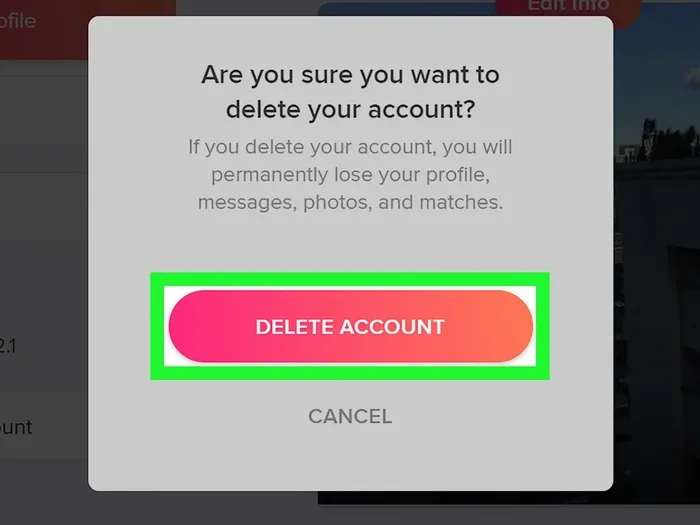
Step 6: Confirm the Deletion
Classmates will ask you to confirm that you want to close your account. This is your final chance to change your mind. Read any warnings carefully. Once you confirm, the process begins. You will receive a confirmation email shortly after.
Step 7: Contact Support If Needed
If you cannot find the closure option or run into any issues, contact Classmates support. They can help you close your Classmates account manually. Use the contact form on the website or send an email to their support team. Be clear and direct in your request.
Common Mistakes People Make When Closing Their Classmates Account
There are a few pitfalls that can cause problems. Avoid these common mistakes to make the process smooth.
Forgetting to Cancel the Subscription
This is the number one mistake. Many people delete their account but keep paying for premium features. Always cancel your Classmates subscription before you close the account. Check your billing statements afterward to make sure no more charges appear.
Not Saving Important Data
Once the account is deleted, your photos and messages are gone forever. Some people regret not downloading their data first. Take the time to save what matters to you. It only takes a few minutes.
Confusing Deactivation with Deletion
Deactivating your account is not the same as deleting it. If you just deactivate, your data stays on their servers. Make sure you choose the permanent deletion option if that is what you want.
Using the Wrong Email Address
If you have multiple email addresses, make sure you log in with the one linked to your Classmates account. Using the wrong email can cause confusion and delays. Double-check before you start the process.
Expecting Immediate Data Removal
Data removal is not always instant. Some information may remain in backup systems for a short period. Do not panic if you see traces of your account for a few days after deletion. This is normal and part of the process.
Tips for Protecting Your Privacy After Closing Your Account
Closing your Classmates account is a big step. But you can do more to protect your privacy online. Here are some tips to keep your information safe.
Delete Your Classmates Email Address
If you used a Classmates email address, consider deleting it. This removes another link to the platform. You can set up email forwarding to your main address before closing it.
Search for Yourself Online
After deletion, search your name online. You might still find traces of your Classmates profile on search engines. This happens sometimes. The data usually gets removed from search results over time. You can also request removal from specific search engines if needed.
Use Strong, Unique Passwords
If you reused your Classmates password on other sites, change those passwords too. Using the same password across platforms is a security risk. Create strong, unique passwords for each of your online accounts. A password manager can help you keep track.
Check Third-Party App Connections
Classmates may have connected to other apps or services you used. Check your connected apps and remove any links to Classmates. This ensures no third party can access your old data.
Frequently Asked Questions About Closing a Classmates Account
Can I close my Classmates account without canceling my subscription first?
You can close your account, but it is strongly recommended to cancel your Classmates subscription first. If you do not cancel, you may continue to be charged for premium features. Always handle the subscription cancellation before proceeding with account deletion to avoid any unwanted billing.
How long does it take to close a Classmates account?
The account closure process usually starts immediately after you confirm. However, it may take a few days for all your data to be fully removed from Classmates systems. Some information may remain in backup archives for a limited time. You should receive a confirmation email once the deletion request is processed.
Can I reopen my Classmates account after closing it?
No, closing your Classmates account is permanent. Once you confirm deletion, you cannot recover your profile, photos, or messages. This is why it is so important to download your data before you close the account. Make sure you are certain about your decision before confirming.
Will my classmates still be able to see my profile after I close my account?
Once your account is closed, your profile should no longer be visible to other Classmates members. However, any content you shared, such as photos or posts, may have been shared by others before your account was closed. Removing personal information from your profile before deletion helps minimize your exposure.
What happens to my photos and messages when I close my account?
When you delete your Classmates account, your photos and messages are removed from the active platform. They may be retained in backup systems for a short period as part of standard data management practices. This is why downloading your data beforehand is so important if you want to keep any memories.
Is there a way to temporarily pause my Classmates account instead of deleting it?
Yes, you can deactivate your account instead of deleting it. Deactivation hides your profile but keeps your data stored on Classmates servers. You can reactivate anytime by logging back in. If you are unsure about permanent deletion, deactivation gives you a safe middle ground while you decide.
Final Thoughts on Closing Your Classmates Account
Closing your Classmates account is a straightforward process when you know what to do. Start by canceling your subscription and downloading your data. Then follow the account closure steps carefully. Avoid the common mistakes we covered, and you will have a smooth experience.
Remember that this decision is permanent. Make sure you are ready before you confirm. Protect your privacy and take control of your online presence. Whether you are leaving Classmates for privacy reasons, subscription costs, or simply because you do not need it anymore, you now have the tools to do it right.
Take your time, follow the steps in this guide, and you will successfully close your Classmates account with confidence. Your digital life is yours to manage, and now you know exactly how to do it.