Does A Smart Tv Need Wired Internet For Better Streaming
Does a smart TV need wired internet for better streaming? The short answer is yes — a wired connection delivers faster, more stable performance. Many smart TV users experience buffering and lag because they rely solely on WiFi. Switching to a wired ethernet connection can transform your viewing experience with smoother playback, sharper picture quality, and fewer interruptions. In this guide, we break down everything you need to know about wired vs wireless internet for your smart TV.
You settle in on the couch, hit play on your favorite show, and then… the loading wheel appears. Again. Nothing kills the mood faster than a buffering smart TV. If you have ever wondered whether your internet connection type is to blame, you are not alone.
The question does a smart TV need wired internet for better streaming comes up all the time. The truth is, your internet connection type makes a huge difference in how your TV performs. Wired ethernet and wireless WiFi each have their place. But for the best streaming experience, one clearly wins.
This guide covers everything you need to know. We will compare WiFi and wired connections, explain when each option makes sense, and give you practical steps to improve your setup. By the end, you will know exactly what your smart TV needs to stream flawlessly.
Key Takeaways
- Wired internet is faster and more stable: Ethernet connections reduce buffering and improve streaming quality significantly.
- WiFi works fine for basic streaming: If you only watch standard content, WiFi may be enough for your needs.
- 4K and HDR streaming demand more bandwidth: Wired connections handle high-resolution content much better than wireless.
- Setting up wired internet is simple: Most smart TVs have an ethernet port, and the setup takes just minutes.
- Router placement matters: Even with WiFi, good placement can improve your smart TV internet experience.
- Hybrid setups offer the best of both worlds: Use wired for your TV and wireless for other devices.
📑 Table of Contents
- What Is Wired Internet For Smart TVs?
- WiFi vs Wired Internet For Smart TVs
- When Does A Smart TV Need Wired Internet?
- How To Set Up Wired Internet On Your Smart TV
- Common Smart TV Internet Problems And How To Fix Them
- Expert Tips For Best Streaming Performance
- Is Wired Internet Worth The Effort?
- Conclusion
What Is Wired Internet For Smart TVs?
Wired internet means connecting your smart TV directly to your router using an ethernet cable. This creates a dedicated, physical link between your TV and your home network. Think of it like a private highway just for your TV’s data.
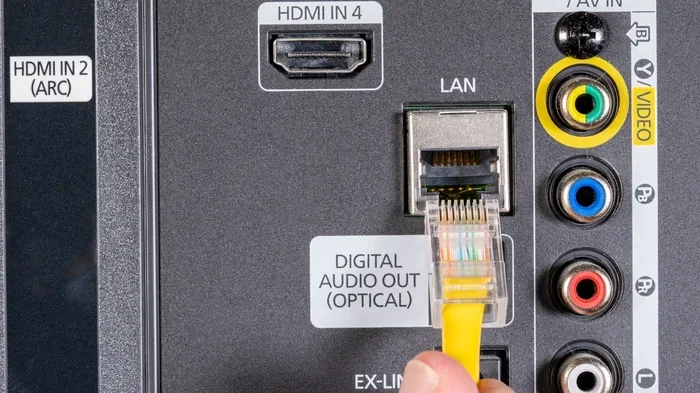
Most modern smart TVs come with an ethernet port built right into the back or side. You simply plug in the cable, and your TV connects to the internet. No passwords to enter, no signal bars to worry about. It is straightforward and reliable.
The main benefit of a wired connection is consistency. Your internet speed stays steady because the signal does not travel through the air. There are no walls, microwaves, or neighbor networks to interfere with the connection. For streaming, this means fewer pauses and sharper video quality.
How Does Ethernet Work With Smart TVs?
When you plug an ethernet cable into your smart TV, the cable carries data directly from your router to your TV. This uses the TCP/IP protocol, which is the backbone of all internet communication. The data travels fast and with minimal loss.
Most smart TVs support gigabit ethernet, which can handle speeds up to 1,000 Mbps. Even if your internet plan does not offer that speed, the wired connection ensures you get the full potential of what your provider delivers. No signal degradation, no unexpected drops.
If you also use devices like a Bluetooth adapter for audio or other peripherals, a wired internet connection keeps your TV’s network stable. This means your Bluetooth devices and streaming can work together without interference. You can learn more about using Bluetooth with your TV in our guide on Can I Use A Bluetooth Adapter On My Tv.
WiFi vs Wired Internet For Smart TVs
Wireless WiFi is the default choice for most households. It is convenient. You do not need to run cables across the room. But convenience comes with trade-offs when it comes to streaming quality.
Let us compare the two options side by side.
Speed And Stability
Wired connections almost always win when it comes to speed consistency. An ethernet cable delivers the full speed your plan offers directly to your TV. WiFi, on the other hand, shares bandwidth with every device in your home.
Here is a quick comparison:
- Wired Ethernet: Consistent speeds, low latency, no interference from other devices.
- WiFi: Convenient setup, but speeds can fluctuate based on distance, walls, and network traffic.
If multiple people in your household are streaming, gaming, or video calling at the same time, your WiFi signal takes a hit. Your smart TV competes for bandwidth with phones, laptops, and tablets. A wired connection eliminates this competition entirely.
Picture Quality And Buffering
Streaming in 4K or HDR requires a lot of data. These formats need a steady, fast connection to deliver smooth picture quality. WiFi signals can drop or slow down just enough to cause buffering or reduced resolution.
With a wired connection, your TV gets the data it needs without interruption. The result is crisp, buffer-free streaming even at the highest quality settings. If you have ever noticed your 4K content looking fuzzy or pixelated, a weak WiFi signal might be the culprit.
For users who also cast content from mobile devices, a stable TV connection helps everything run smoother. You can find helpful tips on connecting devices to your TV in our article about Can I Connect My Phone To Hdmi Tv.
When Does A Smart TV Need Wired Internet?
Not everyone needs a wired connection. But certain situations make it almost essential. Let us look at when you should seriously consider plugging in that ethernet cable.
You Stream In 4K Or HDR
4K streaming uses roughly 15 to 25 Mbps of bandwidth. HDR content demands even more. If your WiFi signal is weak or your household network is busy, you may not get consistent speeds above that threshold.
A wired connection ensures your TV always has enough bandwidth for high-resolution content. Netflix, Disney+, and Apple TV all recommend at least 15 Mbps for 4K streaming. A hardwired connection gives you peace of mind that you will hit those numbers every time.
You Have Multiple Devices On Your Network
Modern households have many connected devices. Smart speakers, security cameras, phones, laptops, gaming consoles, and tablets all share your WiFi. The more devices connected, the more your bandwidth gets split.
If your smart TV is competing with a dozen other devices, wired internet gives it priority. The TV gets a direct line to the router without sharing the wireless signal. This is especially important during peak usage hours in the evening.
You Game Or Stream On Your TV
Gaming on a smart TV requires low latency and fast response times. WiFi introduces lag, which can make fast-paced games feel unresponsive. Wired connections dramatically reduce latency.
Similarly, if you stream content to other devices, a stable TV connection helps. For example, if you stream your Steam Deck to your TV, a wired internet connection on the TV side ensures smooth, lag-free gameplay. Check out our guide on Can I Stream My Steam Deck To My Tv for more tips on optimizing your streaming setup.
Your WiFi Signal Is Weak In The Living Room
Not every home has perfect WiFi coverage. Thick walls, long distances, and multiple floors can weaken your wireless signal. If your smart TV sits in a spot with poor WiFi reception, a wired connection is the best fix.
Instead of buying expensive WiFi extenders or mesh systems, a simple ethernet cable can solve the problem. Your TV gets a strong, direct connection regardless of where it sits in your home.
How To Set Up Wired Internet On Your Smart TV
Setting up a wired connection on your smart TV is easier than you might think. Most people can complete the setup in under five minutes. Here is how to do it.
Step 1: Check For An Ethernet Port
Look at the back or side of your smart TV. You are looking for a rectangular port labeled “Ethernet” or “LAN.” Most smart TVs from brands like Samsung, LG, Sony, and TCL include this port. If your TV does not have one, you can use a USB-to-ethernet adapter.
Step 2: Get The Right Ethernet Cable
You need a standard ethernet cable, also called a Cat5e or Cat6 cable. These cables are cheap and widely available at any electronics store. A longer cable gives you more flexibility in placing your TV, so aim for at least 10 feet to start.
Step 3: Connect The Cable
Plug one end of the ethernet cable into your TV and the other end into your router. That is it. Your TV should automatically detect the connection and configure the settings.
Step 4: Test Your Connection
Go to your TV’s network settings and run a speed test. This confirms your wired connection is working properly. Look for speeds that match or exceed what your internet plan promises. If the speeds are lower than expected, try a different cable or a different port on your router.
For users who also want to connect other devices wirelessly, a hybrid setup works great. Your TV stays wired for stability, while other devices use WiFi. This approach gives you the best of both worlds without sacrificing performance.
Common Smart TV Internet Problems And How To Fix Them
Even with a good setup, smart TV internet issues can pop up. Here are the most common problems and simple fixes.
Buffering During Streaming
Buffering is the number one frustration for smart TV users. It usually happens when your connection cannot keep up with the data demands of the video. The fix is often as simple as switching from WiFi to a wired connection.
If you cannot use a cable, try moving your router closer to the TV. Walls and furniture block WiFi signals. Even a few feet of repositioning can make a big difference. You might also consider setting up a mesh WiFi system to extend coverage throughout your home.
Slow Load Times On Apps
If apps like Netflix or Hulu take forever to load, your internet speed may be the issue. Run a speed test on your TV to check your current connection speed. Anything below 10 Mbps will struggle with HD content.
A wired connection almost always resolves slow load times. The direct link to your router removes all the variables that affect WiFi performance. You get the full speed your internet plan provides.
Intermittent Connection Drops
A smart TV that keeps disconnecting from the internet is frustrating. This usually happens with WiFi when the signal is weak or unstable. Interference from other electronic devices can also cause drops.
A wired connection eliminates these drops completely. The physical cable provides a constant, uninterrupted link to your router. If you must use WiFi, try changing your router’s channel or moving it to a more central location in your home.
Expert Tips For Best Streaming Performance
Want to get the most out of your smart TV and internet connection? These expert tips will help you optimize everything.
Use A Dedicated Streaming Device
Sometimes the smart TV built-in apps are not the best. A dedicated streaming device like a Roku or Apple TV can deliver better performance. These devices often have stronger processors and better WiFi antennas than built-in TV smart features.
If you use a Roku with a projector instead of a TV, make sure your internet connection is strong enough to handle the extra resolution. Learn more in our guide on Can I Use A Roku With A Projector.
Keep Your Router Firmware Updated
Router manufacturers release firmware updates that improve performance and fix bugs. Check your router settings periodically and install any available updates. An up-to-date router can significantly improve your smart TV streaming experience.
Place Your Router Strategically
If you are using WiFi, router placement is critical. Keep your router in a central, elevated location away from walls and electronic interference. The closer your router is to your TV, the better your WiFi signal will be.
For the absolute best performance, skip WiFi entirely and use a wired connection. But if WiFi is your only option, good router placement can make a noticeable difference.
Limit Background Usage On Your Network
Other devices on your network can eat up bandwidth without you noticing. Automatic updates, cloud backups, and other downloads slow down your connection. Before a big movie night, pause any heavy downloads on other devices.
A wired TV connection is immune to this problem because it has a dedicated line to the router. But for WiFi-connected devices, managing background usage helps keep everything running smoothly.
Is Wired Internet Worth The Effort?
The answer depends on your streaming habits and home setup. For casual viewers who watch standard definition or HD content on a quiet network, WiFi is probably fine. But for anyone who watches 4K content, has multiple connected devices, or experiences buffering, wired internet is absolutely worth it.
The cost is minimal. An ethernet cable costs under $15, and the setup takes minutes. The performance improvement is dramatic. You get faster speeds, lower latency, and a connection that does not fluctuate with network traffic.
Think of it this way. WiFi is like a shared road. Everyone uses it, and traffic can slow things down. A wired connection is like a private lane that only your TV drives on. The difference in performance is clear.
If you are still unsure, try it for a week. Plug in the cable, stream your favorite shows, and see the difference yourself. Most people who switch to wired internet for their smart TV never go back to WiFi for streaming.
For users who also use their TV for other tasks, like connecting an antenna for live channels, a stable internet connection works hand in hand with good reception. Learn more in our article on Can I Hook Up An Antenna To My Smart Tv.
Conclusion
Does a smart TV need wired internet for better streaming? The evidence is clear. A wired ethernet connection delivers faster speeds, more stability, and a buffer-free viewing experience that WiFi simply cannot match. While WiFi works well for casual viewing, serious streamers benefit greatly from a hardwired setup.
Setting up wired internet on your smart TV is simple, affordable, and makes an immediate difference. Whether you watch 4K movies, stream live sports, or game on your TV, a wired connection gives you the reliability and speed you need. Try it once, and you will wonder how you ever streamed without it.
Take a few minutes today to check your TV’s ethernet port and grab a cable. Your future self will thank you every time you hit play and the video starts instantly, every single time.
Frequently Asked Questions
Can I use WiFi for smart TV streaming if I have fast internet?
Yes, fast WiFi can work well for smart TV streaming. However, WiFi speeds can fluctuate based on distance, interference, and the number of connected devices. A wired connection provides consistent speeds regardless of these factors. For the most reliable experience, especially with 4K content, ethernet is still the better choice.
What type of ethernet cable do I need for my smart TV?
A standard Cat5e or Cat6 ethernet cable works perfectly for smart TVs. These cables support gigabit speeds, which is more than enough for 4K streaming. You do not need expensive or specialized cables. Any quality ethernet cable from a reputable brand will get the job done.
Does a wired internet connection improve gaming on a smart TV?
Yes, absolutely. Wired connections have much lower latency than WiFi. This means faster response times, smoother gameplay, and no lag during fast-paced action. If you play games on your smart TV or stream games from a PC, a wired connection makes a noticeable difference in performance.
Can I use both WiFi and ethernet on my smart TV at the same time?
Most smart TVs do not allow simultaneous WiFi and ethernet connections. The TV typically prioritizes one connection type. If you plug in an ethernet cable, the TV will usually switch from WiFi to the wired connection automatically. This ensures you always get the most stable connection available.
How long does an ethernet cable need to be for a smart TV setup?
The length depends on where your router is located relative to your TV. Standard ethernet cables come in lengths from 3 to 100 feet. Measure the distance between your router and TV, and add a few extra feet for routing the cable along floors and walls. A 10 to 25-foot cable works for most living room setups.
Will a wired internet connection fix all my smart TV streaming problems?
A wired connection fixes most streaming issues related to internet speed and stability. However, it will not solve problems caused by app glitches, outdated TV software, or server issues on the streaming platform’s end. If you still experience problems after switching to wired, try updating your TV software or restarting your streaming apps.