Does Bluetooth Receiver Matter for Your Sound Setup
A Bluetooth receiver can seriously upgrade your sound setup by adding wireless capability to older devices. It improves audio freedom, reduces cable clutter, and lets you stream from any Bluetooth device. However, not all receivers are equal, and choosing the wrong one can hurt your sound quality.
Key Takeaways
- A Bluetooth receiver matters if you want to add wireless audio to non-Bluetooth devices.
- Sound quality depends heavily on the Bluetooth codec and receiver quality.
- Range and latency are two factors many people overlook when buying a receiver.
- Built-in Bluetooth and external receivers each have pros and cons for your audio setup.
- Not all Bluetooth receivers work the same way with different devices.
- Price does not always equal performance when it comes to Bluetooth audio gear.
- Setting up a Bluetooth receiver is usually simple and takes just a few minutes.
📑 Table of Contents
- Does a Bluetooth Receiver Really Matter for Your Sound Setup?
- What Exactly Does a Bluetooth Receiver Do?
- How a Bluetooth Receiver Affects Sound Quality
- Bluetooth Receiver vs. Built-in Bluetooth
- Key Features to Look for in a Bluetooth Receiver
- Common Mistakes People Make With Bluetooth Receivers
- Does a Bluetooth Receiver Matter? The Final Verdict
- Frequently Asked Questions
Does a Bluetooth Receiver Really Matter for Your Sound Setup?
You love your old stereo system. It sounds great. But it has no Bluetooth. So you wonder, does a Bluetooth receiver even matter? The short answer is yes. It matters a lot if you want to stream music wirelessly without sacrificing sound quality.
A Bluetooth receiver bridges the gap between your older audio gear and modern devices like phones and tablets. It opens up a whole new world of wireless audio without forcing you to buy a brand-new sound system. Think of it as a small, affordable upgrade that brings big benefits.
But here is the thing. Not every Bluetooth receiver delivers the same results. Some add almost no latency. Others compress audio in ways that hurt the listening experience. So the real question is not just whether you need one. It is whether you need the right one.
In this guide, we break down everything you need to know about Bluetooth receivers. We cover sound quality, range, compatibility, and common mistakes. By the end, you will know exactly whether a Bluetooth receiver is worth adding to your setup.
What Exactly Does a Bluetooth Receiver Do?
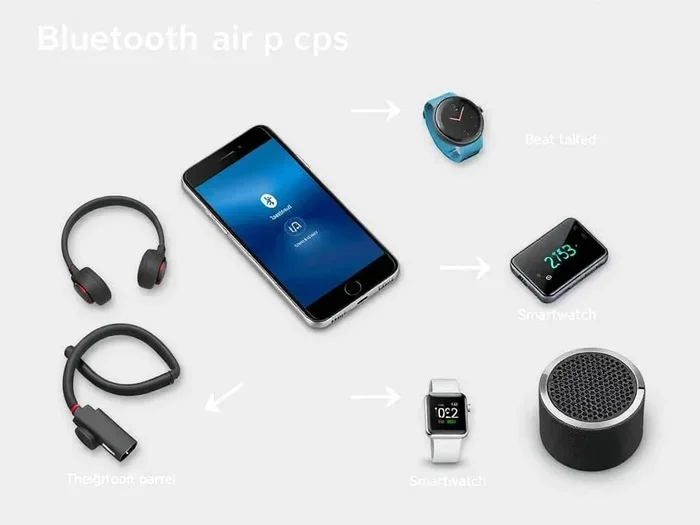
A Bluetooth receiver takes wireless signals from your phone, tablet, or laptop and turns them into audio your speakers or headphones can play. It acts as a translator between wireless technology and your wired audio gear.
Without a Bluetooth receiver, your old speakers stay wired. You need a cable to connect your phone. A Bluetooth receiver removes that cable. It gives you the freedom to move around the room while your music plays.
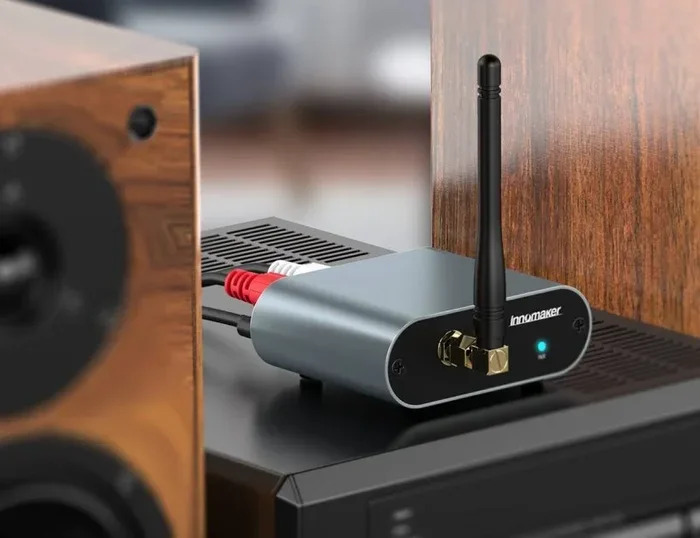
Most receivers plug into a 3.5mm aux port, RCA input, or USB port. Some connect through optical audio. The connection type depends on your speaker or stereo system. Once paired, your device streams audio directly to the receiver.
Many people also confuse a Bluetooth receiver with a Bluetooth transmitter. A receiver gets audio. A transmitter sends it. Make sure you buy the right one for your needs. If you want to add wireless capability to your speakers, you need a receiver.
Who Needs a Bluetooth Receiver?
Not everyone needs a Bluetooth receiver. But certain setups benefit a lot from one. Here are the main groups of people who should consider adding one:
- People with older stereo systems. If your speakers or soundbar do not have Bluetooth, a receiver adds it easily.
- Home office users. You can stream calls and music to your desktop speakers without wires.
- Audiophiles on a budget. A good receiver lets you enjoy wireless streaming without replacing a quality speaker setup.
- TV watchers. You can use a Bluetooth receiver to connect your TV to wireless headphones or speakers. This works great if you want to listen late without disturbing others.
- Gamers. A Bluetooth receiver can reduce cable mess around your gaming desk.
How a Bluetooth Receiver Affects Sound Quality
This is the big question. Does a Bluetooth receiver change how your music sounds? Yes, it does. But the answer is more nuanced than you might think.
The quality of audio you get from a Bluetooth receiver depends on several factors. The Bluetooth version matters. The codec matters. And the hardware inside the receiver matters too. Let us break this down.
Bluetooth Codecs and Why They Matter
A Bluetooth codec is the format used to compress and send audio wirelessly. Different codecs offer different levels of quality. Here are the most common ones you will encounter:
- SBC. This is the default codec for most Bluetooth devices. It works fine but does not deliver the best sound quality.
- AAC. Apple devices use this codec often. It sounds better than SBC for most listeners.
- aptX. This codec offers much better audio fidelity. It is a big upgrade for people who care about sound.
- aptX HD and LDAC. These are high-resolution codecs. They deliver near-wireless quality that surprises many listeners.
When shopping for a Bluetooth receiver, check which codecs it supports. A receiver that handles aptX or LDAC will give you noticeably better wireless audio than one that only uses SBC.
Latency: The Hidden Problem
Latency is the delay between when audio plays on your device and when you hear it. A cheap Bluetooth receiver might add noticeable lag. This is especially bad for watching videos or playing games.
Higher-end receivers use low-latency codecs like aptX Low Latency. These reduce the delay to almost nothing. If you plan to watch videos or game with a Bluetooth receiver, pay close attention to latency specs.
Does Range Affect Sound Quality?
Bluetooth range does not directly affect sound quality. But it does affect your experience. Most Bluetooth receivers work within 30 to 50 feet. Walls and obstacles can weaken the signal.
A weak signal can cause audio dropouts or stuttering. This does not mean the sound quality is bad. But it does mean the connection is unreliable. A good Bluetooth receiver maintains a strong signal even through walls.
Bluetooth Receiver vs. Built-in Bluetooth
Many modern speakers and soundbars come with built-in Bluetooth. So why would you need an external Bluetooth receiver? Let us compare the two options.
| Feature | Built-in Bluetooth | External Bluetooth Receiver |
|---|---|---|
| Cost | Included with the device | $15 to $80 typically |
| Audio Quality | Good but limited by device hardware | Can be better with a quality receiver |
| Upgradeability | Cannot be upgraded | Can swap for a better model anytime |
| Compatibility | Only works with that device | Works with any device that has aux or RCA |
| Portability | Stays with the device | Small and easy to move between setups |
The biggest advantage of an external Bluetooth receiver is flexibility. You can use it with multiple devices. You can upgrade it without buying new speakers. And you can bring it to different rooms or even different homes.
Built-in Bluetooth works fine for most casual users. But if you want better audio streaming quality or you own older gear, an external receiver is the smarter choice.
For example, if you want to turn your stereo into Bluetooth, a receiver is the easiest and most affordable way to do it. It takes just a few minutes to set up and instantly adds wireless capability to your existing system.
Key Features to Look for in a Bluetooth Receiver
Not all Bluetooth receivers are created equal. Here are the features that actually matter when you are shopping.
1. Bluetooth Version
Look for Bluetooth 5.0 or newer. These versions offer better range, lower power use, and improved audio stability. Older versions like Bluetooth 4.0 work but may struggle with signal strength and interference.
2. Codec Support
As we discussed, codec support directly impacts sound quality. Choose a receiver that supports at least aptX. If you want the best possible sound, look for LDAC or aptX HD support.
3. Connection Options
Make sure the receiver matches your audio setup. Look for 3.5mm aux, RCA, optical, or USB connections depending on what your speakers or stereo support.
4. Battery Life (for Portable Models)
If you want a portable Bluetooth receiver, check the battery life. Some last 6 hours, while others go 12 hours or more. Pick one that fits how you plan to use it.
5. Pairing Ease
A good receiver pairs quickly and stays connected. Look for models with simple pairing processes. Some even support multipoint pairing, which lets you connect two devices at once.
Common Mistakes People Make With Bluetooth Receivers
Even after buying a Bluetooth receiver, many people make mistakes that hurt their experience. Here are the most common ones to avoid.
Buying the Cheapest Option
A $10 Bluetooth receiver might seem like a great deal. But it often uses outdated Bluetooth versions and low-quality codecs. The result is poor sound and frustrating dropouts. Spending a little more on a quality model pays off in audio performance and reliability.
Ignoring Compatibility
Not every receiver works with every device. Before you buy, check that the Bluetooth receiver is compatible with your speakers, TV, or stereo. Some work best with certain operating systems or audio formats.
Placing the Receiver Poorly
Where you place your Bluetooth receiver affects signal strength. Keep it close to your source device. Avoid placing it behind walls or inside closed cabinets. Good placement means fewer dropouts and better audio.
Forgetting to Update Firmware
Some receivers have updatable firmware. Manufacturers release updates that improve Bluetooth compatibility and fix bugs. Check the manufacturer’s website and install updates when available.
Using It in a Crowded Wireless Environment
Bluetooth operates on the 2.4GHz frequency. In apartments or busy offices, many devices share this space. Wi-Fi routers, microwaves, and other Bluetooth devices can cause interference. A quality Bluetooth receiver handles this better, but placement still matters.
Does a Bluetooth Receiver Matter? The Final Verdict
So, does a Bluetooth receiver matter? Yes, it absolutely does. It transforms your old audio gear into a wireless setup without replacing your speakers or stereo. The freedom to stream from any device is a game changer.
But it matters even more that you choose the right one. A quality Bluetooth receiver with good codec support and low latency delivers excellent sound. A cheap, poorly made one can ruin your listening experience.
If you are serious about your sound setup, invest in a Bluetooth receiver that matches your needs. Check codec support, Bluetooth version, and connection options before you buy. A small investment today can save you from frustration tomorrow.
Think about it this way. Your speakers or stereo already sound good. A Bluetooth receiver just unlocks the ability to play music wirelessly. It is one of the easiest and most affordable upgrades you can make to any audio setup.
Whether you want to stream music in the kitchen, listen to podcasts in the living room, or watch movies without disturbing anyone, a Bluetooth receiver makes it all possible. It is a small device that makes a big difference.
Start by checking what audio inputs your current setup has. Then find a Bluetooth receiver that matches. You will be streaming wirelessly in minutes. And once you go wireless, you will wonder how you ever lived with cables.
Do not let outdated gear hold you back. A Bluetooth receiver brings your sound setup into the modern age. It is simple, effective, and worth every penny.
Frequently Asked Questions
Can I use a Bluetooth receiver with any speaker or stereo system?
Most Bluetooth receivers work with any system that has an aux input, RCA ports, or optical output. Check your speaker or stereo for available inputs before purchasing a receiver. The connection type you need depends on what ports your audio gear supports.
Does a Bluetooth receiver reduce sound quality compared to wired connections?
A good Bluetooth receiver with modern codecs like aptX or LDAC delivers sound quality very close to wired connections. Cheap receivers that only use the SBC codec may compress audio more and reduce quality. The receiver you choose makes a big difference in the final sound you hear.
Can I use a Bluetooth receiver to connect headphones to a TV?
Yes, you can use a Bluetooth receiver to connect wireless headphones to almost any TV with an audio output. This is a popular setup for late-night listening. Just plug the receiver into your TV’s audio port and pair your headphones. You will enjoy private listening without any cables.
How far can a Bluetooth receiver be from the source device?
Most Bluetooth receivers work within 30 to 50 feet in open space. Walls, furniture, and other obstacles can reduce this range. A receiver with Bluetooth 5.0 or newer maintains a stronger signal over longer distances. Keep the receiver within a reasonable range for the best wireless audio experience.
Is it hard to set up a Bluetooth receiver?
No, setting up a Bluetooth receiver is usually very simple. Plug it into your audio device, turn on Bluetooth on your phone or laptop, and pair them. Most receivers connect in under a minute. If you run into issues, check that your device supports the same Bluetooth version as the receiver.
Can I use a Bluetooth receiver with my PC to stream music wirelessly?
Yes, you can add a Bluetooth receiver to your desktop or laptop to stream music wirelessly to your speakers. Some receivers plug into USB ports while others use 3.5mm audio jacks. Just make sure you have the right connection type for your PC and that your system recognizes the device. This is a great way to enjoy wireless audio from your computer without buying new speakers.