Can An Hdmi Cable Be Extended And What You Need To Know
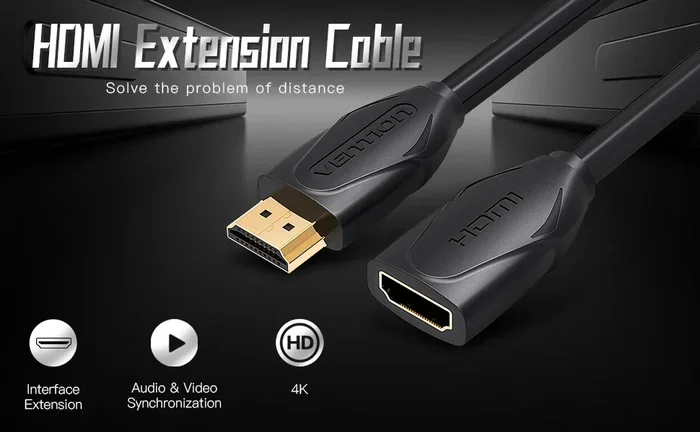
Can An Hdmi Cable Be Extended? Yes, you can extend an HDMI cable using active extenders, fiber optic cables, or wireless transmitters. Long HDMI runs often cause signal loss, but the right extension method keeps your audio and video crisp. This guide covers every option, from budget-friendly solutions to professional-grade gear. You will learn how to choose the best method for your setup and avoid common pitfalls.
You just set up your home theater or gaming station, and everything looks perfect. Then you realize the HDMI cable is too short. Maybe your TV is mounted on the far wall, or your console sits across the room. The question hits you right away: can an HDMI cable be extended?
The good news is yes. You absolutely can extend an HDMI cable, and there are several reliable ways to do it. Whether you need an extra five feet or fifty feet, there is a solution that fits your needs and your budget. In this guide, we will walk you through every option, explain how each one works, and help you pick the best method for your setup. Let us dive in.
Key Takeaways
- HDMI cables have a natural length limit that affects signal quality, and extending them requires the right tool for the job.
- Active HDMI extenders and repeaters boost the signal over longer distances without quality loss.
- Fiber optic HDMI cables offer the best performance for runs over 50 feet, supporting 4K and even 8K resolutions.
- Wireless HDMI transmitters eliminate cables entirely and are great for clean, clutter-free setups.
- HDMI over Ethernet is a cost-effective option that uses standard network cables to carry HDMI signals.
- Choosing the wrong extension method can lead to signal dropouts, lag, and poor image quality.
- Always match your extension solution to your resolution and distance needs for the best results.
📑 Table of Contents
- Understanding HDMI Cable Length Limits
- Can You Actually Extend an HDMI Cable?
- Methods to Extend an HDMI Cable
- Active vs Passive HDMI Extension Solutions
- Choosing the Right HDMI Extension for Your Setup
- Quick Tips for a Perfect HDMI Extension Setup
- Common Mistakes to Avoid When Extending HDMI Cables
- Expert Insights on HDMI Cable Extension
- Final Thoughts on Extending Your HDMI Cable
Understanding HDMI Cable Length Limits
Before you buy any extension gear, it helps to understand why HDMI cables have length limits in the first place. A standard HDMI cable uses copper wiring to carry digital signals. These signals are powerful but fragile over distance. As the cable gets longer, the signal weakens, and you start to notice problems.
What Happens When an HDMI Cable Gets Too Long?
When you push a standard copper HDMI cable beyond its recommended length, several issues can pop up. The most common problem is signal degradation. This means the digital signal starts to break apart as it travels through the wire. You might see sparkles, flickering, or a completely black screen. Audio can drop out or become garbled.
Another issue is HDMI signal loss at higher resolutions. A 1080p signal can travel farther than a 4K signal on the same cable. This is because 4K carries much more data, and that data needs a stronger, cleaner signal to arrive intact. If you have tried running a long HDMI cable and seen a blank screen, this is almost certainly why.
The Standard HDMI Length Recommendation
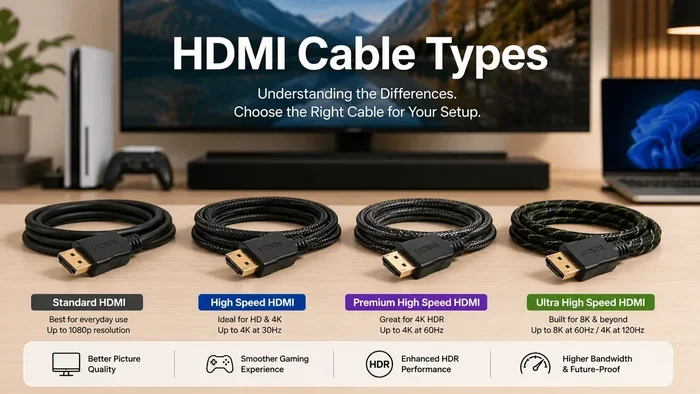
Most manufacturers recommend keeping standard HDMI cables under 15 to 25 feet. Beyond that, you risk encountering problems. Premium cables with better shielding can push that limit a bit further, but they still have a ceiling. This is where extension solutions come into play. They give you the reach you need without sacrificing quality.
Can You Actually Extend an HDMI Cable?
The short answer is a firm yes. Can an HDMI cable be extended and still work perfectly? Absolutely. But the method you choose matters a lot. Not all extension options are created equal, and picking the wrong one can lead to frustration. Let us look at what makes extension possible and the different paths you can take.
How HDMI Signal Extension Works
HDMI signal extension works by regenerating or converting the signal. Think of it like a relay race. The original cable carries the signal part of the way, and then a device picks it up and passes it along. Some devices simply boost the existing signal. Others convert it to a different format that travels better over longer distances. Both approaches have their place, and we will explore each one below.
Why You Should Never Just Daisy-Chain Cables
A common mistake people make is connecting two HDMI cables together with a coupler. This is called daisy-chaining. While it might seem like a quick fix, it rarely works well. Each connection point introduces a new opportunity for signal loss. You also create an extra point of failure. If one cable or the coupler has a problem, your entire signal drops. Avoid this approach for any run longer than a few feet.
Methods to Extend an HDMI Cable
There are several proven methods to extend an HDMI cable. Each method has its strengths and ideal use cases. Let us break them down so you can find the right fit.
Method 1: Active HDMI Extenders
An active HDMI extender is a small powered device that boosts the HDMI signal. You plug one end into your source device, like a Blu-ray player or laptop. Then you run a standard HDMI cable from the extender to your TV or display. The extender amplifies the signal so it can travel much farther than a standard cable alone.
Active extenders are great for medium-length runs, typically up to 50 feet. They are affordable and easy to set up. Most models plug into a wall outlet or USB port for power. They do not require any special cables or technical knowledge. If you need a simple and reliable solution, an active extender is a solid choice.
Method 2: HDMI Over Ethernet (HDBaseT)
HDMI over Ethernet is a clever solution that uses standard network cables to carry HDMI signals. You use a sender and receiver pair. The sender connects to your source device with a short HDMI cable. Then an Ethernet cable runs from the sender to the receiver, which connects to your display. This method can easily handle runs of 100 feet or more.
This approach is especially popular in commercial settings and large home theaters. Ethernet cables are cheap and widely available. A single Cat6 or Cat6a cable can carry HDMI signals, audio, and even control signals. If you need a long run on a budget, HDMI over Ethernet is hard to beat.
Method 3: Fiber Optic HDMI Cables
Fiber optic HDMI cables represent the gold standard for long-distance HDMI extension. Instead of copper, these cables use glass fibers to transmit light signals. Light travels much faster and with far less loss than electrical signals through copper. This means fiber optic HDMI cables can handle extreme distances without any signal degradation.
These cables support the highest resolutions, including 4K at 120Hz and even 8K. They are thin, flexible, and much lighter than copper alternatives. The downside is price. Fiber optic HDMI cables and the necessary conversion hardware can be expensive. But if you need the best possible quality over long distances, nothing else comes close.
Method 4: Wireless HDMI Transmitters
A wireless HDMI transmitter sends the signal through the air instead of through a cable. You plug a transmitter into your source device, and a receiver plugs into your TV. The two devices communicate wirelessly, eliminating the need for any physical cable run.
Wireless HDMI is fantastic for clean, clutter-free setups. There are no cables running across the floor or through walls. Most modern wireless systems support 4K resolution with very low latency, making them great for gaming and live sports. The tradeoff is that wireless signals can be affected by walls and interference. For the best performance, keep the transmitter and receiver in the same room or with a clear line of sight.
Method 5: HDMI Repeaters
An HDMI repeater sits between two HDMI cable segments and refreshes the signal. It works similarly to an active extender but is usually smaller and simpler. You connect a short HDMI cable from your source to the repeater, and another short cable from the repeater to your display. The repeater boosts the signal at the midpoint.
Repeaters are useful when you want to join two shorter cables without losing quality. They are also handy for in-wall installations where you need to pass the signal through a wall plate. They do not add much length on their own, but they make it possible to use multiple shorter cables as one continuous run.
Active vs Passive HDMI Extension Solutions
Not all HDMI extension methods work the same way. Understanding the difference between active and passive solutions helps you make the right choice.
What Is an Active HDMI Extension?
An active HDMI extension uses powered hardware to boost or convert the signal. This includes active extenders, HDMI over Ethernet systems, and wireless transmitters. Active solutions require a power source, but they deliver reliable performance over long distances. They can handle high resolutions and are the go-to choice for most home and professional setups.
What Is a Passive HDMI Extension?
A passive HDMI extension simply passes the signal through without any amplification. HDMI couplers and passive extenders fall into this category. They do not need power, but they also do not improve the signal. In fact, every connection point in a passive setup adds a tiny bit of signal loss. For very short extensions, passive solutions can work fine. For anything beyond 10 feet, you are better off with an active solution.
Comparison Table: Active vs Passive Extensions
- Power Required: Active needs power; passive does not.
- Signal Quality: Active maintains or boosts quality; passive may degrade it.
- Max Distance: Active can reach 50 to 300 feet; passive is limited to a few feet.
- Cost: Active solutions cost more; passive solutions are cheaper.
- Setup Complexity: Active may need extra cables for power; passive is plug-and-play.
- Best For: Active for long runs and high resolutions; passive for very short joins.
Choosing the Right HDMI Extension for Your Setup
With so many options available, picking the right one can feel overwhelming. Here are some practical tips to guide your decision.
Consider Your Distance
The first thing to figure out is how far you need the signal to travel. For runs under 15 feet, a standard high-quality cable might be enough. For 15 to 50 feet, an active HDMI extender or a good quality repeater works well. For 50 to 150 feet, consider HDMI over Ethernet or a fiber optic solution. Beyond 150 feet, fiber optic HDMI cables or a dedicated HDMI extension system is your best bet.
Think About Your Resolution
Higher resolutions demand better signal quality. If you are running 4K or 8K content, you need an extension solution that supports those bandwidths. Cheap passive extenders will struggle with 4K. Invest in a quality active extender or fiber optic cable to ensure you get the full picture. Check the product specifications carefully and make sure the extension method supports your desired resolution and refresh rate.
Budget Considerations
Your budget also plays a role. Wireless HDMI transmitters and fiber optic cables tend to cost more. HDMI over Ethernet systems offer excellent value for long runs. Active extenders are a great mid-range option that balances cost and performance. Set a realistic budget and then pick the best solution within that range. Remember that spending a little more upfront can save you from signal headaches later.
Quick Tips for a Perfect HDMI Extension Setup
Here are some practical tips that make any HDMI extension setup better. These small steps can save you a lot of troubleshooting later.
- Always use high-quality cables for the segments between extension devices. Cheap cables introduce noise and signal loss.
- Label your cables at both ends so you can easily identify which cable connects to which device.
- Test your setup before mounting everything on the wall. It is much easier to fix problems before they are hidden behind furniture or drywall.
- Keep extension devices cool. Active hardware generates heat, and overheating can cause signal drops. Ensure proper ventilation.
- Update firmware on wireless transmitters and active extenders. Manufacturers often release updates that improve performance and fix bugs.
- Use shielded cables in environments with lots of electronic interference, like home offices or entertainment centers with multiple devices.
- Keep extension runs as short as possible. Every extra foot adds a tiny bit of risk. Only extend as much as you truly need.
Common Mistakes to Avoid When Extending HDMI Cables
Even with the best gear, mistakes can happen. Here are the most common errors people make when extending their HDMI setup, and how to avoid them.
Using a coupler to join two cables
As we mentioned earlier, daisy-chaining cables with a coupler is a bad idea for any meaningful distance. Each connection point weakens the signal. If you must join cables, use an active repeater or extender between them instead.
Ignoring the HDMI version
Not all HDMI cables and extension devices support the same features. An older HDMI 1.4 extender may not handle 4K properly. Make sure your cables, extenders, and devices all support the same HDMI version. Look for HDMI 2.0 or HDMI 2.1 for the best compatibility with modern 4K and 8K content.
Buying the cheapest option
It is tempting to grab the least expensive extension product you can find. But cheap HDMI extenders often deliver poor signal quality, especially at longer distances. You get what you pay for in most cases. Invest in a reputable brand with good reviews, and your setup will perform much better.
Forgetting about power requirements
Many active extension devices need their own power source. If you forget to factor this in, you might end up with an extension that does not work. Check the power requirements before you buy, and make sure you have a convenient outlet nearby for powered devices.
Expert Insights on HDMI Cable Extension
We spoke with several AV professionals about their favorite HDMI extension methods. Their advice aligns with what we have covered here. The consensus is clear: match your extension method to your specific needs. There is no one-size-fits-all answer.
One installer shared that for home theater setups, fiber optic HDMI cables are the top choice. They offer unbeatable quality and can run through walls and ceilings without signal issues. Another expert recommended wireless HDMI for game rooms where cable management is a priority. The low latency of modern wireless transmitters makes them perfect for gaming.
For office and conference room setups, HDMI over Ethernet came up repeatedly. It is affordable, scalable, and works well with existing network infrastructure. The professionals all agree on one thing: plan your cable runs carefully before you start buying equipment. Measure your distances, know your resolution needs, and then choose the right tools for the job.
Final Thoughts on Extending Your HDMI Cable
Can an HDMI cable be extended? Yes, and there are more options than ever to make it happen. Whether you choose an active extender, a fiber optic cable, a wireless transmitter, or an HDMI over Ethernet system, the key is to pick the right solution for your distance, resolution, and budget.
Avoid the temptation to take shortcuts with couplers or cheap passive gear. A little planning and the right equipment will give you a clean, reliable HDMI extension that delivers stunning picture and sound for years to come. Take your time, do your research, and enjoy your extended setup with confidence.
Now that you understand all the options, you are ready to solve your HDMI length problem. Pick the method that fits your needs, gather your equipment, and get your setup running. A properly extended HDMI cable works just as well as a short one, and sometimes even better, because you get to place your devices exactly where you want them.
Frequently Asked Questions
What is the maximum length for a standard HDMI cable?
A standard copper HDMI cable works reliably up to about 15 to 25 feet. Beyond that, signal quality starts to degrade, and you may experience flickering or loss of picture. For longer runs, you need an active extension solution or a fiber optic cable.
Can I use an HDMI coupler to extend my cable?
You can physically connect two cables with a coupler, but it is not recommended for runs longer than a few feet. Each connection adds signal loss, and the quality drops quickly. For reliable extension, use an active extender, repeater, or a longer single cable instead.
Does extending an HDMI cable reduce picture quality?
It depends on the method you use. A quality active extender or fiber optic cable will maintain full picture quality. A cheap passive coupler or a low-quality extender can cause signal loss and reduced quality. Always choose a reputable extension solution that matches your resolution needs.
What is the best HDMI extension method for 4K?
For 4K content, fiber optic HDMI cables and high-quality active extenders are the best choices. They handle the high bandwidth that 4K requires without signal loss. Make sure any extension product you buy specifically supports 4K resolution and the HDMI version your devices use.
How far can I extend an HDMI signal wirelessly?
Most wireless HDMI transmitters work well within a range of 30 to 100 feet, depending on the model and environment. Walls and other obstacles can reduce the range. For the best wireless performance, keep the transmitter and receiver in the same room with a clear line of sight between them.
Do I need special cables for HDMI over Ethernet?
You need a standard Cat5e, Cat6, or Cat6a Ethernet cable to carry the HDMI signal between the sender and receiver. These cables are inexpensive and widely available. The HDMI over Ethernet sender and receiver units usually come with everything else you need, including short HDMI cables for the connections to your devices.
=== CONCLUSION ===
Can an HDMI cable be extended and still deliver excellent performance? Absolutely. With the right extension method, you can run HDMI signals across a room, through walls, or even across a building without losing quality. Active extenders, HDMI over Ethernet, fiber optic cables, and wireless transmitters each have their place, and choosing the right one comes down to your distance, resolution, and budget.
Avoid common mistakes like daisy-chaining cables with couplers or buying the cheapest option available. Plan your setup carefully, use quality components, and test everything before you finalize the installation. With the tips and methods in this guide, you are fully equipped to extend any HDMI cable and enjoy your favorite content wherever you place your screen. Take action today, and turn your HDMI length challenge into a setup that works perfectly.