Does Delta Airlines Have Free Wi Fi On All Flights
Does Delta Airlines Have Free Wi Fi? The answer depends on your ticket type and route. Delta offers free basic Wi-Fi on most flights, but streaming and faster speeds require a paid plan. Learn about Delta’s Wi-Fi options, how to connect, and what to expect at 35,000 feet.
Does Delta Airlines Have Free Wi Fi? This is a question thousands of travelers ask before every flight. In today’s connected world, staying online at 35,000 feet feels essential. Whether you need to finish work, stream a movie, or just check messages, Wi-Fi makes a huge difference.
Delta Air Lines is one of the largest airlines in the world. They serve millions of passengers every day across domestic and international routes. With that scale comes a lot of questions about their in-flight internet service. Is it free? How fast is it? Can you stream Netflix on a Delta flight?
This guide answers all of those questions and more. We will walk you through Delta’s Wi-Fi offerings, pricing, and practical tips. You will learn exactly what to expect the next time you fly Delta. Let us dive in.
Key Takeaways
- Basic Wi-Fi Is Free: Delta provides complimentary basic Wi-Fi on nearly all domestic and international flights.
- Streaming Costs Extra: You need a Delta Wi-Fi pass or a Medallion membership to stream movies and music.
- Speed Varies: In-flight Wi-Fi speed depends on the route, aircraft type, and number of users connected.
- Multiple Ways to Connect: You can log in through the Delta app, a web portal, or your device settings.
- Free Wi-Fi Is Not Universal: Some older aircraft or specific routes may not offer Wi-Fi at all.
- Pro Tip: Download content before your flight to avoid relying on in-flight Wi-Fi for entertainment.
📑 Table of Contents
- Understanding Delta Airlines Wi-Fi Basics
- Is Delta Wi-Fi Free on All Flights?
- Delta Wi-Fi Pricing and Plans
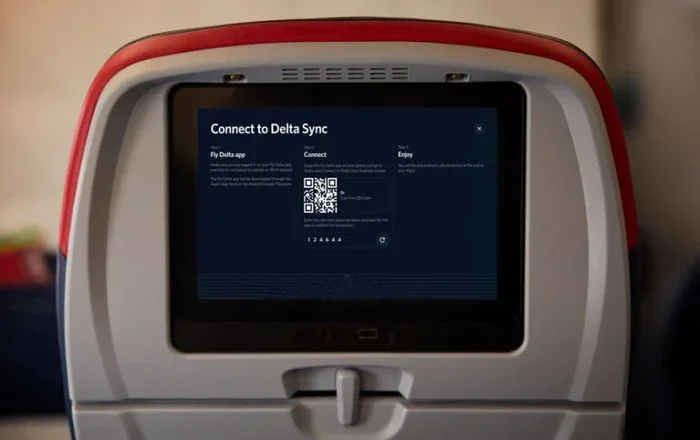
- How to Connect to Delta Wi-Fi
- What Can You Do With Delta Wi-Fi?
- Factors That Affect Delta Wi-Fi Speed
- Comparing Delta Wi-Fi With Other Airlines
- Common Mistakes Passengers Make With Delta Wi-Fi
- Expert Tips for Staying Connected on Delta
- The Future of Delta Wi-Fi
- Final Thoughts
Understanding Delta Airlines Wi-Fi Basics
Delta Airlines Wi-Fi works a bit differently than your home internet. The airline uses satellite and air-to-ground technology to deliver a signal to your device. This means your connection bounces off satellites or ground towers while you are in the air. It is a complex system, but it happens in seconds.
Delta offers two main tiers of Wi-Fi service. The first is a basic plan that lets you browse the web, check email, and use messaging apps. The second tier is a faster plan that supports streaming, video calls, and large downloads. Which one you get depends on your ticket type and membership status.
How Delta In-Flight Wi-Fi Works
When you board a Delta flight, your device will detect a Wi-Fi network. You connect to it just like you would at a coffee shop. A login page will appear, asking you to choose a plan or sign in. Once you are connected, you can start browsing.
The connection is shared among all passengers on the plane. This is why speeds can slow down during busy flights. Think of it like a home Wi-Fi network with many devices. The more people using it, the slower it gets for everyone. If you want to boost your signal at home before or after the flight, you might consider a Wi-Fi booster to improve your range and speed.
Delta Wi-Fi Technology: Satellite vs. Air-to-Ground
Delta uses two types of Wi-Fi technology. Satellite Wi-Fi connects to orbiting satellites. This works well over oceans and remote areas where ground towers cannot reach. Air-to-ground Wi-Fi connects to cell towers on the ground. This is faster but only works over land.
Most modern Delta aircraft use a combination of both. This gives you the best possible coverage on every route. The technology has improved a lot over the past few years. Delta continues to invest in better systems to keep passengers connected.
Is Delta Wi-Fi Free on All Flights?
Here is the short answer: Does Delta Airlines Have Free Wi Fi on every flight? Not exactly. Delta offers free basic Wi-Fi on most flights, but full-speed or streaming Wi-Fi usually costs money. The exact offering depends on your fare type, your SkyMiles status, and the aircraft on your route.
Let us break this down further. Delta has changed its Wi-Fi policy several times over the years. They used to charge for all Wi-Fi access. Now, they offer a free basic tier to all passengers. This is a big improvement for travelers who just want to stay in touch.
Free Wi-Fi Eligibility
Most Delta passengers can access free basic Wi-Fi. This includes travelers on domestic flights and many international routes. The free tier allows you to browse websites, send messages, and use social media. It does not support HD streaming or video calls.
Delta SkyMiles Medallion members get extra perks. Top-tier Medallion members often receive complimentary full-speed Wi-Fi. This is a great benefit for frequent flyers. If you fly Delta often, upgrading your membership can save you money on Wi-Fi passes.
What About International Flights?
International flights may have different Wi-Fi policies. Some international routes offer free basic Wi-Fi, while others charge for any access. The availability depends on the aircraft type and the route. Delta is expanding Wi-Fi coverage on international flights every year.
If you are flying internationally, it is a good idea to check Wi-Fi availability before your trip. You can do this through the Delta app or by checking your aircraft type on the Delta website. Staying informed helps you plan your connectivity needs ahead of time.
Delta Wi-Fi Pricing and Plans
Delta offers several Wi-Fi plans for passengers who want more than the free basic tier. These plans give you faster speeds and access to streaming services. The pricing varies based on the length of your flight and the type of device you are using.
Wi-Fi Pass Options
Delta sells Wi-Fi passes through their app and onboard portal. You can choose from several options:
- Single Flight Pass: This gives you full-speed Wi-Fi for one flight. Prices typically range from $7 to $30 depending on the flight length.
- Day Pass: Some Delta flights offer a day pass that covers all your Wi-Fi needs for 24 hours. This is great for travelers with connecting flights.
- Monthly Subscription: Frequent Delta flyers can subscribe to a monthly Wi-Fi plan. This saves money if you fly often.
- Annual Subscription: Delta offers an annual Wi-Fi plan for the heaviest users. This is the best value for people who fly every week.
SkyMembership Wi-Fi Benefits
Delta SkyMiles members enjoy special Wi-Fi perks. Medallion members in certain tiers get free full-speed Wi-Fi on all flights. Even lower-tier SkyMiles members may receive discounted Wi-Fi passes. These benefits add real value to flying Delta regularly.
If you are deciding whether to join SkyMiles, the Wi-Fi benefits alone can be a strong reason. Combine that with free checked bags and priority boarding, and the value adds up fast. You can also explore other connectivity options like connecting to Xfinity Wi-Fi away from home for seamless internet before and after your flight.
How to Connect to Delta Wi-Fi
Connecting to Delta Wi-Fi is straightforward. You do not need to be a tech expert to get online. Here is a simple step-by-step guide that works on most devices.
Step-by-Step Connection Guide
- Turn on Airplane Mode: Switch on Airplane Mode on your phone or laptop. Then turn Wi-Fi back on manually. This is the most important first step.
- Find the Delta Network: Look for a Wi-Fi network named “Delta Wi-Fi” or something similar. Select it from your list of available networks.
- Open Your Browser: A login page should pop up automatically. If it does not, open your browser and visit any website. You will be redirected to the Delta Wi-Fi portal.
- Choose Your Plan: Select the free basic plan or a paid plan if you want faster speeds. Follow the on-screen instructions to complete your purchase if needed.
- Start Browsing: Once you are connected, you can start using the internet. Your session will last for the duration of your flight.
Tips for a Better Connection
- Download the Delta App: The Delta app makes it easy to connect and manage your Wi-Fi session.
- Bring a Charger: Using Wi-Fi drains your battery faster. Keep your device charged throughout the flight.
- Close Unneeded Apps: Background apps use data and slow down your connection. Close them before you start browsing.
- Use Messaging Apps: Apps like WhatsApp and iMessage work well on the free basic tier. They use less data than video calls.
What Can You Do With Delta Wi-Fi?
What you can do on Delta Wi-Fi depends on your plan and the speed of the connection. Here is a breakdown of what is possible with each tier.
With Free Basic Wi-Fi
- Browse websites and read articles
- Check email and send messages
- Use social media platforms
- Send text messages through messaging apps
- Access Delta’s in-flight entertainment portal
With a Paid Wi-Fi Pass
- Stream movies and TV shows
- Make video calls
- Download large files or documents
- Join virtual meetings
- Use any app that requires a strong connection
Keep in mind that streaming quality can vary. Even with a paid pass, the number of users on the plane affects your experience. If you want to make sure you have something to watch, download content before you board. You can also connect your phone to your TV for a better viewing experience using Wi-Fi screen sharing if you have compatible devices.
Factors That Affect Delta Wi-Fi Speed
Not all Delta Wi-Fi connections are the same. Several factors influence how fast and reliable your internet will be during the flight. Understanding these factors helps you set realistic expectations.
Aircraft Type and Equipment
Newer Delta aircraft have better Wi-Fi equipment. Delta has been upgrading its fleet with modern satellite Wi-Fi systems. Older planes may have slower or less reliable connections. When you book a flight, you can often check the aircraft type on the Delta website.
Number of Passengers Online
This is the biggest factor. A full flight with everyone streaming videos will slow down the connection for everyone. If you are on a plane with only a few passengers online, your speeds will be much better. Early morning and red-eye flights tend to have fewer users online.
Route and Location
Your flight path affects Wi-Fi performance. Over oceans and remote areas, satellite connections may be slower. Over populated areas with good ground tower coverage, air-to-ground connections tend to be faster. Domestic flights within the United States usually have better Wi-Fi than flights over remote regions.
Weather conditions can also play a role. Heavy cloud cover or storms may interfere with satellite signals. While this does not happen often, it is worth keeping in mind for long-haul flights.
Device and Settings
Your own device matters too. Older phones and laptops may not support the latest Wi-Fi standards. Keeping your device updated helps ensure the best possible connection. You can also adjust your device settings to improve performance. For instance, you might want to switch your Wi-Fi frequency to optimize connectivity in crowded areas.
Comparing Delta Wi-Fi With Other Airlines
How does Delta Wi-Fi stack up against the competition? Let us look at how other major airlines handle in-flight internet.
| Airline | Free Basic Wi-Fi | Streaming Included | Speed |
|---|---|---|---|
| Delta Air Lines | Yes (most flights) | Paid pass required | Moderate to Fast |
| JetBlue | Yes (all flights) | Free basic streaming | Moderate |
| Southwest | Yes (all flights) | Paid pass required | Moderate |
| American Airlines | Yes (most flights) | Paid pass required | Moderate to Fast |
| United Airlines | Yes (most flights) | Paid pass required | Moderate to Fast |
Delta is competitive with other major US carriers. JetBlue stands out for offering free streaming on all flights. Delta’s free basic tier is solid, but the paid options are priced similarly to the industry average. If you value consistent Wi-Fi, Delta is a strong choice.
Common Mistakes Passengers Make With Delta Wi-Fi
Avoiding common mistakes helps you get the most out of Delta Wi-Fi. Here are some pitfalls to watch out for.
Assuming All Flights Have Wi-Fi
Not every Delta flight offers Wi-Fi. Some regional jets and older aircraft do not have the equipment. Always check before you fly. The Delta app and website show Wi-Fi availability for each flight.
Not Downloading Content Before Boarding
Relying entirely on in-flight Wi-Fi for entertainment is risky. The connection may be slow or unavailable. Download movies, podcasts, and music before you leave the gate. This ensures you have something to do even if the Wi-Fi fails.
Forgetting to Turn Off Airplane Mode Properly
Many passengers forget to turn Wi-Fi back on after enabling Airplane Mode. This is the most common connection mistake. Always double-check that your Wi-Fi is on before trying to connect.
Not Logging Out After the Flight
Leaving your device connected to Delta Wi-Fi after landing can drain your battery. It may also cause confusion when you try to connect to a different network later. Always log out when your flight ends.
Expert Tips for Staying Connected on Delta
Frequent flyers know that a little preparation goes a long way. Here are expert tips to improve your Delta Wi-Fi experience.
- Fly Early Morning Flights: These tend to have fewer passengers online, giving you better speeds.
- Use the Delta App: The app provides the smoothest connection process and real-time Wi-Fi status updates.
- Bring a Portable Hotspot: If you need reliable internet, consider a mobile hotspot as a backup. You can also look into extending your Wi-Fi range with signal boosters at home to practice before your trip.
- Choose a Window Seat: Some passengers report better Wi-Fi signals near the windows. This is because the antennas are often mounted on the fuselage exterior.
- Join Delta SkyMiles: The Wi-Fi perks alone make membership worthwhile for regular travelers.
The Future of Delta Wi-Fi
Delta continues to invest in improving its in-flight internet. The airline is exploring new technologies that promise faster speeds and better coverage. In the near future, passengers may enjoy free streaming on all flights.
Delta has partnered with leading Wi-Fi providers to upgrade its fleet. These partnerships aim to bring fiber-like speeds to the skies. As technology advances, the gap between ground and air internet will continue to shrink.
For now, Delta offers a solid Wi-Fi experience that meets the needs of most travelers. Whether you are on a short hop or a long international flight, you can stay connected in the air.
Final Thoughts
So, does Delta Airlines have free Wi-Fi? Yes, but with some conditions. Delta offers free basic Wi-Fi on most flights, which covers browsing and messaging. For streaming and faster speeds, you will need a paid pass or a SkyMiles Medallion membership. The experience varies by flight, but Delta is continuously improving its in-flight connectivity.
Planning ahead makes all the difference. Check Wi-Fi availability before your flight, download entertainment in advance, and choose your seat wisely. These small steps ensure you stay connected and entertained throughout your journey. Delta’s Wi-Fi is a great tool for modern travelers, and understanding how it works helps you use it to its full potential.
The next time you book a Delta flight, you will know exactly what to expect. Stay connected, stay productive, and enjoy the skies.
Frequently Asked Questions
Is Delta Wi-Fi completely free?
Delta offers free basic Wi-Fi on most flights, which allows browsing and messaging. However, streaming and high-speed access require a paid Wi-Fi pass or a SkyMiles Medallion membership. The free tier is great for light users but not for those who need to stream video.
Can I stream Netflix on Delta Wi-Fi?
Yes, but only with a paid Wi-Fi pass. The free basic tier does not support streaming services like Netflix or Hulu. Delta offers its own in-flight entertainment system that works without Wi-Fi on most aircraft.
How fast is Delta Wi-Fi?
Delta Wi-Fi speeds vary depending on the aircraft, route, and number of users. Basic browsing works well on the free tier. Paid passes offer faster speeds suitable for streaming and video calls. Speeds are generally comparable to a good home broadband connection.
Can I use Delta Wi-Fi on international flights?
Delta Wi-Fi is available on many international flights, but the offerings vary by route and aircraft. Some international routes offer free basic Wi-Fi, while others charge for access. Check Wi-Fi availability for your specific flight before you travel.
Do Delta SkyMiles members get free Wi-Fi?
Delta SkyMiles Medallion members in certain tiers receive complimentary full-speed Wi-Fi on flights. Lower-tier members and SkyMiles regulars may get discounted Wi-Fi passes. The exact benefits depend on your membership level and fare type.
What should I do if Delta Wi-Fi is not working?
First, make sure Airplane Mode is on and Wi-Fi is turned on separately. Try disconnecting and reconnecting to the Delta Wi-Fi network. If the issue persists, restart your device or clear your browser cache. You can also ask a flight attendant for assistance with the connection.
=== CONCLUSION ===
Does Delta Airlines Have Free Wi Fi on all flights? The answer is nuanced but generally yes for basic use. Delta provides complimentary basic Wi-Fi on most domestic and international flights. For a better experience with streaming and faster speeds, paid Wi-Fi passes or SkyMiles membership benefits are the way to go.
Delta’s in-flight internet has come a long way. The airline continues to invest in better technology and broader coverage. Whether you are a occasional flyer or a frequent traveler, understanding Delta’s Wi-Fi options helps you make the most of your time in the air.
Remember to prepare ahead of your flight. Download your entertainment, check Wi-Fi availability, and choose the right seat. With these steps, you will stay connected and productive from takeoff to landing. Delta Wi-Fi is a valuable amenity, and knowing how to use it puts you ahead of the crowd.