Can HDMI 21 Do 144Hz 4K And What You Need To Know
Can HDMI 2.1 Do 144Hz 4K? The short answer is yes. HDMI 2.1 brings the bandwidth needed to push 4K resolution at 144Hz refresh rate, making it a game-changer for PC gamers and console players alike. This guide breaks down everything you need to know about HDMI 2.1 bandwidth, compatible cables, and the gear required to unlock smooth 4K gaming at ultra-high frame rates.
If you are into PC gaming or next-gen consoles, you have probably heard the buzz around HDMI 2.1. The big question on everyone’s mind is simple: can HDMI 2.1 do 144Hz 4K? The answer is a solid yes, but there is more to the story than just plugging in a cable and calling it a day.
Whether you are building a new gaming setup or upgrading your current one, understanding how HDMI 2.1 handles high refresh rates and ultra high definition resolution is essential. In this guide, we will walk through everything you need to know. From bandwidth requirements to compatible cables and devices, we have you covered.
The world of 4K gaming has evolved fast. What used to be a luxury is now becoming mainstream. With 144Hz refresh rate monitors and TVs hitting the market, players want smooth visuals without sacrificing image quality. HDMI 2.1 was designed specifically to meet this demand, and it delivers.
Key Takeaways
- HDMI 2.1 fully supports 144Hz at 4K resolution, making it ideal for modern gaming setups.
- You need an HDMI 2.1 ultra high speed cable to get the full 48 Gbps bandwidth required for 4K 144Hz.
- Not all devices support HDMI 2.1 features, so check your monitor, TV, or console before buying.
- VRR and ALLM are key HDMI 2.1 features that reduce screen tearing and input lag during gameplay.
- HDMI 2.0 can do 4K but not at 144Hz, so upgrading to HDMI 2.1 makes a real difference for high refresh rate gaming.
- Your entire signal chain matters from the source device to the display for the best 4K 144Hz experience.
📑 Table of Contents
What Is HDMI 2.1 and Why Does It Matter
HDMI 2.1 is the latest version of the High Definition Multimedia Interface standard. It was released in 2017 and brought a massive leap in capabilities compared to its predecessors. The most important upgrade is the bandwidth increase to 48 Gbps, which is four times more than HDMI 2.0.
This extra bandwidth opens the door to higher resolutions, faster refresh rates, and new features that gamers and movie lovers genuinely appreciate. Think of bandwidth as a highway. The wider the highway, the more data can travel at once. HDMI 2.1 is like going from a two-lane road to an eight-lane superhighway for your audio and video signals.
Key Features of HDMI 2.1
HDMI 2.1 comes packed with features that make a real difference in everyday use:
- Higher bandwidth (48 Gbps) for uncompressed video and audio
- Variable Refresh Rate (VRR) to reduce screen tearing
- Auto Low Latency Mode (ALLM) for faster response times
- Support for 4K at 120Hz and 144Hz depending on the setup
- 8K resolution support at 60Hz
- Enhanced Audio Return Channel (eARC) for better sound quality
- Dynamic HDR for improved contrast and color in every scene
These features are not just marketing buzzwords. They directly impact your experience, whether you are playing a fast-paced shooter or watching a high quality movie. The high refresh rate support alone makes HDMI 2.1 a must-have for serious 4K gaming.
Can HDMI 2.1 Do 144Hz 4K
Let us get straight to the point. Can HDMI 2.1 do 144Hz 4K? Yes, it absolutely can. The 48 Gbps HDMI 2.1 bandwidth is more than enough to handle uncompressed 4K video at 144 frames per second. This is a huge leap from HDMI 2.0, which struggles to push 4K beyond 60Hz without compression.
However, there is an important catch. Both your source device and your display need to support HDMI 2.1 for this to work. If your graphics card or gaming console outputs a HDMI 2.1 signal but your monitor only accepts HDMI 2.0, you will be limited to lower refresh rates. The same goes in reverse.
The Role of Your GPU and Console
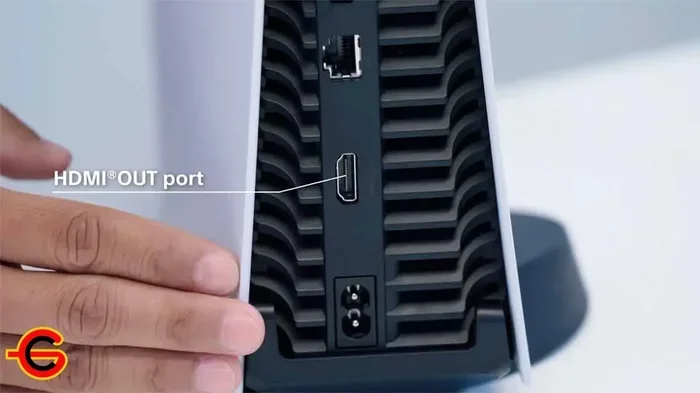
Your GPU or gaming console also plays a big role. Rendering 4K at 144Hz requires serious graphical power. A high end graphics card like the NVIDIA RTX 4080 or 4090 can handle this in many titles, especially with DLSS technology helping to boost frame rates. On the console side, the PlayStation 5 and Xbox Series X support 4K at 120Hz via HDMI 2.1, though 144Hz depends on the game and display.
For PC gamers, the high refresh rate monitor is the final piece of the puzzle. Many 4K 144Hz monitors now come with HDMI 2.1 ports, making it easier than ever to connect your setup and enjoy buttery smooth gameplay at ultra high definition.
HDMI 2.1 Bandwidth Explained Simply
Understanding HDMI 2.1 bandwidth does not have to be complicated. Let us break it down in simple terms. Bandwidth is the amount of data that can pass through the cable every second. More bandwidth means more data, which means higher resolution and faster refresh rates.
| HDMI Version | Max Bandwidth | Max 4K Refresh Rate |
|---|---|---|
| HDMI 2.0 | 18 Gbps | 4K at 60Hz |
| HDMI 2.0b | 18 Gbps | 4K at 60Hz |
| HDMI 2.1 | 48 Gbps | 4K at 120Hz / 144Hz |
As you can see, HDMI 2.1 offers a dramatic improvement. The jump from 18 Gbps to 48 Gbps is what makes 4K 144Hz possible. Without that extra bandwidth, the signal would be compressed, leading to lower quality or lower frame rates.
Signal bandwidth also affects other features like HDR and color depth. With HDMI 2.1, you get support for HDR10, Dolby Vision, and deeper color ranges without any compromise. This means richer blacks, brighter highlights, and more vibrant colors in your games and movies.
Why Bandwidth Matters for Gaming
When you are playing a fast paced game, every frame counts. A high refresh rate gives you smoother motion and a competitive edge. But if your bandwidth is too low, your display has to drop resolution or frame rate to keep up. HDMI 2.1 eliminates this problem by providing plenty of headroom for uncompressed 4K 144Hz output.
Think about it this way. You have invested in a powerful gaming PC or console. You have a stunning 4K monitor. The last thing you want is for your cable to be the bottleneck. HDMI 2.1 ensures your entire setup can perform at its best.
What You Need for 144Hz 4K Gaming
Getting 4K 144Hz working through HDMI 2.1 requires the right combination of gear. Let us walk through each component so you know exactly what to look for.
1. An HDMI 2.1 Ultra High Speed Cable
Not all cables are created equal. To get the full 48 Gbps bandwidth of HDMI 2.1, you need a certified HDMI 2.1 ultra high speed cable. These cables are rated for 48 Gbps and support 4K 144Hz, 8K 60Hz, and HDR without any issues.
Here is what to look for when buying a cable:
- Ultra High Speed HDMI certification label
- 48 Gbps rated bandwidth
- Ethernet channel support (optional but helpful)
- eARC support for advanced audio
- Good build quality with durable connectors
Avoid cheap cables that claim to be HDMI 2.1 but do not carry the official certification. A bad cable can cause flickering, signal loss, or reduced performance. Stick with trusted brands and always check for the Ultra High Speed logo.
2. A Compatible Display
Your monitor or TV must have an HDMI 2.1 port and support 4K at 144Hz. Many modern gaming monitors and high end TVs now include HDMI 2.1 connectivity. Before purchasing, double check the specs to confirm the display can handle the resolution and refresh rate you want.
Some popular options include 42-inch and 48-inch OLED TVs from LG and Samsung, as well as gaming monitors from brands like ASUS, LG, and Acer. These displays are designed to take full advantage of HDMI 2.1 features.
3. A Powerful Source Device
Your source device needs to output a 4K 144Hz signal. On the PC side, this means a modern graphics card from NVIDIA or AMD that supports HDMI 2.1. On the console side, the PlayStation 5 and Xbox Series X both have HDMI 2.1 outputs.
If your source device only has HDMI 2.0, you can still use an HDMI 2.1 cable, but you will be limited to the capabilities of the older port. The cable alone does not upgrade your source device.
HDMI 2.1 vs HDMI 2.0 for 4K Gaming
The difference between HDMI 2.1 and HDMI 2.0 is significant when it comes to 4K gaming. Here is a side by side look at what each version offers:
- HDMI 2.0 maxes out at 4K and 60Hz. That is fine for casual gaming and movie watching, but competitive players will notice the limitation.
- HDMI 2.1 pushes 4K to 120Hz or 144Hz, delivering a much smoother and more responsive experience.
- HDMI 2.0 does not support VRR or ALLM natively, while HDMI 2.1 includes both features as standard.
- HDMI 2.1 also supports higher color depths and dynamic HDR, which HDMI 2.0 cannot match.
If you are serious about 4K gaming, upgrading to HDMI 2.1 is one of the best decisions you can make. The improved refresh rate, lower input lag, and enhanced visual quality make a noticeable difference in every session.
Common Mistakes to Avoid
Even with the right gear, mistakes can happen. Here are some common pitfalls to watch out for:
Assuming All HDMI 2.1 Cables Are the Same
Not every cable labeled HDMI 2.1 is truly ultra high speed. Some cables only support 10 Gbps or 18 Gbps, which is not enough for 4K 144Hz. Always look for the official Ultra High Speed certification on the packaging.
Ignoring Your Display’s Capabilities
Buying a 4K 144Hz monitor with an HDMI 2.1 port does not guarantee 144Hz if the monitor’s HDMI 2.1 port is limited to a lower refresh rate at 4K. Always read the full specifications and user reviews before making a purchase.
Using a Long Cable Without Proper Certification
Longer cables can suffer from signal loss, especially at the high HDMI 2.1 bandwidth levels. If you need a cable longer than 6 feet, invest in a premium certified cable with active signal boosting to maintain quality.
Forgetting to Enable VRR and ALLM
Even with a fully HDMI 2.1 setup, features like Variable Refresh Rate and Auto Low Latency Mode must be enabled in your device settings. Without them, you may still experience screen tearing or higher input lag during gaming.
Expert Tips for Getting the Best 4K 144Hz Experience
Want to squeeze every bit of performance out of your HDMI 2.1 setup? Here are some pro tips that make a real difference:
- Keep your cable as short as possible to minimize signal degradation at 48 Gbps.
- Update your GPU drivers regularly to ensure full HDMI 2.1 feature support.
- Enable VRR on both your GPU and display for the smoothest possible gameplay.
- Use DisplayPort 2.1 as an alternative if your monitor supports it, as it also handles 4K 144Hz with ease.
- Check your source device settings to make sure it is outputting 4K at 144Hz and not a lower resolution or refresh rate.
- Test your setup with a 4K 144Hz test pattern to confirm everything is working correctly before diving into a game.
These small steps can save you from frustration and help you get the most out of your HDMI 2.1 investment. A little preparation goes a long way toward a perfect 4K gaming experience.
Conclusion
HDMI 2.1 is a game changer for anyone who wants to experience 4K gaming at 144Hz. The answer to the question can HDMI 2.1 do 144Hz 4K is a definitive yes. With the right ultra high speed cable, a compatible display, and a powerful source device, you can enjoy incredibly smooth and visually stunning gameplay at ultra high definition resolution.
The 48 Gbps bandwidth of HDMI 2.1 removes the limitations that held back earlier versions of the standard. Features like VRR, ALLM, and dynamic HDR make the entire experience better, whether you are competing in esports or exploring open world games.
Investing in HDMI 2.1 gear today means you are future proofing your setup for years to come. As more games and content are optimized for higher refresh rates and resolutions, having a HDMI 2.1 connection ensures you are ready. So go ahead, upgrade your cable, check your gear, and enjoy the full potential of 4K 144Hz gaming.
Frequently Asked Questions
Can HDMI 2.1 do 4K 144Hz on a PC?
Yes, HDMI 2.1 can deliver 4K at 144Hz on a PC as long as your graphics card, cable, and monitor all support HDMI 2.1. Make sure your GPU has an HDMI 2.1 output and that your monitor accepts a 4K 144Hz signal through its HDMI port.
Do I need a special cable for HDMI 2.1 4K 144Hz?
Yes, you need a certified HDMI 2.1 ultra high speed cable rated for 48 Gbps. Regular or older cables may not carry enough bandwidth for uncompressed 4K at 144Hz and could result in signal issues or reduced performance.
Can HDMI 2.0 do 4K 144Hz?
No, HDMI 2.0 is limited to 4K at 60Hz. It does not have enough bandwidth to handle 144 frames per second at 4K resolution. You need HDMI 2.1 to achieve 4K 144Hz.
Does the PlayStation 5 support 4K 144Hz via HDMI 2.1?
The PlayStation 5 supports 4K at 120Hz via HDMI 2.1. It does not currently output 4K at 144Hz, but 120Hz still provides a very smooth gaming experience compared to traditional 60Hz setups.
Is VRR important for HDMI 2.1 4K gaming?
Yes, Variable Refresh Rate (VRR) is a key HDMI 2.1 feature that syncs your display refresh rate with your GPU output. This reduces screen tearing and stuttering, giving you a much smoother gaming experience at high frame rates.
Can I use an HDMI 2.1 cable with an HDMI 2.0 device?
Yes, HDMI 2.1 cables are backward compatible with older devices. However, you will only get the performance level supported by the older device. The cable will not upgrade an HDMI 2.0 port to support 4K 144Hz.