Can Hdmi Run 240hz The Truth About High Refresh Rates
Can HDMI run 240Hz? The short answer is yes, but only with the right cable and port version. HDMI 2.1 is the key to unlocking 240Hz at high resolutions, while older HDMI versions fall short. This guide covers everything you need to know about high refresh rate displays, bandwidth requirements, and how to get the most out of your setup.
If you are a gamer or a tech enthusiast, you have probably wondered about HDMI 240Hz. The idea of ultra-smooth visuals is exciting. But can your current setup actually deliver it? The truth is more nuanced than you might think.
Not all HDMI cables are the same. Not all ports support high refresh rates. And not every monitor or TV can display 240 frames per second. In this guide, we will walk through everything you need to know. We will cover HDMI versions, bandwidth limits, cable requirements, and what it all means for your gaming experience. By the end, you will know exactly what you need to get the most out of a high refresh rate display.
Key Takeaways
- HDMI 2.1 is essential for 240Hz: Only the latest HDMI standard supports the bandwidth needed for 240Hz at higher resolutions.
- HDMI 2.0 can do 240Hz at 1080p: Older cables work at lower resolutions but struggle with 4K and 1440p at 240Hz.
- Cable quality matters: Not all HDMI cables are created equal. Certified ultra-high-speed cables are a must.
- Your GPU and monitor must support it too: The cable alone won’t give you 240Hz if your hardware can’t keep up.
- VRR technology enhances the experience: Variable refresh rate works hand-in-hand with high refresh rates to reduce screen tearing.
- Resolution trade-offs exist: You may need to lower resolution to hit 240Hz on some setups.
📑 Table of Contents
- What Is Refresh Rate and Why Does It Matter?
- Can HDMI Run 240Hz? The Short Answer
- Understanding HDMI Bandwidth and Why It Matters
- HDMI 2.1: The Game Changer for High Refresh Rates
- Common Mistakes People Make With HDMI and 240Hz
- Quick Tips for Getting the Best 240Hz Experience Over HDMI
- HDMI 240Hz: Resolution Trade-Offs Explained
- The Future of HDMI and High Refresh Rates
- Conclusion
What Is Refresh Rate and Why Does It Matter?
Before we dive into HDMI specifics, let us talk about refresh rate in simple terms. Your display refreshes the image on screen many times per second. That number is the refresh rate. A 60Hz display refreshes 60 times per second. A 240Hz display refreshes 240 times per second. That is four times faster.
Why does this matter? Higher refresh rates mean smoother motion. Fast-moving scenes look much clearer. This is a huge advantage in competitive gaming. Players can react faster when the visuals are smoother.
Refresh Rate vs Frame Rate
People often confuse refresh rate with frame rate. They are related but different. Frame rate is how many frames your GPU renders per second. Refresh rate is how many times your display updates per second. Both need to work together for the best results.
If your GPU outputs 240 frames per second but your display only refreshes at 60Hz, you will not see the full benefit. And if your display supports 240Hz but your GPU only outputs 60 frames, you are leaving performance on the table. Both sides of the equation need to match.
Why Gamers Love High Refresh Rates
Competitive gamers swear by high refresh rates. The difference between 60Hz and 144Hz is noticeable immediately. The jump from 144Hz to 240Hz is smaller but still meaningful. Every bit of smoothness helps in fast-paced games. Think shooters, racing games, and fighting titles. The more frames you see, the better your chances of spotting enemies quickly.
Can HDMI Run 240Hz? The Short Answer
So, can HDMI run 240Hz? Yes, it can. But the answer depends on several factors. The version of HDMI matters. The cable matters. The resolution matters. Let us break this down clearly.
The latest standard, HDMI 2.1, was designed for high-bandwidth applications. It can handle 240Hz at 4K resolution. It can even push 4K at 120Hz with HDR enabled. Older HDMI versions like HDMI 2.0 have more limitations. They can support 240Hz, but usually only at 1080p or sometimes 1440p.
HDMI Version Comparison for 240Hz
Not every HDMI version can deliver the same performance. Here is a simple comparison table to show you what each version can do at 240Hz.
| HDMI Version | Max Bandwidth | 240Hz at 1080p | 240Hz at 1440p | 240Hz at 4K |
|---|---|---|---|---|
| HDMI 1.4 | 10.2 Gbps | Yes | No | No |
| HDMI 2.0 | 18 Gbps | Yes | Yes (limited) | No |
| HDMI 2.1 | 48 Gbps | Yes | Yes | Yes |
As you can see, HDMI 2.1 is the clear winner. It offers four times the bandwidth of HDMI 2.0. This massive increase is what makes 4K at 240Hz possible. Without HDMI 2.1, you are limited to lower resolutions for high refresh rates.
Understanding HDMI Bandwidth and Why It Matters
Bandwidth is the data highway for your display. The more bandwidth you have, the more data can flow through. Think of it like a water pipe. A wider pipe carries more water. A wider HDMI bandwidth carries more visual data.
240Hz means your display updates 240 times every second. Each frame contains a lot of data, especially at higher resolutions. 4K resolution has over 8 million pixels. Sending 240 frames of 8 million pixels per second requires serious bandwidth. That is exactly what HDMI 2.1 provides.
How Bandwidth Affects Your Setup
If your HDMI cable or port cannot handle the required bandwidth, you will face problems. You might see a blank screen. Or your display might drop to a lower resolution or refresh rate. Sometimes the image flickers or shows artifacts. These issues all point to insufficient bandwidth.
Here is a quick tip. Always check the specifications of your cable and port before buying a high refresh rate monitor. The packaging should list the HDMI version. If it does not, check the manufacturer website. Do not guess. A mismatch can cause frustrating problems.
The Role of HDMI Cable Certification
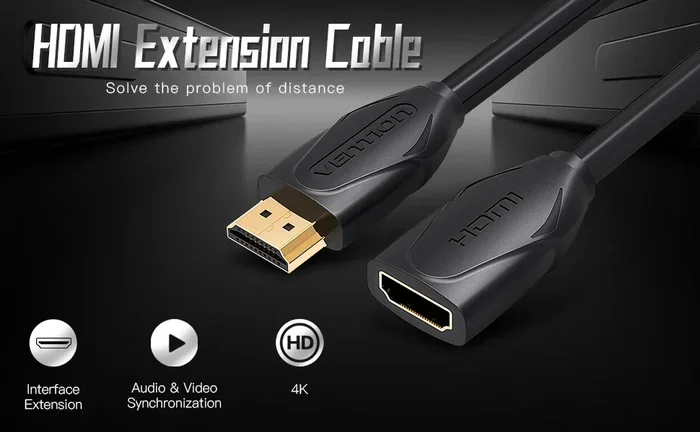
Not all cables labeled “HDMI” are the same. Some support high bandwidth. Others do not. Look for cables certified as Ultra High Speed HDMI. This certification guarantees the cable can handle 48 Gbps. That is the bandwidth needed for HDMI 2.1 features at their full potential.
Avoid cheap, uncertified cables. They might work at 1080p but fail at higher resolutions and refresh rates. Investing in a good cable saves you from headaches later.
HDMI 2.1: The Game Changer for High Refresh Rates
HDMI 2.1 changed the game when it came out. It was built specifically for next-generation displays and gaming. The 48 Gbps bandwidth is a massive leap forward. But bandwidth is not the only improvement. HDMI 2.1 brings several features that enhance your experience.
Key HDMI 2.1 Features
- Higher bandwidth: 48 Gbps compared to 18 Gbps in HDMI 2.0.
- Dynamic HDR: Better color and brightness handling frame by frame.
- Quick Frame Transport: Reduces latency for smoother gameplay.
- Variable Refresh Rate (VRR): Matches the display refresh rate to the GPU output.
- Auto Low Latency Mode: Automatically optimizes settings for gaming.
These features work together to give you the best possible experience. VRR is especially important. It eliminates screen tearing and stuttering. When your GPU cannot keep up with 240 frames per second, VRR adjusts the display refresh rate dynamically. The result is a buttery smooth picture without any visual glitches.
Do You Need HDMI 2.1 for 240Hz?
You need HDMI 2.1 for 240Hz at 1440p or 4K. For 240Hz at 1080p, HDMI 2.0 can sometimes work. But HDMI 2.1 is the future-proof choice. If you are buying a new gaming monitor or TV, look for HDMI 2.1 support. It ensures you are ready for whatever comes next.
Common Mistakes People Make With HDMI and 240Hz
Many people run into problems with their high refresh rate setup. Most of these issues come from simple mistakes. Here are the most common ones and how to avoid them.
Using the Wrong Cable
This is the number one mistake. People buy an expensive monitor that supports 240Hz and pair it with an old cable. The cable cannot handle the bandwidth. The monitor defaults to a lower refresh rate. The result is a frustrating experience that seems like the monitor is broken.
Always use an Ultra High Speed HDMI cable for 240Hz at 1440p or 4K. For 1080p at 240Hz, a high-speed HDMI 2.0 cable usually works. But when in doubt, go for the certified option.
Assuming All Ports Are the Same
Many monitors and TVs have multiple HDMI ports. But not all ports are created equal. Some might be HDMI 2.0 while others are HDMI 2.1. Check the manual or the port labels carefully. Plugging into the wrong port can limit your refresh rate.
Quick tip. Look for labels on the back of your device. If a port says “HDMI 2.1” or “Ultra High Speed,” that is your port for 240Hz at higher resolutions.
Ignoring GPU Limitations
Your GPU has to be powerful enough to output 240 frames per second. A mid-range graphics card might struggle at 4K 240Hz. It may manage 1080p or 1440p at 240Hz easily. Know your GPU’s capabilities before setting your expectations.
Check benchmark results for your specific GPU model. Search for “240Hz gaming performance” with your card name. This gives you a realistic idea of what to expect.
Quick Tips for Getting the Best 240Hz Experience Over HDMI
Want to make sure you are getting the most out of your setup? Follow these practical tips.
- Check your HDMI version. Make sure your cable and port support HDMI 2.1 for the best results.
- Use certified cables. Look for the Ultra High Speed HDMI certification on the packaging.
- Update your display drivers. GPU drivers often include optimizations for high refresh rate displays.
- Enable VRR in your settings. Both your monitor and GPU need VRR enabled for the best experience.
- Match your resolution to your GPU. If 4K 240Hz is too demanding, try 1440p or 1080p.
- Check for firmware updates. Monitors and TVs sometimes receive updates that improve HDMI performance.
Expert Insight: What the Pros Recommend
Tech experts and professional gamers agree on one thing. HDMI 2.1 is the standard to aim for. It removes guesswork and limitations. If you are building a new gaming setup, invest in HDMI 2.1 compatible gear from the start. You will not need to upgrade your cables or ports later. It saves money and frustration in the long run.
Another expert tip. Do not overlook your monitor’s overdrive settings. These settings help pixels transition faster between frames. Properly configured overdrive reduces ghosting at high refresh rates. It makes a noticeable difference in fast-paced games.
HDMI 240Hz: Resolution Trade-Offs Explained
Here is something many people do not realize. You cannot always get 240Hz at every resolution. There is a trade-off between resolution and refresh rate. More pixels mean more data. More data means more bandwidth is needed.
With HDMI 2.1, you can push 4K at 240Hz because the bandwidth is high enough. With HDMI 2.0, you might only get 1080p or 1440p at 240Hz. And with HDMI 1.4, 1080p at 240Hz might be the limit.
If your goal is the smoothest possible experience, 1080p at 240Hz is excellent. If you want both sharpness and smoothness, 1440p at 240Hz is a sweet spot. And if you want the best of both worlds, 4K at 240Hz is possible with HDMI 2.1.
The key is knowing your priorities. Do you value visual detail or smoothness more? This answer guides your setup decisions.
The Future of HDMI and High Refresh Rates
HDMI technology continues to evolve. The HDMI 2.1 standard already supports impressive performance. But the demand for even higher refresh rates is growing. Some monitors now offer 360Hz or even 480Hz. These require even more bandwidth and better cables.
HDMI has plans for the future. Newer specifications will push bandwidth even higher. This means even higher refresh rates at higher resolutions. If you are building a setup today, HDMI 2.1 is the safest bet for future-proofing your equipment.
Keep an eye on DisplayPort as well. DisplayPort 2.1 also supports very high refresh rates. Some gamers prefer DisplayPort for PC gaming. Both HDMI and DisplayPort have their strengths. The best choice depends on your specific setup and needs.
Conclusion
So, can HDMI run 240Hz? Yes, absolutely. But you need the right equipment. HDMI 2.1 is the standard that makes 240Hz at high resolutions possible. Without it, you are limited to lower resolutions or lower refresh rates. The cable, the port, the monitor, and the GPU all need to work together.
Understanding bandwidth requirements helps you make informed decisions. Avoiding common mistakes saves you time and frustration. And choosing the right setup for your needs ensures you get the smoothest gaming experience possible.
The world of high refresh rate displays is exciting. Whether you are a competitive gamer or just someone who loves smooth visuals, 240Hz makes a real difference. Invest in the right HDMI cable, check your hardware compatibility, and enjoy the difference that ultra-smooth motion brings to your screen.
Frequently Asked Questions
Can HDMI 2.0 run 240Hz?
HDMI 2.0 can support 240Hz, but usually only at 1080p resolution. For 1440p or 4K at 240Hz, you need HDMI 2.1. Always check your specific monitor and cable specifications to confirm compatibility.
What HDMI cable do I need for 240Hz?
You need an Ultra High Speed HDMI cable certified for HDMI 2.1. These cables support up to 48 Gbps of bandwidth. Regular or older cables may not handle the data required for 240Hz at higher resolutions.
Is 240Hz worth it for gaming?
Yes, 240Hz is worth it for competitive gamers. The extra smoothness helps with tracking fast-moving targets. Casual gamers may not notice as big a difference compared to 144Hz. But for serious gaming, the upgrade is real.
Can I get 240Hz at 4K with HDMI?
Yes, but only with HDMI 2.1. HDMI 2.1 provides the 48 Gbps bandwidth needed for 4K at 240Hz. Older HDMI versions cannot handle that combination of resolution and refresh rate.
Does my GPU need to output 240fps for 240Hz to matter?
Your GPU needs to get close to 240 frames per second for the full benefit. If your GPU only outputs 120fps, you will still see some improvement over 60fps. But the smoothest experience comes when your GPU and monitor match at 240.
Can I use HDMI 2.1 on older devices?
HDMI 2.1 cables are backward compatible with older HDMI ports. However, you will only get the performance your older port supports. If your device only has HDMI 2.0, you will be limited to 18 Gbps bandwidth.
=== CONCLUSION ===
Can HDMI run 240Hz? The answer is a clear yes with the right setup. HDMI 2.1 is the backbone of high refresh rate gaming at 1440p and 4K. It provides the bandwidth, features, and future-proofing you need. By choosing the right cable, checking your port version, and matching your GPU capabilities, you can unlock an incredibly smooth visual experience.
Do not fall for common mistakes like using the wrong cable or ignoring your GPU’s limits. Take the time to understand your setup. The difference at 240Hz is real and noticeable. Whether you are chasing competitive advantages or simply enjoy the buttery-smooth visuals, a proper HDMI 240Hz setup is well worth the investment.