Can I Use A Computer And Printer At Staples Right Now
Yes, you can use a computer and printer at many Staples locations, but availability depends on the store, your needs, and current policies. Staples stores offer computer workstations, printing services, and copy centers that can help you handle documents, resumes, and projects on the go. This guide covers everything you need to know about accessing these services, including costs, limitations, and smart tips for getting the most out of your visit.
Key Takeaways
- Staples stores often provide public computer access and printing services for customers and visitors.
- Printing costs vary by location, paper size, and color vs. black-and-white options.
- You can typically use in-store computers for free or a small fee, but printing usually costs per page.
- Not all Staples locations offer the same services, so calling ahead saves time.
- Staples tech services and copy centers can handle larger jobs like binding and laminating.
- Be mindful of privacy and security when using shared workstations at retail stores.
📑 Table of Contents
- Can I Use A Computer And Printer At Staples Right Now?
- What Services Does Staples Offer for Computer and Printer Use?
- How Much Does It Cost to Use Computers and Printers at Staples?
- How to Find a Staples Store That Offers Computer and Printer Access
- Tips for Using Computers and Printers at Staples
- Common Mistakes People Make When Using Staples Tech Services
- Expert Insights on Using Retail Tech Services
- Key Takeaways
- Conclusion
Can I Use A Computer And Printer At Staples Right Now?
Have you ever walked into a Staples store and wondered if you could sit down and get some work done? Maybe you need to print a document, finish a resume, or just check your email. The good news is that many Staples stores do let customers use computers and printers. But the full answer depends on a few things. In this article, we break down everything you need to know about using a computer and printer at Staples right now.
Staples is one of the largest office supply retailers in the United States. They sell everything from paper and pens to desks and tech gear. But beyond selling products, many Staples locations offer in-store services that go far beyond what you might expect. These include copy centers, tech support, and even public computer workstations. Whether you are a student, a freelancer, or someone who just needs a quick print job, understanding what Staples offers can save you time and money.
We will walk you through the details step by step. You will learn about public computer access, printing costs, what services are available, and how to make the most of your visit. We also share practical tips and common mistakes to avoid. By the end, you will know exactly what to expect when you walk through the doors of your local Staples.
Why People Need Computer and Printer Access at Retail Stores
Not everyone has a reliable computer or printer at home. Life happens. Your laptop might die, your printer could run out of ink, or you might not own either device. In these moments, having access to a public computer workstation becomes essential. Staples fills this gap for many people in the community.
Here are some common reasons people visit Staples for tech access:
- Printing resumes and cover letters before a job interview.
- Printing school assignments or project materials.
- Filing taxes or printing government forms.
- Checking email or communicating with clients and family.
- Scanning documents that need to be submitted in person or online.
- Making last-minute copies of important paperwork.
These are real needs that real people face every day. Staples understands this, which is why many of their stores have invested in customer-facing technology services. The copy center and business center in many locations serve as mini tech hubs for the community.
What Services Does Staples Offer for Computer and Printer Use?
When you walk into a Staples store, you are not just entering a retail shop. Many locations function as a mini office center with a range of technology services. Let us explore what is typically available.
In-Store Computer Workstations
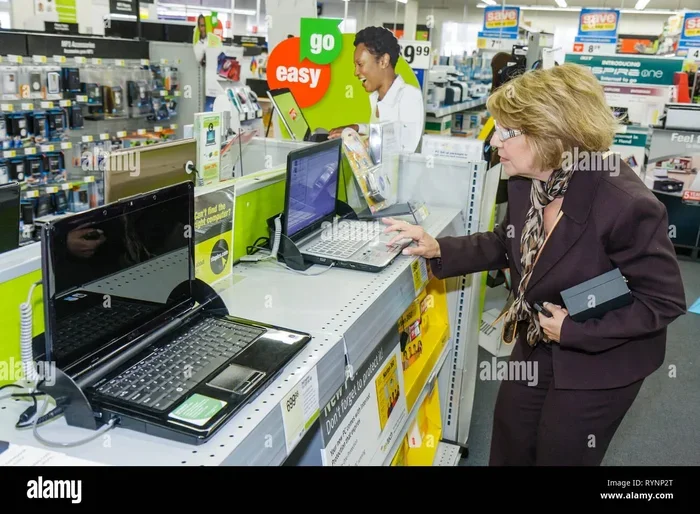
Many Staples stores have designated areas where customers can sit and use a computer. These walk-in computer stations are usually free to use or may have a small hourly fee. You can browse the internet, type documents, and access your email. Some stores even have these stations set up near the store entrance for easy access.
Here is what you can generally expect from Staples computer workstations:
- Internet access through a connected browser.
- Basic office software like Microsoft Word or Google Docs.
- USB ports for saving files to a flash drive.
- Access to email and cloud storage services.
- Limited session times during busy hours.
Keep in mind that these workstations are shared spaces. Always log out of your accounts when you are done. This protects your personal information and keeps the next user safe. Some stores may also have content filtering in place, similar to how mac address filtering works to control network access in public spaces. This means certain websites might be blocked for security reasons.
Printing Services at Staples
Printing is one of the most popular services at Staples. Whether you need a single black-and-white page or a full-color presentation, most locations can handle the job. Staples printing services are available at the copy center or business center counter.
Here is a quick look at what you can print at Staples:
- Black-and-white documents at a low per-page cost.
- Color prints for presentations, flyers, and photos.
- Photo prints on different paper types and sizes.
- Large-format prints for posters and banners.
- Binding, lamination, and finishing options for professional documents.
The cost of printing at Staples varies by location and print type. Black-and-white prints are usually the most affordable, while color and large-format prints cost more. You can also upload files online through the Staples website and pick them up in-store. This is a great option if you want to skip the wait time.
Copy and Scan Services
Beyond printing, many Staples locations offer copying and scanning services. You can bring in a document and make multiple copies quickly. Some stores also have flatbed scanners or all-in-one machines where you can scan documents directly to a USB drive or email them to yourself.
Scanning services are especially useful for people who need to digitize old documents or submit paperwork online. The staff at the business center can often help you with the scanning process if you are not sure how to do it yourself.
How Much Does It Cost to Use Computers and Printers at Staples?
Cost is a big factor when deciding where to print or use a computer. Let us break down what you can expect to pay.
Computer Use Fees
In most cases, using a computer at Staples is either free or comes with a minimal fee. Some stores offer free internet access at designated stations. Others may charge a small hourly rate, usually between one and five dollars. The fee structure depends on the store location and local demand.
Here is a general idea of what to expect:
- Free computer access at many locations during regular store hours.
- Small hourly fee at stores with high demand or dedicated tech stations.
- No fee for basic internet and document tasks in most cases.
Printing Costs
Printing costs at Staples are generally competitive with other retail print shops. Here is a rough breakdown:
| Print Type | Approximate Cost Per Page |
|---|---|
| Black-and-white (letter size) | $0.10 – $0.25 |
| Color (letter size) | $0.50 – $1.00 |
| Photo prints (4×6) | $0.25 – $0.75 |
| Large-format (poster size) | $5.00 – $20.00+ |
| Binding and lamination | $1.00 – $5.00+ per item |
These prices are estimates and can vary by location. Always check with your local store for current pricing. You can also save money by printing online and picking up in-store, which sometimes offers lower rates.
How to Find a Staples Store That Offers Computer and Printer Access
Not every Staples location provides the same services. Some stores are larger and offer full business centers, while smaller locations may have limited options. Here is how you can find a store that meets your needs.
Using the Staples Store Locator
The easiest way to check services at your local store is through the Staples website store locator. You can enter your zip code or city and view the services available at nearby locations. Look for stores that list “copy and print services,” “business center,” or “tech services” in their description.
Calling Ahead
When in doubt, call the store directly. Ask about computer availability, printer services, and any fees. This simple step can save you a trip and ensure you get what you need. It is especially helpful if you are on a tight schedule or have a large print job.
Checking Online Reviews
Online reviews on Google or Yelp can also give you a sense of what to expect. Look for reviews that mention computer access, printing quality, and customer service at the business center. Real customer experiences are often the best indicator of what you will encounter.
Tips for Using Computers and Printers at Staples
Getting the most out of your visit to Staples requires a bit of planning. Here are some practical tips to help you succeed.
Bring Your Files on a USB Drive
Always carry your documents on a USB flash drive. This is the easiest way to transfer files to a public computer and send them to the printer. Make sure your files are saved in a common format like PDF or DOCX for the best compatibility. Scanning your documents to PDF before you go can also save time and reduce errors at the print counter.
Arrive During Off-Peak Hours
Staples stores can get busy, especially during lunch hours and weekends. If you need to use a computer or printer, try visiting during early morning or mid-afternoon on a weekday. You will likely find available workstations and shorter wait times for printing.
Check the Printer Before You Print
Before you send your final print job, do a quick check. Make sure the printer has enough paper and ink. If you are printing from a public computer, verify that your file looks correct on the screen before hitting print. This saves paper, ink, and frustration.
Protect Your Personal Information
Using a shared computer comes with privacy risks. Always log out of every account when you are done. Clear your browser history if the computer allows it. Do not save passwords on public workstations. Being cautious protects your identity and keeps your data safe.
Take Advantage of Online Upload Options
If you do not want to wait in line at the business center, consider uploading your files through the Staples website. You can select your local store, choose your print options, and pay online. When you arrive at the store, your order will be ready for pickup. This is a convenient alternative that saves time and reduces in-store wait times.
Common Mistakes People Make When Using Staples Tech Services
Even with the best intentions, mistakes happen. Here are some common errors to avoid.
Not Checking File Compatibility
Public computers may not have every software program installed. If your file requires a specific application, it might not open correctly. Always save your files in widely supported formats like PDF or plain text. This ensures smooth printing and scanning every time.
Forgetting to Bring Necessary Accessories
It sounds obvious, but many people forget their USB drives or cables. Some stores may not have spare storage devices available. Always double-check that you have everything you need before you leave home.
Ignoring Store Policies
Every Staples store has its own set of rules for computer and printer use. Some limit session times. Others restrict certain types of content. Respect the store policies and be courteous to other customers waiting for access. Being a good visitor goes a long way.
Underestimating Print Costs
Color printing and large-format prints can add up quickly. Set a budget before you print and ask about pricing before committing to a large job. This prevents surprise costs and helps you plan your spending.
Expert Insights on Using Retail Tech Services
Experts in the retail and tech space often highlight the value of public access technology in communities. Stores like Staples play an important role in bridging the digital divide. Not everyone has access to a computer or printer at home, and retail tech services fill that gap.
However, experts also caution users about security and privacy on shared devices. When you use a public computer, your data is exposed to the device’s previous users and the network administrators. This is why it is important to use secure connections, avoid sensitive transactions, and always log out completely. Some stores also implement network-level protections, such as mac address filtering and other access controls, to keep their networks safe. Understanding these measures helps you use public tech spaces with confidence.
Key Takeaways
- Many Staples stores offer computer and printer access for customers and visitors.
- Printing costs vary by type, size, and color, but are generally affordable.
- Computer workstations are often free or low-cost to use during store hours.
- Not all locations offer the same services, so check ahead with your local store.
- Online upload and pickup options can save you time and reduce in-store waits.
- Protect your privacy by logging out of all accounts and avoiding sensitive tasks on shared devices.
- Staples copy centers offer a range of services beyond printing, including scanning, binding, and lamination.
Conclusion
Can I use a computer and printer at Staples right now? The answer is most likely yes. Staples stores across the country offer computer workstations, printing services, and copy centers that make it easy to handle everyday tech tasks. Whether you need to print a resume, scan a document, or finish a school project, your local Staples can help.
By understanding the costs, services, and tips shared in this guide, you can make the most of your next visit. Plan ahead, bring your files, and respect the store’s policies. With a little preparation, you can get your work done quickly and efficiently at any Staples location that offers these services.
The next time you need computer or printer access, remember that your local Staples store might be the perfect solution. Walk in, ask the staff, and get started on your project with confidence.
Frequently Asked Questions
Is it free to use a computer at Staples?
In most cases, using a computer at Staples is free or comes with a very small fee. However, policies vary by location. Some stores may charge an hourly rate for extended use. It is always a good idea to call ahead and confirm the computer access policy at your local store.
Can I print documents from my phone at Staples?
Yes, many Staples locations allow you to print from your phone. You can use the Staples app or upload files through their website. Some stores also have wireless printing options. Check with your local store to see what mobile printing options are available.
What file formats work best for printing at Staples?
PDF and DOCX files are the most widely supported formats at Staples. These formats preserve your formatting and work reliably on most public computers. Avoid using niche or proprietary file formats that may not open correctly on shared workstations.
How much does color printing cost at Staples?
Color printing at Staples typically costs between $0.50 and $1.00 per page for standard letter-size documents. Larger formats and specialty prints cost more. Prices vary by location, so check with your local store for exact pricing.
Can I use Staples computers for online banking or shopping?
It is not recommended to use public computers for sensitive tasks like online banking or shopping. Shared devices may have keyloggers or other security risks. If you must do so, use a secure connection and log out completely when finished. For best safety, use your own device whenever possible.
Do all Staples stores have a business center?
No, not all Staples stores have a full business center. Larger locations are more likely to offer comprehensive services like computer access, printing, copying, scanning, and finishing options. Smaller stores may have limited services or none at all. Always check with your local store before visiting.