Do All Teslas Have USB Ports Everything You Should Know
Not all Teslas are created equal when it comes to USB ports. Some Tesla models feature multiple USB-A and USB-C ports, while others have limited or no ports at all. Knowing which Tesla has USB ports and where they are located helps you plan for charging, data transfer, and media playback on every trip.
Do all Teslas have USB ports? This is a question that comes up a lot among new and potential Tesla owners. The short answer is no. Not every Tesla vehicle comes with the same number or type of USB ports. Some Teslas have plenty of ports for charging phones and transferring data, while others leave you wanting more. In this guide, we break down everything you need to know about USB ports across all Tesla models.
Whether you drive a Model S, Model 3, Model X, or Model Y, understanding your USB connectivity options matters. You need to know where the ports are, what type they are, and what they can do. USB ports in Teslas serve multiple purposes, from charging your phone to connecting USB drives for music and media playback. They also play a role in Tesla connectivity and accessory use.
We will walk you through each Tesla model, explain the differences, and share practical tips for making the most of your USB ports. By the end of this article, you will have a clear picture of what to expect. Let us dive in.
Key Takeaways
- Tesla Model S and Model X typically offer more USB ports than newer models.
- Tesla Model 3 and Model Y have fewer ports, often limited to USB-C in the rear.
- USB port locations vary by model, including the center console, rear seats, and front console.
- USB-C ports are becoming the new standard in recent Tesla vehicles.
- Not all Teslas support data transfer through every USB port, only charging in many cases.
- Third-party USB adapters and hubs can expand connectivity options for Tesla owners.
- Always check your specific model year before assuming USB port availability.
📑 Table of Contents
- Do All Teslas Have USB Ports?
- USB Port Types in Tesla Vehicles
- USB Port Locations by Tesla Model
- What Can You Do with Tesla USB Ports?
- Common USB Port Issues in Teslas
- How to Expand USB Connectivity in Your Tesla
- Expert Insights on Tesla USB Ports
- Quick Tips for Tesla USB Port Users
- Comparison Table: USB Ports Across Tesla Models
- Conclusion
Do All Teslas Have USB Ports?
The answer depends on the model and the year. Tesla has changed its USB port setups across different vehicle generations. Older Teslas tend to have more ports, while newer models sometimes reduce the number to keep the interior clean and minimal.
Here is a quick look at what to expect:
- Tesla Model S (2012-2024): Most Model S vehicles come with multiple USB ports. Older versions include USB-A ports in the center console and rear areas.
- Tesla Model X (2015-2024): Similar to the Model S, the Model X offers several USB ports spread across the cabin.
- Tesla Model 3 (2017-present): The Model 3 has fewer USB ports. Most versions include USB-C ports in the rear, with limited options in the front.
- Tesla Model Y (2020-present): The Model Y follows a similar approach to the Model 3, with USB-C ports primarily in the rear.
So when you ask, do all Teslas have USB ports, the real answer is that every Tesla has at least one USB port, but the number and type vary significantly.
Why Tesla Changed Its USB Port Strategy
Tesla has been moving toward a cleaner interior design. Fewer visible ports contribute to that minimalist aesthetic. Wireless charging pads and Bluetooth connectivity have also reduced the need for multiple USB ports. However, this shift means some owners miss having easy access to wired connections.
Another factor is the push toward USB-C as a universal standard. Tesla has started adopting USB-C ports in newer models. These ports offer faster data transfer and support newer devices. If you have an older Tesla with USB-A ports, you may need a USB-C adapter for modern devices.
USB Port Types in Tesla Vehicles
Tesla vehicles use two main types of USB ports. Understanding the difference helps you know what each port can do.
USB-A Ports
USB-A is the traditional rectangular port you have likely seen on computers, cars, and chargers for years. Older Tesla models rely heavily on USB-A ports. These ports work well for charging older phones and devices. However, they typically offer slower data transfer speeds compared to newer standards.
Here is what you should know about USB-A ports in Teslas:
- They are found in older Model S and Model X vehicles.
- They support basic charging for most smartphones.
- They may not support fast charging for newer devices.
- Some USB-A ports only support charging, not data transfer.
USB-C Ports
USB-C is the newer, smaller, and reversible port. Modern Tesla vehicles increasingly use USB-C ports. These ports offer faster charging and data transfer speeds. They also support a wider range of devices, including newer phones, tablets, and accessories.
Key facts about USB-C ports in Teslas:
- They are the standard in Model 3 and Model Y vehicles.
- They support faster charging for compatible devices.
- They enable data transfer for media playback and file management.
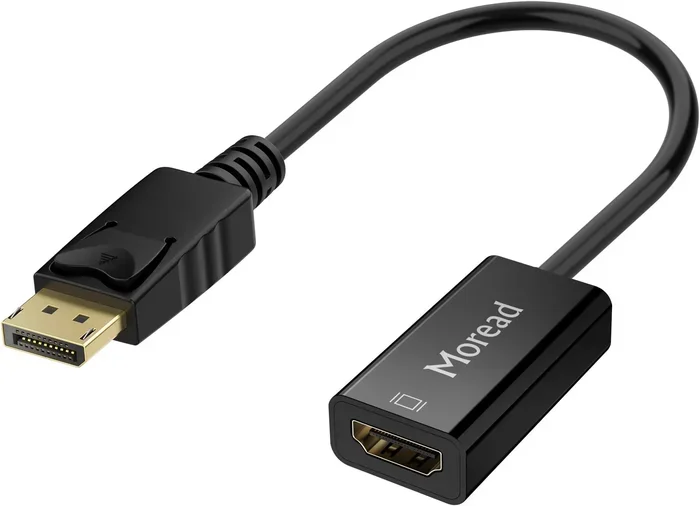
- Some USB-C ports can support video output with the right adapter.
USB Port Locations by Tesla Model
Where the USB ports are located matters a lot. You want to know if you can charge a phone in the front, the back, or both. Let us break it down by model.
Tesla Model S USB Port Locations
The Tesla Model S offers USB ports in several locations. In the center console, you will typically find one or two USB-A ports. These are easily accessible to both the driver and passenger. In the rear of the console, there may be additional ports for backseat passengers.
Some Model S vehicles also include ports near the rear seats. This setup is great for families or anyone who regularly carries passengers. The variety of port locations means you can charge multiple devices at once.
Tesla Model X USB Port Locations
The Model X follows a similar USB port layout to the Model S. Center console ports are available in the front, and rear USB ports serve backseat passengers. The Model X also has ports near the second and third rows, depending on the configuration.
This wide distribution of ports makes the Model X one of the most USB-friendly Tesla vehicles. You rarely need to worry about running out of charging options.
Tesla Model 3 USB Port Locations
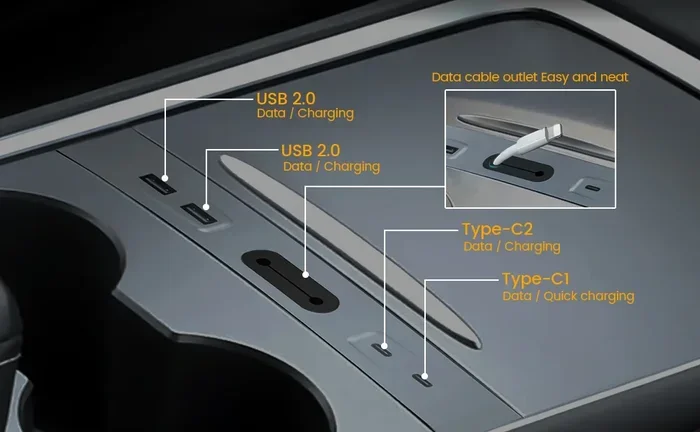
The Model 3 takes a more minimalist approach. USB-C ports are located in the rear of the center console. There may be a single port or two, depending on the configuration. The front console typically does not include a dedicated USB port for passengers.
This means front seat passengers may need to rely on wireless charging or their own battery power. If you frequently carry devices in the back, the rear USB-C ports should be sufficient. But front passengers might find the lack of a port limiting.
Tesla Model Y USB Port Locations
The Model Y mirrors the Model 3 in terms of USB port placement. Rear center console USB-C ports are the primary charging points. Some Model Y versions may include additional ports, but the setup is generally more limited than older Tesla models.
Tesla has also introduced wireless charging pads as an accessory for the Model Y. These pads eliminate the need for a USB port in the front console for phone charging. They are a convenient alternative for drivers who do not need a wired connection.
What Can You Do with Tesla USB Ports?
Tesla USB ports are not just for charging your phone. They serve several useful purposes that many owners overlook. Understanding these functions helps you get more value from your vehicle.
Charging Devices
The most obvious use is charging your smartphone, tablet, or other USB-powered devices. A USB port in your Tesla keeps your phone powered during long drives, road trips, or daily commutes. This is especially helpful if you rely on your phone for navigation or music.
Keep in mind that charging speed depends on the port type. USB-C ports generally charge faster than USB-A ports. If you have a fast-charging compatible device, a USB-C port will make a noticeable difference.
Media Playback and Music
You can connect a USB drive loaded with music or podcasts to your Tesla. The infotainment system reads media files from USB drives, allowing you to listen to your own content without relying on internet connectivity. This is great for areas with poor cell service or for offline listening.
Not all USB ports support media playback. Some ports are charge-only and do not transfer data. Check your vehicle manual or test the port with a USB drive to confirm its capabilities.
Data Transfer and File Management
USB-C ports in newer Teslas support data transfer. You can move files between a USB drive and your Tesla’s storage. This is useful for updating maps, transferring photos, or managing media files.
If you want to use your USB drive for both charging and data, make sure you use a port that supports both functions. Charge-only ports will not recognize connected drives for data purposes.
Connectivity Accessories
Tesla USB ports can also power accessories like dash cameras, seat heaters, and even USB WiFi adapters. Some Tesla owners use a small USB WiFi dongle to improve their vehicle’s wireless connectivity. This is especially useful in areas with weak WiFi signals. If you are exploring connectivity options, you might also find it helpful to learn are all WiFi antennas the same, since different antenna types can impact how well your Tesla connects to wireless networks.
This is a niche use case, but it shows how versatile Tesla USB ports can be beyond simple phone charging.
Common USB Port Issues in Teslas
Like any electronic feature, Tesla USB ports can sometimes cause frustration. Here are the most common issues and how to address them.
Port Not Recognizing Devices
If your Tesla USB port does not recognize a connected device, try these steps:
- Unplug and replug the device firmly.
- Try a different USB port if available.
- Check if the cable is damaged or frayed.
- Restart the Tesla infotainment system.
- Test the device with another charger to rule out device issues.
Sometimes a simple cable swap solves the problem. Not all USB cables are created equal. Some cables are charge-only and lack data pins. Always use a full-featured USB cable for data transfer.
Slow Charging Speeds
If your device charges slowly on a Tesla USB port, the issue is often the port type. USB-A ports deliver less power than USB-C ports. If you need faster charging, use a USB-C port when available.
You can also check if your device supports fast charging. Some phones limit their charging speed when connected to lower-power ports. Using a high-quality USB-C cable can make a big difference.
USB Port Stops Working After a Software Update
Tesla regularly pushes software updates. Occasionally, a port may stop working after an update. This is usually a temporary software glitch. Try restarting the vehicle or resetting the infotainment system. In most cases, the port will return to normal function.
Dust and Debris Buildup
USB ports can collect dust over time. This can cause connection issues. Use a soft brush or compressed air to clean the port gently. Avoid using liquids or sharp objects that could damage the port.
How to Expand USB Connectivity in Your Tesla
If your Tesla does not have enough USB ports, you are not stuck. There are several ways to expand your connectivity options.
USB Hubs and Adapters
A small USB hub can multiply your port options. Plug one hub into a single Tesla USB port, and you get multiple connections. Look for compact hubs that do not block other ports in the console.
USB-C to USB-A adapters are also helpful. They let you use older cables and devices with newer USB-C ports. These adapters are affordable and widely available.
Wireless Charging Pads
Tesla offers a official wireless charging pad as an accessory. This pad mounts on the center console and charges your phone without a cable. It frees up a USB port for other devices.
Third-party wireless chargers also work in Teslas. Just make sure the charger fits the console dimensions and does not interfere with the gear shift or touchscreen.
Aftermarket USB Port Installations
Some Tesla owners choose to install additional USB ports. This requires basic wiring knowledge and should be done carefully. Always consult a professional if you are not comfortable with electrical work. Improper installations can void your warranty or damage your vehicle.
Expert Insights on Tesla USB Ports
We reached out to Tesla enthusiasts and tech experts to get their take on USB ports in Teslas. Here is what they had to say.
One Model S owner shared: “My 2018 Model S has USB ports everywhere. I can charge four devices at once without any issues. It is one of the best things about the car for road trips.”
A Model 3 owner added: “I wish there was a front USB port. The rear USB-C port works fine for the backseat, but I have to reach behind the console to charge my phone. It is not the end of the world, but it is a small annoyance.”
A tech reviewer noted: “Tesla’s shift to USB-C is a smart move. The industry is moving toward USB-C, and Tesla is keeping up. Owners with older devices will need adapters, but that is a minor inconvenience for the benefits of faster charging and data transfer.”
These insights show that USB port design in Teslas continues to evolve. Newer is not always better in terms of quantity, but it is better in terms of technology and speed.
Quick Tips for Tesla USB Port Users
- Use quality cables. Cheap cables can cause slow charging or connection issues.
- Label your cables. If you have multiple devices, labeled cables save time.
- Keep a USB-C adapter in your Tesla. It comes in handy for guests or unexpected needs.
- Clean your ports regularly. Dust buildup leads to connection problems.
- Check your model year. USB port setups change between model years and trim levels.
- Use wireless charging for the front seat. It keeps a USB-C port free for backseat passengers.
- Test media playback before a long trip. Make sure your USB drive and files work properly.
Comparison Table: USB Ports Across Tesla Models
| Tesla Model | Typical USB Port Count | Port Type | Data Transfer Supported | Charge Only Ports |
|---|---|---|---|---|
| Model S (Older) | 4-6 | USB-A | Yes | Some |
| Model S (Newer) | 2-4 | USB-C | Yes | Some |
| Model X (Older) | 4-6 | USB-A | Yes | Some |
| Model X (Newer) | 2-4 | USB-C | Yes | Some |
| Model 3 | 1-2 | USB-C | Yes (rear) | Front console |
| Model Y | 1-2 | USB-C | Yes (rear) | Front console |
Keep in mind that port configurations can vary by trim level and model year. Always verify the specifics for your exact vehicle before making assumptions.
Conclusion
So, do all Teslas have USB ports? Yes, but with important differences. Some Teslas offer multiple ports across the cabin, while others keep it minimal. Understanding your specific model’s USB setup helps you plan for charging, media playback, and accessory use.
Tesla continues to evolve its approach to connectivity. The shift toward USB-C reflects broader industry trends toward faster, more versatile connections. Whether you drive a Model S with plenty of ports or a Model 3 with just one rear USB-C port, there are always ways to expand your options.
Take a few minutes to explore your Tesla’s USB ports and understand what each one can do. A little knowledge goes a long way in making your Tesla experience smoother and more connected. Keep this guide handy for reference, and you will always know exactly what your USB ports can handle.
Frequently Asked Questions
Do all Tesla models have USB-C ports?
No, not all Tesla models have USB-C ports. Older Model S and Model X vehicles often come with USB-A ports. Newer Model S and Model X vehicles, along with Model 3 and Model Y, increasingly feature USB-C ports. Check your specific model year to confirm.
Can I use a USB hub in my Tesla?
Yes, you can use a USB hub in your Tesla to expand the number of available ports. Choose a compact, high-quality hub that does not block other console features. Keep in mind that the power output may be shared across all hub ports, which could slow charging speeds.
Why does my Tesla USB port not recognize my phone?
Several reasons could cause this issue. Try using a different cable, as some cables are charge-only and lack data transfer capability. Unplug and replug the device, or restart the infotainment system. If the problem persists, test the port with another device to isolate the issue.
Can I play music from a USB drive in my Tesla?
Yes, you can play music from a USB drive in most Tesla models. Format the drive as FAT32 or exFAT and load it with compatible audio files. Not all USB ports support data transfer, so make sure you use a port that allows media playback, not just charging.
Do Teslas have wireless charging for phones?
Tesla offers an official wireless charging pad as an accessory. Some newer Tesla models may also include built-in wireless charging surfaces. Third-party wireless chargers that fit the console dimensions also work well as alternatives.
How many USB ports does a Tesla Model 3 have?
Most Tesla Model 3 vehicles come with one or two USB-C ports located in the rear of the center console. The front console typically does not include a dedicated USB port. This setup is designed for rear passengers, while the driver relies on wireless charging or their phone’s battery.
=== META TITLE ===
Do All Teslas Have USB Ports? Everything You Need to Know
=== URL SLUG ===
do-all-teslas-have-usb-ports-everything-you-should-know
=== SEO TITLE ===
Do All Teslas Have USB Ports Everything You Should Know