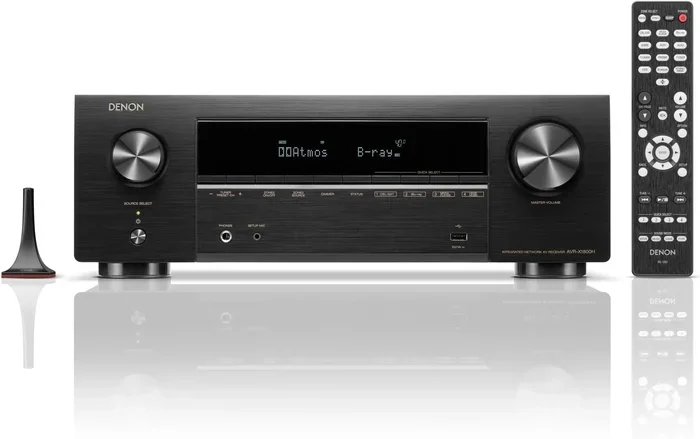
Do Denon Receivers Have Bluetooth Wireless Streaming
Do Denon receivers have Bluetooth? Yes, most modern Denon receivers come with built-in Bluetooth wireless streaming, making it easy to connect your phone, tablet, or laptop without extra cables. Bluetooth connectivity lets you stream music, podcasts, and more directly to your home theater or stereo system. In this guide, we break down which Denon models support Bluetooth, how to pair devices, and tips for getting the best wireless audio quality.
If you have ever stood in front of your stereo system wondering how to get music from your phone without plugging in a cable, you are not alone. Bluetooth wireless streaming has become one of the most popular ways to listen to music at home. And if you own or are thinking about buying a Denon receiver, you might be asking a simple question: do Denon receivers have Bluetooth?
The short answer is yes, most modern Denon receivers do include Bluetooth. But the full picture is a bit more nuanced. Some models have it, some do not, and the way you use it can make a big difference in sound quality. In this article, we will walk you through everything you need to know about Bluetooth on Denon receivers, from setup to troubleshooting, so you can get the most out of your audio system.
## What Is Bluetooth Wireless Streaming on a Denon Receiver?
Bluetooth wireless streaming is a technology that lets two devices exchange audio signals without using any cables. When your Denon receiver has Bluetooth built in, it acts as a speaker or output device. You can send music from your phone, tablet, or computer straight to the receiver through the air.
Denon has been incorporating Bluetooth into its receivers for several years now. The feature is part of what makes these receivers so convenient for everyday listening. Instead of running an auxiliary cable from your phone to the receiver, you just pair the devices once and they connect automatically in the future.
### How Bluetooth Works on Denon Receivers
Bluetooth uses short-range radio waves to transmit audio data between devices. Your phone sends the audio signal, and the Denon receiver picks it up and plays it through your speakers. The process involves something called a Bluetooth codec, which is basically the format the audio data is sent in.
Different codecs offer different levels of audio quality. The most common ones you will encounter with Denon receivers include SBC, aptX, and AAC. aptX is especially popular because it delivers near-CD quality sound over a Bluetooth connection. Some newer Denon models also support LDAC, which is Sony’s high-resolution Bluetooth codec.
### Built-in Bluetooth vs. External Bluetooth Adapters
There are two ways to get Bluetooth on your Denon receiver. The first is built-in, which means the receiver already has the hardware inside it. The second is an external adapter, which you plug into the receiver’s input.
Built-in Bluetooth is obviously more convenient. You do not need any extra cables or devices. However, external Bluetooth adapters can sometimes offer better audio quality because they have their own dedicated processing power. If you are curious about adding Bluetooth to non-Bluetooth equipment, you can check out how to turn your stereo into Bluetooth using an adapter. That guide covers the same principles that apply to Denon receivers.
## Which Denon Receiver Models Have Bluetooth?
Not every Denon receiver on the market has Bluetooth. The feature is most common in models released after 2015. Here is a general breakdown of what to expect across Denon’s product lines.
### Denon Home Theater Receivers
Denon’s home theater receivers, like the AVR series, typically come with Bluetooth built in. Models such as the Denon AVR-X3700H, AVR-X4700H, and AVR-X6700H all support Bluetooth wireless streaming. These receivers are designed for people who want both a powerful home theater system and the convenience of wireless music streaming.
Most of these models support multiple Bluetooth codecs, including aptX and AAC. This means you can expect good sound quality when streaming from your phone or tablet. The Bluetooth range is usually around 30 feet, which is more than enough for most living rooms.
### Denon Stereo Receivers
Denon’s stereo receivers, like the PMA series, also commonly include Bluetooth. The PMA-1700NE, for example, is a popular stereo receiver that features built-in Bluetooth. It is a great option for people who want a simple, two-channel setup for listening to music.
Older stereo receivers from Denon, particularly those made before 2015, may not have Bluetooth at all. If you own an older model, you can still add Bluetooth functionality using an external adapter.
### Denon Network Receivers
Denon’s network receivers, which include features like Wi-Fi and streaming service support, almost always include Bluetooth as well. Models like the Denon DRA-900H and DRA-1080 combine network streaming with Bluetooth, giving you multiple ways to play music.
### Quick Comparison Table
| Denon Model Series | Bluetooth Built-in? | Common Codecs | Typical Range |
|---|---|---|---|
| AVR-X Series (Home Theater) | Yes | SBC, aptX, AAC | ~30 feet |
| PMA Series (Stereo) | Yes (most models) | SBC, aptX | ~30 feet |
| DRA Series (Network) | Yes | SBC, aptX, AAC, LDAC | ~30 feet |
| Older Models (Pre-2015) | Usually No | N/A | N/A |
If you are shopping for a new Denon receiver and Bluetooth is important to you, always check the specifications on the product page. Look for the words “Bluetooth” or “Bluetooth wireless streaming” in the feature list.
## How to Pair Your Device with a Denon Receiver
Pairing your phone or tablet to a Denon receiver is straightforward. Follow these steps to get connected in just a few minutes.
1. Turn on your Denon receiver and make sure Bluetooth is enabled in the settings menu.
2. On your phone or tablet, go to the Bluetooth settings and turn Bluetooth on.
3. Put your Denon receiver into pairing mode. On most models, you can do this by pressing the Bluetooth button on the remote or the front panel.
4. Look for your Denon receiver in the list of available devices on your phone.
5. Tap on the receiver name to connect.
6. Once paired, you should hear a confirmation sound from the receiver, and the Bluetooth indicator light will stay solid.
After the initial pairing, your devices will usually reconnect automatically whenever both Bluetooth options are turned on. This makes it really convenient for daily use. You just open your music app and start playing.
### Tips for a Smooth Pairing Process
Keep your phone close to the receiver during the first pairing. This helps establish a strong connection. Also, make sure no other Bluetooth devices are interfering. If you have had trouble pairing in the past, try turning Bluetooth off and on again on both devices. Sometimes a simple restart of your phone fixes connection issues.
If you are having trouble connecting, you might also want to check if other wireless devices are causing interference. Wireless signals from microwaves, baby monitors, or even neighboring Wi-Fi networks can sometimes disrupt Bluetooth connections. Moving your receiver away from these devices can help.
## Bluetooth Audio Quality on Denon Receivers
One of the biggest questions people have about Bluetooth streaming is whether the sound quality is good enough. The answer depends on a few factors, including the Bluetooth codec being used and the quality of your speakers.
### Understanding Bluetooth Codecs
A Bluetooth codec is the compression format used to send audio over a Bluetooth connection. The most common codecs you will encounter with Denon receivers are:
- SBC: The default Bluetooth codec. It works with all Bluetooth devices but offers standard audio quality.
- aptX: A higher-quality codec that delivers near-CD sound. Most modern Denon receivers support aptX.
- aptX HD: An even better version of aptX that supports high-resolution audio.
- LDAC: Sony’s codec that supports very high-quality streaming. Found on some newer Denon models.
- AAC: Commonly used by Apple devices. Good quality but not as high as aptX HD or LDAC.
The codec your phone and receiver both support will determine the audio quality. If both devices support aptX, you will get better sound than if you are stuck with SBC.
### Does Bluetooth Compromise Sound Quality?
Bluetooth does compress audio to some degree, which means there is a slight loss in quality compared to a wired connection. However, with modern codecs like aptX and LDAC, this loss is barely noticeable for most listeners. If you have good speakers or headphones, you will likely not hear a difference.
For the best results, make sure your Denon receiver and your phone are using the same codec. You can usually check this in the Bluetooth settings on both devices. Some Denon receivers also let you choose your preferred codec in the setup menu.
### Quick Tips for Better Bluetooth Audio Quality
- Keep your phone within 10 to 15 feet of the receiver for the strongest signal.
- Avoid placing the receiver near other wireless devices that might cause interference.
- Make sure both your phone and receiver support the same high-quality codec.
- Update your Denon receiver’s firmware to get the latest Bluetooth improvements.
- Use lossless music files or high-quality streaming services for the best sound.
## What If My Denon Receiver Does Not Have Bluetooth?
If you own an older Denon receiver or a budget model that does not include Bluetooth, do not worry. You have several options for adding wireless streaming to your system.
### Bluetooth Transmitter or Adapter
A Bluetooth transmitter is a small device that plugs into your receiver’s audio input. It receives the Bluetooth signal from your phone and sends it to the receiver as an audio cable signal. This is one of the most popular and affordable ways to add Bluetooth to any audio system.
You can find Bluetooth transmitters for as little as $15 to $30. Some models even support aptX for better audio quality. If you want to learn more about how Bluetooth adapters work with audio equipment, check out this guide on using a Bluetooth adapter on your TV. The same principles apply to receivers.
### Bluetooth Receiver with RCA or Optical Input
Another option is a Bluetooth receiver that connects directly to your receiver’s inputs. These devices often have RCA or optical outputs, making them easy to integrate into a Denon system. They tend to offer better range and stability than transmitters.
### Can You Replace Your Receiver?
If your Denon receiver is quite old and lacks Bluetooth, you might consider upgrading to a newer model. Modern Denon receivers offer much more than just Bluetooth. They include Wi-Fi, network streaming, support for services like Spotify and Tidal, and advanced audio processing. If you are curious about upgrading, you can read about what to consider when getting a new audio setup, similar to how you would evaluate if you need extra software for a Blue Yeti mic. It is all about matching your equipment to your needs.
## Common Bluetooth Issues with Denon Receivers and How to Fix Them
Bluetooth is generally reliable, but you might run into issues from time to time. Here are the most common problems and their solutions.
### Connection Drops Frequently
If your Bluetooth connection keeps dropping, the most common cause is distance or interference. Move your phone closer to the receiver and away from other wireless devices. Walls and furniture can also weaken the signal.
### No Sound After Pairing
Sometimes the devices connect but no sound plays. Check the volume on both your phone and the Denon receiver. Also make sure the receiver is set to the correct input source. On many Denon models, you can select the Bluetooth input by pressing the “BT” button on the remote.
### Pairing Mode Will Not Activate
If your receiver will not enter pairing mode, try turning Bluetooth off and on again. You can also try resetting the Bluetooth settings on the receiver. On some Denon models, you need to hold the Bluetooth button for a few seconds to enter pairing mode.
### Audio Delay or Lag
If you notice a delay between the audio and video, this is a common Bluetooth issue. The audio signal takes a fraction of a second longer to transmit wirelessly than a cable signal. Using a codec like aptX Low Latency can help reduce this delay. Not all Denon models support this codec, so check your specifications.
## Expert Insights on Bluetooth and Denon Receivers
Audio experts generally agree that Bluetooth on Denon receivers is more than good enough for most listening situations. The convenience of wireless streaming far outweighs the small quality difference compared to a wired connection for everyday use.
However, audiophiles who demand the highest possible sound quality may still prefer a wired connection or a network stream over Wi-Fi. Wi-Fi streaming does not have the same compression limitations as Bluetooth, so it can deliver better audio quality. That said, for casual listening, workouts, or quick parties, Bluetooth on a Denon receiver works beautifully.
One expert tip is to keep your Denon receiver’s firmware updated. Denon regularly releases firmware updates that improve Bluetooth performance and add support for new codecs. You can update the firmware through the Denon app or by visiting the Denon support website.
## Final Thoughts on Bluetooth in Denon Receivers
So do Denon receivers have Bluetooth? For the vast majority of modern models, the answer is yes. Bluetooth wireless streaming is now a standard feature on most Denon receivers, from home theater models to stereo receivers. It makes it incredibly easy to stream music from your phone, tablet, or laptop without any cables.
If your receiver has Bluetooth, take a few minutes to pair your devices and explore the feature. The convenience is hard to beat. And if your receiver does not have Bluetooth, adding it with an external adapter is simple and affordable.
Whether you are listening to your favorite playlist, streaming a podcast, or watching a movie with wireless audio, Bluetooth on your Denon receiver gives you the freedom to enjoy your audio however you want. It is one of those features that you quickly realize you cannot live without once you have it.
Key Takeaways
- Built-in Bluetooth: Most newer Denon receivers include Bluetooth wireless streaming right out of the box.
- Easy Pairing: Connecting your devices to a Denon receiver via Bluetooth is a simple process that takes under a minute.
- Audio Quality Matters: Bluetooth codecs like aptX and LDAC can significantly improve the sound quality of your wireless stream.
- Not All Models Are Equal: Older or budget Denon receivers may lack Bluetooth, so always check before buying.
- Workarounds Exist: If your Denon receiver does not have Bluetooth, you can add it using a Bluetooth adapter or transmitter.
- Range and Stability: Bluetooth works best within 30 feet and can be affected by walls and other wireless signals.
Frequently Asked Questions
Do all Denon receivers have Bluetooth built in?
No, not all Denon receivers have Bluetooth. Most models released after 2015 include it, but older and some budget models may not. Always check the product specifications before purchasing if Bluetooth is important to you.
Can I use Bluetooth headphones with my Denon receiver?
Yes, you can connect Bluetooth headphones to a Denon receiver if the receiver supports Bluetooth output. Some Denon models allow you to pair Bluetooth headphones directly, while others may need a Bluetooth transmitter connected to the headphone output.
What is the Bluetooth range on a Denon receiver?
The typical Bluetooth range on a Denon receiver is about 30 feet in open space. Walls, furniture, and other electronic devices can reduce this range. For the best connection, keep your phone or streaming device within 15 feet of the receiver.
Does Bluetooth on Denon receivers support high-resolution audio?
Some newer Denon models support high-resolution Bluetooth codecs like LDAC and aptX HD. These codecs can transmit audio at higher quality than standard Bluetooth. Check your specific model’s specifications to see which codecs it supports.
Can I connect multiple Bluetooth devices to my Denon receiver at once?
Most Denon receivers can remember multiple paired Bluetooth devices. However, they usually can only stream audio from one device at a time. You can switch between devices by disconnecting one and connecting another through the receiver’s Bluetooth menu.
How do I update the Bluetooth firmware on my Denon receiver?
You can update your Denon receiver’s firmware using the Denon Home app or by downloading updates from the Denon website. Firmware updates often include improvements to Bluetooth performance and support for new audio codecs.
=== CONCLUSION ===
Do Denon receivers have Bluetooth? Yes, the majority of modern Denon receivers come equipped with Bluetooth wireless streaming, making it simple and convenient to enjoy your favorite music without cables. From home theater receivers to stereo models, Bluetooth has become a standard feature that most users rely on every day.
Whether you are streaming music from your phone, connecting headphones for late-night listening, or setting up a quick Bluetooth speaker system, Denon makes it easy. The key is to know which models support Bluetooth, how to pair your devices, and how to get the best audio quality from your wireless connection.
If your current Denon receiver does not have Bluetooth, do not worry. Affordable Bluetooth adapters and transmitters can add this feature to almost any audio system. And if you are in the market for a new receiver, choosing a model with built-in Bluetooth ensures you are ready for the wireless future of audio.
Take some time today to explore the Bluetooth features on your Denon receiver. You might discover a whole new way to enjoy your music that you never knew was possible.