Do Wireless Cameras Need A DVR For Modern Security
Wireless cameras can work with or without a DVR, depending on your security needs. Modern options like NVR systems and cloud storage offer flexible alternatives to traditional digital video recorders. Understanding your choices helps you build a smarter, more affordable home surveillance setup.
Wireless cameras have changed the way we think about home security. You no longer need miles of cables or bulky equipment to keep your property safe. But one question keeps coming up: do wireless cameras need a DVR? The short answer is no, not always. But the full answer depends on what you want to achieve with your security setup.
In this guide, we will break down everything you need to know about wireless cameras and DVRs. We will cover what a DVR does, what alternatives exist, and how to choose the right option for your home. Whether you are a tech beginner or a seasoned DIYer, this article will help you make a smart decision.
Modern security has evolved fast. From cloud storage to local SD card recording, there are now more ways than ever to capture and save your security footage. Let us dive in and explore your options.
Key Takeaways
- DVRs are not always required: Many wireless cameras now store footage in the cloud or on local SD cards.
- NVR systems are the modern alternative: They work better with IP and wireless cameras than traditional DVRs.
- Cloud storage offers convenience: You can access your footage from anywhere without bulky hardware.
- Consider your needs carefully: Budget, storage capacity, and remote access all influence whether you need a DVR.
- Wireless connectivity matters: Can Wireless Wi Fi Work Anywhere is a common question that ties into camera placement.
- Game cameras and security cameras overlap: Can I Use A Game Camera For Home Security explores related uses for wireless cameras.
📑 Table of Contents
- What Is A DVR And Why Do People Use It?
- Do Wireless Cameras Actually Need A DVR?
- Wireless Cameras Vs. Traditional DVR Setups
- Do You Need A DVR For Home Security?
- How To Choose The Right Setup For Your Needs
- Common Mistakes People Make With Wireless Camera Setups
- Expert Tips For Getting The Most Out Of Your Wireless Cameras
- The Future Of Wireless Security Cameras
- Final Thoughts
What Is A DVR And Why Do People Use It?
A DVR stands for Digital Video Recorder. It is a device that records video from security cameras onto a hard drive. For years, DVRs have been the backbone of home surveillance systems. They work with analog cameras through coaxial cables.
Here is what a DVR does in a standard setup:
- Receives video signals from connected cameras.
- Compresses and stores the footage on a hard drive.
- Lets you replay recorded footage on a connected monitor.
- Manages multiple camera feeds simultaneously.
Traditional DVR systems come with several advantages. They are reliable, they do not need a strong internet connection, and they offer consistent recording quality. However, they also have limitations. Running coaxial cables through your home can be a hassle. And scaling up means buying more cables and ports.
For many years, if you wanted a security system, you needed a DVR. That is no longer the only path forward.
Do Wireless Cameras Actually Need A DVR?
The answer really depends on the type of wireless camera you buy and how you want to store your footage. Let us look at the different scenarios.
Cameras With Built-In Storage
Many modern wireless cameras come with a built-in SD card slot. You simply insert a microSD card, and the camera records directly to it. No DVR needed. This is one of the simplest and most affordable setups you can use.
Brands like Wyze, Arlo, and Ring offer cameras that store footage locally. You just pop in a card, set your recording preferences, and you are good to go. The downside is that SD cards can be removed or damaged. They also have limited storage space compared to a dedicated DVR.
Cameras That Use Cloud Storage
Cloud storage is another popular option. With this setup, your wireless camera sends footage over your Wi-Fi network to a secure cloud server. You can access the footage from your phone or computer at any time.
Cloud storage has some big benefits:
- No physical storage device to manage or replace.
- Footage is safe even if your camera is stolen or damaged.
- Easy to access from anywhere with an internet connection.
- Automatic backups mean you do not have to remember to save files.
The main drawback is the monthly subscription fee. Most cloud storage plans cost between $3 and $15 per month per camera. Over time, this can add up. But for many homeowners, the convenience is worth it.
Cameras That Work With NVR Systems
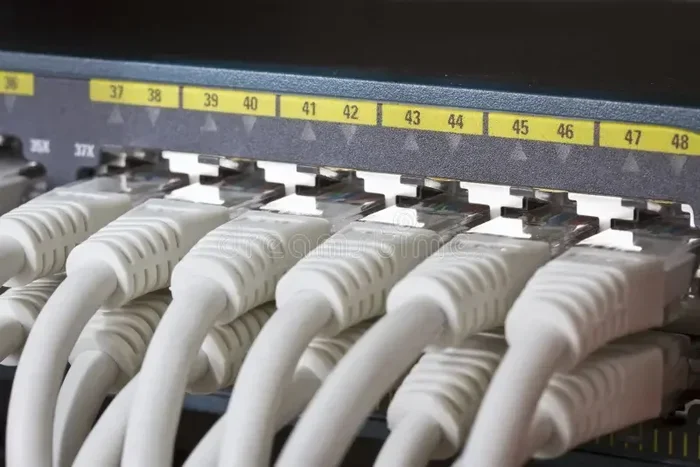
An NVR, or Network Video Recorder, is the modern cousin of the DVR. NVRs are designed specifically for IP cameras, including wireless models. Instead of coaxial cables, NVR systems use your existing network infrastructure.
If you are asking, do wireless cameras need a DVR, the truth is they more commonly pair with an NVR. Here is why:
- Better image quality: NVRs handle high-resolution footage from IP cameras.
- Easier installation: No need for dedicated cable runs.
- Scalability: You can add more cameras without rewiring.
- Smart features: Many NVR systems support motion detection and alerts.
So while a DVR is not strictly necessary, an NVR might be a better fit for a wireless camera setup.
Wireless Cameras Vs. Traditional DVR Setups
Let us compare the two approaches side by side. This will help you understand where each option shines and where it falls short.
| Feature | Wireless Camera + Cloud/SD | Traditional DVR Setup |
|---|---|---|
| Installation | Easy, no cables needed | Requires coaxial cable runs |
| Storage | Cloud or SD card | Built-in hard drive |
| Remote Access | Excellent via app | Limited without extra setup |
| Scalability | Very easy to add cameras | More complex to expand |
| Internet Dependency | Yes, for cloud storage | No, works offline |
| Monthly Cost | Cloud plans may apply | One-time purchase |
| Image Quality | High resolution (1080p to 4K) | Good, but often lower resolution |
As you can see, wireless cameras offer more flexibility in most cases. But traditional DVR systems still have a place, especially in areas with unreliable internet or for users who prefer local-only storage.
It is also worth noting that wireless connectivity plays a big role in how well your cameras perform. If your Wi-Fi signal is weak where you mount the camera, you may experience lag or dropped footage. This is something to consider before you decide on a setup.
Do You Need A DVR For Home Security?
Most modern homeowners do not need a traditional DVR anymore. The rise of smart home technology has given us better, more convenient options. But there are situations where a DVR still makes sense.
You might want a DVR if:
- You live in an area with poor internet and cloud storage is not practical.
- You already have analog cameras and do not want to replace them.
- You prefer one-time hardware costs over monthly subscription fees.
- You want a self-contained system that does not rely on external servers.
On the other hand, you do not need a DVR if:
- You have a strong Wi-Fi connection throughout your property.
- You prefer cloud storage for easy remote access.
- You want a simple setup with minimal hardware.
- You plan to expand your system over time.
The bottom line is that the security camera market has shifted dramatically. Wireless cameras with smart features now dominate the consumer space. DVRs are still relevant, but they are no longer the default choice.
How To Choose The Right Setup For Your Needs
Choosing between a DVR, NVR, cloud storage, or SD card storage comes down to a few key factors. Let us walk through them.
Consider Your Budget
Budget is often the first thing people think about. A basic wireless camera with SD card storage can cost as little as $30 to $50. Cloud storage adds a small monthly fee. A full NVR system with multiple cameras can run $200 to $500 or more.
DVR systems tend to fall in the middle of the price range. They require a one-time hardware purchase, but you may need to pay for a hard drive separately.
Think About Storage Capacity
How much footage do you need to keep? SD cards usually max out at 256GB to 512GB. A typical DVR hard drive holds 1TB to 4TB. Cloud storage plans vary widely, and some offer unlimited storage for a flat fee.
If you want to keep weeks of footage, a larger storage option will serve you better. For short-term clips and event-based recording, a smaller setup works just fine.
Evaluate Your Internet Connection
Your internet speed matters a lot if you are going the wireless route. Slow or unstable connections can cause dropped footage, laggy live views, and failed uploads to the cloud.
If you have a strong and stable Wi-Fi connection, wireless cameras with cloud storage are a great choice. If your internet is spotty, consider local storage options or a wired NVR system.
Check Your Smart Home Ecosystem
Many wireless cameras integrate with smart home platforms like Alexa, Google Home, and Apple HomeKit. This lets you view live feeds, receive alerts, and control your cameras using voice commands.
Before buying, make sure the camera brand you choose works with your existing smart home setup. Compatibility can save you a lot of frustration down the road.
Common Mistakes People Make With Wireless Camera Setups
There are a few mistakes that trip up a lot of people when setting up wireless security cameras. Avoiding these can save you time and money.
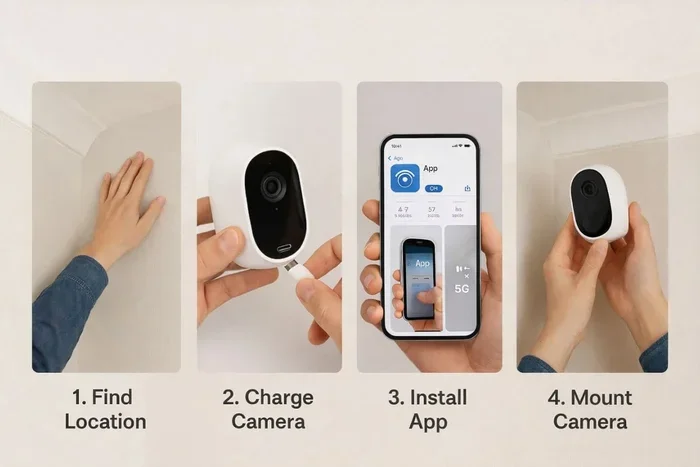
Skipping the power source. Wireless does not mean battery-powered. Some wireless cameras still need a constant power supply. Make sure you have a power outlet near your mounting location.
Ignoring Wi-Fi range. Just because a camera is wireless does not mean it will connect from anywhere. Test your Wi-Fi signal at the proposed camera location before you mount it.
Forgetting about privacy. Wireless cameras that send footage to the cloud can be vulnerable if not properly secured. Always use strong passwords and enable two-factor authentication.
Choosing the wrong storage option. Do not just pick the cheapest option. Think about how long you want to keep footage and how many cameras you will run.
Not checking for night vision. If you need 24/7 coverage, make sure your wireless camera has good night vision capabilities. This is especially important for outdoor setups.
Expert Tips For Getting The Most Out Of Your Wireless Cameras
Want to get the best performance from your wireless security cameras? Here are some expert-backed tips.
- Place your router centrally. The closer your cameras are to your router, the stronger the connection will be.
- Use a dedicated Wi-Fi network. Set up a separate network for your security devices. This keeps them isolated from your personal devices and improves performance.
- Set motion detection zones. Most wireless cameras let you define specific areas for motion detection. This reduces false alerts and saves storage space.
- Check firmware updates regularly. Manufacturers release updates that fix bugs and improve security. Keep your cameras up to date.
- Use a UPS for power backup. A small uninterruptible power supply keeps your cameras running during outages.
These simple steps can make a big difference in the reliability and effectiveness of your wireless security system.
The Future Of Wireless Security Cameras
The technology behind wireless cameras is evolving fast. We are seeing trends that point toward even more independence from traditional hardware like DVRs.
AI-powered detection is becoming standard. Cameras can now distinguish between people, animals, and vehicles. This means fewer false alerts and more relevant footage.
Edge computing is another big development. Instead of sending all footage to the cloud, smart cameras process data locally. This reduces bandwidth usage and speeds up response times.
5G connectivity will also play a role. Faster wireless speeds mean better image quality and more reliable connections, even in remote locations. The need for a DVR or NVR may continue to shrink as cameras become more self-sufficient.
One thing is clear: the future of home surveillance is wireless, smart, and cloud-friendly. DVRs still have a place, but they are no longer the center of the security ecosystem.
Final Thoughts
So, do wireless cameras need a DVR? The answer is a clear no for most modern setups. You have better, more flexible options today. Cloud storage, SD card recording, and NVR systems all offer excellent alternatives to traditional DVRs.
That said, DVRs are not completely obsolete. They still serve a purpose in certain situations, especially where internet connectivity is limited or where users prefer a fully local setup. The key is to understand your needs and choose the option that fits your lifestyle and budget.
Take your time to evaluate your options. Consider your internet speed, storage needs, and budget. With the right setup, your wireless cameras can provide reliable, high-quality security without the need for a bulky DVR. The modern approach to home surveillance is simpler, smarter, and more connected than ever before.
Start with one or two cameras, test the setup, and expand from there. You will be surprised at how easy and effective a wireless-only security system can be. Your home, your rules, your setup.
Frequently Asked Questions
Can wireless cameras record without any storage device?
Most wireless cameras need some form of storage, whether it is a cloud service, an SD card, or a network video recorder. Some cameras offer live viewing only without recording, but this is rare for security purposes. Always check the storage options before buying a camera.
Is a DVR better than cloud storage for wireless cameras?
It depends on your needs. A DVR provides local, reliable storage without monthly fees. Cloud storage offers convenience and remote access but requires a subscription. For most users, cloud storage or SD card storage works better with wireless cameras than a traditional DVR.
Can I use my wireless cameras with an NVR instead of a DVR?
Yes, absolutely. NVRs are designed for IP and wireless cameras. They offer better image quality, easier setup, and more flexibility than traditional DVRs. Most modern wireless camera systems work best with an NVR rather than a DVR.
Do all wireless cameras need Wi-Fi to work?
Most wireless cameras do need Wi-Fi for live streaming, remote access, and cloud storage. However, some cameras can record to a local SD card without Wi-Fi. They will only need internet when you want to view footage remotely or update settings.
How long can wireless cameras record on an SD card?
This depends on the card size and camera settings. A 128GB SD card can typically store 24 to 72 hours of footage at standard resolution. Higher resolution settings use more space and reduce recording time. Look for cameras with loop recording to automatically overwrite old footage.
Are wireless cameras secure without a DVR?
Yes, wireless cameras can be very secure without a DVR. Look for cameras that offer end-to-end encryption, two-factor authentication, and regular firmware updates. Local storage on an SD card keeps your footage off the cloud, adding an extra layer of privacy.