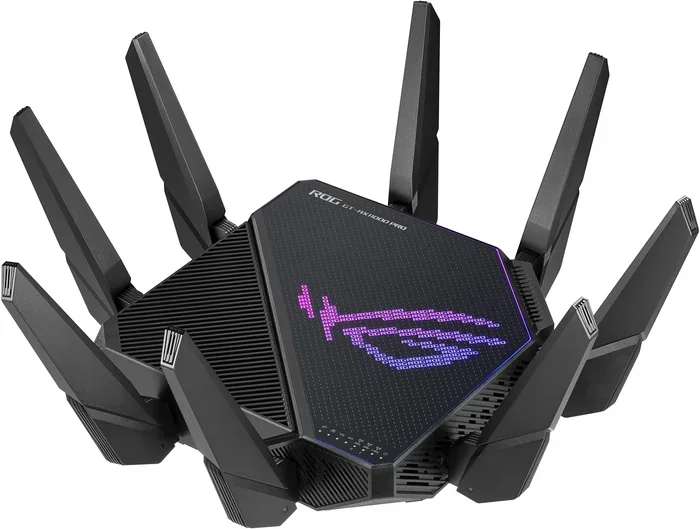
Does Asus Router Support Wi Fi 6 And Why You Should Care
Yes, many Asus routers support Wi-Fi 6, also known as 802.11ax. This next-gen wireless standard brings faster speeds, lower latency, and better performance for homes with multiple devices. If you own a modern Asus router, there is a good chance it already has Wi-Fi 6 built in.
Wi-Fi 6 is the latest wireless standard, and it is changing how we connect at home. If you have been wondering does Asus router support Wi-Fi 6, the short answer is yes. Many Asus routers come packed with Wi-Fi 6 technology right out of the box. But not every Asus model has it, so it pays to know what you are looking for.
In this guide, we will walk through everything you need to know. We will cover which Asus routers have Wi-Fi 6, what Wi-Fi 6 actually does, and why it matters for your home network. Whether you are a casual internet user or a tech enthusiast, this article will help you make sense of it all.
Let us start with the basics. Wi-Fi 6 is the consumer-friendly name for the IEEE 802.11ax wireless standard. It is the newest generation of Wi-Fi technology. Compared to older standards like Wi-Fi 5 (802.11ac), Wi-Fi 6 delivers better speed, efficiency, and performance. Especially when many devices are connected at once.
Key Takeaways
- Wi-Fi 6 support is common in newer Asus routers: Most models released after 2019 include Wi-Fi 6 capabilities.
- Wi-Fi 6 offers real-world benefits: Faster speeds, lower latency, and better handling of multiple connected devices.
- Check your model number to confirm: Look for “AX” in the model name, which stands for Wi-Fi 6.
- You need Wi-Fi 6 devices to get the full benefit: Your phone, laptop, or smart home device must also support Wi-Fi 6.
- Asus routers offer extra features: AiMesh, parental controls, and advanced QoS make Asus a top choice for Wi-Fi 6 users.
- Upgrading is worth it for smart homes: Homes with many smart devices see the biggest improvements from Wi-Fi 6.
📑 Table of Contents
What Is Wi-Fi 6 and Why Does It Matter?
The Basics of Wi-Fi 6 Technology
Wi-Fi 6 is more than just a faster connection. It is a smarter way to manage wireless data. The technology uses advanced techniques like OFDMA (Orthogonal Frequency Division Multiple Access) and MU-MIMO (Multi-User Multiple Input Multiple Output). These fancy terms simply mean the router can talk to many devices at the same time instead of one by one.
Think of it like a highway. Older Wi-Fi standards are like a single-lane road. Only one car can pass at a time. Wi-Fi 6 is like a multi-lane highway. More data flows at once, and traffic moves smoother. This matters a lot in homes where phones, tablets, smart TVs, and smart home gadgets are all online at the same time.
Wi-Fi 6 also uses 1024-QAM, which allows each data packet to carry more information. The result? Faster downloads, smoother streaming, and less lag during video calls or gaming sessions.
Key Benefits of Wi-Fi 6 for Home Users
- Faster wireless speeds: Wi-Fi 6 can reach speeds up to 9.6 Gbps under ideal conditions.
- Lower latency: Data travels faster between your device and the router, reducing delays.
- Better multi-device handling: Homes with 20 or more connected devices perform much better.
- Improved battery life on devices: Wi-Fi 6 includes Target Wake Time (TWT), which helps devices save power.
- Better performance in crowded areas: Apartment buildings and busy neighborhoods see less interference.
Which Asus Routers Support Wi-Fi 6?
Not every Asus router has Wi-Fi 6. The company makes a wide range of models, from budget options to high-end gaming routers. The trick is knowing which ones include the latest standard. The easiest way to tell is by looking at the model name.
How to Identify a Wi-Fi 6 Asus Router
Asus uses a simple naming convention. If the model name includes the letters “AX,” it supports Wi-Fi 6. Here are some popular examples:
- Asus RT-AX86U: A top-rated Wi-Fi 6 router with excellent speeds and gaming features.
- Asus RT-AX88U: A powerful router with 8 streams and great range.
- Asus RT-AX58U: A more affordable Wi-Fi 6 option that still delivers strong performance.
- Asus RT-AX56U: A budget-friendly entry point into Wi-Fi 6.
- Asus ROG Rapture GT-AX11000: A premium gaming router with Wi-Fi 6 and triple bands.
If you see “AC” in the model name instead, that means Wi-Fi 5 (802.11ac). These are still good routers but do not have the full benefits of Wi-Fi 6. Always double-check the model number on the router settings page or the back of the unit.
Asus AiMesh and Wi-Fi 6 Compatibility
One of the best things about Asus routers is AiMesh support. This feature lets you create a mesh network using multiple Asus routers. A mesh network helps extend Wi-Fi coverage across larger homes. And many AiMesh-compatible Asus routers support Wi-Fi 6, so you can build a whole-home system with the latest technology.
When setting up a mesh system, you want all nodes to use the same Wi-Fi standard. Mixing Wi-Fi 5 and Wi-Fi 6 routers can limit your overall performance. Stick with all Wi-Fi 6 nodes for the best results.
Why Should You Care About Wi-Fi 6 on Your Asus Router?
Speed Improvements You Can Actually Feel
The theoretical speed differences between Wi-Fi 5 and Wi-Fi 6 are impressive. But what does that mean in real life? For most users, the difference shows up in everyday tasks. Streaming 4K video buffers less. File downloads finish faster. Video calls stay crystal clear even when other devices are using the network.
For example, if you have a smart home setup with cameras, smart speakers, and connected lights, Wi-Fi 6 handles all of that traffic smoothly. Older routers might struggle when too many devices are active at once. Wi-Fi 6 was designed specifically to solve this problem.
Better Performance for Smart Homes
Smart homes are growing fast. The average household now has over 10 connected devices. Each one uses bandwidth, even when you are not actively using it. Smart cameras, thermostats, and doorbells constantly send and receive data in the background.
Wi-Fi 6 handles this background traffic efficiently. It uses less airtime per device, which means more room for the things that matter most to you. If you are considering adding more smart devices, having a Wi-Fi 6 Asus router gives your network room to grow.
Gaming and Streaming Benefits
Online gamers benefit a lot from Wi-Fi 6. The lower latency means faster response times. In competitive games, that can be the difference between winning and losing. Streaming 4K or even 8K content also benefits from the higher bandwidth and more efficient data handling.
Asus routers are known for their gaming features. Models like the ROG Rapture line include adaptive QoS, which prioritizes gaming traffic. Pair that with Wi-Fi 6 speeds, and you have a powerful setup for serious gamers.
How to Set Up and Optimize Wi-Fi 6 on Your Asus Router
Accessing Your Router Settings
Setting up Wi-Fi 6 on your Asus router is straightforward. First, connect to your router’s network. Then open a web browser and type in the router’s IP address, usually 192.168.1.1 or router.asus.com. Log in with your admin credentials, and you will see the main dashboard.
From there, navigate to the wireless settings. You should see options for both the 2.4 GHz and 5 GHz bands. Wi-Fi 6 routers often support both bands simultaneously, which is sometimes called dual-band or tri-band depending on the model.
Enabling Wi-Fi 6 Mode
In some cases, you may need to manually enable Wi-Fi 6 mode. Look for a setting called “Wireless Mode” or “Wi-Fi Standard.” Select the option that includes “802.11ax” or “Wi-Fi 6.” Save your settings, and the router will restart.
After restarting, make sure your devices are connecting to the correct band. The 5 GHz band generally offers better speeds and less interference. You can also check if you need to switch between frequency bands depending on your device and distance from the router.
Maximizing Your Wi-Fi 6 Performance
To get the most out of your Wi-Fi 6 Asus router, follow these quick tips:
- Place your router in a central location: This helps distribute the signal evenly throughout your home.
- Keep firmware updated: Asus regularly releases firmware updates that improve performance and security. Check the router admin panel for updates.
- Use the 5 GHz band for demanding tasks: Gaming, 4K streaming, and video calls work best on the 5 GHz frequency.
- Consider adding a Wi-Fi booster: If you have dead zones, a booster can help extend coverage. Check if a Wi-Fi booster is right for your setup.
- Adjust the router antenna: Proper antenna placement can significantly improve signal strength. You can add or adjust antennas for better coverage.
Common Mistakes to Avoid with Wi-Fi 6 Asus Routers
Assuming All Devices Will Automatically Be Faster
Here is a common misconception. Having a Wi-Fi 6 router does not automatically make every device faster. Your phone, laptop, or tablet must also support Wi-Fi 6 to take advantage of the new standard. If your device only supports Wi-Fi 5, it will connect at Wi-Fi 5 speeds.
That said, even with older devices, a Wi-Fi 6 router can improve overall network efficiency. The router manages traffic better, which benefits all connected devices.
Overlooking Firmware Updates
Asus is known for providing excellent firmware support. But many users never check for updates. Firmware updates often include performance improvements, security patches, and new features. Skipping updates means you might miss out on optimizations that could improve your Wi-Fi 6 experience.
Ignoring Channel Congestion
Wi-Fi 6 handles congestion better than older standards, but it is not magic. If you live in a densely populated area with many nearby networks, channel overlap can still cause issues. Use the router’s built-in channel scanner to find the least congested channel for both the 2.4 GHz and 5 GHz bands.
Expert Insights on Asus Wi-Fi 6 Routers
Networking experts consistently rate Asus as one of the top brands for Wi-Fi 6 routers. The company has been quick to adopt the new standard across its product line. Their routers are known for strong build quality, intuitive software, and a feature-rich interface.
According to industry reviews, Asus Wi-Fi 6 routers offer excellent value compared to competitors. The RT-AX series, in particular, is praised for balancing performance and price. For users who want a reliable, fast, and future-proof home network, an Asus Wi-Fi 6 router is a solid choice.
One thing to keep in mind is that Wi-Fi 6 is not just about speed. It is about efficiency. As more devices connect to home networks, this efficiency becomes increasingly important. Investing in a Wi-Fi 6 router now means your network will be ready for the growing number of smart devices and high-bandwidth applications.
Final Thoughts
So, does Asus router support Wi-Fi 6? The answer is a clear yes for most modern models. Asus has embraced Wi-Fi 6 across a wide range of routers, from budget-friendly options to premium gaming models. The key is to check the model name for “AX” and confirm your devices also support the standard.
Wi-Fi 6 brings real benefits to everyday users. Faster speeds, lower latency, and better handling of multiple devices make it a worthwhile upgrade. If you have been using an older router, switching to a Wi-Fi 6 Asus router can transform your home network experience.
Take a few minutes to check your current router. If it does not support Wi-Fi 6, consider upgrading. Your internet speed, streaming quality, and smart home performance will thank you. And with Asus’s strong lineup and AiMesh support, building a fast and reliable network has never been easier.
Frequently Asked Questions
What does AX mean in Asus router model names?
The “AX” in Asus router model names stands for Wi-Fi 6 (802.11ax). It is the easiest way to identify whether an Asus router supports the latest Wi-Fi standard. If you see AX in the model number, you have a Wi-Fi 6 router.
Can I use Wi-Fi 6 if my internet plan is slow?
Yes, but you will not see the full benefits of Wi-Fi 6 if your internet plan has low speeds. Wi-Fi 6 improves how your router handles local network traffic. For the best experience, pair a Wi-Fi 6 router with a fast internet plan from your provider.
Do I need new devices to use Wi-Fi 6?
Yes, both your router and your devices need to support Wi-Fi 6. A Wi-Fi 6 router will work with older devices, but those devices will connect at their maximum supported speed, which may be Wi-Fi 5 or lower.
Is an Asus Wi-Fi 6 router worth the extra cost?
For most households, absolutely. Wi-Fi 6 offers faster speeds, lower latency, and better performance with multiple devices. If you have a smart home, stream a lot of content, or game online, the investment pays off quickly.
How do I check if my Asus router firmware is up to date?
Log into your router’s admin panel by typing router.asus.com or 192.168.1.1 into your browser. Go to the Administration tab and look for the firmware update section. If an update is available, follow the prompts to install it.
Can I mix Wi-Fi 5 and Wi-Fi 6 routers in an Asus AiMesh setup?
You can, but it is not recommended. Mixing standards can limit the overall performance of your mesh network. For the best experience, use all Wi-Fi 6 compatible routers in your AiMesh setup.
=== CONCLUSION ===
Asus routers do support Wi-Fi 6, and the selection is growing every year. Whether you need a budget-friendly option or a high-end gaming router, Asus has a Wi-Fi 6 model for you. The technology delivers real-world improvements in speed, efficiency, and multi-device performance that make it well worth the upgrade.
Take the time to check your current setup, confirm your model supports Wi-Fi 6, and optimize your settings for the best experience. With the right Asus router and a few smart adjustments, your home network will be ready for whatever the future brings.