Does ATT Give You Free Mobile Hotspot Data and Plans
Does ATT give free mobile hotspot? Yes, AT&T includes hotspot data on most unlimited and prepaid plans, though the amount varies by plan tier. This guide covers AT&T mobile hotspot options, data limits, setup steps, and common mistakes so you can stay connected without surprises.
Are you wondering whether AT&T gives free mobile hotspot access? You are not alone. Many people want to know if they can use their AT&T plan for mobile hotspot tethering without paying extra. The short answer is yes, but it depends on your specific plan and data allowance.
AT&T offers several options for mobile WiFi hotspot usage. Some plans include hotspot data at no extra cost, while others may require an add-on or a higher-tier plan. Understanding what is available helps you make the best choice for your needs.
This guide covers everything you need to know about ATT hotspot plans, from data limits to setup steps. Whether you are looking for AT&T internet on the go or just want to share your connection with friends, you will find the answers here.
Key Takeaways
- AT&T includes hotspot data on most unlimited plans: You get a set amount of high-speed hotspot data each month at no extra charge.
- Prepaid options are available: You can get AT&T prepaid hotspot plans without a long-term contract or credit check.
- Hotspot speeds vary by plan: Higher-tier plans offer faster mobile WiFi hotspot speeds and more data.
- Setup is simple: You can activate your AT&T hotspot directly from your phone settings in just a few taps.
- Data limits matter: Know your hotspot data limits to avoid slow speeds or unexpected overage charges.
- You don’t always need phone service: Some AT&T hotspot options work without a traditional phone line or number.
📑 Table of Contents
What Is AT&T Mobile Hotspot and How Does It Work
AT&T mobile hotspot lets you share your phone’s cellular data connection with other devices. Think of it as turning your phone into a portable WiFi router. Other devices like laptops, tablets, and gaming consoles can connect to the internet through your phone.
The process is called hotspot tethering. When you enable it, your phone creates a small wireless network. Other devices can then connect to that network using a password you set. Your phone uses its cellular data to keep those devices online.
Using hotspot tethering is one of the most convenient ways to stay connected. You do not need a separate mobile WiFi hotspot device or a second data plan. Your phone does all the work for you.
How Hotspot Tethering Works on AT&T
AT&T supports hotspot tethering on most of its plans. When you turn on the hotspot feature, your phone broadcasts a WiFi signal. Other devices see this signal and can connect just like they would to a home router.
Here is how it works in simple steps:
- Open your phone’s Settings app.
- Go to Network or Connections settings.
- Turn on the Mobile Hotspot option.
- Set a network name and password.
- Connect your other device to the new network.
Once connected, the other device uses your AT&T data plan to access the internet. All data used by connected devices counts toward your plan’s data limit. This includes browsing, streaming, downloads, and anything else you do through the hotspot.
AT&T Hotspot Devices You Can Use
You do not need a special device to use AT&T mobile hotspot. Any smartphone that supports hotspot tethering can work. However, AT&T also sells dedicated hotspot devices that are designed specifically for this purpose.
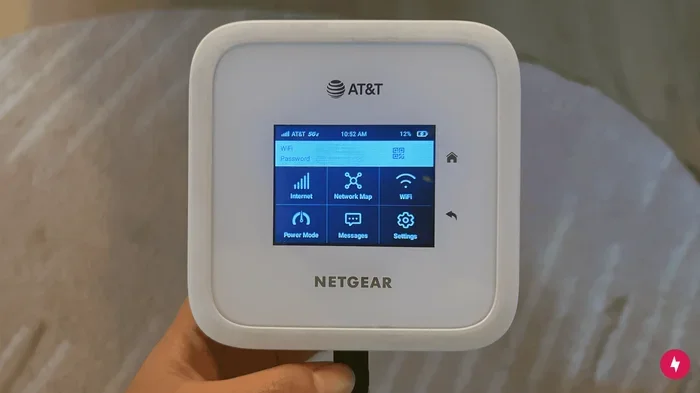
These dedicated devices, sometimes called mobile WiFi hotspots or portable hotspots, have better batteries and stronger antennas than most phones. They can connect more devices at once and often provide more stable connections over long periods. Some popular options include AT&T’s own lineup of hotspot devices from brands like Netgear and Huawei. These devices plug in a SIM card and create a WiFi network wherever AT&T network coverage is available.
Does AT&T Offer Free Mobile Hotspot Data
The question of whether AT&T gives free mobile hotspot data does not have a single yes or no answer. It depends entirely on which plan you have. Some plans include hotspot data at no extra charge, while others limit or exclude it entirely.
AT&T Unlimited Plans with Hotspot Benefits
AT&T’s unlimited data plans are the most common way people get free hotspot data. Most unlimited plans include a set amount of high-speed hotspot data each month. After you use that amount, speeds may slow down, but you can still stay connected.
Here is a quick look at what you can expect from AT&T unlimited plans:
- Unlimited Starter: Includes a small amount of hotspot data, usually around 5 GB per month at full speed.
- Unlimited Extra: Offers more hotspot data, often around 15 GB per month at full speed.
- Unlimited Elite: Provides the most hotspot data, sometimes up to 50 GB or more at full speed.
These plans give you free hotspot data as part of your monthly fee. There is no separate charge just for turning on your hotspot. However, the amount of high-speed data you get varies by plan.
If you want to learn more about unlimited hotspot options, check out our guide on Can I Get Unlimited Hotspot. It covers the best ways to get unlimited hotspot access on different networks and helps you compare your options.
Prepaid Hotspot Options from AT&T
AT&T also offers prepaid hotspot plans that can be very affordable. These plans do not require a contract or credit check. You pay in advance for a set amount of data, and you can use it for hotspot tethering just like any other data.
AT&T prepaid hotspot plans are great for people who do not want to commit to a long-term contract. You can buy data as you need it, and there are no hidden fees. Some prepaid plans also include a small amount of free hotspot data each month.
The trade-off is that prepaid plans may not offer the same speeds or coverage as postpaid unlimited plans. Still, for casual use or light browsing, they work well and can save you money. If you are exploring mobile hotspot plans, prepaid options are worth considering.
AT&T Hotspot Plans: What You Need to Know
Not all AT&T data plans are the same when it comes to hotspot usage. Understanding the differences helps you pick the right plan and avoid surprises on your bill.
Comparing AT&T Hotspot Data Speeds
AT&T hotspot speeds depend on several factors. Your plan type, current network congestion, and signal strength all play a role. Here is a general breakdown of what to expect:
- 5G Hotspot Speeds: On AT&T’s 5G network, you can expect speeds between 100 Mbps and 1 Gbps in ideal conditions. This is fast enough for streaming, video calls, and even online gaming.
- 4G LTE Hotspot Speeds: On 4G LTE, speeds typically range from 5 Mbps to 50 Mbps. This is sufficient for browsing, email, and standard-definition video streaming.
- Deprioritized Speeds: After you use your high-speed hotspot data limits, AT&T may slow your connection. These deprioritized speeds are still usable but may feel slower during peak hours.
For most people, the AT&T hotspot speeds on unlimited plans are more than enough for everyday use. You can browse the web, check email, and stream videos on the go. The key is knowing when you are hitting your hotspot data limits so you can adjust your usage.
Hotspot Coverage and Network Quality
AT&T network coverage is one of the strongest in the United States. With a vast 5G and 4G LTE network, AT&T provides reliable hotspot coverage in most cities and many rural areas.
When you use your phone as a mobile WiFi hotspot, you rely on the same towers that serve regular phone users. This means your hotspot connection quality depends on how strong the AT&T signal is in your area.
Before relying on AT&T connectivity for important work or travel, check the coverage map on AT&T’s website. You can also ask neighbors or coworkers who use AT&T about their experience in your area. Good hotspot coverage makes all the difference in the world.
If you are often on the move and need reliable AT&T internet on the go, consider one of the higher-tier unlimited plans. These plans not only offer more hotspot data but also tend to have priority access to network resources. That means faster and more stable mobile WiFi hotspot connections when you need them most.
How to Set Up Your AT&T Mobile Hotspot
Setting up your AT&T hotspot is quick and easy. You do not need any special tools or technical skills. Here is a step-by-step guide to get you started.
Step-by-Step Hotspot Activation
Follow these simple steps to activate your mobile data hotspot on an AT&T phone:
- Open the Settings app on your AT&T phone.
- Tap on Network and Internet or Connections, depending on your phone model.
- Look for the Hotspot and Tethering option.
- Tap on Mobile Hotspot to turn it on.
- Set a network name (SSID) and a strong password.
- Save your settings and connect your other device.
That is it! Your AT&T hotspot activation is complete. Other devices can now find your network and connect using the password you set. The whole process takes less than a minute once you have done it a few times.
AT&T hotspot activation may take a few seconds the first time you set it up. If you have trouble, try restarting your phone and checking that your data plan is active. Sometimes a simple reboot fixes connection issues. You can also check for software updates that might improve hotspot performance.
Tips for Better Hotspot Performance
Getting the most out of your mobile WiFi hotspot is not just about turning it on. A few simple tips can improve your experience significantly:
- Stay close to your phone: The closer your connected device is to your phone, the stronger the signal and the faster the speeds.
- Turn off unused connected devices: Every device that connects uses your data and can slow down the network for others.
- Use a VPN for security: When using hotspot tethering in public places, a VPN protects your data from prying eyes.
- Keep your phone charged: Using your phone as a hotspot device drains the battery quickly. Keep it plugged in when possible.
- Update your phone’s software: AT&T regularly releases updates that improve hotspot performance and stability.
These small steps make a big difference. You will get faster speeds, better reliability, and a more secure connection when you follow these tips. Think of them as simple habits that keep your mobile data hotspot running smoothly every day.
Common Mistakes to Avoid with AT&T Hotspot
Using AT&T mobile hotspot is straightforward, but some common mistakes can cause frustration. Here are the pitfalls to watch out for.
- Ignoring your data limits: Many people forget how much hotspot data they have used. Keep an eye on your data usage to avoid slow speeds or overage charges.
- Leaving your hotspot on all the time: This drains your battery and uses data even when no one is connected. Turn it off when you are not actively using it.
- Using a weak password: An open or weak hotspot password lets anyone connect to your network. This can slow your speeds and use up your data.
- Not checking coverage: If you are in an area with poor AT&T network coverage, your hotspot will be slow or may not work at all.
- Connecting too many devices: Most phones can handle a few connected devices at once. Connecting too many can cause lag and slow everyone down.
Avoiding these mistakes keeps your mobile WiFi hotspot running smoothly. You will get better speeds, longer battery life, and a more secure connection. A little awareness goes a long way toward making your AT&T hotspot experience better.
Can You Get Hotspot Without AT&T Phone Service
You do not always need an AT&T phone line to get hotspot access. There are options available for people who want mobile hotspot without a traditional phone service plan.
AT&T offers prepaid data-only plans and mobile hotspot plans that work without a phone number. These plans give you data that you can use for hotspot tethering on any compatible device. You just insert a SIM card into a hotspot device or phone, and you are online.
If you are curious about whether you can get hotspot without phone service, we have covered this topic in detail. Check out our article on Can I Get Hotspot Without Phone Service for a full breakdown of your options.
Another option worth exploring is using AT&T WiFi in public places. AT&T has thousands of WiFi hotspots in airports, cafes, and shopping centers across the country. You can connect to these networks for free or at a low cost. To learn more about connecting to AT&T WiFi anywhere, see our guide on Can I Connect to ATT Wi-Fi Anywhere.
For those who use their hotspot for gaming or streaming on the go, you might wonder about connecting devices like the Steam Deck. Our guide on Can I Connect Steam Deck to Mobile Hotspot has tips and tricks for the best experience.
Final Thoughts on AT&T Free Mobile Hotspot
So, does AT&T give you free mobile hotspot? The answer is yes, for many plans. AT&T includes hotspot data on most of its unlimited and prepaid plans. You just need to know which plan fits your needs and how to manage your data usage.
Whether you need AT&T internet on the go for work, travel, or entertainment, AT&T mobile hotspot is a powerful tool. With the right plan and a few smart habits, you can stay connected wherever you are.
Start by checking your current plan’s hotspot allowance. If it does not meet your needs, consider upgrading to an unlimited plan or exploring prepaid options. The right setup gives you free mobile hotspot access and keeps you connected without breaking the bank.
Remember, hotspot tethering is a convenient way to share your connection with friends, family, or coworkers. Just keep an eye on your data, use strong passwords, and enjoy the freedom of AT&T connectivity on the go.
Frequently Asked Questions
Is AT&T mobile hotspot really free?
Yes, AT&T mobile hotspot is included at no extra charge on most unlimited and prepaid plans. However, the amount of high-speed hotspot data varies by plan. After you use your included data, speeds may slow down, but you can still connect.
How much free hotspot data does AT&T include?
The amount depends on your plan. Unlimited Starter plans typically include around 5 GB of hotspot data per month. Unlimited Extra plans offer about 15 GB. Unlimited Elite plans can provide up to 50 GB or more. Check your specific plan details for exact numbers.
Can I use AT&T hotspot without a phone plan?
Yes, you can. AT&T offers prepaid data-only plans and mobile hotspot plans that do not require a phone number. These plans work with a SIM card in a compatible device or phone and give you data for hotspot tethering without a traditional phone service.
Why is my AT&T hotspot slow?
Several factors can cause slow AT&T hotspot speeds. You may have used up your high-speed data allowance and entered a deprioritized speed tier. Network congestion, weak signal strength, or too many connected devices can also slow things down. Try moving to a better coverage area or disconnecting unused devices.
How do I check my AT&T hotspot data usage?
You can check your hotspot data limits and usage through the AT&T myAT&T app or by logging into your account on the AT&T website. The app shows real-time data usage and alerts you when you are nearing your limit. You can also set data usage warnings to stay on track.
What devices can connect to my AT&T mobile hotspot?
Most devices that connect to WiFi can use your AT&T mobile hotspot. This includes laptops, tablets, smart TVs, gaming consoles, and other smartphones. The number of devices you can connect at once depends on your phone model, but most support between 5 and 10 simultaneous connections.