Does the B450M DS3H WiFi Support 3600MHz RAM Speed
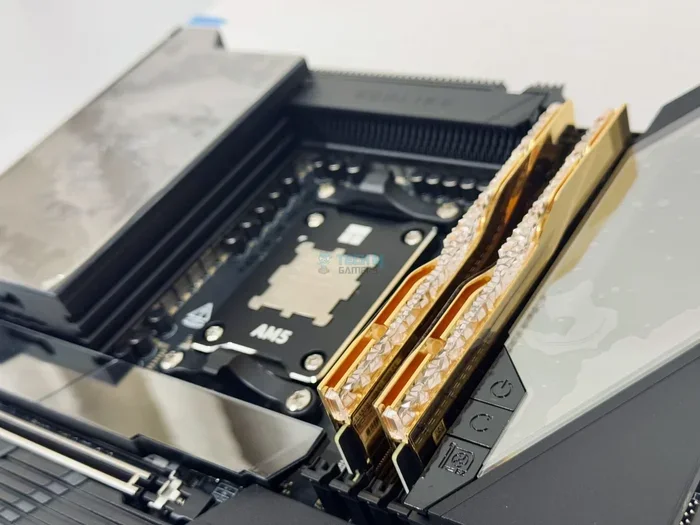
The Gigabyte B450M DS3H WiFi motherboard supports DDR4 RAM, but its official maximum speed is 3200MHz. Running 3600MHz RAM on this board is possible with certain AMD Ryzen CPUs and updated BIOS, though it is not guaranteed. You may need to enable XMP or DOCP profiles and update your firmware to push memory beyond the stock limit.
Are you building or upgrading a PC and wondering whether the B450M DS3H WiFi motherboard can handle 3600MHz RAM? You are not alone. This is one of the most common questions among budget builders and upgrade enthusiasts alike.
The B450M DS3H WiFi is a popular micro-ATX motherboard from Gigabyte. It comes with built-in WiFi, a solid VRM setup, and DDR4 memory support. But when it comes to pushing memory speeds to 3600MHz, things get a little tricky. Let us break it all down for you.
In this guide, we will look at the official specifications, what the B450 chipset can actually do, and how to get the most out of your RAM. Whether you are a gamer, a content creator, or just someone who wants a fast system, this article has you covered.
Key Takeaways
- Official Support Limit: The B450M DS3H WiFi officially supports DDR4 RAM up to 3200MHz.
- 3600MHz Is Possible: With a compatible Ryzen CPU and updated BIOS, 3600MHz RAM can work on this board.
- XMP and DOCP Are Key: You must enable memory overclocking profiles in BIOS to reach higher speeds.
- WiFi 5 Built-In: The board includes a realtek WiFi module, which you can compare to setups like forcing your phone to use 2.4 GHz WiFi for better signal range.
- Check CPU Compatibility: Not all Ryzen processors unlock higher memory speeds on B450 boards.
📑 Table of Contents
- What Is the B450M DS3H WiFi Motherboard?
- Understanding RAM Speed and Memory Frequency
- Does the B450M DS3H WiFi Support 3600MHz RAM Speed?
- Comparing RAM Speed Support Across B450 Boards
- How to Enable 3600MHz RAM on the B450M DS3H WiFi
- WiFi Features of the B450M DS3H WiFi
- Common Mistakes When Using 3600MHz RAM on B450 Boards
- Expert Insights on B450 Memory Overclocking
- Final Verdict
What Is the B450M DS3H WiFi Motherboard?
The Gigabyte B450M DS3H WiFi is a micro-ATX motherboard built around the AMD B450 chipset. It was designed to support AMD Ryzen processors from the first, second, and third generations. The “WiFi” in the name means it has a built-in wireless network adapter. This is a big plus for users who want a clean build without extra PCIe WiFi cards.
Here are some key specs of the board:
- Form Factor: Micro-ATX
- Chipset: AMD B450
- Memory Type: DDR4
- Memory Slots: 2 DIMM slots
- Max Official RAM Speed: 3200MHz
- Max RAM Capacity: 32GB (2 x 16GB)
- WiFi: Realtek WiFi module (802.11ac)
- CPU Support: Ryzen 1000, 2000, and 3000 series (with BIOS update)
The board is well known for its value. It offers solid connectivity and decent features at a budget-friendly price. Many users pair it with a Ryzen 5 3600 or Ryzen 5 5600 for a reliable gaming and productivity setup.
If you are curious about how this board’s WiFi compares to other setups, you might find it helpful to read about getting pocket WiFi in Japan if you travel frequently and rely on wireless connectivity on the go.
Understanding RAM Speed and Memory Frequency
Before we dive into the B450M DS3H WiFi specifics, let us quickly talk about RAM speed. Memory frequency is measured in megahertz (MHz). The higher the number, the faster data can move between your RAM and your CPU.
DDR4 RAM commonly comes in speeds like 2133MHz, 2400MHz, 2666MHz, 3200MHz, and 3600MHz. The number printed on the RAM stick is its rated speed. But that does not always mean your motherboard will run it at that speed out of the box.
Here is why it matters:
- Faster RAM improves multitasking. You can switch between apps more smoothly.
- Gamers benefit from higher frame rates. Especially in CPU-bound titles.
- Content creators see faster render times. Video editing and 3D modeling love fast memory.
- Bandwidth increases with speed. More data moves per second means better overall responsiveness.
However, there is a catch. Your motherboard and CPU must both support the speed you want. If either one cannot handle it, the RAM will downclock to the highest supported speed.
Does the B450M DS3H WiFi Support 3600MHz RAM Speed?
This is the big question. The short answer is: it depends on your CPU and BIOS version. The long answer takes a little more detail.
The B450 chipset was originally designed for Ryzen 1000 and 2000 series processors. At launch, these CPUs supported DDR4 memory up to 2666MHz. When AMD released Ryzen 3000 series CPUs, they officially supported memory speeds up to 3200MHz. Gigabyte released BIOS updates for the B450M DS3H WiFi that added support for 3200MHz RAM on compatible Ryzen 3000 CPUs.
But what about 3600MHz? Here is where things get interesting.
The Role of the CPU
Your CPU plays a huge role in determining what RAM speeds you can use. On the B450 chipset:
- Ryzen 1000 and 2000 series: Max supported memory speed is 2666MHz. These CPUs cannot run 3600MHz RAM at full speed.
- Ryzen 3000 series (Zen 2): Officially supports up to 3200MHz. Some chips can handle 3600MHz with a BIOS update, but this is not guaranteed.
- Ryzen 5000 series (Zen 3): These CPUs work on B450 boards with a BIOS update and can sometimes push memory to 3600MHz or slightly beyond.
The memory controller lives inside the CPU, not the motherboard. So even if the board is capable, the CPU must be able to handle the speed.
BIOS Updates and Memory Overclocking
Gigabyte has released several BIOS updates for the B450M DS3H WiFi over the years. These updates expanded memory compatibility and added support for newer CPUs. To get the best chance of running 3600MHz RAM:
- Update your BIOS to the latest version from Gigabyte’s website.
- Enable XMP or DOCP in the BIOS settings. XMP is Intel’s term; DOCP is AMD’s equivalent.
- Check your CPU’s memory controller to see if it can handle 3600MHz.
- Test stability using tools like MemTest86 or Cinebench after enabling the profile.
Without enabling XMP or DOCP, your RAM will run at its default JEDEC speed, which is usually 2133MHz or 2400MHz. This is much slower than the rated 3600MHz speed on the stick.
If you are having trouble with your wireless connection while testing, you might want to check whether adding an antenna to your WiFi router can improve your setup’s overall connectivity.
What Happens If You Install 3600MHz RAM?
If you put 3600MHz RAM into a B450M DS3H WiFi board with a compatible Ryzen CPU and updated BIOS, here is what you can expect:
- Best case: The RAM runs at 3600MHz with XMP enabled. You get the full speed benefit.
- Most likely case: The RAM runs at 3200MHz. The memory controller on the CPU caps the speed.
- Worst case: The system boots but the RAM runs at a lower speed, or it fails to boot entirely. You would need to manually adjust timings and voltage in BIOS.
It is worth noting that the B450M DS3H WiFi only has two DIMM slots. This means you can install up to 32GB of RAM (two 16GB sticks). Using two sticks also enables dual-channel mode, which boosts memory bandwidth and improves performance.
Comparing RAM Speed Support Across B450 Boards
Not all B450 motherboards are the same. Different brands and models handle memory overclocking differently. Here is a quick comparison of how the B450M DS3H WiFi stacks up against other popular B450 boards:
| Motherboard | Max Official RAM Speed | 3600MHz Possible? | DIMM Slots |
|---|---|---|---|
| Gigabyte B450M DS3H WiFi | 3200MHz | Yes (with Ryzen 3000/5000) | 2 |
| MSI B450 TOMAHAWK MAX | 3466MHz | Yes (with Ryzen 3000/5000) | 4 |
| ASUS ROG STRIX B450-F | 3466MHz | Yes (with Ryzen 3000/5000) | 4 |
| Gigabyte B450 AORUS PRO | 3466MHz | Yes (with Ryzen 3000/5000) | 4 |
| ASRock B450M PRO4 | 3200MHz | Yes (with Ryzen 3000/5000) | 4 |
As you can see, the B450M DS3H WiFi holds its own for a budget board. However, higher-end B450 boards tend to have better VRM cooling and more memory slots. If you are planning a serious overclocking setup, a board like the MSI B450 TOMAHAWK MAX might be a better choice.
For users who also care about network connectivity, the board’s built-in WiFi module works well for everyday tasks. If you are curious about wireless display options, you can explore whether AirPlay works with Roku without WiFi for streaming content in your home network.
How to Enable 3600MHz RAM on the B450M DS3H WiFi
If you have already purchased 3600MHz RAM and want to try running it on your B450M DS3H WiFi board, follow these steps:
Step 1: Update Your BIOS
Visit Gigabyte’s support page and find the latest BIOS for your specific model. Use the Q-Flash Plus feature or the BIOS flashback tool to update without installing a CPU (if supported). A fresh BIOS often improves memory compatibility.
Step 2: Install the RAM Correctly
Install your RAM sticks in the correct slots for dual-channel mode. On the B450M DS3H WiFi, this means using both DIMM slots (A2 and B2). Consult your motherboard manual for the exact slot color coding.
Step 3: Enter BIOS and Enable DOCP
Boot into BIOS by pressing DEL or F2 during startup. Navigate to the overclocking or memory settings section. Look for DOCP (Direct Overclock Profile) and enable it. Select the profile that matches your RAM’s rated speed.
Step 4: Adjust Voltage If Needed
3600MHz RAM often requires a voltage boost. The standard DDR4 voltage is 1.2V, but XMP/DOCP profiles typically set it to 1.35V or higher. Make sure your RAM can handle the voltage before increasing it.
Step 5: Test for Stability
After saving your BIOS settings, run a memory stress test. MemTest86 is a great free tool. Run it for at least one full pass to check for errors. If the system is stable, you are good to go.
Quick tip: if your system is unstable at 3600MHz, try dropping to 3200MHz or adjusting the memory timings. Not every RAM kit can hit 3600MHz on every platform.
WiFi Features of the B450M DS3H WiFi
While this article focuses on RAM, it is worth noting that the B450M DS3H WiFi includes built-in wireless connectivity. The board uses a Realtek WiFi chip that supports 802.11ac (WiFi 5). This gives you speeds up to 433Mbps on the 5GHz band and up to 150Mbps on the 2.4GHz band.
For most home users, this is more than enough for browsing, streaming, and light gaming. However, if you want better wireless performance, you can always add a dedicated WiFi card or set up a Google WiFi access point to extend your network coverage.
The built-in WiFi is convenient, but it does not directly affect RAM performance. These are separate subsystems on the motherboard. Your RAM speed depends on the CPU’s memory controller and the motherboard’s memory topology, not the wireless adapter.
Common Mistakes When Using 3600MHz RAM on B450 Boards
Here are some mistakes that users commonly make when trying to push 3600MHz RAM on a B450 board:
- Not updating the BIOS: Older BIOS versions may not support higher memory speeds on newer CPUs. Always update first.
- Forgetting to enable DOCP/XMP: The RAM will run at a much slower default speed if you skip this step.
- Using incompatible CPUs: Older Ryzen 1000 and 2000 series CPUs simply cannot handle 3600MHz memory.
- Mixing RAM kits: Using two different RAM sticks can cause instability at higher speeds. Stick to a matched kit.
- Ignoring thermal limits: Hot RAM can cause crashes and errors. Make sure your case has decent airflow.
Avoiding these mistakes will save you a lot of frustration. Take your time, update your BIOS, and test thoroughly.
Expert Insights on B450 Memory Overclocking
According to hardware experts, the B450 chipset can surprisingly handle memory speeds beyond its official rating when paired with the right CPU. Many users have reported successfully running 3600MHz RAM on B450 boards with Ryzen 5 3600 or Ryzen 5 5600 processors.
The key is the memory controller inside the CPU. AMD’s Zen 2 and Zen 3 architectures have improved memory controllers compared to Zen 1. This is why Ryzen 3000 and 5000 series CPUs can push memory faster on B450 boards.
However, results vary from chip to chip. Some CPUs are better overclockers than others. This is known as the “silicon lottery.” Even two identical CPU models can handle different memory speeds.
If you are serious about getting the most from your memory, consider the following:
- Buy a Ryzen 5 3600 or newer CPU. These have the best memory controller support on B450.
- Choose a RAM kit with good timings. Lower timings (like CL16) often perform better than higher ones at the same speed.
- Use 32GB (2 x 16GB) for the best dual-channel performance. Four sticks can sometimes limit the maximum stable speed.
Final Verdict
So, does the B450M DS3H WiFi support 3600MHz RAM? The answer is a cautious yes. With a compatible Ryzen 3000 or 5000 series CPU, an updated BIOS, and DOCP enabled, you can run 3600MHz RAM on this board. However, it is not guaranteed for every setup. Your mileage may vary depending on the specific CPU and RAM kit you use.
The B450M DS3H WiFi remains a solid budget motherboard for AMD builds. It offers built-in WiFi, decent memory support, and enough features for most users. If 3600MHz RAM is a must-have for you, make sure your CPU can handle it before purchasing.
For users exploring wireless networking options alongside their build, understanding how different devices connect to networks can be helpful. Check out resources on connecting your air conditioner to WiFi to learn more about smart home connectivity.
In summary, the B450M DS3H WiFi is a capable board that can work with fast RAM. Just be prepared to do a little tweaking in BIOS to get the best results.
Frequently Asked Questions
Can I run 3600MHz RAM on the B450M DS3H WiFi with a Ryzen 5 3600?
Yes, in most cases you can. The Ryzen 5 3600 supports memory speeds up to 3200MHz officially, but with a BIOS update and DOCP enabled, many users have successfully run 3600MHz RAM on this board. Stability may vary, so always test after enabling the profile.
What happens if I put 3600MHz RAM into the B450M DS3H WiFi without updating the BIOS?
The RAM will likely work but run at a lower speed, usually 3200MHz or even 2666MHz. An outdated BIOS may not recognize the full speed potential of your memory module. Always update your BIOS first for the best compatibility.
Does the B450M DS3H WiFi have WiFi 6 support?
No, the B450M DS3H WiFi uses a Realtek WiFi chip that supports WiFi 5 (802.11ac). It does not support the newer WiFi 6 (802.11ax) standard. For WiFi 6 speeds, you would need to add a separate WiFi 6 card or use a dedicated router.
Can I use 3600MHz RAM with a Ryzen 5 2600 on the B450M DS3H WiFi?
It is unlikely. The Ryzen 5 2600 is based on the Zen+ architecture and officially supports memory up to 2666MHz. While a BIOS update might allow higher speeds, 3600MHz is generally beyond what this CPU’s memory controller can handle reliably.
How do I enable DOCP on the B450M DS3H WiFi?
Restart your PC and press DEL or F2 to enter the BIOS. Navigate to the overclocking or memory settings menu. Look for the DOCP option and enable it. Select the profile that matches your RAM’s rated speed, then save and exit.
Is 3600MHz RAM worth it on a B450 board?
It depends on your use case. For gaming and general productivity, 3200MHz RAM provides excellent performance. The jump to 3600MHz offers diminishing returns on B450 boards. If you are doing heavy memory-intensive work like video editing or 3D rendering, the extra speed can help, but make sure your CPU supports it first.
=== CONCLUSION ===
The B450M DS3H WiFi motherboard is a great budget option for AMD builds. It supports DDR4 RAM up to 3200MHz officially, and with the right CPU and BIOS update, you can push 3600MHz RAM on this board. Just remember that your CPU’s memory controller plays the biggest role in determining what speeds you can achieve.
To get the best results, always update your BIOS, enable DOCP or XMP, and use a compatible Ryzen CPU like the Ryzen 5 3600 or 5600. Test your system for stability after making any changes to memory settings.
Whether you are building a gaming PC or a workstation, understanding your motherboard’s memory limits helps you make smarter purchasing decisions. The B450M DS3H WiFi delivers solid value, and with the right setup, it can handle fast RAM speeds that keep your system running smoothly.