Does Jetblue Wi Fi Let You Text During Your Flight
Yes, JetBlue Wi-Fi lets you text during your flight using messaging apps that work over Wi-Fi. With JetBlue’s Fly-Fi network, you can send and receive texts through apps like iMessage, WhatsApp, and Facebook Messenger without using cellular service. This guide breaks down exactly how it works, what plans you need, and tips for the best inflight texting experience.
You are settling into your seat on a JetBlue flight. The cabin lights dim. The fasten seatbelt sign goes on. And then it hits you — you have a message you need to send. Or maybe you are waiting on an important text from someone back home. The big question is simple: does JetBlue Wi-Fi let you text during your flight?
The short answer is yes. But the full answer is a little more nuanced. How you text on a plane depends on the type of messaging you use, the Wi-Fi plan you have, and the technology JetBlue uses to deliver internet at 35,000 feet. This guide walks you through everything you need to know about texting on JetBlue flights so you can stay connected without any surprises.
JetBlue has been a leader in airline Wi-Fi for years. Their Fly-Fi network was one of the first to offer free basic internet on domestic flights. But free does not always mean fast, and not all apps behave the same way at cruising altitude. Let us break it all down.
Key Takeaways
- JetBlue Wi-Fi supports texting: You can use messaging apps over the inflight Wi-Fi network to send and receive texts.
- Fly-Fi is free for basic use: JetBlue offers free basic Wi-Fi, but messaging apps may work even on the free tier.
- WhatsApp, iMessage, and Facebook Messenger work well: Most internet-based messaging apps function over JetBlue’s Wi-Fi.
- Traditional SMS may not work: Standard text messages that rely on cellular networks usually do not work during a flight.
- Wi-Fi calling is another option: If your phone supports it, you can make calls using Wi-Fi calling instead of cellular service.
- Speed varies by flight: Inflight Wi-Fi speed depends on the route, number of users, and technology used.
- Download before you fly: For the best experience, set up your messaging apps and download any needed content before takeoff.
📑 Table of Contents
- How JetBlue Wi-Fi Works for Messaging
- Can You Use Wi-Fi Calling on JetBlue Flights?
- JetBlue Wi-Fi Plans and Pricing for Texting
- Tips for the Best Texting Experience on JetBlue
- Common Mistakes People Make When Trying to Text on JetBlue
- How JetBlue Compares to Other Airlines for In-Flight Texting
- What About International JetBlue Flights?
- Security and Privacy When Texting Over JetBlue Wi-Fi
- The Future of In-Flight Connectivity and Texting
- Final Thoughts
How JetBlue Wi-Fi Works for Messaging
JetBlue uses a technology called ATG (Air-to-Ground) for most of its domestic flights. This means your phone connects to cell towers on the ground while you are in the air. For international routes, JetBlue may use satellite Wi-Fi, which works differently and can offer different speeds.
When you connect to the JetBlue Wi-Fi network, your phone acts like it is on a regular internet connection. This is the key to understanding why some messaging apps work and others do not.
Messaging Apps That Work Over Wi-Fi
Any messaging app that uses the internet to send messages will work on JetBlue Wi-Fi. Here are the most common ones:
- WhatsApp: Uses internet data to send texts, voice messages, and make calls. Works great over inflight Wi-Fi.
- Facebook Messenger: Internet-based. You can send and receive messages without any issues.
- iMessage: Apple’s messaging service works over Wi-Fi. If you have a strong Wi-Fi signal, iMessage should work fine.
- Telegram: Uses the internet for all messaging. Works well on airline Wi-Fi.
- Signal: A privacy-focused messaging app that works over any internet connection, including inflight Wi-Fi.
- WeChat: Popular for international travelers. Functions over Wi-Fi just like other apps.
The common thread here is that all these apps use internet-based messaging rather than traditional cellular networks. As long as you have a Wi-Fi connection, they will work.
Messaging Apps That May Not Work
Traditional SMS and MMS messages rely on cellular networks. These are the green bubble texts on iPhones and the default texting app on most Androids. During a flight, your phone cannot connect to cell towers in the usual way. So standard text messages will not go through.
Some users report that RCS (Rich Communication Services) also struggles at altitude. RCS is the newer standard that replaces SMS on many Android phones. It requires a data connection, but sometimes the way it handles authentication causes problems on airline Wi-Fi networks.
If you rely on traditional texting, you will need to switch to an internet-based app while flying. This is not a JetBlue limitation — it is how cellular service works at altitude.
Can You Use Wi-Fi Calling on JetBlue Flights?
Wi-Fi calling is another option for staying in touch during a flight. If your phone supports Wi-Fi calling, you can make and receive voice calls using the JetBlue Wi-Fi network instead of cell towers.
Here is what you need to know:
- Wi-Fi calling works on most modern smartphones. Both iPhones and Androids support it, but you need to enable it in your settings first.
- Your carrier must support Wi-Fi calling. Major carriers like Verizon, AT&T, and T-Mobile all offer this feature.
- Not all flights support Wi-Fi calling. Some airlines block voice calls over their Wi-Fi networks, even if the technology allows it. JetBlue generally allows Wi-Fi calling on its flights.
- Be considerate of other passengers. Even if Wi-Fi calling is allowed, keep your calls short and your volume low. Nobody wants to hear your conversation mid-flight.
If you want to try Wi-Fi calling on your next JetBlue flight, test it on the ground first. Connect to a Wi-Fi network, enable Wi-Fi calling in your phone settings, and make a test call. If it works on the ground, it will likely work on the plane too.
JetBlue Wi-Fi Plans and Pricing for Texting
One of the best things about JetBlue is that they offer free basic Wi-Fi on most flights. But does free Wi-Fi mean you can text for free? Let us look at the details.
| Plan | Price | Speed | Texting Support |
|---|---|---|---|
| Fly-Fi Free | $0 | Basic (up to 10 Mbps) | Yes — messaging apps work |
| Fly-Fi Plus | Varies | Faster (up to 20 Mbps) | Yes — all messaging apps work smoothly |
| Fly-Fi Premium | Varies | Fastest (streaming speeds) | Yes — best experience for all apps |
The free Fly-Fi plan is usually enough for texting and messaging apps. You do not need to pay extra just to send messages. However, if you want to stream video or browse the web at faster speeds, you may want to upgrade.
Keep in mind that Wi-Fi pricing can change based on the route and aircraft type. International flights may not have free Wi-Fi. Always check the JetBlue app or website before your trip to see what is available on your specific flight.
Some travelers also ask about data roaming on flights. Data roaming typically refers to using your cellular plan outside your home network. On a plane, you are not roaming on cellular networks in the traditional sense. Your phone connects to the airline Wi-Fi network, which is a separate connection entirely.
Tips for the Best Texting Experience on JetBlue
Want to make sure your inflight messaging goes smoothly? Here are some practical tips that will help.
Connect to Wi-Fi Early
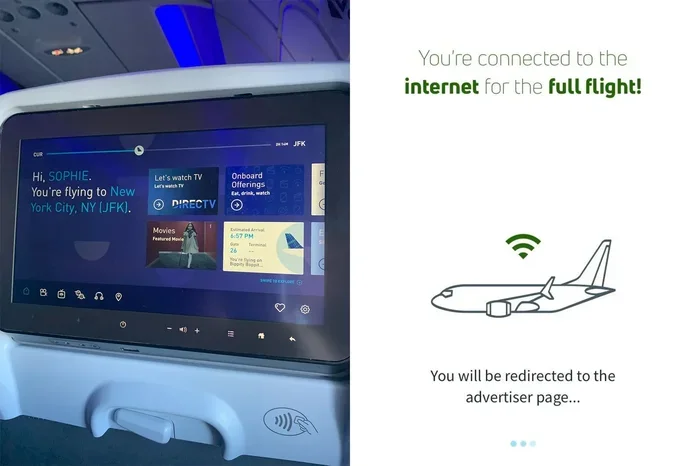
As soon as the cabin crew says you can use electronic devices, connect to the JetBlue Wi-Fi network. The earlier you connect, the better your chances of getting a strong signal. The network can get crowded as more passengers come online, and a weaker signal means slower messaging.
Download Messages Before You Fly
If you know you will be in an area with poor Wi-Fi, download any important messages or conversations before takeoff. Messaging apps like WhatsApp and Telegram let you access cached messages offline. You can read old messages even without a connection.
Use Wi-Fi-Only Mode
Put your phone in Airplane Mode first, then turn Wi-Fi back on manually. This prevents your phone from constantly searching for a cellular signal, which drains your battery and can cause confusion. When Wi-Fi is on and cellular is off, your phone will use the inflight Wi-Fi network for all data, including messaging.
Check Your App Settings
Some messaging apps have settings that control whether they use Wi-Fi or cellular data. Make sure your apps are set to use Wi-Fi when available. In most cases, this is the default behavior, but it is worth checking if you are having trouble sending messages.
Be Patient with Slow Connections
Inflight Wi-Fi is not the same as your home broadband. Speeds can vary based on the number of users, the route, and the technology used. If your messages are slow to send, give them a moment. Most messaging apps will queue your messages and send them once the connection is strong enough.
Consider a Wi-Fi Booster for Future Trips
If you frequently travel and struggle with weak signals, you might wonder about Wi-Fi boosters for your devices. While you cannot boost a signal on an airplane (the Wi-Fi is controlled by the airline), a good Wi-Fi booster for your home or office can help you stay connected on the ground before and after your flight. Staying connected on the ground means you can send important messages before you board or right after you land.
Common Mistakes People Make When Trying to Text on JetBlue
Avoid these common pitfalls so your inflight texting goes smoothly:
- Not enabling Wi-Fi after turning on Airplane Mode: This is the number one mistake. Airplane Mode turns off all wireless connections, including Wi-Fi. You need to manually turn Wi-Fi back on.
- Expecting traditional SMS to work: Standard text messages need cellular towers. They will not work on a plane, period.
- Not checking if Wi-Fi is available on your flight: Not all JetBlue aircraft have Wi-Fi. Check the JetBlue app or website before your trip.
- Forgetting to log in to the Wi-Fi portal: Some JetBlue flights require you to visit a login page before you can connect. Open your browser and you should be prompted.
- Ignoring data limits: Free Wi-Fi may have data limits. Heavy use can slow down your connection or cut it off entirely.
How JetBlue Compares to Other Airlines for In-Flight Texting
JetBlue is not the only airline that offers Wi-Fi. But how does it stack up when it comes to texting and messaging?
Most major airlines now offer some form of Wi-Fi, and most of them support internet-based messaging apps. The difference is in the quality, speed, and pricing of the Wi-Fi service.
JetBlue stands out because of its free basic Wi-Fi offering. Many other airlines charge for Wi-Fi, and some charge high prices. On JetBlue, you can often text and message for free without paying for an upgraded plan.
However, airlines like Delta and Alaska have been improving their Wi-Fi offerings too. Delta offers free messaging on its Wi-Fi network, similar to JetBlue. Alaska Airlines also provides Wi-Fi that supports messaging apps.
When comparing airline Wi-Fi for texting, the key factors are:
- Is messaging free? JetBlue and Delta both allow free messaging.
- What speeds can you expect? JetBlue’s Fly-Fi network generally offers decent speeds for messaging.
- Does the airline use modern technology? JetBlue has been updating its fleet with newer Wi-Fi equipment that provides better connections.
If you are choosing an airline based on Wi-Fi quality, JetBlue is a strong contender. Their commitment to inflight connectivity has made them a favorite among frequent flyers who need to stay connected.
What About International JetBlue Flights?
International flights may use satellite Wi-Fi instead of the ATG technology used on domestic routes. Satellite Wi-Fi can offer different speeds and reliability compared to ground-based systems.
On international JetBlue flights, texting over Wi-Fi still works. Messaging apps that use internet data will function the same way. However, satellite connections can sometimes be slower or less stable than ATG connections.
If you are flying internationally with JetBlue, here are a few extra tips:
- Download your messaging apps before departure. This ensures you have the latest versions and any needed data cached.
- Check the Wi-Fi plan for your route. International flights may not have the same free Wi-Fi options as domestic flights.
- Consider a Wi-Fi booster app. Some apps claim to optimize your Wi-Fi connection. While they cannot create a signal out of nothing, they can help your phone maintain a more stable connection.
Also, keep in mind that some countries have restrictions on Wi-Fi calling and certain messaging apps. Check the regulations of your destination before relying on specific apps while flying.
Security and Privacy When Texting Over JetBlue Wi-Fi
Any time you use a public or shared Wi-Fi network, security is a concern. Inflight Wi-Fi is no different. Here is what you should know about staying safe while messaging on JetBlue.
Most modern messaging apps use end-to-end encryption. This means your messages are encrypted on your device and can only be decrypted by the recipient. Apps like WhatsApp, Signal, and iMessage all use this type of encryption.
However, public Wi-Fi networks can still pose risks. Other users on the same network could potentially intercept unencrypted data. This is why you should:
- Use encrypted messaging apps. Avoid sending sensitive information over unencrypted channels.
- Make sure the websites you visit use HTTPS. Look for the padlock icon in your browser.
- Avoid logging into sensitive accounts like banking on shared Wi-Fi if possible.
- Keep your phone’s software updated. Updates often include security patches that protect you on public networks.
JetBlue does not monitor or log your browsing activity on their Wi-Fi network. But the nature of shared networks means you should always practice good digital hygiene, especially when traveling.
The Future of In-Flight Connectivity and Texting
The world of airline Wi-Fi is changing fast. JetBlue continues to invest in better technology for its passengers. Here is what the future may hold for inflight texting and connectivity.
Newer aircraft are being equipped with more advanced Wi-Fi systems that offer faster speeds and more reliable connections. As satellite technology improves, we can expect better performance on international routes too.
Some experts predict that in the near future, 5G connectivity at altitude could become a reality. This would transform the in-flight experience, making texting, calling, and streaming as seamless as it is on the ground.
For now, JetBlue’s Fly-Fi network does a solid job of keeping passengers connected. And for the most common need — sending a quick text message — it works well and often for free.
Final Thoughts
Does JetBlue Wi-Fi let you text during your flight? Yes, it absolutely does. As long as you use internet-based messaging apps, you can stay connected from takeoff to landing. The free Fly-Fi network makes it easy to send messages without paying extra.
Just remember that traditional SMS texts will not work at altitude. You need to use apps like WhatsApp, iMessage, or Facebook Messenger that rely on internet data. And always connect to Wi-Fi early in the flight for the best experience.
Next time you board a JetBlue flight, do not worry about missing important messages. With the right setup, you can text just about as easily as you do on the ground. Stay connected, stay informed, and enjoy your flight.
Frequently Asked Questions
Can I send regular text messages on JetBlue Wi-Fi?
No, traditional SMS text messages require cellular network towers, which your phone cannot connect to during a flight. You need to use internet-based messaging apps like WhatsApp, iMessage, or Facebook Messenger to send texts over JetBlue’s Wi-Fi network.
Is JetBlue Wi-Fi free for texting and messaging?
Yes, JetBlue offers free basic Wi-Fi called Fly-Fi on most domestic flights. Messaging apps that use internet data, such as WhatsApp and iMessage, work on the free tier without any additional cost. You only need to pay if you want faster speeds for streaming or browsing.
Why can’t I connect to JetBlue Wi-Fi during my flight?
There are several reasons this can happen. The Wi-Fi may not be available on your specific aircraft, the network could be overloaded with too many users, or you may need to log in through the JetBlue portal first. Try connecting early in the flight and make sure Airplane Mode is on with Wi-Fi manually enabled.
Does Wi-Fi calling work on JetBlue flights?
Yes, Wi-Fi calling generally works on JetBlue flights if your phone supports it and your carrier offers the feature. Enable Wi-Fi calling in your phone settings before your flight, and make sure to turn on Wi-Fi after activating Airplane Mode. Keep in mind that voice calls should be made respectfully and at a low volume.
Can I use WhatsApp on a JetBlue flight?
Yes, WhatsApp works on JetBlue Wi-Fi because it uses the internet to send messages, voice notes, and make calls. As long as you are connected to the JetBlue inflight Wi-Fi network, WhatsApp should function normally. Download any important chats or media before your flight for the best experience.
How fast is JetBlue Wi-Fi for sending messages?
JetBlue’s free Wi-Fi is usually fast enough for messaging and sending texts through apps. Speeds can vary depending on the route, the number of connected users, and the aircraft type. For basic texting and messaging, the free tier is more than sufficient. For streaming or large file transfers, you may want to consider an upgraded plan.
=== CONCLUSION ===
JetBlue Wi-Fi does let you text during your flight. With the Fly-Fi network, you can use messaging apps like WhatsApp, iMessage, Facebook Messenger, and Telegram to stay in touch from takeoff to landing. The free basic plan covers most messaging needs, and you do not need to spend extra just to send texts.
Remember to use internet-based messaging apps, connect to Wi-Fi early, and avoid relying on traditional SMS for inflight communication. Follow the tips in this guide, and you will have a smooth and connected experience on every JetBlue flight.
Staying connected in the sky is easier than ever. JetBlue has made it simple to send messages, make calls, and share updates while you fly. So next time you are up in the air, do not hesitate to reach out — your JetBlue Wi-Fi has you covered.