Does Lg Tv Have Bluetooth Connection For Your Devices
Yes, most LG Smart TVs come with built-in Bluetooth, allowing you to connect wireless headphones, speakers, and soundbars easily. This guide covers which LG TV models support Bluetooth, how to pair devices, and what to do if your TV lacks native Bluetooth. You will also learn about Bluetooth adapters and common troubleshooting tips.
This is a comprehensive guide about Does Lg Tv Have Bluetooth Connection.
Key Takeaways
- Built-in Bluetooth: Most modern LG Smart TVs include native Bluetooth for wireless audio devices.
- Easy Pairing: Connecting Bluetooth headphones or speakers to your LG TV takes just a few simple steps.
- Adapter Option: If your LG TV lacks Bluetooth, a Bluetooth adapter can add wireless capability quickly.
- Multiple Devices: You can connect headphones, speakers, soundbars, and even your phone via Bluetooth.
- Range Matters: Bluetooth typically works within 30 feet, so keep your device nearby for best results.
[FEATURED_IMAGE_PLACEHOLDER]
Does Lg Tv Have Bluetooth Connection For Your Devices
LG TVs are some of the most popular smart TVs on the market today. They come packed with features, stunning displays, and smart capabilities. But one question keeps popping up among buyers and users: does LG TV have Bluetooth connection for your devices? The short answer is yes. Most LG Smart TVs released in the last several years include built-in Bluetooth. This lets you wirelessly connect headphones, speakers, soundbars, and even your phone. But the full story is a bit more detailed than that.
Not every LG TV model has the same Bluetooth features. Some models offer Bluetooth 5.0 with multi-point pairing. Others may only support basic Bluetooth audio output. And a few older or budget models might not have Bluetooth at all. This guide will walk you through everything you need to know. We will cover which LG TVs support Bluetooth, how to pair your devices, and what to do if your TV does not have built-in Bluetooth. By the end, you will have a clear picture of how Bluetooth works on your LG TV.
Bluetooth on your LG TV opens up a world of convenience. Imagine watching your favorite show late at night with wireless headphones. No one else gets disturbed. Or picture streaming music from your phone to your TV speakers without any cables. These are real possibilities when your LG TV has Bluetooth. Let us dive into the details and help you get the most out of this handy feature.
Which LG TV Models Support Bluetooth
Not all LG TVs are created equal when it comes to Bluetooth. The good news is that most mid-range and high-end models include it. But budget models and older sets may not. Here is what you need to know about LG TV Bluetooth compatibility.
LG Smart TV Bluetooth Built-In
LG’s line of Smart TVs running webOS generally includes Bluetooth support. Models from the UM series, the UP series, and the higher-end SK and SK8 series all come with Bluetooth built in. These TVs use Bluetooth to connect wireless headphones, speakers, and audio devices. The Bluetooth version varies by model. Newer TVs often feature Bluetooth 5.0 or higher, which gives you a stronger and more stable connection.
If you are shopping for a new LG TV, check the specifications before you buy. Look for “Bluetooth” in the connectivity section of the product page. Most LG product listings clearly state whether Bluetooth is included. If you already own an LG TV, you can check your model number on LG’s official website. The spec sheet will list all supported wireless connections.
Older LG TV Models and Bluetooth
Older LG TVs, especially those from 2015 and earlier, may not have Bluetooth. Some models from 2016 to 2018 started including it, but it was not standard. If your LG TV does not have Bluetooth, do not worry. You still have options. A Bluetooth adapter can add wireless audio capability to any TV with an available audio output. We will cover this in detail later in the article.
LG TV Bluetooth Audio Output vs. Input
It is important to understand that LG TVs use Bluetooth mostly as an audio output. This means you can send audio from your TV to wireless headphones or speakers. Some LG TVs also support Bluetooth input, which lets you connect a phone or tablet to the TV for audio streaming. The exact Bluetooth profile supported varies by model. Look for terms like A2DP (for audio streaming) and AVRCP (for remote control) in your TV’s manual.
How to Connect Bluetooth Devices to Your LG TV
Pairing a Bluetooth device to your LG TV is straightforward. Whether you are connecting wireless headphones or a Bluetooth speaker, the process is similar. Here is a step-by-step guide that works for most LG Smart TVs.
Step 1: Turn on Bluetooth on Your LG TV
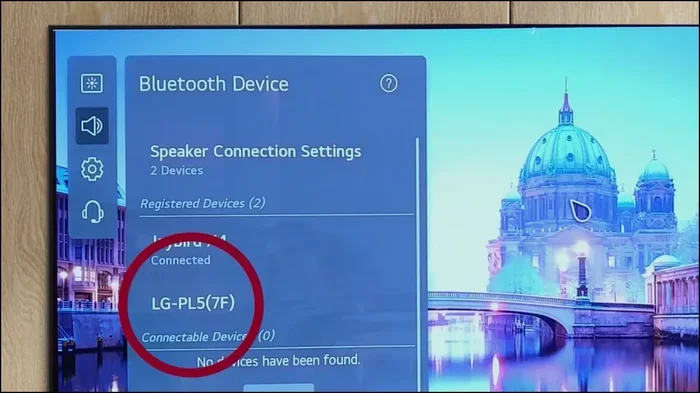
First, grab your LG TV remote. Press the Settings button, which usually looks like a gear icon. Navigate to the Sound or All Settings section. Look for Bluetooth or Connection settings. Select Bluetooth and turn it on. Your TV will start searching for nearby devices.
Step 2: Put Your Device in Pairing Mode
Now take your Bluetooth headphones or speaker. Put it into pairing mode. Most devices have a dedicated button or a combination of buttons for this. Check your device’s manual if you are unsure. Once your device is in pairing mode, it will appear on your LG TV’s Bluetooth screen.
Step 3: Select and Pair
On your LG TV, you will see a list of available devices. Select your headphones or speaker from the list. The TV will connect automatically. You should hear a confirmation sound, and the device name will show as connected. Now your LG TV is sending audio wirelessly to your Bluetooth device.
Quick Tips for Better Bluetooth Pairing
- Keep your Bluetooth device within 10 to 15 feet of the TV during pairing.
- Make sure your device is fully charged before pairing.
- Turn off other Bluetooth devices nearby to avoid interference.
- Restart your LG TV if the Bluetooth menu does not respond.
- Check for TV software updates, as these can improve Bluetooth performance.
Using Bluetooth Headphones With Your LG TV
One of the most popular reasons people want Bluetooth on their LG TV is to use wireless headphones. Whether you are a late-night viewer or someone who wants private listening, Bluetooth headphones are a great choice. Most Bluetooth headphones work seamlessly with LG TVs that support Bluetooth audio output.
If you are looking for the best Bluetooth headphones for your LG TV, look for models that support the A2DP profile. This is the standard for streaming high-quality audio. Many popular brands like Sony, Bose, and JBL offer headphones that pair easily with LG Smart TVs. The connection is stable and the audio quality is usually excellent, especially with Bluetooth 5.0.
Some users wonder about using any Bluetooth headphones with their TV. The answer is generally yes. Most Bluetooth headphones use standard protocols that work with any TV that supports Bluetooth. However, some headphones designed specifically for phones may not have the best TV pairing experience. Look for headphones that advertise TV compatibility for the best results.
You can also connect multiple Bluetooth headphones to some LG TVs using the TV’s audio sharing feature. This lets two people listen to the same TV audio on separate headphones. Check your TV’s sound settings for an audio sharing or dual audio option.
Can You Use a Bluetooth Adapter If Your LG TV Lacks Bluetooth
Not every LG TV comes with built-in Bluetooth. If your model is older or a budget set, you might not have this feature. But you are not stuck. A Bluetooth adapter can add wireless audio capability to almost any TV. This is a simple and affordable solution that works well.
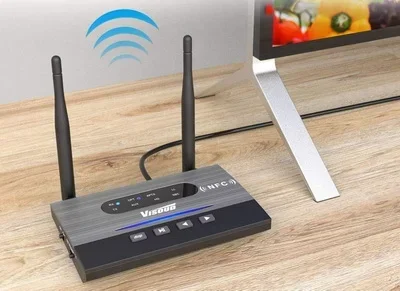
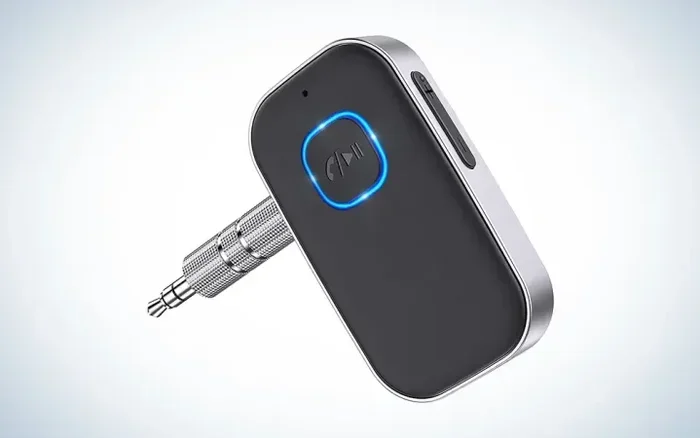
A Bluetooth adapter plugs into your TV’s audio output. This could be a 3.5mm headphone jack, an optical port, or an HDMI ARC port. The adapter then sends audio wirelessly to your Bluetooth headphones or speakers. The setup is easy and does not require any technical skills.
If you are wondering about using a Bluetooth adapter on your TV, the answer is yes. These adapters are widely available and affordable. You can find them for under $20 on most online retail sites. They work with virtually any TV that has an audio output. Look for adapters that support Bluetooth 5.0 for the best range and audio quality.
Another great option is to make your TV Bluetooth capable with an adapter. This is especially useful for older LG TVs that still deliver great picture quality but lack wireless audio. With the right adapter, you can enjoy all the benefits of Bluetooth without buying a new TV.
Types of Bluetooth Adapters for TVs
- 3.5mm Audio Bluetooth Adapters: These plug into your TV’s headphone jack. They are the most common and affordable option.
- Optical Bluetooth Adapters: These connect to your TV’s optical audio output. They offer better audio quality than 3.5mm adapters.
- HDMI Bluetooth Adapters: These connect via HDMI ARC and offer the best integration with your TV’s sound system.
Bluetooth Connectivity on LG TVs: What to Expect
Understanding how Bluetooth works on your LG TV helps you set realistic expectations. Bluetooth technology has improved a lot over the years. But it still has some limitations that are worth knowing about.
Bluetooth Range and Stability
Bluetooth on LG TVs typically works within a range of about 30 feet. This means your Bluetooth headphones or speaker should be in the same room as the TV for the best experience. Walls and other obstacles can reduce the range. Bluetooth 5.0 offers better range and stability compared to older versions. If your LG TV has Bluetooth 5.0, you will enjoy fewer dropouts and a more reliable connection.
Audio Quality Over Bluetooth
The audio quality you get over Bluetooth depends on several factors. The Bluetooth version on your TV matters. Bluetooth 5.0 supports higher quality audio codecs. The codec your headphones or speaker supports also matters. Most modern devices support AAC or aptX codecs, which deliver clear and rich sound. For casual TV watching, Bluetooth audio quality is more than sufficient. But for audiophiles who want lossless sound, a wired connection might still be the better choice.
Multipoint Connection
Some LG TVs support multipoint Bluetooth, which lets you connect two devices at the same time. This is useful if you want your phone and headphones connected to the TV simultaneously. You can take a phone call through the TV speakers while still hearing your show. Not all LG models support this feature, so check your TV’s specifications if this matters to you.
Common Bluetooth Issues on LG TVs and How to Fix Them
Bluetooth on LG TVs works well most of the time. But sometimes you may run into issues. Here are the most common problems and how to solve them.
Device Not Showing Up in Bluetooth List
If your Bluetooth device does not appear on your LG TV, try these steps. First, make sure the device is in pairing mode. Second, move the device closer to the TV. Third, restart both the TV and the Bluetooth device. Fourth, check if the device is already connected to another device. Bluetooth devices can only connect to one source at a time unless they support multipoint.
Audio Delay or Lag
Audio delay, also called latency, is a common Bluetooth issue. This is when the sound does not match the video on screen. It is more noticeable when watching fast action scenes or playing video games. To reduce audio delay, make sure your TV and Bluetooth device are close together. Also, check if your TV has an audio sync or delay setting in the sound menu. Adjusting this can help align the audio with the video.
Connection Drops Frequently
If your Bluetooth connection keeps dropping, there are a few things to try. First, check for interference from other wireless devices. Wi-Fi routers, microwaves, and other Bluetooth devices can all cause interference. Second, update your TV’s software. LG often releases updates that improve Bluetooth stability. Third, reset your TV’s Bluetooth settings and try pairing again.
For more tips on fixing Bluetooth problems, you can also check out our guide on listening to Samsung TV with Bluetooth headphones, which covers similar troubleshooting steps that apply to LG TVs as well.
Can You Use Bluetooth With Other LG Devices
LG makes more than just TVs. The brand has a wide range of smart home devices and audio equipment. Many of these devices work well together through Bluetooth. If you are already in the LG ecosystem, you can enjoy seamless connectivity across your devices.
LG soundbars are a popular choice for upgrading TV audio. Most LG soundbars connect to LG TVs via Bluetooth or HDMI ARC. When connected via Bluetooth, you can stream music from your phone through the soundbar. This gives you a versatile audio setup for both TV watching and music listening.
LG also makes wireless speakers and audio accessories that pair with LG TVs. These devices use standard Bluetooth protocols, so they work with any TV that has Bluetooth. You can create a multi-room audio setup by connecting multiple LG Bluetooth speakers throughout your home.
It is also worth noting that LG TVs can connect to Bluetooth keyboards and mice. This is handy if you use your TV for web browsing or typing. Just make sure your accessories support the HID (Human Interface Device) Bluetooth profile for compatibility.
Final Thoughts on LG TV Bluetooth Connection
The answer to does LG TV have Bluetooth connection for your devices is a clear yes for most models. LG has embraced Bluetooth as a standard feature on its Smart TVs. This gives users the freedom to connect wireless headphones, speakers, soundbars, and other audio devices without any cables. Whether you are watching movies late at night or streaming music, Bluetooth adds a layer of convenience that wired connections simply cannot match.
If your LG TV does not have built-in Bluetooth, a Bluetooth adapter is an easy and affordable fix. These small devices unlock wireless audio capability in minutes. You do not need to replace your TV to enjoy the benefits of Bluetooth.
Setting up Bluetooth on your LG TV is simple. Just go to your TV’s settings, turn on Bluetooth, and pair your device. Keep your devices close for the best connection. And remember that Bluetooth 5.0 offers the best range and audio quality. With the right setup, your LG TV becomes a wireless audio hub for your entire home.
Take a few minutes to explore your LG TV’s Bluetooth settings today. You might discover a whole new way to enjoy your favorite content. Whether it is private late-night viewing or a whole-home audio setup, Bluetooth on your LG TV makes it all possible.
Frequently Asked Questions
Do all LG TVs have Bluetooth?
Most modern LG Smart TVs include built-in Bluetooth, but older models and some budget TVs may not. Check your TV’s specifications on the LG website or in the user manual to confirm. If your TV lacks Bluetooth, a Bluetooth adapter can add this feature.
Can I connect Bluetooth headphones to my LG TV?
Yes, you can connect Bluetooth headphones to most LG Smart TVs. Simply go to your TV’s Bluetooth settings, put your headphones in pairing mode, and select them from the list. The TV will send audio wirelessly to your headphones.
How far can Bluetooth work on an LG TV?
Bluetooth on LG TVs typically works within 30 feet. For the best experience, keep your Bluetooth device in the same room as the TV. Walls and other obstacles can reduce the effective range. Bluetooth 5.0 offers better range than older versions.
Can I use a Bluetooth transmitter with my LG TV?
Yes, if your LG TV does not have built-in Bluetooth, a Bluetooth transmitter is a great solution. These devices plug into your TV’s audio output and send audio wirelessly to Bluetooth headphones or speakers. They are easy to set up and affordable.
Why does my Bluetooth connection keep dropping on my LG TV?
Bluetooth dropouts can happen due to interference from other wireless devices, distance, or outdated TV software. Try moving your Bluetooth device closer to the TV, reducing wireless interference, and updating your TV’s firmware. Resetting the Bluetooth settings on your TV can also help.
Can I connect multiple Bluetooth devices to my LG TV at once?
Some LG TVs support multipoint Bluetooth, which allows you to connect two devices simultaneously. Check your TV’s specifications to see if this feature is available. If not, you can still switch between paired devices in your TV’s Bluetooth settings.