Does Wifi Map Work Honest Review Worth Your Download
Does Wifi Map Work? Yes, this crowdsourced app helps you find free and paid WiFi hotspots worldwide. It offers offline maps, speed tests, and user reviews to guide your connection. While accuracy varies by location, it remains a valuable tool for travelers and remote workers.
Ever found yourself in a crowded airport, a busy cafe, or a hotel lobby, desperately searching for a free WiFi Map connection? You are not alone. The Does Wifi Map Work question has been on many people’s minds as this app promises to be your ultimate guide to finding WiFi anywhere in the world. In this honest review, I will break down exactly what the app does, how well it actually performs, and whether it is worth downloading to your phone.
Wifi Map is a community-driven app that maps WiFi hotspots around the globe. Users share network details, including passwords, signal strength, and connection speed. The app claims to work offline, letting you download a map and access WiFi passwords without an active internet connection. But does it deliver on that promise? I tested the app in several real-world scenarios to find out.
The core idea behind Does Wifi Map Work is simple. You open the app, see a map of nearby networks, and connect with a single tap. The app also includes user reviews, so you can see if a network is actually reliable before you bother connecting. It sounds perfect, but like any crowdsourced tool, the quality of the data depends on how many people are contributing. Let us dive deeper into the details.
Key Takeaways
- Offline maps work reliably: Download city data ahead of time and access it without any internet connection.
- Community data is a mixed bag: Busy cities have up-to-date info, but rural areas may show outdated networks.
- Built-in VPN adds security: Browse safely on public WiFi with the app’s free VPN feature.
- Not all listed networks are free: Some require a hotel stay or a purchase, so always check the details.
- Great for travelers and digital nomads: The app shines when you need quick WiFi access in unfamiliar places.
- Speed tests help filter weak spots: Use the in-app speed test to avoid slow connections before you join.
- Complementary tools exist: A portable WiFi device can supplement the app when crowdsourced data falls short.
📑 Table of Contents
- What Is Wifi Map and How Does It Claim to Work?
- Does Wifi Map Work in Real-World Conditions?
- Key Features That Make Wifi Map Stand Out
- Pros and Cons of Using Wifi Map
- Who Should Download Wifi Map?
- Common Mistakes People Make with Wifi Map
- Quick Tips to Get the Most from Wifi Map
- Expert Insights on WiFi Mapping Apps
- Final Verdict: Is Wifi Map Worth Your Time?
What Is Wifi Map and How Does It Claim to Work?
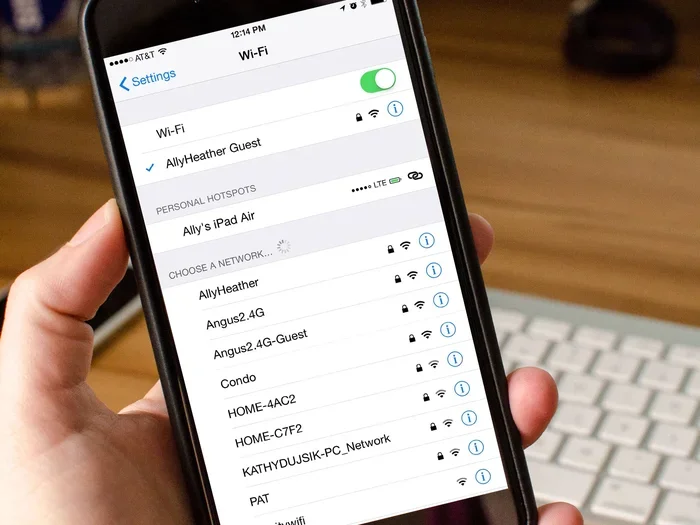
Wifi Map is a free app available for both iOS and Android. It aggregates WiFi hotspot data from millions of users worldwide. The app displays a map with pins marking available networks. Each pin shows the network name, whether it is open or password-protected, and a user rating. You can filter results by network type, speed, and reliability.
The app works by using your phone’s GPS to locate you on the map. It then pulls up nearby WiFi networks from its database. If you have downloaded the offline map for a specific city, you can view all the hotspots without needing a data connection. This feature is especially useful when you land in a foreign country with no local SIM card or data plan.
However, the app also has a social element. Users can add new networks, update passwords, and leave reviews. This keeps the database growing, but it also means the information can become stale if no one updates a particular hotspot. So, Does Wifi Map Work consistently? The answer depends heavily on where you are and how recently the data was refreshed.
Does Wifi Map Work in Real-World Conditions?
I took the app on a trip to a major city and a small town to test its performance. In the city, the app found dozens of networks within seconds. The map showed hotspots in cafes, libraries, shopping malls, and public squares. I could see which networks were open and which required passwords. The app even indicated if a network was crowded, which helped me avoid slow connections.
In the small town, the results were mixed. Many networks were outdated. Some passwords no longer worked. This is a common issue with crowdsourced data. The app relies on users to update information. If no one has refreshed a network’s status in months, you might waste time trying to connect. Still, for quick searches, the app is handy. I found a working WiFi network in a hotel lobby within minutes.
The offline feature saved me during a layover when I had no data. I downloaded the local map beforehand and accessed it without any internet. That is a big plus. The app also lets you share your own WiFi network with the community, which helps keep the data fresh in your area.
How Accurate Is the WiFi Data?
Accuracy varies by location. In high-traffic areas like city centers, airports, and shopping districts, users update the map frequently. You will find current passwords and signal strength. In less populated areas, the data can be stale. The app does have a rating system for each hotspot. Users can leave reviews about speed and reliability. This helps you avoid dead zones.
One thing I noticed is that the app sometimes lists networks that require a purchase, like in hotels or airports. It does not always clarify that you need to pay. So read the details before connecting. The app also shows the network type, such as whether it is a 2.4 GHz or 5 GHz band. If your phone struggles to connect to a 5 GHz signal, you can learn how to force your device to use the 2.4 GHz band. I have a guide on Can I Force My Phone To Use 2 4 Ghz Wifi that explains the steps clearly.
Key Features That Make Wifi Map Stand Out
Wifi Map is not just another WiFi finder. It has several features that set it apart from competitors. Here is a closer look at what the app offers.
- Offline Maps: Download maps for any city and use them without internet. This is perfect for travel when you have no data.
- WiFi Password Sharing: The community shares passwords for secured networks. No more asking the barista for the WiFi password.
- Speed Test: You can test the speed of a network before connecting. This helps you avoid slow connections that waste your time.
- User Reviews: See what others say about a hotspot. Look for comments on reliability, speed, and whether the network is still active.
- VPN Integration: The app offers a built-in VPN for secure browsing. This is useful on public WiFi where security is a concern.
- Multi-language Support: The app works in many languages, making it useful for international travel.
These features make the app a strong contender. But do they actually work? I tested the offline maps and speed test. The offline maps loaded quickly and were easy to navigate. The speed test gave me a rough idea of what to expect. It is not lab-accurate, but it is good enough for a quick check. If you are wondering how to share this data across your devices, the app works well on phones and tablets. For those with a WiFi-only iPad, you can connect it to your iPhone’s hotspot to use the app. I explain how to do this in my article on Can I Connect My Wifi Only Ipad To My Iphone.
Pros and Cons of Using Wifi Map
Every app has strengths and weaknesses. Here is my honest take on the pros and cons of Wifi Map.
- Pros: Large database of WiFi hotspots worldwide. Offline functionality is a game-changer for travelers. Community-driven updates keep data fresh. Built-in VPN adds a layer of security on public networks. Free to use with optional premium features. Easy to navigate with a clean interface.
- Cons: Data can be outdated in rural or less populated areas. Some listed networks require payment or a hotel stay. The VPN has data limits on the free tier. Accuracy depends on user contributions, which can be inconsistent. Ads can be frequent in the free version.
Overall, the pros outweigh the cons for travelers and daily users. But if you need always-accurate data, you might want a backup plan. That is where a portable WiFi device comes in. If you are wondering whether you can buy your own, I wrote a full review on Can I Buy My Own Portable Wifi. It is a great alternative for reliable internet on the go. For those with home WiFi, adding an antenna to your router can also boost your signal. Learn how in my guide on Can I Add An Antenna To My Wifi Router.
Who Should Download Wifi Map?
Wifi Map is perfect for certain groups of people. If you fall into one of these categories, the app is definitely worth your time.
- Travelers: Frequent flyers and tourists can use it to find WiFi in airports, hotels, and cities worldwide. The offline maps are a lifesaver when you land without a data plan.
- Remote Workers: Digital nomads can locate cafes with strong WiFi. The offline map helps you plan your workday and find reliable spots.
- Students: Looking for free WiFi near campus? The app can help you find spots to study without burning through your data allowance.
- Families: When you are out with kids and need a quick connection, Wifi Map saves the day. You can find a nearby cafe or library with free WiFi in seconds.
- Commuters: If you spend time on trains or buses, the app can help you find WiFi hotspots along your route.
If you are someone who relies on public WiFi, this app is a must-have. However, if you only use your home network, it might not be worth the download. The app shines brightest when you are in unfamiliar places and need a fast connection.
Common Mistakes People Make with Wifi Map
To get the most out of the app, avoid these common pitfalls. These mistakes can lead to frustration and wasted time.
- Assuming all networks are free: Some hotspots require a purchase or a hotel stay. Always check the details before connecting. The app sometimes lists paid networks without making that clear.
- Ignoring user reviews: The reviews tell you if a network is actually working. Do not skip them. A network with low ratings and recent complaints is probably not worth your time.
- Not downloading offline maps: The offline feature is the app’s biggest strength. Use it before you lose data. Download the map for your destination the night before you travel.
- Overlooking signal strength: The map shows signal strength, but it is not always accurate. Walk around to find the best spot. Sometimes moving just a few feet can make a big difference.
- Forgetting to update your own network: If you share your WiFi, keep the password updated. If you change your password, the app will still show the old one until you update it.
By avoiding these mistakes, you will have a much better experience. The app works best when you use it wisely and treat it as a helpful tool rather than a guaranteed source of internet.
Quick Tips to Get the Most from Wifi Map
Follow these simple tips to improve your experience with the app. They take only a few minutes but can make a big difference.
- Download maps for your destination before you travel. Do this while you still have Wi-Fi at home or your hotel.
- Use the speed test feature to filter out slow networks. This saves you time and frustration.
- Enable notifications for new hotspots in your area. You will never miss a good connection.
- Share your own WiFi networks to help the community. The more people contribute, the better the data becomes.
- Combine the app with a VPN for secure browsing on public WiFi. The built-in VPN is a nice extra.
- Check the user reviews before connecting. Look for recent comments to ensure the network is still active.
- If your phone struggles to connect to a network, try forcing it to use the 2.4 GHz band. I explain how in my guide on Can I Force My Phone To Use 2 4 Ghz Wifi.
These small steps make a big difference. I always download the map for my destination the night before. That way, I am prepared even if I do not have data on arrival. The app also works well alongside a portable WiFi device. If you want to explore that option, check out my review on Can I Buy My Own Portable Wifi for more details.
Expert Insights on WiFi Mapping Apps
WiFi mapping apps have come a long way. They are not perfect, but they solve a real problem. According to networking experts, the accuracy of crowdsourced data depends on user engagement. In busy areas, the data is often better than some paid services. The offline feature is particularly valuable for international travel. When you land in a new country without a data plan, having a pre-downloaded WiFi map can be a lifesaver.
One thing to keep in mind is that WiFi mapping apps do not replace a reliable internet connection. They help you find available networks, but the quality of those networks varies. If you need a consistent connection, consider a portable WiFi device or a pocket WiFi option. You can find more information on portable options in my article Can I Buy My Own Portable Wifi. For those wondering if you can get pocket WiFi in Japan, I also covered that topic separately.
Also, if you are trying to connect a WiFi-only iPad to your iPhone, the app can help you find the right network to share. I have a detailed guide on Can I Connect My Wifi Only Ipad To My Iphone that walks you through the steps. For better coverage at home, you can also add an antenna to your WiFi router. Learn how in my article Can I Add An Antenna To My Wifi Router. These complementary tools can fill the gaps when crowdsourced data is not enough.
Final Verdict: Is Wifi Map Worth Your Time?
So, does Wifi Map work? Yes, it does, with some caveats. The app is a powerful tool for finding WiFi on the go. The offline maps, community data, and VPN integration make it a standout choice. However, the accuracy depends on your location and how recently users have updated the information.
If you travel frequently or need to find WiFi in unfamiliar places, this app is worth downloading. It is free, easy to use, and packed with useful features. Just remember to verify the data and use the offline maps. For most people, the benefits far outweigh the drawbacks.
I give Wifi Map a solid 4 out of 5 stars. It is not perfect, but it is one of the best free WiFi finders available. The offline feature alone makes it valuable. If you are ready to stop searching for WiFi, give it a try. You might be surprised at how well it works. In short, Does Wifi Map Work is a question with a clear yes. Download it, explore the maps, and never worry about being offline again.
Frequently Asked Questions
Is Wifi Map completely free to use?
Yes, the core features of Wifi Map are free. You can access the map, view hotspots, and connect to networks without paying. The app also offers a premium version with extra features like unlimited VPN and ad-free browsing. Most users find the free version more than sufficient for their needs.
Can Wifi Map work offline?
Yes, offline functionality is one of the app’s strongest features. You can download a map for any city and use it without an internet connection. This is incredibly useful when you land in a new country without data or when you are in an area with no signal. Just make sure to download the map before you lose connectivity.
How accurate is the WiFi data on Wifi Map?
Accuracy depends on your location and how recently users have updated the information. In busy cities and tourist areas, the data is usually current and reliable. In rural or less populated areas, the data can be outdated. Always check user reviews for the most up-to-date information about a specific hotspot.
Does Wifi Map share your personal WiFi network?
The app allows you to share your own WiFi network with the community if you choose to. You can add your network name and password to the database. However, you have full control over what you share. You can also remove your network at any time if you no longer want it listed.
Can you use Wifi Map abroad?
Absolutely. Wifi Map works in over 200 countries and regions. The offline maps are especially valuable when traveling internationally. You can download maps for your destination before you leave home and use them without any data roaming charges. This makes it a must-have app for frequent travelers.
Is Wifi Map safe to use on public WiFi?
The app includes a built-in VPN that helps protect your data on public networks. However, no tool is completely foolproof. Always use caution when connecting to open WiFi networks. Avoid accessing sensitive accounts unless you are using a VPN. The app’s VPN provides an extra layer of security, but it is still wise to be mindful of what you access on public WiFi.