How Do I Add Bluetooth To My Bose Wave Step By Step
Adding Bluetooth to your Bose Wave is easier than you think. Whether you have a Bose Wave Radio or a Bose Wave Music System, you can unlock wireless streaming with the right Bluetooth adapter or transmitter. This guide walks you through every step, from choosing the best Bluetooth module to pairing your devices and enjoying wireless audio without any hassle.
This is a comprehensive guide about How Do I Add Bluetooth To My Bose Wave.
Key Takeaways
- Bluetooth adapters work with most Bose Wave models: You can add wireless capability to your existing system without buying a new one.
- A Bluetooth transmitter is the most common solution: It connects to your Wave’s auxiliary input or cassette adapter port for seamless streaming.
- Pairing is simple and fast: Most Bluetooth adapters pair with your phone or tablet in under 30 seconds.
- Sound quality stays great: Modern Bluetooth adapters preserve the rich sound your Bose Wave is known for.
- You can also make old Bose speakers Bluetooth: The same approach works for other Bose speaker systems in your home.
- Avoid common mistakes: Using the wrong input or skipping firmware updates can cause connection problems.
[FEATURED_IMAGE_PLACEHOLDER]
How Do I Add Bluetooth To My Bose Wave Step By Step
Your Bose Wave system delivers amazing sound. But if it was made before Bluetooth became standard, you might feel stuck. The good news is that adding Bluetooth to your Bose Wave is one of the easiest upgrades you can do. You do not need to replace your entire system. A simple adapter or transmitter unlocks wireless streaming from your phone, tablet, or laptop.
In this guide, we walk you through every single step. You will learn which adapter works best, how to connect it, and how to pair your devices. We also cover common problems and tips to get the best sound quality. By the end, you will be streaming music wirelessly through your Bose Wave system like a pro.
Let us get started. Your wireless listening experience is just a few minutes away.
Why Add Bluetooth To Your Bose Wave
Bose Wave systems are beloved for their rich, clear sound. But older models lack built-in Bluetooth. This means you are limited to CDs, radio, or wired connections. Adding Bluetooth connectivity changes everything. You can stream music from any device without cables.
Here is why this upgrade is worth your time:
- Wireless freedom: Play music from your phone without any wires. Move around your room freely.
- Modern convenience: Connect Spotify, Apple Music, YouTube, or any app directly to your Bose Wave.
- Multiple device support: Switch between your phone, tablet, and laptop with ease.
- Preserve your investment: Keep using your Bose Wave instead of buying a new one.
- Better than a cassette adapter: Wireless streaming sounds cleaner and more reliable than cassette-based solutions.
Many people also ask, can I make my old Bose speakers Bluetooth? The answer is yes. The same Bluetooth adapter approach works for many Bose speaker systems. So even if you have other Bose devices, this guide helps you across the board.
Understanding Your Bose Wave Model
Before you buy an adapter, it helps to know which Bose Wave you own. Different models have different input options. The right Bluetooth solution depends on what connections your system has.
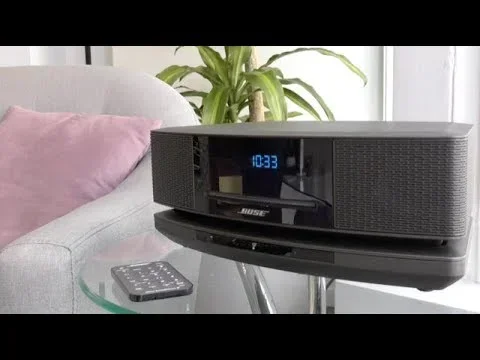
Bose Wave Radio
The Bose Wave Radio is one of the most popular models. It has a CD player, AM/FM radio, and an auxiliary input on the back. The auxiliary input is a standard 3.5mm jack. This makes it very easy to connect a Bluetooth transmitter. Most Bluetooth adapters plug right into this port and start working immediately.
Bose Wave Music System
The Bose Wave Music System offers more connectivity options. It typically has an auxiliary input, a headphone jack, and sometimes a USB port. The auxiliary input works perfectly with Bluetooth transmitters. Some models also support a Bluetooth module that connects internally for a cleaner setup.
Bose Wave SoundTouch
If you have a Bose Wave SoundTouch system, you are in luck. These models already have built-in Wi-Fi and some Bluetooth features. You may just need to update the software or enable Bluetooth in the settings. Check your user manual or the Bose app for details.
Best Bluetooth Adapters For The Bose Wave
Not all Bluetooth adapters are the same. Some work better with the Bose Wave than others. Here are the top options you should consider.
Option 1: Bluetooth Transmitter (Most Popular)
A Bluetooth transmitter plugs into your Wave’s auxiliary input. It sends audio wirelessly to your Bluetooth headphones or speakers. But more importantly, it receives audio from your phone and plays it through the Bose Wave. This is the most common and affordable approach.
Look for a transmitter that supports aptX or aptX Low Latency. These codecs deliver better sound quality. Brands like 1Mii, Avantree, and TaoTronics make reliable options.
Option 2: Bluetooth Receiver Module
A Bluetooth receiver module connects internally to your Bose Wave. This is a more advanced option. It requires opening up the system and soldering or wiring the module inside. The benefit is a cleaner look with no external dongles. If you are handy with electronics, this is a great choice.
Many people also wonder, can I use a Bluetooth adapter on my TV? Yes, the same type of Bluetooth receiver modules work for TVs too. The concept is the same across devices.
Option 3: USB Bluetooth Adapter
Some newer Bose Wave models have a USB port. A USB Bluetooth adapter can plug directly in. This is the simplest solution if your model supports it. Just plug it in, install any needed drivers, and you are ready to go.
| Adapter Type | Ease of Setup | Sound Quality | Price Range |
|---|---|---|---|
| Bluetooth Transmitter | Very Easy | Excellent | $15 – $40 |
| Bluetooth Receiver Module | Moderate | Excellent | $20 – $50 |
| USB Bluetooth Adapter | Easy | Good | $10 – $25 |
For most Bose Wave owners, a Bluetooth transmitter is the best choice. It is simple, affordable, and delivers great results. If you want to explore how Bluetooth technology works across different devices, you might also enjoy learning about turning your stereo into Bluetooth for other audio systems in your home.
Step By Step: Adding Bluetooth To Your Bose Wave
Now for the part you have been waiting for. Here is the complete step-by-step process to add Bluetooth to your Bose Wave.
Step 1: Gather Your Materials
Before you start, make sure you have everything you need:
- A Bluetooth transmitter or adapter (we recommend one with an auxiliary cable included)
- A 3.5mm auxiliary cable (if not included with your adapter)
- Your Bose Wave system
- A phone, tablet, or computer to test the connection
- Optional: fresh batteries or a power source for the transmitter
Step 2: Power Off Your Bose Wave
Always turn off your Bose Wave before making any connections. This protects both your system and the adapter. It also prevents any audio feedback or static during setup.
Step 3: Connect The Bluetooth Transmitter
Plug the 3.5mm cable from your Bluetooth transmitter into the auxiliary input on the back of your Bose Wave. The auxiliary input is usually labeled “AUX” or “Line In.” Make sure the connection is firm and secure.
If your Bose Wave uses a cassette deck for input, you can use a cassette adapter instead. However, a Bluetooth transmitter with a direct auxiliary connection gives better sound quality and more reliable performance.
Step 4: Power On The Bluetooth Transmitter
Turn on your Bluetooth transmitter. Most models have a power button or switch. Some transmitters charge via USB, while others use batteries. Make sure it is fully charged or has fresh batteries before pairing.
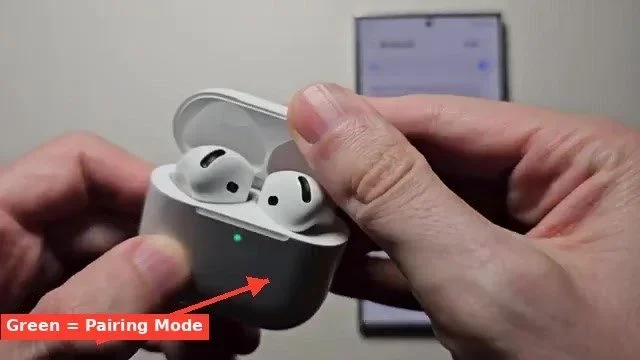
Step 5: Put The Transmitter In Pairing Mode
Press and hold the pairing button on your Bluetooth transmitter. A flashing LED light usually indicates it is ready to pair. Check your transmitter’s manual if you are unsure which button to press.
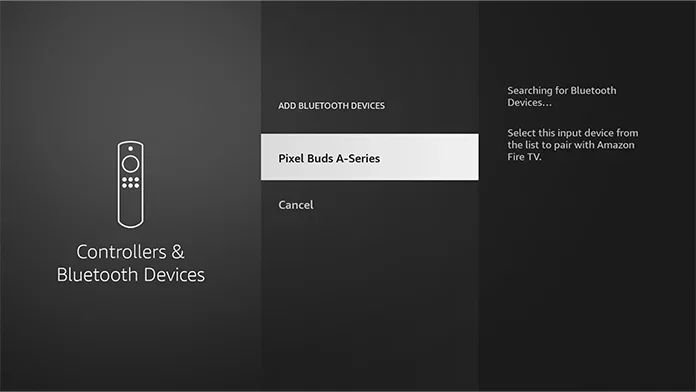
Step 6: Pair Your Device
On your phone or tablet, go to Settings and open Bluetooth. Turn Bluetooth on and look for available devices. Your transmitter should appear in the list. Tap on it to connect.
Once paired, you should see a confirmation. The LED on the transmitter will usually stop flashing and stay solid. This means the connection is active.
Step 7: Test The Connection
Play music on your phone. The sound should come through your Bose Wave speakers. Adjust the volume on both your phone and your Bose Wave for the best balance. Start with the phone volume at about 70% and use the Bose Wave for fine-tuning.
Step 8: Enjoy Wireless Music
That is it. You are now streaming wirelessly through your Bose Wave. You can control playback from your phone, skip tracks, and adjust volume all from your device. It feels like magic.
Tips For The Best Sound Quality
Adding Bluetooth does not mean you have to sacrifice sound quality. Follow these tips to get the best possible audio from your setup.
Use The Right Bluetooth Codec
Bluetooth codecs affect audio quality. Look for adapters that support aptX or aptX HD. These codecs deliver near-lossless sound over Bluetooth. Standard SBC codec works fine for most users, but aptX makes a noticeable difference for audiophiles.
Keep Your Devices Close
Bluetooth works best within about 30 feet. Keep your phone near your Bose Wave for a strong, stable connection. Walls and obstacles can weaken the signal. If you experience dropouts, move closer to the system.
Minimize Wireless Interference
Wi-Fi routers, microwaves, and other Bluetooth devices can interfere with your connection. If you notice static or dropouts, try moving your router away from the Bose Wave. Switching to a less crowded Bluetooth channel can also help.
Update Your Adapter Firmware
Many Bluetooth adapters receive firmware updates. These updates improve connectivity and sound quality. Check the manufacturer’s app or website for updates after you set up your adapter.
Turn Off When Not In Use
Leaving your Bluetooth transmitter on all the time can drain batteries and cause interference. Turn it off when you are not streaming. This also extends the life of the adapter.
For more tips on wireless audio setups, you can also explore how to use a Bluetooth adapter on your TV for a whole-home wireless audio strategy.
Common Problems And How To Fix Them
Sometimes things do not go smoothly. Here are the most common issues people face when adding Bluetooth to their Bose Wave and how to solve them.
No Sound From The Speakers
This usually means the transmitter is not connected to the right input. Double-check that the cable is in the AUX or Line In port. Also make sure your Bose Wave is set to the correct input source. Use the mode or source button on your Wave to select Aux.
Bluetooth Will Not Pair
First, make sure your transmitter is in pairing mode. The LED should be flashing. Next, make sure Bluetooth is turned on your phone. Try turning Bluetooth off and back on. If it still does not work, reset the transmitter by holding the power button for 10 seconds.
Audio Cuts Out Intermittently
Interference is the most common cause. Move closer to the Bose Wave. Remove other Bluetooth devices from the area. Also check that your transmitter firmware is up to date.
Poor Sound Quality
If the sound is tinny or distorted, try adjusting the volume balance. Keep your phone volume around 70% and use the Bose Wave controls for final adjustments. Also check that you are using a quality auxiliary cable. Cheap cables can degrade sound.
Transmitter Does Not Charge
Try a different USB cable or power source. Some chargers do not provide enough power for Bluetooth transmitters. Use the cable that came with the adapter or a known high-quality USB charger.
These issues are normal and easy to fix. Do not get discouraged. Once you solve the problem, your wireless setup will work flawlessly.
Can You Use A Bluetooth Transmitter For Other Devices Too
Absolutely. A Bluetooth transmitter is a versatile tool. You can use it with many audio systems in your home. The same approach works for turning older speakers into wireless devices.
For example, if you have an older car stereo, you can add Bluetooth using a transmitter. Many people ask, can I use a Bluetooth transmitter for my car? The answer is yes. The same principle applies. You connect the transmitter to your car’s audio input and stream wirelessly from your phone.
Similarly, you can use a transmitter to make your stereo Bluetooth capable. If you are wondering, can I turn my stereo into Bluetooth, the answer is definitely. A Bluetooth transmitter or receiver opens up wireless streaming for almost any audio system.
This versatility makes Bluetooth adapters a smart investment. One small device can upgrade multiple systems in your home or car.
Frequently Asked Questions
Can I add Bluetooth to any Bose Wave model?
Most Bose Wave models can be upgraded with Bluetooth. The Bose Wave Radio and Wave Music System work great with Bluetooth transmitters. Even older models that only have a cassette deck can use a cassette Bluetooth adapter. Check your specific model for available input options before purchasing an adapter.
Do I need any special equipment to add Bluetooth?
You need a Bluetooth transmitter or adapter and an auxiliary cable. Most transmitters come with the cable included. If your Bose Wave has a USB port, a USB Bluetooth adapter is even simpler. That is all you need to get started with wireless streaming.
Will adding Bluetooth affect my Bose Wave sound quality?
Modern Bluetooth adapters preserve excellent sound quality. Look for adapters that support aptX or aptX HD codecs for the best results. The difference between wired and Bluetooth audio is minimal with quality adapters. Most listeners cannot tell the difference in everyday use.
How long does it take to set up Bluetooth on a Bose Wave?
The entire setup takes about 10 to 15 minutes. Plugging in the transmitter, pairing your device, and testing the connection is quick and straightforward. Even if you are not tech-savvy, you can complete the process without any difficulty.
Can I connect multiple devices to my Bluetooth adapter?
Most Bluetooth transmitters support multipoint connectivity. This means you can pair two devices at the same time. Your phone and tablet can both connect, and you can switch between them easily. Check your adapter’s specifications to confirm multipoint support.
Is it better to buy a new Bluetooth-enabled Bose system instead?
Adding Bluetooth to your existing Bose Wave is much more affordable than buying a new system. A quality Bluetooth adapter costs between $15 and $40. Your Bose Wave already has excellent speakers and sound quality. An adapter lets you enjoy modern wireless features without replacing your investment.
Final Thoughts
Adding Bluetooth to your Bose Wave is one of the best upgrades you can make. It brings your beloved sound system into the modern age. You get wireless streaming, easy device switching, and the freedom to enjoy music without cables. The process is simple, affordable, and takes just minutes.
Start with a quality Bluetooth transmitter. Connect it to your Bose Wave’s auxiliary input. Pair your phone and start streaming. You will wonder how you ever lived without it.
Remember, the same approach works for many other audio systems too. Whether you want to make your old Bose speakers Bluetooth or upgrade other devices in your home, the principles are the same. A small adapter opens up a world of wireless possibility.
So go ahead. Give your Bose Wave the Bluetooth upgrade it deserves. Your ears will thank you.
Frequently Asked Questions
What is How Do I Add Bluetooth To My Bose Wave?
How Do I Add Bluetooth To My Bose Wave is an important topic with many practical applications.