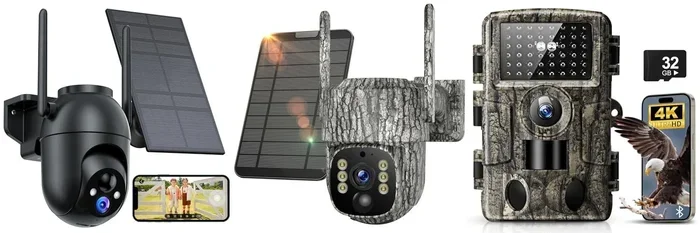
Can You Use A Game Camera As A Security Camera For Home
Yes, you can use a game camera as a security camera for home monitoring. These trail cameras offer motion detection, night vision, and weatherproof builds that make them a solid home security option. While they lack live streaming and smart alerts, a game camera can still protect your property affordably and discreetly.
More and more homeowners are asking a simple question: can you use a game camera as a security camera for home protection? The short answer is yes. A game camera, also known as a trail camera, can do a surprising job as a budget-friendly security camera. But before you run out and buy one, there are important things you need to know.
If you are tired of expensive monthly security subscriptions and want a simple way to monitor your property, a game camera might be exactly what you need. These rugged little devices were originally designed for hunters tracking wildlife, but they have found a second life in the world of home security. In this guide, we will walk through everything you need to consider before using a game camera for home protection.
We will cover how game cameras work, what features matter most for security, and how they compare to traditional surveillance cameras. Whether you want to watch your backyard, monitor a cabin in the woods, or keep an eye on your driveway, this article has you covered. Let us dive in.
Key Takeaways
- Affordable Alternative: Game cameras cost far less than traditional security systems while offering reliable motion-activated recording.
- Night Vision Capability: Most game cameras include infrared night vision, making them effective for 24/7 surveillance.
- No Wi-Fi Required: Many game cameras store footage locally on an SD card, so you do not need an internet connection.
- Stealth and Discretion: Game cameras are small and camouflaged, making them ideal for hidden property monitoring.
- Limited Smart Features: Unlike modern security cameras, game cameras usually lack real-time alerts and live streaming.
- Weather Resistant: Game cameras are built to withstand rain, snow, and extreme temperatures for outdoor use.
📑 Table of Contents
- What Is A Game Camera And How Does It Work
- Can A Game Camera Really Replace A Security Camera
- Key Features To Look For In A Game Camera For Security
- Setting Up Your Game Camera For Home Security
- Game Camera Vs Traditional Security Camera
- Can You Use A Game Camera For Home Security Without Wi-Fi
- Expert Tips For Maximizing Your Game Camera Security Setup
- Final Thoughts
What Is A Game Camera And How Does It Work
A game camera is a rugged, weatherproof device designed to capture photos and videos of wildlife. Hunters and nature enthusiasts have used them for decades. These cameras sit quietly in the woods and wait for movement before triggering a shot.
Here is how they work in simple terms:
- Motion Sensor: A passive infrared (PIR) sensor detects heat and movement. When an animal or person walks by, the camera wakes up and starts recording.
- Infrared Flash: Most game cameras use invisible infrared flash for night vision. This means the camera captures clear images in total darkness without alerting anyone nearby.
- SD Card Storage: Photos and videos save directly to a removable SD card inside the camera. You walk up to the camera later to retrieve your footage.
- Battery Power: Game cameras run on batteries, which can last weeks or even months depending on usage and temperature.
The beauty of a game camera is its simplicity. There are no wires, no complicated apps, and no monthly fees. You set it up, walk away, and let it do its job. This simplicity is exactly what makes it appealing for home security use.
Why Game Cameras Work For Security
The core technology behind a game camera is surprisingly similar to what you find in basic security cameras. Both use motion detection to trigger recording. Both capture still images and video clips. And both can operate in low-light or no-light conditions.
The main difference is the feature set. A traditional surveillance camera often includes live streaming, cloud storage, smartphone alerts, and two-way audio. A game camera focuses on capturing and storing footage locally. For many homeowners, this trade-off is more than acceptable.
Can A Game Camera Really Replace A Security Camera
This is the big question, and the honest answer is: it depends on what you need. A game camera can absolutely serve as a security camera for basic property monitoring. But it cannot fully replace a full-featured home security system if you need real-time alerts or live video feeds.
Let us break down when a game camera makes sense and when it does not.
When A Game Camera Works Great For Security
- Vacation Homes: If you own a cabin or second home that sits empty for weeks, a game camera is perfect. It runs on batteries, records motion, and stores everything on an SD card.
- Backyard Monitoring: Want to know if someone is trespassing in your yard at night? A game camera with night vision can catch everything.
- Driveway and Gate Surveillance: Placed at your driveway entrance, a game camera can capture license plates and faces of visitors.
- Budget-Friendly Monitoring: Game cameras cost between $50 and $200, making them far cheaper than a full security camera system.
- Off-Grid Properties: If your property has no Wi-Fi or power outlets, a battery-powered game camera is one of your best options. You can learn more about using security cameras without Wi-Fi here.
When A Game Camera Falls Short
- No Live Streaming: You cannot watch a live feed from a game camera on your phone. You must physically retrieve the SD card to review footage.
- No Real-Time Alerts: Traditional smart security cameras send instant notifications when motion is detected. Game cameras do not.
- No Two-Way Audio: You cannot speak through a game camera to scare off intruders.
- Delayed Review: Since footage is stored locally, you only discover events after the fact, not in real time.
For many homeowners, these limitations are fine. But if you want instant alerts and live monitoring, you should look into a proper wireless security camera system instead.
Key Features To Look For In A Game Camera For Security
Not all game cameras are created equal. If you plan to use one for home security, you need to know which features matter most.
Motion Detection Speed
This is arguably the most important feature. The faster the motion detection sensor triggers, the more likely you are to capture the full event. Look for cameras with trigger speeds under 0.5 seconds. A slow trigger means you might miss the beginning of someone walking through your yard.
Night Vision Range
Since most break-ins and trespassing happen at night, infrared night vision is essential. Check the night vision range in feet. A good game camera for security should have a night vision range of at least 50 to 100 feet. Some models even offer color night vision, which produces clearer images than traditional black-and-white infrared.
Field Of View
The field of view determines how wide an area the camera can see. A wider field of view covers more ground but may reduce image detail at the edges. For home security, look for a field of view between 60 and 120 degrees. This gives you a good balance between coverage and clarity.
Photo and Video Quality
Most game cameras shoot photos at 12 to 20 megapixels and video at 1080p or 4K. For security purposes, 1080p video is usually enough to identify faces and license plates. Higher resolution is always better, but it also eats up SD card space faster.
Weatherproofing
Game cameras are built to survive rain, snow, heat, and cold. Look for an IP65 or higher rating for reliable outdoor durability. A weatherproof game camera will keep working through storms and extreme temperatures without any issues.
Battery Life
Battery life varies widely, from a few weeks to several months. Cold weather drains batteries faster, so if you live in a northern climate, consider lithium batteries for longer life. Some advanced models even support solar panel attachments for continuous power.
Setting Up Your Game Camera For Home Security
Setting up a game camera for home security is straightforward. You do not need any technical skills or professional help. Here is a step-by-step guide to getting the most out of your setup.
Step 1: Choose the Right Location
The placement of your game camera determines how effective it is. Focus on high-traffic areas around your property:
- Driveway entrance — captures vehicles and visitors arriving
- Back door or side gate — monitors common entry points
- Perimeter fence line — detects anyone approaching your property
- Backyard or garden area — watches for activity in hidden spots
- Garage or shed entrance — protects valuable storage areas
Place the camera 3 to 6 feet off the ground, angled slightly downward. This height captures faces and upper bodies clearly. Avoid pointing the camera directly at sunlight, as this can cause glare and false triggers.
Step 2: Secure the Camera
Game cameras come with mounting straps and screws. Use both for a secure setup. If you are worried about theft, consider hiding the camera in a tree or bush. Many game cameras are designed with camouflage patterns that blend into the environment. You can also use a lock box for extra protection.
Step 3: Set Up the SD Card
Insert a high-quality microSD card with at least 32GB of storage. Format the card in the camera before first use. This ensures the camera writes data correctly and reduces the risk of errors. A 64GB card can store thousands of photos and several hours of video.
Step 4: Adjust Motion Sensitivity
Most game cameras let you adjust motion sensitivity. Set it to medium or high for security monitoring. Too low, and the camera will miss movement. Too high, and it will trigger on small animals or swaying branches, wasting battery and storage space.
Step 5: Test and Fine-Tune
Walk in front of the camera and check the footage. Make sure the image is clear, the framing is good, and the trigger speed is fast enough. Adjust the position or sensitivity as needed. A quick test saves you from missing important footage later.
Quick Tips For Better Results
- Point the camera away from direct sunlight and bright streetlights to avoid glare.
- Clear branches and leaves from the sensor area to reduce false triggers.
- Check and replace batteries every 2 to 3 months for consistent performance.
- Retrieve SD cards regularly to review and back up your security footage.
- Use a high-speed SD card for faster write times and smoother video recording.
Game Camera Vs Traditional Security Camera
Still not sure if a game camera is right for your home security needs? Let us compare them side by side.
| Feature | Game Camera | Traditional Security Camera |
|---|---|---|
| Price | $50 – $200 | $100 – $500+ |
| Monthly Fees | None | $0 – $30+ |
| Night Vision | Yes (infrared) | Yes (infrared or color) |
| Motion Detection | Yes | Yes (often smarter) |
| Live Streaming | No | Yes (most models) |
| Smartphone Alerts | No | Yes |
| Two-Way Audio | No | Yes (most models) |
| Wi-Fi Required | No | Usually yes |
| Battery Powered | Yes | Sometimes |
| Weatherproof | Yes | Most models |
| Cloud Storage | No | Yes (usually) |
| Ease of Setup | Very easy | Moderate |
As you can see, a game camera wins on simplicity and cost. It requires no Wi-Fi, no subscriptions, and no complicated setup. A traditional security camera wins on smart features and real-time monitoring. Your choice depends entirely on your needs and budget.
If you want a simple, no-fuss way to monitor your property, a game camera is hard to beat. If you want live alerts and remote access, invest in a proper wireless security system. Many homeowners even use both — game cameras for outbuildings and remote areas, and smart cameras for the main house.
One thing to keep in mind is that a game camera can also help with the broader security setup around your home. For example, if you want to extend your Wi-Fi coverage to outdoor camera locations, you might want to explore options like boosting your Wi-Fi signal outside to support additional devices.
Can You Use A Game Camera For Home Security Without Wi-Fi
Yes, and this is one of the biggest advantages of using a game camera for home security. Most game cameras do not need Wi-Fi at all. They record footage to an SD card and store it locally. This means you can place a game camera anywhere on your property — even in remote areas with no internet connection.
This is a huge benefit compared to many Wi-Fi security cameras that require a stable internet connection to function. If your property has weak or no Wi-Fi, a game camera is a practical and reliable alternative. You simply walk out periodically, remove the SD card, and review your footage on a computer or phone.
For those who want even more offline security options, there are also security cameras that work entirely without Wi-Fi. You can explore those options here.
How To Review Your Game Camera Footage
Reviewing footage from a game camera is simple:
- Remove the SD card from the camera.
- Insert it into your computer or use a card reader.
- Open the photo and video files with any standard media player.
- Sort files by date to find the events you want to review.
- Copy important files to a backup drive or cloud storage.
Some modern game cameras also have a small LCD screen built in, so you can review footage directly on the camera without removing the SD card. This is a nice convenience feature worth looking for.
Expert Tips For Maximizing Your Game Camera Security Setup
Want to get the most out of your game camera for home security? Here are some expert tips that make a real difference.
Use Multiple Cameras
One camera covers one angle. For full property coverage, use two or three cameras placed at different entry points and blind spots. This gives you a complete picture of activity around your home. Think of it as creating your own DIY surveillance system on a budget.
Check Local Laws
Before placing a game camera on your property, check your local laws and regulations. In most areas, recording on your own property is legal. However, pointing a camera into a neighbor’s yard or window can create legal issues. Always respect privacy boundaries.
Use Timelapse Mode
Many game cameras offer a timelapse mode that takes photos at set intervals. This is great for monitoring slow-moving events like construction, wildlife activity, or property changes over time. It also conserves battery compared to motion-activated mode.
Keep Your Camera Hidden
A visible game camera might deter some intruders, but a hidden one captures more honest footage. Place your camera inside a fake rock, a tree hollow, or a birdhouse-style enclosure. Just make sure the sensor still has a clear view of the detection zone.
For additional home security insights, you might also want to read about how Wi-Fi can detect people in a room, which opens up another dimension of property monitoring technology.
Final Thoughts
So, can you use a game camera as a security camera for home? Absolutely. A game camera offers an affordable, simple, and reliable way to monitor your property. It works without Wi-Fi, runs on batteries, and captures clear footage day and night.
While it may not have the smart features of a modern security camera system, it more than makes up for it in ease of use and low cost. Whether you are securing a vacation home, monitoring a remote property, or simply keeping an eye on your backyard, a game camera gets the job done.
If you are serious about home security, consider pairing a game camera with a few other simple measures. Good locks, outdoor lighting, and a home security system all work together to keep your property safe. A game camera is a great starting point — and a surprisingly powerful one at that.
Start small, test a single camera, and see how it works for your situation. Once you see the results, you will likely want to expand your setup. The best part is, you can do it all without breaking the bank or dealing with complicated technology.
Frequently Asked Questions
Can I use any game camera for home security?
Most game cameras can work for basic home security, but look for models with fast trigger speeds, good night vision, and weatherproofing. Higher-end game cameras with 1080p video and infrared flash will give you the best results for monitoring your property at night and in low-light conditions.
Do game cameras need Wi-Fi to work as security cameras?
No. One of the biggest advantages of a game camera is that it does not need Wi-Fi. It records footage directly to an SD card, making it perfect for remote properties, cabins, and areas with no internet access. This makes it a great offline security camera alternative.
How long does a game camera battery last for security use?
Battery life depends on usage, but most game cameras last between 2 and 6 months on a set of batteries. Cold weather shortens battery life significantly. Using lithium batteries or a solar panel attachment can extend runtime considerably for continuous property monitoring.
Can game cameras record video or only photos?
Most modern game cameras can record both photos and videos. Video quality typically ranges from 720p to 4K. For home security, 1080p video is usually sufficient to capture clear footage of people and vehicles. Video clips can be set to record for a few seconds up to several minutes per motion trigger.
Is it legal to use a game camera for home security?
In most places, using a game camera on your own property for security is perfectly legal. However, laws vary by state and country. Avoid pointing cameras into neighbors’ private spaces or public areas where privacy expectations exist. Always check your local regulations before setting up any surveillance device.
Can I use a game camera with a smartphone for live monitoring?
Standard game cameras do not support live streaming to smartphones. However, some newer models offer Bluetooth or Wi-Fi connectivity that lets you preview images on your phone. For true live monitoring, you would need a traditional Wi-Fi security camera. But for periodic review, a game camera with an SD card works perfectly well.