Can You Use A USB Bluetooth Dongle On A TV Right Now
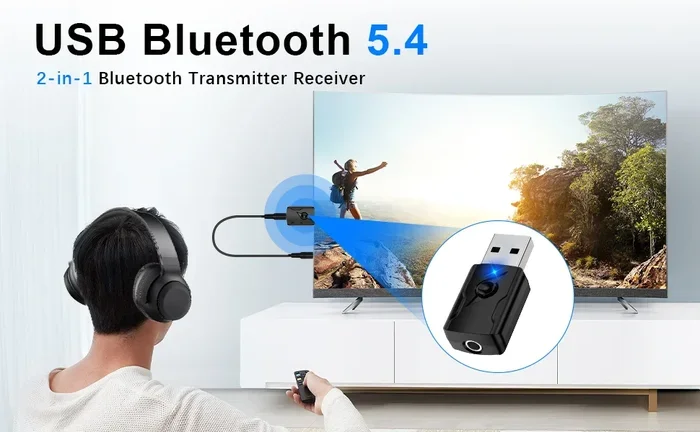
Yes, you can use a USB Bluetooth dongle on your TV to enjoy wireless audio from your favorite headphones or speakers. A Bluetooth dongle plugs right into your TV’s USB port and adds Bluetooth connectivity to TVs that lack it built in. This simple adapter lets you stream audio wirelessly without cables, making your viewing experience more flexible and enjoyable.
Have you ever wanted to watch your TV late at night without disturbing anyone else in the house? Or maybe you just hate tangled cables running across your living room. Either way, using a USB Bluetooth dongle on your TV might be the simple fix you have been looking for.
The idea is straightforward. You plug a small USB device into your TV, and suddenly your TV can connect to wireless headphones, speakers, or soundbars. No cords. No hassle. But does it really work that easily? The short answer is yes, but there are a few things you should know before you buy one. In this guide, we walk you through everything you need to make Bluetooth connectivity work on your TV.
Key Takeaways
- Plug-and-play simplicity: A USB Bluetooth dongle connects to your TV in seconds and requires minimal setup.
- Works on most TVs: As long as your TV has a USB port, you can likely add Bluetooth support with a dongle.
- Wireless freedom: You can use Bluetooth headphones or speakers without worrying about cable length or placement.
- Check compatibility first: Not all dongles work with all TVs, so verify your TV’s USB and Bluetooth specs before buying.
- Audio latency matters: Some dongles may have slight audio delays, so choose one with low-latency support for video watching.
- Alternative options exist: If a dongle doesn’t work, Bluetooth adapters or transmitters are other ways to add wireless audio to your TV.
📑 Table of Contents
- What Is a USB Bluetooth Dongle?
- How Does a Bluetooth Dongle Work with Your TV?
- Benefits of Using a USB Bluetooth Dongle on Your TV
- How to Set Up a USB Bluetooth Dongle on Your TV
- Common Problems and How to Fix Them
- Choosing the Right USB Bluetooth Dongle for Your TV
- Can You Use Any Bluetooth Dongle with Any TV?
- Final Thoughts
What Is a USB Bluetooth Dongle?
A USB Bluetooth dongle is a tiny adapter that plugs into a USB port on your TV. It acts as a bridge between your TV and Bluetooth devices like headphones or speakers. Think of it as a small, affordable way to give your TV wireless audio capabilities.
These dongles come in all shapes and sizes. Some are barely bigger than a USB flash drive. Others have a short cable that lets them stick out from the port more comfortably. Most Bluetooth dongles support the latest Bluetooth versions, which means better range, faster connections, and improved sound quality.
Here is what you need to know about these little devices:
- They are plug-and-play: Most dongles work right out of the box without needing extra software.
- They are affordable: You can find reliable options for under $15 to $30.
- They are portable: You can unplug them and use them on another TV or device.
- They support multiple devices: Many dongles can pair with more than one Bluetooth device at a time.
If you are curious about how this compares to other Bluetooth solutions for TVs, you might want to check out using a Bluetooth adapter on your TV as an alternative approach.
How Does a Bluetooth Dongle Work with Your TV?
Understanding how a Bluetooth dongle connects to your TV helps you troubleshoot issues later. The process is simple but involves a few behind-the-scenes steps.
When you plug the dongle into your TV’s USB port, the TV recognizes it as an external audio device. The dongle then starts broadcasting a Bluetooth signal that your wireless headphones or speakers can detect. Once you pair the devices, audio flows from your TV to the Bluetooth device without any cables.
The Pairing Process
Here is how the pairing process typically works:
- Plug the dongle into your TV’s USB port.
- Turn on your Bluetooth headphones or speaker.
- Put your Bluetooth device in pairing mode.
- Go to your TV’s audio settings and select the Bluetooth option.
- Choose your device from the list of available devices.
- Wait for the connection to establish.
Once paired, your TV audio streams wirelessly to your chosen device. Some dongles also let you connect multiple devices at once, which is great if you have a few family members who want to listen on their own headphones.
One thing to keep in mind is that your TV needs to support USB audio output. Most modern TVs do, but some older models may not recognize a Bluetooth dongle properly. If you are unsure, you can also check whether your TV supports Bluetooth audio output through other means.
Benefits of Using a USB Bluetooth Dongle on Your TV
So why should you bother with a USB Bluetooth dongle? There are several real benefits that make this a popular choice for many households.
1. Wireless Freedom
The biggest advantage is obvious: no cables. You can sit on your couch, lie in bed, or even sit in another room and still hear your TV audio clearly. This is especially helpful for late-night watching when others are sleeping.
2. Easy Setup
Unlike complicated home theater setups, a Bluetooth dongle takes minutes to install. You do not need to call a technician or spend hours configuring settings. Just plug it in, pair your device, and you are good to go.
3. Cost Effective
A Bluetooth dongle costs a fraction of what a new smart TV or sound system would cost. For a small investment, you get wireless audio streaming on a TV that might not have it built in.
4. Works with Many Devices
Most Bluetooth dongles are not limited to TVs. You can use them with laptops, desktop computers, and even some tablets. This makes them a versatile tool for your entire home setup.
If you are also interested in using wireless headphones with your TV, you might want to read about whether any Bluetooth headphones work with your TV for more insights.
How to Set Up a USB Bluetooth Dongle on Your TV
Setting up a Bluetooth dongle on your TV is a straightforward process. Here is a step-by-step guide to help you get started.
Step 1: Check Your TV’s USB Port
Before you buy a dongle, look at the back or side of your TV. Do you see a USB port? Most modern TVs have at least one. Note whether it is a standard USB-A port or a smaller USB-C port. You will need a dongle that matches your port type.
Step 2: Choose the Right Dongle
Not all Bluetooth dongles are the same. Look for one that supports Bluetooth 4.0 or higher. This ensures a stable connection and good range. Also check if the dongle supports the audio profile you need, such as A2DP for stereo audio.
Step 3: Plug It In
Insert the dongle into your TV’s USB port. Your TV should recognize it automatically. Some TVs may display a notification. Others may require you to go into the settings menu.
Step 4: Install Drivers (If Needed)
Most dongles work without extra drivers. However, some TVs may need a software update or a driver download. Check your TV manufacturer’s website if the dongle does not show up right away.
Step 5: Pair Your Bluetooth Device
Go to your TV’s audio or Bluetooth settings. Put your headphones or speaker in pairing mode. Select your device from the list and wait for the connection. You should hear a confirmation sound or see a message on screen.
Step 6: Test the Audio
Play a video or some music to test the connection. Make sure the audio is clear and there is no noticeable delay. If everything sounds good, you are all set.
For those who want to explore other ways to make their TV Bluetooth-ready, you can also look into making your TV Bluetooth with an adapter for additional options.
Common Problems and How to Fix Them
Even though setting up a Bluetooth dongle is easy, you might run into a few hiccups along the way. Here are the most common issues and how to solve them.
Dongle Not Recognized by TV
If your TV does not detect the dongle, try these steps:
- Unplug the dongle and plug it back in.
- Try a different USB port on your TV.
- Check if the USB port is working by testing it with another device.
- Update your TV’s firmware through the settings menu.
- Restart your TV and let it re-detect the dongle.
Audio Delay or Lag
A slight delay between the video and audio can be annoying. This is called audio latency. To reduce it:
- Choose a dongle that supports low-latency Bluetooth codecs.
- Move your Bluetooth device closer to the TV.
- Avoid placing the dongle near other wireless devices that might cause interference.
- Check if your TV has an audio sync setting you can adjust.
Connection Drops Frequently
If your Bluetooth connection keeps dropping, it might be a range or interference issue. Try moving the dongle and your Bluetooth device closer together. Also, keep the dongle away from microwaves, cordless phones, and other devices that operate on the same frequency.
Poor Audio Quality
If the sound is scratchy or unclear, the issue might be with the Bluetooth version or codec. Upgrading to a Bluetooth 5.0 dongle can significantly improve audio quality. You can also try adjusting the audio settings on your TV for a better output.
If you are exploring options beyond a dongle, listening to your Samsung TV with Bluetooth headphones is another popular approach worth considering.
Choosing the Right USB Bluetooth Dongle for Your TV
Not all Bluetooth dongles are created equal. Here are the key factors to consider before you make a purchase.
Bluetooth Version
Go for a dongle that supports Bluetooth 4.0 or higher. Bluetooth 5.0 offers the best range, speed, and stability. It also uses less power, which can be a bonus if your TV’s USB port has limited power output.
Compatibility
Check if the dongle is compatible with your TV brand and model. Some dongles work better with smart TVs than others. Reading user reviews can give you a good sense of compatibility before you buy.
Range
Most Bluetooth dongles have a range of about 30 feet. If you plan to move around a lot while watching TV, look for one with a longer range or a stronger signal.
Audio Codecs
Higher-quality dongles support advanced audio codecs like aptX or AAC. These codecs deliver better sound with less compression. If audio quality matters to you, this is an important spec to check.
Price
You do not need to spend a lot. A decent Bluetooth dongle can be found for $10 to $25. More expensive options may offer better range, audio quality, or extra features, but for most users, a budget-friendly dongle works perfectly fine.
Quick tip: if you find that a dongle does not suit your needs, you can also explore using a USB Bluetooth dongle on your TV as a starting point for your research.
Can You Use Any Bluetooth Dongle with Any TV?
The short answer is no, not every dongle works with every TV. Your TV needs to support USB audio input and recognize the dongle as an audio device. Most modern TVs handle this without issues, but some older or budget models may not. Before purchasing, check your TV’s manual or look up its specs online to confirm USB audio support.
Also, keep in mind that some smart TVs have their own Bluetooth built in. If your TV already supports Bluetooth, you might not need a dongle at all. In that case, you can simply pair your headphones or speakers directly. But if your TV does not have native Bluetooth, a USB Bluetooth dongle is your best bet for adding wireless audio.
It is also worth noting that some dongles are designed for computers and may not work seamlessly with TVs. Always look for dongles that are specifically labeled for TV or media use. These are optimized for audio streaming and tend to have better compatibility.
One more thing to consider: if you want a more permanent and stable solution, you might want to look into a Bluetooth transmitter that connects to your TV’s audio output. This is different from a USB dongle but serves a similar purpose. You can learn more about using a Bluetooth transmitter for audio streaming in different settings.
Final Thoughts
Using a USB Bluetooth dongle on your TV is one of the simplest and most affordable ways to add wireless audio to your viewing experience. Whether you want to watch movies late at night with headphones, connect a wireless speaker for better sound, or just get rid of cable clutter, a Bluetooth dongle delivers.
The setup is quick, the cost is low, and the results are immediate. You do not need to be tech-savvy to make it work. Just plug it in, pair your device, and enjoy wireless sound from your TV.
Remember to choose a dongle that matches your TV’s USB port and supports a recent Bluetooth version. If you run into issues, the troubleshooting tips in this guide should help you resolve most problems quickly. With the right dongle, your TV becomes a wireless audio hub that works with headphones, speakers, and soundbars of all kinds.
So go ahead, grab a Bluetooth dongle, and upgrade your TV watching experience today. It is one of those small changes that makes a big difference.