Does The Apple Watch Use Bluetooth to Connect to Your Phone
Yes, the Apple Watch uses Bluetooth to connect to your iPhone and other devices. This wireless technology lets your watch sync health data, receive notifications, and stream audio without cables. Understanding how Apple Watch Bluetooth works helps you troubleshoot issues and get the most from your smartwatch.
Your Apple Watch sits quietly on your wrist, but behind the scenes, it is constantly talking to your phone. This little device uses Bluetooth to stay in touch with your iPhone. Without this wireless connection, your smartwatch would not be able to show you notifications, track your workouts, or sync your health data.
So does the Apple Watch really use Bluetooth to connect to your phone? The short answer is yes. But there is a lot more to the story. In this article, we will walk through exactly how Apple Watch Bluetooth works, what you need to know about pairing, range limits, and how to fix common connection issues. Whether you own an Apple Watch Series 9 or an older model, this guide has you covered.
We will also explore how Bluetooth compares to Wi-Fi and cellular connections on the watch. By the end, you will understand everything you need to know about keeping your Apple Watch connected. Let us dive in.
Key Takeaways
- Apple Watch relies on Bluetooth: It uses Bluetooth to pair with your iPhone and sync data wirelessly.
- Bluetooth Low Energy saves battery: The watch uses BLE technology to minimize power drain while staying connected.
- Range matters: Bluetooth works best within 30 feet, and obstacles can weaken the signal.
- You can connect without your iPhone nearby: Some features work independently using Wi-Fi or cellular.
- Troubleshooting is simple: Restarting both devices often fixes common Bluetooth connection problems.
- Bluetooth version affects performance: Newer versions offer faster speeds and better range.
- Pairing is straightforward: The process takes just a few minutes using the Watch app on your iPhone.
📑 Table of Contents
- What Is Bluetooth and How Does It Work on the Apple Watch?
- How to Pair Your Apple Watch Using Bluetooth
- Bluetooth Range and What Affects Your Connection
- Can You Use Your Apple Watch Without Bluetooth?
- Troubleshooting Common Apple Watch Bluetooth Problems
- Bluetooth vs Wi-Fi vs Cellular on the Apple Watch
- Tips to Improve Your Apple Watch Bluetooth Connection
- Final Thoughts on Apple Watch Bluetooth Connectivity
What Is Bluetooth and How Does It Work on the Apple Watch?
Bluetooth is a wireless technology that lets devices talk to each other over short distances. It uses radio waves to send and receive data. Your Apple Watch has a built-in Bluetooth chip that handles all of this behind the scenes.
Apple uses a special version of Bluetooth called Bluetooth Low Energy, or BLE. This version uses much less power than standard Bluetooth. That is why your watch battery can last all day even while staying connected to your phone. BLE sends small bursts of data quickly and then goes back to sleep.
Why Bluetooth Low Energy Matters
BLE is a game changer for smartwatches. It allows the Apple Watch to stay connected without draining your battery fast. Here is why it is so important:
- Low power use: BLE uses a fraction of the energy compared to older Bluetooth versions.
- Fast data transfer: It sends health metrics and notifications quickly.
- Stable connection: BLE maintains a steady link between your watch and phone.
- Background operation: It works quietly in the background without you noticing.
When you pair your Apple Watch with your iPhone, the two devices exchange a pairing key. This key keeps the connection secure. After that, they communicate automatically whenever they are within range. You do not need to do anything extra.
How to Pair Your Apple Watch Using Bluetooth
Pairing your Apple Watch with your iPhone is simple. The whole process takes about five minutes. Here is exactly how to do it step by step.
Step-by-Step Pairing Guide
- Turn on your Apple Watch: Press and hold the side button until you see the Apple logo.
- Open the Watch app on your iPhone: The app should appear automatically on your phone screen.
- Tap “Pair” when prompted on both devices.
- Wait for the pairing code: Your iPhone will show a code. Enter it on your Apple Watch.
- Choose your settings: Pick what you want to sync, like notifications and health data.
- Wait for the sync to finish: This may take a minute or two depending on your data.
Once paired, your Apple Watch stays connected via Bluetooth as long as both devices are turned on and within range. You can check the connection status by opening the Control Center on your watch. The green phone icon means Bluetooth is active.
Need help with the setup? You can also visit our guide on does Bluetooth work on Apple Watch without iPhone to learn more about standalone features.
Bluetooth Range and What Affects Your Connection
Bluetooth has a limited range, and understanding this helps you manage expectations. The standard range for Apple Watch Bluetooth is about 30 feet, or roughly 10 meters. This is the distance at which the connection stays strong and stable.
Factors That Weaken Bluetooth Signals
Several things can interfere with your Bluetooth connection. Here are the most common ones:
- Walls and obstacles: Thick walls, floors, and doors block Bluetooth signals.
- Other wireless devices: Wi-Fi routers and microwaves can cause interference.
- Distance: Moving too far from your iPhone weakens the signal.
- Low battery: A low battery on either device can reduce performance.
- Bluetooth version: Older Bluetooth versions have shorter ranges.
If you have ever walked away from your phone and lost your connection, you have experienced this firsthand. The good news is that your Apple Watch can reconnect automatically once you are back in range. It does not require any manual input from you.
What Happens When You Go Out of Range?
When your Apple Watch moves more than 30 feet from your iPhone, the Bluetooth connection drops. Your watch will still work for many features, though. It can track your workouts, tell time, and play music stored on the device. But you will not receive new notifications until the connection is restored.
Some Apple Watch models can use Wi-Fi or cellular data to stay connected even when your phone is far away. This is especially useful if you leave your phone in another room.
Can You Use Your Apple Watch Without Bluetooth?
Many people wonder if they can use their Apple Watch without Bluetooth. The answer depends on what you want to do. Let us break it down.
Features That Work Without Bluetooth
Even without a Bluetooth connection, your Apple Watch can still do a lot:
- Tell time: The clock function works independently.
- Track workouts: Built-in sensors track your heart rate and steps.
- Play stored music: Music downloaded to the watch plays without a phone.
- Use built-in apps: Calculator, timer, and alarm work offline.
Features That Require Bluetooth
However, some features need Bluetooth to work properly:
- Receiving notifications: Texts, calls, and app alerts need a live connection.
- Syncing health data: Your metrics are sent to your iPhone via Bluetooth.
- Answering calls: You need Bluetooth to handle calls through the watch.
- Streaming audio: Playing music from your phone requires a Bluetooth link.
If you want to explore Bluetooth connectivity on other devices, check out our article on using Bluetooth headphones with PS4 for a broader look at Bluetooth applications.
Troubleshooting Common Apple Watch Bluetooth Problems
Bluetooth issues are frustrating, but they are usually easy to fix. Here are the most common problems and how to solve them.
Apple Watch Won’t Connect to iPhone
This is the most common issue. Try these steps in order:
- Turn Bluetooth off and on: Go to Settings on your iPhone and toggle Bluetooth off, then back on.
- Restart both devices: Hold the side button on your watch and your iPhone, then restart each one.
- Check the distance: Make sure both devices are within 30 feet of each other.
- Remove and re-pair: Go to the Watch app, unpair your watch, and pair it again.
- Update your software: Make sure both devices run the latest watchOS and iOS versions.
Bluetooth Keeps Disconnecting
If your connection drops frequently, here are some things to check:
- Other devices nearby: Too many Bluetooth devices in the area can cause interference.
- Software updates: Outdated software often causes connection drops.
- Low battery: A low battery on either device weakens the signal.
- Background apps: Some apps on your iPhone may use Bluetooth resources.
Can You Uninstall Bluetooth From Your Apple Watch?
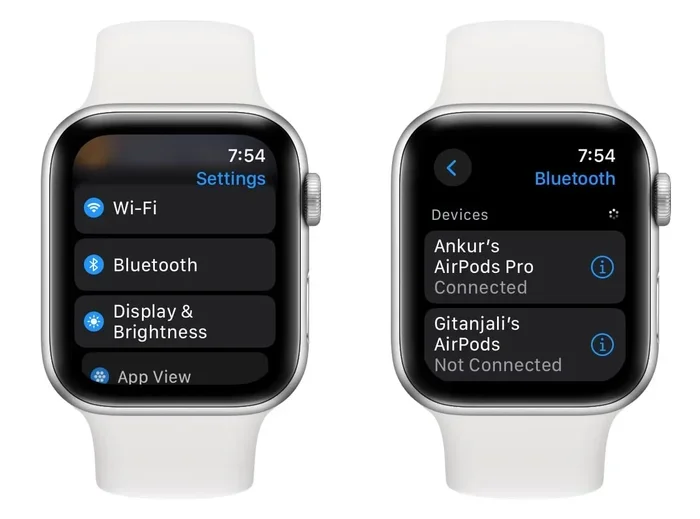
You might wonder if you can remove Bluetooth entirely from your watch. The short answer is no. Bluetooth is a core part of the Apple Watch. You cannot uninstall it. However, you can turn it off temporarily. Just go to Settings > Bluetooth on your watch and toggle it off. But keep in mind that turning it off disables many of the watch’s features.
If you are curious about Bluetooth management on other devices, you might enjoy our guide on can I uninstall Bluetooth for a deeper look at Bluetooth settings across different platforms.
Bluetooth vs Wi-Fi vs Cellular on the Apple Watch
Your Apple Watch can connect to your phone in more ways than just Bluetooth. Let us compare the three main connection types.
| Connection Type | Range | Battery Use | Requires iPhone Nearby? | Best For |
|---|---|---|---|---|
| Bluetooth | ~30 feet | Low | Yes | Daily syncing and notifications |
| Wi-Fi | ~100+ feet | Medium | No | Streaming and downloads without phone |
| Cellular | Unlimited | High | No | Calls and messages on the go |
Bluetooth is the default connection method. It uses the least battery and works well for most daily tasks. Wi-Fi kicks in when your phone is not nearby but you are still on a known network. Cellular gives you full independence but uses more power.
Most people rely on Bluetooth for everyday use. It is fast, efficient, and handles the bulk of data syncing between your watch and phone. The newer Bluetooth 5.0 and 5.3 versions offer even better range and speed compared to older versions.
Tips to Improve Your Apple Watch Bluetooth Connection
Want a stronger, more reliable Bluetooth connection? Try these practical tips.
- Keep your software updated: Apple releases updates that improve Bluetooth performance. Always install the latest watchOS and iOS.
- Stay within range: Try to keep your watch within 30 feet of your phone for the best signal.
- Reduce interference: Move away from Wi-Fi routers and other Bluetooth devices when connecting.
- Restart regularly: A simple restart clears temporary glitches that can affect Bluetooth.
- Check for obstructions: Remove metal cases or thick sleeves that might block the signal.
- Reset network settings: If all else fails, resetting network settings on your iPhone can fix persistent issues.
These small steps go a long way in keeping your Apple Watch connected. A stable Bluetooth link means faster notifications, smoother health tracking, and a better overall experience.
For a deeper look at Bluetooth speaker setups, you can also read our article on turning your stereo into Bluetooth to explore how Bluetooth works with different audio devices.
Final Thoughts on Apple Watch Bluetooth Connectivity
The Apple Watch uses Bluetooth as its primary way to connect to your phone. This wireless technology powers everything from notifications to health tracking. Understanding how it works helps you get the most out of your device.
Bluetooth Low Energy keeps your battery healthy while maintaining a steady connection. The range is limited but more than enough for daily use. And when issues pop up, simple troubleshooting steps usually fix them fast.
Whether you pair your watch for the first time or troubleshoot a connection problem, knowing the basics of Apple Watch Bluetooth makes a big difference. Keep your devices updated, stay within range, and enjoy the seamless wireless experience Apple designed.
Your Apple Watch and iPhone work best as a team. And Bluetooth is the invisible thread that keeps them connected throughout your day. Take care of that connection, and your smartwatch will reward you with a smooth, reliable experience every single day.
Frequently Asked Questions
Does the Apple Watch use Bluetooth to connect to any phone?
Apple Watch is designed to work with iPhone. It uses Bluetooth to pair specifically with iPhones. Android phones are not supported for Apple Watch pairing, so Bluetooth connectivity only works in the Apple ecosystem.
How far can my Apple Watch be from my iPhone while staying connected via Bluetooth?
The standard Bluetooth range is about 30 feet or 10 meters. Walls and other obstacles can reduce this distance. If you go beyond this range, the connection drops, but your watch can still work using Wi-Fi or cellular on supported models.
Does Bluetooth on the Apple Watch drain the battery quickly?
No. Apple Watch uses Bluetooth Low Energy, which is designed to use very little power. The watch battery typically lasts all day with Bluetooth active. Heavy use of streaming or cellular data will drain the battery faster than Bluetooth alone.
Can I use my Apple Watch without ever connecting to Bluetooth?
Yes, you can use many features without Bluetooth. The watch can tell time, track workouts, play stored music, and use built-in apps. However, you will miss notifications, live health syncing, and call features without a Bluetooth connection.
What Bluetooth version does the Apple Watch use?
Newer Apple Watch models use Bluetooth 5.0 or later. Older models use Bluetooth 4.2 or earlier. Newer versions offer better range, faster data transfer, and improved battery efficiency compared to older versions.
Why does my Apple Watch Bluetooth keep disconnecting from my iPhone?
Common causes include being out of range, low battery on either device, interference from other wireless devices, or outdated software. Restarting both devices, updating to the latest software, and resetting network settings usually fixes the problem.