How Do I Check My Amazon Mp3 Credit Balance Right Now
Checking your Amazon MP3 credit balance is quick and easy once you know where to look. Whether you are on a desktop or mobile device, you can view your credits in just a few taps. This guide walks you through every method to check your Amazon MP3 credit balance right now, so you never lose track of your digital music funds.
Have you ever wanted to buy a new album on Amazon only to realize you are not sure how much credit you have left? It happens to the best of us. Maybe you bought an Amazon gift card months ago and forgot about it. Or perhaps you earned credits from a promotion and never checked if they are still there. Whatever the reason, knowing your Amazon MP3 credit balance matters. It saves you from checkout surprises and helps you plan your next music purchase. In this guide, we will walk you through every way to check your balance quickly and easily.
Your Amazon MP3 credit balance is simply the amount of money stored in your Amazon account specifically for digital music purchases. Think of it like a prepaid wallet just for songs, albums, and audiobooks. Amazon makes it straightforward to add funds, use them, and track what is left. But the interface is not always obvious. That is exactly why this guide exists. By the time you finish reading, you will know exactly how to find your balance on any device in under two minutes.
We will cover everything from checking your balance on a computer to using the Amazon Music mobile app. We will also explain where your credits come from, how to use them wisely, and what to do if something looks wrong. You will find practical tips, real examples, and common mistakes to avoid. Let us dive right in and get your Amazon MP3 credit balance sorted out once and for all.
Key Takeaways
- Check from multiple devices: You can view your Amazon MP3 credit balance on both the Amazon website and the Amazon Music app.
- Credits come from several sources: Gift cards, promotions, and refunds all add to your Amazon MP3 wallet.
- No extra fees apply: Your existing credits cover MP3 purchases without additional charges.
- Credits never expire: Amazon does not set an expiration date on MP3 credits in your account.
- Use credits for more than music: Some Amazon digital content also accepts MP3 credits as payment.
- Track your spending: Reviewing your purchase history helps you understand how fast your credits are going.
📑 Table of Contents
What Is an Amazon MP3 Credit Balance?
Before we get into the how-to, let us quickly understand what we are dealing with. An Amazon MP3 credit balance is the amount of money sitting in your Amazon account that is designated for purchasing digital music. This includes individual songs, full albums, and even some audiobook content sold through the Amazon Music Store.
How Amazon MP3 Credits Work
When you add funds to your Amazon account, those funds go into your general account balance. However, when you make a purchase from the Amazon Music Store, Amazon pulls from this balance specifically. The process is automatic. You do not need to select a separate payment method for MP3 purchases if you have enough credits available.
Here is how it works in practice. Let us say you have a Amazon gift card balance of $25. You browse the Amazon Music Store and find an album for $12. When you click purchase, Amazon deducts $12 from your balance. You are left with $13 in your Amazon MP3 credit balance. Simple as that.
One great thing about Amazon credits is that they do not expire. You do not need to rush and spend them before a deadline. They sit in your account until you are ready to use them. This gives you complete flexibility over your Amazon digital music purchases.
Types of Amazon Digital Credits
Not all credits are the same. Amazon offers a few different types that can all be used toward MP3 purchases. Understanding these helps you manage your Amazon MP3 credit balance more effectively.
- Gift Card Credits: Money loaded onto your account via an Amazon gift card. This is the most common type.
- Promotional Credits: Bonus credits Amazon sometimes offers during sales or as part of a promotion.
- Refund Credits: Money returned to your account when you return a digital music purchase.
- Amazon Rewards Credits: Points earned through Amazon programs that can be redeemed for store credit.
All of these credit types pool together into one Amazon account balance. When you make a purchase, Amazon uses them in the order they were added. This is important to know because it affects how you track your spending.
How to Check Your Amazon MP3 Credit Balance
Now let us get to the main event. Checking your Amazon MP3 credit balance is straightforward, but the steps differ slightly depending on whether you are using a computer or a mobile device. We will cover both methods in detail.
Checking Your Balance on the Amazon Website
If you are sitting at a computer, this is the fastest way to see your credits. Follow these simple steps:
- Open your web browser and go to amazon.com.
- Sign in to your Amazon account using your email and password.
- Hover over the “Accounts and Lists” dropdown menu at the top right of the page.
- Click on “Account” from the dropdown menu.
- On the left side of the page, look for the section called “Payment Methods” or “Gift Cards.”
- Click on “Gift Cards” or “Balance” to see your current Amazon MP3 credit balance.
You should now see a clear number showing your available balance. This amount includes all credit types pooled together. If you do not see the balance right away, try refreshing the page or clearing your browser cache. Sometimes the page needs a fresh load to display the correct amount.
Another quick way to check is by going to your “Buy Again” section. This shows your recent purchases and gives you a good sense of how much you have spent recently. If you want to track your Amazon purchase history in more detail, you can also visit the “Order History” section under your account settings.
Checking Your Balance on the Amazon Music App
If you prefer using your phone or tablet, the Amazon Music app makes it easy to check your credits on the go. Here is how:
- Open the Amazon Music app on your device.
- Tap the “Menu” icon, usually three horizontal lines, in the top left corner.
- Scroll down and tap “Settings.”
- Look for “Account” or “Payment Options.”
- Your Amazon MP3 credit balance should be displayed right there.
The mobile app is especially handy when you are browsing the music store and want to know immediately if you have enough credits for a purchase. You do not need to switch to a browser or log in on a computer. Everything is right at your fingertips.
Just make sure your app is updated to the latest version. Older versions of the app sometimes display balance information incorrectly. If you are having trouble, try updating the app first before troubleshooting further. Also, if you charge your iPhone with a USB-C charger while checking, you will avoid any battery interruptions during the process.
Checking Balance Through Amazon Customer Service
If you have tried both methods above and still cannot find your balance, do not worry. Amazon customer service can help. You can reach them through the “Help” section on the Amazon website. Simply type “check MP3 credit balance” in the search bar, and you will be connected to the right support team. They can pull up your account and show you your exact Amazon MP3 credit balance in real time.
You can also call Amazon directly if you prefer speaking with a person. The customer service number is listed on the Amazon Help page. This is a good option if you are dealing with a technical issue that prevents you from viewing your balance online.
Where Does Amazon MP3 Credit Come From?
Understanding where your credits come from helps you manage them better. Let us look at the most common sources of Amazon MP3 credit balance additions.
Amazon Gift Cards
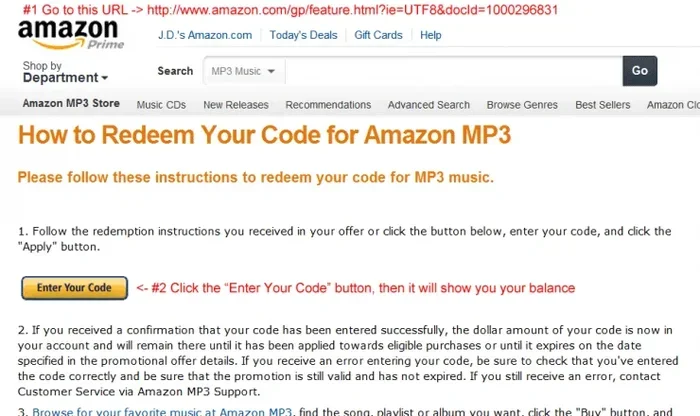
Gift cards are the number one way people add credits to their Amazon accounts. You can buy physical gift cards at stores like Walmart, Target, and Best Buy. You can also purchase digital gift cards directly on Amazon. Once you redeem a gift card, the value is added to your account balance immediately.
To redeem a gift card, simply go to the “Gift Cards” section on Amazon and enter the claim code. The funds will be available for MP3 purchases right away. If you are also interested in using your Amazon account for other things, you might wonder about getting your Amazon photos on your PC — and yes, the same account works for that too!
Promotional Credits and Bonuses
Amazon regularly runs promotions that offer bonus credits. These can come from seasonal sales, loyalty programs, or special events. For example, Amazon sometimes offers credits when you purchase a certain amount of music or when you sign up for a new service. Keep an eye on your email and the Amazon promotions page to stay informed about these opportunities.
Promotional credits are just as good as regular gift card credits. They work the same way at checkout and do not have different rules. They all contribute to your overall Amazon MP3 credit balance.
Refunds and Returns
If you return a digital music purchase, the refund goes back to your account balance. This is another way your Amazon MP3 credit balance can grow. Refunds are processed quickly, usually within a few hours, and the credits are immediately available for use.
How to Use Your Amazon MP3 Credits Wisely
Now that you know how to check your balance, let us talk about using those credits smartly. After all, you worked hard to build up that Amazon MP3 credit balance, and you want to make it count.
Buying MP3 Downloads
The most obvious use for your credits is buying MP3 downloads. When you browse the Amazon Music Store, you will see prices listed next to each song and album. If you have enough credits in your account, Amazon will automatically apply them at checkout. You do not need to do anything special.
Here is a quick tip. Before you buy, make a list of the albums or songs you want. This way, you can see the total cost and compare it to your balance. It saves you from getting to checkout and realizing you do not have enough credits. Think of it like making a shopping list before you go to the store.
Redeeming Credits for Albums and Singles
You can use your credits to buy both full albums and individual singles. Some people prefer buying singles to build a custom playlist. Others like grabbing whole albums for a complete listening experience. Either way, your Amazon MP3 credit balance covers both options equally.
If you are someone who loves discovering new music, consider waiting for sales. Amazon often discounts albums during events like Prime Day or Black Friday. Your credits go further during these periods, letting you buy more music for the same balance.
Using Credits on the Go
One of the best things about Amazon MP3 credits is that you can use them anywhere. You do not need to be at home or connected to a specific device. Whether you are at home relaxing or charging your phone with a car USB during a road trip, you can browse and buy music with your credits anytime.
Just make sure you have a stable internet connection when making purchases. A weak connection can sometimes cause issues with the checkout process. If you are traveling, you might also want to connect your phone to an HDMI TV to preview music videos or album artwork on a bigger screen before buying.
Common Issues When Checking Your Amazon MP3 Credit Balance
Even though checking your balance is usually simple, sometimes things do not work as expected. Here are the most common issues and how to fix them.
Balance Not Updating
If you just added credits or made a purchase and your balance is not reflecting the change, do not panic. This is a common issue. Usually, it just means your page needs a refresh. Try logging out and back in, or clearing your browser cache. The balance should update within a few minutes.
If the problem persists, try checking your balance from a different device. Sometimes the issue is specific to one browser or device. Switching to a different device can help you see the correct Amazon MP3 credit balance immediately.
Missing Credits
Have you ever added a gift card and the credits never showed up? This can happen if the claim code was entered incorrectly. Double-check the code and make sure there are no spaces or typos. If the code is correct and credits are still missing, contact Amazon customer service. They can investigate and add the missing credits to your account.
Another reason credits might appear missing is if they were used for a purchase you do not remember. Check your Amazon purchase history to see if any recent transactions used your credits. This is a good habit to build — reviewing your history regularly helps you stay on top of your spending.
Credits Not Applying at Checkout
Sometimes your balance looks fine, but the credits do not apply when you try to buy music. This usually happens when your account has multiple payment methods set up. Amazon may default to a different payment method instead of using your credits first. To fix this, go to your payment settings and make sure your credit balance is set as the primary payment method for digital purchases.
Tips to Manage Your Amazon MP3 Credits Effectively
Managing your Amazon MP3 credit balance does not have to be complicated. A few simple habits can make a big difference.
Keep Track of Your Spending
Make it a habit to check your balance once a week. This keeps you aware of how much you have and how fast you are spending. You can set a reminder on your phone to check every Sunday evening. It only takes a minute and saves you from surprises later.
You can also download your Amazon order history as a spreadsheet. This gives you a detailed view of every purchase and how much credit each one used. Over time, this data helps you understand your music spending patterns and budget better.
Maximize Your Credits During Sales
Amazon runs sales on digital music throughout the year. The best times to use your credits are during major sale events. Your balance stretches further when prices are lower. Keep an eye out for deals during Prime Day, Black Friday, and holiday sales. Planning your purchases around these events is one of the smartest ways to manage your Amazon MP3 credit balance.
Combine Credits with Other Payment Methods
If you do not have enough credits to cover a purchase, Amazon allows you to combine your credit balance with another payment method. This means you can use up your credits and pay the remaining balance with a credit card or debit card. This is a great way to make sure no credit goes to waste.
Just be aware of the order Amazon uses your payment methods. By default, Amazon applies credits first and then charges the remaining amount to your other payment method. You can change this order in your account settings if you prefer a different setup.
Keep Your Account Secure
Your Amazon MP3 credit balance is tied to your Amazon account. Keeping your account secure protects your credits from unauthorized use. Enable two-factor authentication, use a strong password, and never share your login details. These simple steps go a long way in keeping your digital music funds safe.
Conclusion
Checking your Amazon MP3 credit balance does not have to be confusing or time-consuming. Whether you use the Amazon website, the mobile app, or customer service, you now have multiple ways to see exactly how much credit you have. The key is to make it a regular habit. Check your balance weekly, track your spending, and take advantage of sales to stretch your credits further.
Your Amazon MP3 credit balance is a valuable resource for building your digital music library. With the tips and methods in this guide, you are fully equipped to manage it like a pro. So go ahead, check your balance today, and start planning your next music purchase. You might be surprised at how much you have available. Happy listening!
Frequently Asked Questions
Can I check my Amazon MP3 credit balance from my phone?
Yes, you can. Open the Amazon Music app, tap the Menu icon, go to Settings, and then tap Account. Your balance will be displayed there. You can also visit amazon.com through your phone browser and follow the same steps as on a computer.
Do Amazon MP3 credits expire?
No, Amazon MP3 credits do not expire. Once you add credits to your account, they remain there until you use them. You can hold onto them for as long as you want without worrying about losing any value.
Can I use my Amazon MP3 credits to buy audiobooks?
Amazon MP3 credits can be used for digital content purchases on Amazon, including some audiobook content available through the Amazon Music Store. However, audiobooks purchased through Audible may require a separate payment method. Always check the payment options at checkout.
Why is my Amazon MP3 credit balance showing zero?
This usually happens if you have not added any credits to your account yet, or if you have already used all your credits on previous purchases. Check your gift card redemption history and purchase history to see where your credits went. If you believe there is an error, contact Amazon customer service.
Can I transfer my Amazon MP3 credits to another account?
No, Amazon MP3 credits are tied to your specific account and cannot be transferred to another account. You can only use them for purchases made under your account. This is a security measure to protect your digital funds.
How long does it take for promotional credits to appear in my balance?
Most promotional credits appear in your account within a few hours of the qualifying event or purchase. Some credits may take up to 24 hours to show up. If your credits have not appeared after 24 hours, reach out to Amazon customer service for help.