Does Alaska WiFi Support Streaming While Traveling
Alaska WiFi can support streaming, but it depends heavily on your location, the provider, and the type of connection available. Urban areas like Anchorage and Fairbanks offer reliable speeds for HD streaming, while remote and rural regions often struggle with satellite or limited cellular options. This guide breaks down everything you need to know about streaming with Alaska WiFi while traveling.
Does Alaska WiFi support streaming while you travel? The short answer is yes, but with some important caveats. Alaska is a vast and beautiful state, but its geography creates unique challenges for internet connectivity. Whether you are road-tripping through the Denali National Park or staying in a cabin near Homer, your streaming experience will depend on where you are and what kind of connection you have.
This article covers everything you need to know about Alaska WiFi and streaming. We will look at how WiFi works in different parts of the state, which streaming platforms perform best, and what tools you can use to stay connected. By the end, you will know exactly how to set up your devices for the best possible experience.
Traveling in Alaska is an incredible adventure. The mountains, glaciers, and wildlife make it one of the most stunning places on earth. But let us be honest, being offline for days can feel isolating. You want to share your experiences, stream a movie at the end of a long day, or at least check in with family back home. Understanding your WiFi options makes all the difference.
Most travelers do not think about internet connectivity until they actually need it. By then, you might be stuck in a remote area with no signal and a long list of shows you wanted to watch. Planning ahead saves you from frustration. It also helps you choose the right equipment and data plans before you leave home.
The good news is that Alaska has made big strides in internet infrastructure over the past few years. More providers are expanding coverage, and new technologies are making remote connections more reliable than ever. Still, there are real limitations, especially in the vast wilderness areas that make Alaska so special.
Key Takeaways
- Urban Alaska has solid WiFi: Cities like Anchorage and Juneau offer speeds that handle most streaming platforms easily.
- Remote areas rely on satellite: Rural and wilderness regions often use satellite internet, which can be slower and more prone to interruptions.
- A Wi-Fi booster helps a lot: Signal amplification devices can dramatically improve your streaming experience in weak coverage zones.
- Mobile hotspots are a great backup: Cellular data plans with unlimited or high data caps work well for streaming on the go.
- Lowering streaming quality saves bandwidth: Switching from 4K to 720p or 1080p can make a huge difference on slower connections.
- Plan ahead for offline content: Downloading shows and movies before heading into remote areas ensures uninterrupted entertainment.
📑 Table of Contents
- How WiFi Works in Different Parts of Alaska
- Can You Stream Movies and Shows in Alaska?
- Best WiFi Options for Travelers in Alaska
- Tips to Improve Your WiFi Signal in Alaska
- Streaming Services and Alaska WiFi: What to Expect
- Common Challenges with WiFi in Alaska
- Expert Tips for Streaming in Remote Alaska
- Final Thoughts on Alaska WiFi and Streaming
How WiFi Works in Different Parts of Alaska
Alaska is not one uniform place when it comes to internet access. The state has three main zones that affect your WiFi experience: urban centers, suburban and town areas, and remote wilderness regions.
Urban WiFi Coverage
Cities like Anchorage, Fairbanks, Juneau, and Sitka have well-developed internet infrastructure. Multiple providers offer cable, fiber, and 5G services in these areas. WiFi speeds in urban Alaska are comparable to what you would find in most lower-48 cities. You can comfortably stream 4K content on platforms like Netflix, Hulu, and Disney Plus without major issues.
Most hotels, cafes, and vacation rentals in these cities provide WiFi for guests. The speeds vary, but you can generally expect 25 to 100 Mbps in well-equipped locations. That is more than enough for HD and even 4K streaming on one or two devices at a time.
Suburban and Town WiFi
Smaller towns and suburban areas around Alaska have decent but sometimes inconsistent coverage. Providers like GCI and Alaska Communications serve many of these regions. WiFi speeds here typically range from 10 to 50 Mbps. That is enough for HD streaming, but you might notice buffering if multiple devices are connected at the same time.
If you are staying in a cabin or a smaller lodging option outside major cities, check with the host about internet speeds before booking. Some remote cabins use satellite connections that can be slower and less reliable during bad weather.
Remote and Wilderness WiFi
This is where things get tricky. Large portions of Alaska have no traditional WiFi infrastructure at all. In places like Denali National Park, the Arctic Circle, or the backcountry along the Kenai Peninsula, you are often looking at satellite internet or no connection whatsoever.
Satellite internet in Alaska has improved with services like HughesNet and Starlink. But streaming on satellite connections requires patience. Speeds typically range from 10 to 25 Mbps, and latency can cause buffering during live streams or fast-paced content. Weather conditions like heavy cloud cover or rain can also weaken satellite signals significantly.
Can You Stream Movies and Shows in Alaska?
The short answer is yes, you can stream in Alaska, but your experience will vary. Let us break down what streaming actually requires and how Alaska WiFi measures up.
Streaming Quality and Bandwidth
Streaming quality depends on your available bandwidth. Here is a quick look at what different streaming qualities need:
- Standard Definition (480p): Requires about 1 to 3 Mbps. Works on almost any Alaska WiFi connection.
- High Definition (1080p): Requires about 5 to 10 Mbps. Achievable in most urban and suburban areas.
- 4K Ultra HD: Requires about 15 to 25 Mbps. Best suited for strong urban WiFi or fiber connections.
If your connection falls below these thresholds, you will experience buffering, lower picture quality, or both. In remote Alaska, sticking with standard or high definition is usually the safest bet for a smooth viewing experience.
Which Streaming Platforms Work Best?
Not all streaming platforms are created equal when it comes to bandwidth efficiency. Some platforms compress their video better than others, which means they perform well even on slower connections.
Netflix, for example, adjusts its streaming quality based on your available bandwidth automatically. This feature, called adaptive bitrate streaming, is a lifesaver in areas with weaker WiFi. Disney Plus and Hulu also offer similar adaptive streaming, though they tend to use slightly more bandwidth at higher quality settings.
Amazon Prime Video lets you manually adjust the streaming quality, which gives you more control. If you are in a remote area, lowering the quality setting to 720p or 1080p can prevent constant buffering.
For live TV and sports, platforms like Sling TV and YouTube TV require a more stable connection because they stream live content without the same level of buffering tolerance. If you are in an area with fluctuating WiFi, downloaded content is always more reliable than live streaming.
Best WiFi Options for Travelers in Alaska
Planning your WiFi setup before heading to Alaska can save you a lot of headaches. Here are the most reliable options for staying connected.
Mobile Hotspots and Portable WiFi
A mobile hotspot is one of the best tools for streaming while traveling in Alaska. These devices use cellular networks to create a WiFi hotspot for your phones, tablets, and laptops. Most major carriers like Verizon, AT&T, and T-Mobile offer coverage in Alaska, though signal strength varies by region.
Before you travel, check coverage maps for your carrier in the specific areas you plan to visit. Urban and highway corridors generally have strong signals, but remote areas may have limited or no cellular coverage.
Portable WiFi devices like the Verizon Jetpack or AT&T Unite are compact and easy to carry. They create a personal WiFi network that multiple devices can connect to. Just keep an eye on your data usage, as streaming can eat through data quickly. Unlimited data plans are ideal for travelers who plan to stream regularly.
Satellite Internet Options
For remote cabins, lodges, and wilderness areas, satellite internet is often the only option available. Starlink has become a popular choice among Alaskans and travelers because it offers lower latency and faster speeds than traditional satellite services.
Starlink requires a clear view of the northern sky, which can be challenging in heavily forested or mountainous areas. However, many users in Alaska report solid performance for streaming, especially with the newer Starlink Mini units designed for portability.
Traditional satellite services like HughesNet are more widely available but come with lower data caps and slower speeds. They can handle basic streaming in standard definition, but 4K content is usually out of the question.
Public WiFi and Community Networks
Many Alaska communities have public WiFi available at libraries, visitor centers, and community hubs. These networks are free to use and can be a great backup when your personal connection fails. However, public WiFi is often slow and shared among many users, so do not count on it for heavy streaming.
Some Alaska Native communities have also built their own WiFi networks to serve residents and visitors. These networks vary widely in quality, but they can be a lifeline in remote areas where other options are limited.
Tips to Improve Your WiFi Signal in Alaska
Even with the best plan, you might face weak signals in certain parts of Alaska. Here are practical tips to boost your connection and improve your streaming experience.
Using a WiFi Booster or Extender
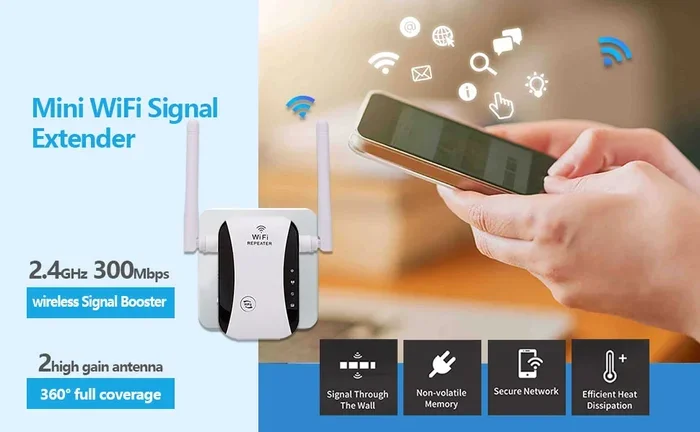
A WiFi booster can make a noticeable difference in signal strength, especially in cabins or lodges that are far from the source router. These devices amplify your existing WiFi signal and extend its range, giving you a stronger connection in areas with weak coverage.
Some boosters also work as signal extenders, helping you reach areas of a property that are normally dead zones. When choosing a booster for travel, look for a portable and battery-powered option that is easy to set up.
Positioning Your Router or Device
Simple positioning changes can improve your WiFi signal significantly. Place your router or hotspot in a central location, away from walls and metal objects. Elevating the device on a shelf or table can also help reduce interference.
If you are using a satellite dish or Starlink antenna, make sure it has a clear line of sight to the sky. Trees, buildings, and even heavy cloud cover can block or weaken the signal.
Reducing Interference from Other Devices
Multiple devices connected to the same network can slow down your WiFi speed. If you are streaming, try to disconnect devices that are not actively using the internet. Also, avoid running large downloads or updates while you are streaming, as these compete for the same bandwidth.
Switching to the 2.4 GHz frequency band on your router can sometimes help with range, though it offers lower speeds than the 5 GHz band. In remote Alaska, range often matters more than speed, so the 2.4 GHz band can be the better choice.
Streaming Services and Alaska WiFi: What to Expect
Different streaming services perform differently on Alaska WiFi. Here is a closer look at what you can realistically expect.
Netflix and Amazon Prime Video
Both Netflix and Amazon Prime Video are among the most forgiving platforms for slower connections. Their adaptive streaming technology automatically adjusts video quality based on your available bandwidth. In Alaska, you can expect smooth playback on both services as long as you have at least 5 Mbps of bandwidth.
Netflix offers a download feature that lets you save shows and movies for offline viewing. This is incredibly useful for travelers heading into areas with no WiFi. Download content the night before you lose connection, and you can watch without any internet at all.
Disney Plus and Hulu
Disney Plus and Hulu also offer adaptive streaming and offline downloads. Disney Plus tends to use slightly more bandwidth at higher quality levels, but its 1080p streaming is smooth on most Alaska WiFi connections. Hulu live TV, on the other hand, requires a more stable and faster connection because it streams live content.
For the best experience with these platforms in Alaska, download content in advance or plan your streaming sessions during times when you have a strong connection.
YouTube and Free Streaming
YouTube is another good option for Alaska travelers. The platform adjusts video quality automatically, and its compression is efficient enough to work on slower connections. Many YouTube creators also offer downloadable content through YouTube Premium, which lets you save videos for offline viewing.
Free streaming services like Tubi and Pluto TV are also worth considering. They require less bandwidth than premium platforms and offer a solid selection of movies and shows.
Common Challenges with WiFi in Alaska
Even with the best preparation, you may run into issues with WiFi while traveling in Alaska. Understanding these challenges helps you manage expectations and plan accordingly.
Weather-Related Signal Issues
Alaska’s weather can be harsh, and it affects WiFi signals. Heavy snow, ice, and rain can weaken both cellular and satellite connections. In winter months, when daylight is limited and storms are common, you may experience more frequent outages or slower speeds.
This is another reason why downloading content in advance is so important. If you know a storm is coming, download your favorite shows or movies ahead of time so you have entertainment even if your connection goes down.
Data Caps and Limited Plans
Many Alaska internet plans come with data caps, especially satellite services. Streaming video uses a lot of data, and hitting your cap can mean extra charges or throttled speeds. Before you travel, check your plan’s data limits and consider upgrading to an unlimited plan if you plan to stream frequently.
For mobile hotspots, keep an eye on your usage as well. A single hour of HD streaming can use up to 3 GB of data, and a 4K stream can use double that. If you have a limited data plan, lower your streaming quality or rely on downloaded content.
Limited Coverage in National Parks
Alaska’s national parks are some of the most beautiful and remote places in the country. But they are also some of the worst for WiFi coverage. Denali National Park, Gates of the Arctic, and Glacier Bay all have very limited or no traditional internet access.
If you plan to spend time in these areas, assume you will be offline for most of your trip. Use the time to disconnect and enjoy nature, or prepare by downloading plenty of content before you enter the park.
Expert Tips for Streaming in Remote Alaska
Experienced Alaska travelers and digital nomads share a few strategies that make a big difference when streaming in remote areas.
- Invest in a Starlink setup: If you frequently visit remote parts of Alaska, Starlink is the most reliable option for consistent streaming. The initial cost is higher, but the performance is worth it for serious travelers.
- Carry a backup hotspot: Having two different cellular hotspots from different carriers ensures you have a fallback if one network fails in a particular area.
- Use an Ethernet connection when possible: Some lodges and cabins offer wired internet, which is always faster and more stable than WiFi. Bring an Ethernet adapter for your laptop if you plan to stay in these locations.
- Set your streaming apps to download automatically: Many apps let you schedule downloads for times when your connection is strongest. Use this feature to prep your content each morning.
Staying connected in Alaska is possible with the right setup and expectations. The key is planning ahead, choosing the right tools, and being flexible when conditions are less than ideal.
Final Thoughts on Alaska WiFi and Streaming
So, does Alaska WiFi support streaming while traveling? Absolutely, but your experience will depend on where you are and how prepared you are. Urban and suburban Alaska offers reliable WiFi that handles streaming with ease. Remote and wilderness areas require more planning and the right equipment, but even there, options like Starlink and mobile hotspots make staying connected increasingly possible.
The most important thing you can do is plan ahead. Research the WiFi options at your destination, invest in the right tools like a WiFi extender or booster, and always have offline content as a backup. With these steps, you can enjoy your favorite shows and movies even in the most remote corners of Alaska.
Alaska is a place that rewards preparation and flexibility. The same mindset that helps you navigate its vast wilderness also helps you stay connected. Embrace the adventure, plan for connectivity, and you will find that streaming while traveling in Alaska is entirely doable.
Whether you are watching the northern lights from a cabin with strong WiFi or streaming a movie on a satellite connection in the backcountry, the experience is part of what makes Alaska so special. Stay connected, stay entertained, and enjoy every moment of your Alaskan adventure.
Frequently Asked Questions
Can I stream Netflix in remote Alaska?
Yes, but your experience depends on your connection type. Satellite internet and mobile hotspots can handle Netflix in standard or high definition. In very remote areas, downloading content in advance is the most reliable option for watching without interruptions.
Is Starlink available everywhere in Alaska?
Starlink is available across most of Alaska, but it requires a clear view of the northern sky. Dense tree cover, deep valleys, and heavy mountain terrain can block the signal. Check Starlink’s coverage map for your specific location before relying on it for streaming.
How much data do I need for streaming in Alaska?
An hour of HD streaming uses about 3 GB of data, while 4K streaming uses up to 7 GB per hour. For a week of casual streaming, plan for at least 50 to 100 GB of data. Unlimited data plans are ideal for heavy streamers traveling in Alaska.
Can I use a WiFi booster to improve streaming in Alaska?
Yes, a WiFi booster can significantly improve your signal strength and streaming quality, especially in cabins or lodges far from the router. Portable and battery-powered boosters are great for travelers who need flexibility in remote areas.
What is the best mobile carrier for streaming in Alaska?
Verizon generally offers the most reliable coverage in Alaska, followed by AT&T and T-Mobile. Coverage varies by region, so always check your carrier’s coverage map for the specific areas you plan to visit. A carrier with a strong Alaska network makes a big difference for streaming on the go.
Should I download content before traveling to remote Alaska?
Absolutely. Downloading movies, shows, and music before heading into remote areas ensures you have entertainment even if your WiFi connection fails. Most major streaming platforms, including Netflix, Disney Plus, and Amazon Prime, offer offline download options for their content.
=== CONCLUSION ===
Alaska WiFi can support streaming while traveling, but success depends on your location, equipment, and preparation. Urban areas offer fast and reliable connections for all types of streaming, while remote regions require smarter strategies like offline downloads, mobile hotspots, and satellite internet. By understanding your options and planning ahead, you can stay entertained throughout your Alaskan adventure. The beauty of Alaska is unmatched, and with the right WiFi setup, you do not have to choose between exploring the wilderness and enjoying your favorite content.