Does Korean Air Have Wi Fi on International Flights 2023
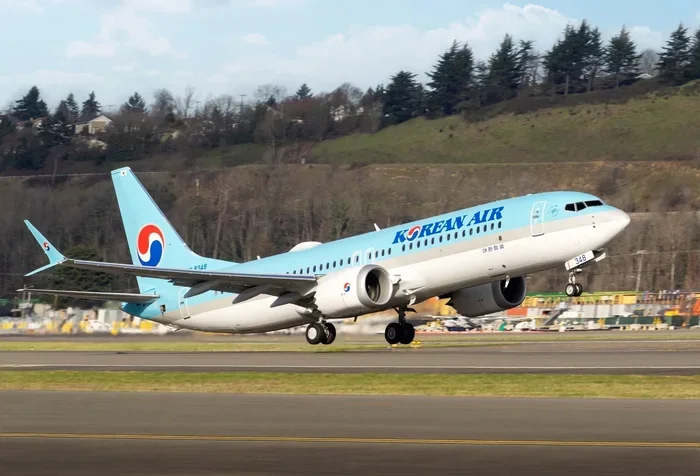
Does Korean Air Have Wi-Fi? Yes, Korean Air offers Wi-Fi on most international flights as of 2023. Passengers can connect to in-flight internet through a simple login process, and the airline provides both free and paid Wi-Fi packages depending on your ticket class. Korean Air Wi-Fi coverage spans long-haul routes across Asia, Europe, North America, and beyond, making it one of the better-connected airlines for international travelers.
This is a comprehensive guide about Does Korean Air Have Wi Fi 2023.
Key Takeaways
- Wi-Fi Availability: Korean Air offers Wi-Fi on the majority of its international flights in 2023.
- Free and Paid Options: Some cabins receive complimentary Wi-Fi, while others offer affordable data packages.
- Easy Setup: Connecting to Korean Air Wi-Fi is straightforward and does not require special equipment.
- Speed and Performance: The Wi-Fi speed is sufficient for browsing, messaging, and light streaming.
- Coverage Areas: Korean Air Wi-Fi works on long-haul routes spanning multiple continents.
- Device Compatibility: Laptops, tablets, and smartphones all work with Korean Air in-flight internet.
[FEATURED_IMAGE_PLACEHOLDER]
Does Korean Air Have Wi-Fi on International Flights in 2023?
Let us get straight to the point. Does Korean Air have Wi-Fi on international flights in 2023? The answer is yes. Korean Air has invested heavily in in-flight internet technology, and most of its long-haul international flights now offer Wi-Fi connectivity. Whether you are flying from Seoul to New York, London, or Sydney, you can expect to have some form of internet access during your journey.
But here is the thing. Not all Wi-Fi experiences are created equal. The quality of Korean Air Wi-Fi depends on several factors. These include your route, the aircraft type, your ticket class, and even the weather conditions at cruising altitude. This guide breaks down everything you need to know about staying connected with Korean Air in 2023.
If you have ever been stuck on a long flight without any way to pass the time, you know how frustrating it can be. In-flight Wi-Fi changes that completely. You can catch up on work, video call loved ones, stream movies, or simply scroll through social media while cruising at 35,000 feet. Korean Air recognized this need early and has worked to make connectivity a standard feature on its international network.
The airline uses a satellite-based system for its internet service. This means the Wi-Fi signal is not dependent on ground towers. Instead, the aircraft communicates with satellites orbiting the Earth. This setup allows Korean Air Wi-Fi to work over oceans and remote areas where traditional cell towers cannot reach. That is a big advantage for international travelers.
Now, you might be wondering about the cost. Some airlines charge a fortune for Wi-Fi. Others offer it for free. Korean Air falls somewhere in between. The pricing and availability vary based on your flight and cabin class. We will cover all of that in detail below.
How Does Korean Air Wi-Fi Work?
The Technology Behind the Connection
Korean Air uses a system called satellite-based in-flight Wi-Fi. Here is how it works in simple terms. A small antenna on the top of the aircraft connects to satellites in space. Those satellites relay the signal to ground stations on Earth. From there, the internet reaches the regular web.
This process happens in milliseconds. You do not notice any delay in most cases. The satellite system allows Korean Air to provide internet coverage over the entire globe. Even when flying over the Pacific Ocean or the Arctic, you can stay connected.
The airline uses two main types of satellite connections. One is called Ku-band, which offers faster speeds. The other is Ka-band, which handles more data traffic. Together, these systems ensure that Korean Air Wi-Fi remains functional and reasonably fast throughout the flight.
Connecting to Korean Air Wi-Fi Step by Step
Connecting to the internet on a Korean Air flight is simple. You do not need any special apps or equipment. Here is what you need to do.
- Turn on your device’s Wi-Fi after the plane reaches cruising altitude.
- Select the Korean Air Wi-Fi network from your list of available networks.
- Open your web browser. You will be redirected to the Korean Air Wi-Fi portal.
- Choose your package or log in if you have a complimentary account.
- Start browsing.
That is it. The whole process takes less than two minutes. You can connect multiple devices, but each device needs its own login. Korean Air Wi-Fi works with laptops, tablets, smartphones, and even some gaming devices.
One important tip. Make sure your device is in airplane mode first. Then turn Wi-Fi back on. This prevents any interference with the aircraft’s communication systems. It is also a good idea to extend your Wi-Fi range considerations before flying, so you understand how signal strength works in different environments.
Is Korean Air Wi-Fi Free?
Free Wi-Fi on Select Flights and Cabins
Here is where things get interesting. Korean Air does not offer completely free Wi-Fi on all flights. However, some passengers do get complimentary access. The free Wi-Fi benefit depends on your ticket class and the specific route you are flying.
Passengers flying in First Class and Premium Deluxe on most international routes receive free Wi-Fi. The same applies to some Business Class fares on select long-haul flights. If you are in Economy, you will likely need to purchase a Wi-Fi package.
Korean Air has also run promotional campaigns where all passengers receive free Wi-Fi for a limited time. These promotions are not permanent, so it is always worth checking the airline’s website before your trip. If you are looking for ways to boost your home Wi-Fi before a trip, you might want to check if you can buy a Wi-Fi booster to improve your signal at home first.
Paid Wi-Fi Packages and Pricing
For Economy class passengers and those on routes without free Wi-Fi, Korean Air offers paid packages. The pricing is generally reasonable compared to other airlines. Here is a general breakdown of what to expect.
- Light Use Package: Enough for messaging and email. Usually priced around $5 to $10 for the entire flight.
- Standard Package: Suitable for browsing and social media. Priced around $10 to $20.
- Streaming Package: Designed for video calls and light video streaming. Priced around $20 to $30.
Prices can vary based on the flight duration and route. Shorter flights tend to cost less. Longer international flights may have higher pricing tiers. It is always a good idea to check the in-flight portal for current pricing before purchasing.
One thing to note. Korean Air sometimes offers discounted Wi-Fi bundles if you purchase them before your flight through the Korean Air app or website. This can save you a few dollars. Also, keep in mind that Wi-Fi signal strength can be affected by weather, just like humidity can affect a Wi-Fi signal on the ground, similar factors may influence in-flight connectivity.
What Can You Do With Korean Air Wi-Fi?
Browsing, Messaging, and Work
The Korean Air Wi-Fi speed is good enough for most everyday tasks. You can browse the web, check emails, and use messaging apps like WhatsApp and iMessage without any issues. If you need to work during your flight, you can access cloud-based tools, send documents, and join video calls.
Of course, the speed is not the same as what you get at home or in a coffee shop. It is slower than a Wi-Fi extension setup on the ground. But for a plane flying at 35,000 feet, the performance is impressive. Most passengers find it more than adequate for staying productive or entertained.
Streaming and Entertainment
Can you stream Netflix or YouTube on Korean Air Wi-Fi? The short answer is yes, with some caveats. The streaming quality depends on the package you choose and the number of users on the network at the same time.
During peak hours, when many passengers are online, the speed may drop. This is true for any shared network. If you plan to stream, we recommend the streaming package. It gives you priority access to bandwidth. You can also download content before your flight as a backup plan.
Korean Air also offers its own inflight entertainment system. This system includes movies, TV shows, music, and games. It does not require Wi-Fi. So even if the internet is slow or unavailable, you will still have plenty of entertainment options.
Security and Privacy on Korean Air Wi-Fi
Public Wi-Fi always comes with security concerns. This is true whether you are at an airport café or at 35,000 feet. Korean Air Wi-Fi is no exception. The connection is not encrypted by default, which means your data could potentially be intercepted.
Here are some tips to stay safe. Use a VPN if possible. Avoid accessing sensitive accounts like banking on the flight. Stick to HTTPS websites. And never share personal information over unsecured connections. Wi-Fi security is important everywhere, and this applies doubly when you are on a shared network in the sky.
Korean Air does monitor its network for security purposes. However, the airline cannot guarantee complete privacy. Treat in-flight Wi-Fi the same way you would treat any public Wi-Fi network. Take basic precautions, and you should be fine.
Which Korean Air Routes Offer Wi-Fi?
Korean Air Wi-Fi is available on most international routes. The airline has been steadily expanding its Wi-Fi coverage since 2023. Here is a look at the routes where you can expect to find internet access.
| Region | Routes | Wi-Fi Availability |
|---|---|---|
| North America | Seoul to Los Angeles, New York, Vancouver | Available on most flights |
| Europe | Seoul to London, Paris, Frankfurt | Available on most flights |
| Asia | Seoul to Tokyo, Singapore, Bangkok, Hong Kong | Available on most flights |
| Oceania | Seoul to Sydney, Auckland | Available on select flights |
| Middle East | Seoul to Dubai, Doha | Available on most flights |
| South America | Seoul to São Paulo | Available on select flights |
As you can see, Korean Air Wi-Fi covers a wide range of international destinations. The airline operates some of the world’s longest nonstop flights, and Wi-Fi is a key part of the passenger experience on these routes.
Keep in mind that Wi-Fi availability can change based on the aircraft assigned to a route. Korean Air operates a mix of Boeing 777s, 787 Dreamliners, and Airbus A380s. Most of these aircraft are equipped with Wi-Fi, but older planes may not have the capability. If you are curious about how Wi-Fi works on different aircraft, it is similar to how you might connect your phone to your TV for Wi-Fi where compatibility depends on the devices involved.
Tips for Getting the Best Korean Air Wi-Fi Experience
Book the Right Cabin Class
If free Wi-Fi is important to you, consider booking in Premium Deluxe or Business Class. Not only do you get complimentary internet access, but you also enjoy more spacious seats and better service. It is a win-win for long-haul international flights.
Download Content Before Your Flight
Even the best Korean Air Wi-Fi can slow down during peak usage times. To avoid disappointment, download movies, shows, and music before you board the plane. Most devices allow offline downloads from popular streaming services. This way, you have entertainment regardless of the Wi-Fi situation.
Bring a Portable Charger
Using Wi-Fi on a flight drains your battery faster. The constant data connection keeps your phone or laptop working hard. Bring a portable charger or a high-capacity power bank. This ensures your devices stay powered throughout the flight.
Check Wi-Fi Status Before Boarding
Korean Air provides Wi-Fi status information on its website and app. You can check whether your specific flight has internet access before you arrive at the airport. This saves you from disappointment if the aircraft does not have Wi-Fi capability for that route.
Be Patient During Takeoff and Landing
Wi-Fi is typically not available during takeoff and landing. The aircraft needs to reach a certain altitude before the satellite connection is established. This usually takes about 10 to 15 minutes after departure. Similarly, the connection drops before landing. Plan your online activities accordingly.
Common Mistakes Passengers Make With Korean Air Wi-Fi
Avoiding common mistakes can save you time and frustration. Here are a few things to watch out for.
- Assuming Wi-Fi is always free: Always check your cabin class and route before assuming complimentary access.
- Waiting too long to connect: Connect to the Wi-Fi as soon as the cabin crew announces it is available. This gives you more time to get settled online.
- Not bringing a VPN: A VPN protects your data on any public network, including in-flight Wi-Fi.
- Expecting home-speed internet: Satellite-based internet is slower than ground-based connections. Manage your expectations accordingly.
- Forgetting to log out: Always log out of the Wi-Fi portal when you land. This protects your account and personal data.
These small steps make a big difference. They help you get the most out of Korean Air Wi-Fi while keeping your devices and data safe.
How Does Korean Air Wi-Fi Compare to Other Airlines?
Korean Air is not the only airline offering in-flight Wi-Fi. Many major carriers provide internet access on international flights. But how does Korean Air stack up against the competition?
Compared to airlines like Delta, United, and American, Korean Air offers competitive Wi-Fi speeds and pricing. The satellite-based system provides reliable coverage on international routes. Some airlines offer free Wi-Fi on all flights, but this is still rare in the industry. Korean Air’s approach of offering free access in premium cabins and affordable packages in Economy strikes a good balance.
If you are curious about Wi-Fi options beyond Korean Air, you might also want to explore connecting to Xfinity Wi-Fi away from home or other alternative connectivity options on the ground. These can complement your in-flight experience by ensuring you stay connected before and after your flight.
Overall, Korean Air’s Wi-Fi service is solid. It may not be perfect, but it is a significant improvement over what most airlines offered even five years ago. The airline continues to invest in better technology and faster speeds.
What the Future Holds for Korean Air Wi-Fi
Korean Air is not standing still. The airline is constantly exploring new ways to improve its in-flight connectivity. Future plans include faster satellite systems, improved bandwidth, and potentially free Wi-Fi for all passengers.
The airline industry as a whole is moving toward better and cheaper in-flight internet. Technology is advancing rapidly. In a few years, Korean Air Wi-Fi may be as fast and reliable as your home internet connection. For now, the current service is more than enough for most travelers needs.
If you are a frequent flyer, staying informed about these developments is worthwhile. Check Korean Air’s official website for the latest updates on Wi-Fi features and improvements. The airline regularly adds new capabilities to its fleet.
Final Thoughts on Korean Air Wi-Fi in 2023
So, does Korean Air have Wi-Fi on international flights in 2023? Absolutely. Korean Air Wi-Fi is available on most international routes, offering passengers a reliable way to stay connected while flying across the globe. The service is easy to use, reasonably priced, and continuously improving.
Whether you are a business traveler who needs to stay productive or a leisure traveler who wants to share photos in real time, Korean Air has you covered. The combination of satellite-based technology, multiple pricing tiers, and wide route coverage makes it a strong choice for international flyers.
Remember to take basic security precautions, manage your expectations, and plan ahead. With the right preparation, your Korean Air Wi-Fi experience can be smooth and enjoyable. Stay connected. Stay productive. And enjoy your flight.
FAQs
Is Korean Air Wi-Fi completely free on international flights?
Not entirely. Free Wi-Fi is available for passengers in First Class, Premium Deluxe, and select Business Class cabins. Economy passengers typically need to purchase a Wi-Fi package. Pricing varies by route and flight duration.
How fast is Korean Air Wi-Fi on international flights?
The speed is sufficient for browsing, messaging, emailing, and light streaming. It is not as fast as home broadband, but it is reliable enough for most tasks. Streaming quality depends on the package you choose and network congestion.
Can I use Korean Air Wi-Fi on short-haul international flights?
Wi-Fi is primarily available on long-haul international flights. Short-haul routes may not have Wi-Fi capability. Check the Korean Air website or app for specific flight details before traveling.
What devices work with Korean Air Wi-Fi?
Most devices work with Korean Air Wi-Fi. This includes smartphones, tablets, laptops, and some gaming devices. Just make sure your device has Wi-Fi capability and is updated with the latest software.
Can I use a VPN on Korean Air Wi-Fi?
Yes, you can use a VPN on Korean Air Wi-Fi. In fact, using a VPN is recommended for security and privacy. A VPN encrypts your data and adds an extra layer of protection on the shared in-flight network.
What happens if Korean Air Wi-Fi does not work on my flight?
Wi-Fi availability depends on the aircraft and route. If Wi-Fi is unavailable, the airline typically does not offer compensation. You can still use the inflight entertainment system, which does not require an internet connection. Consider downloading content before your flight as a backup.
Frequently Asked Questions
What is Does Korean Air Have Wi Fi 2023?
Does Korean Air Have Wi Fi 2023 is an important topic with many practical applications.