Can You Get Live Data On Obd2 Here Is The Full Guide
Yes, you can absolutely get live data on OBD2, and it is one of the most powerful features for diagnosing and monitoring your vehicle. OBD2 live data lets you see real-time sensor readings, engine performance metrics, and fault codes straight from your car’s computer. Whether you are a DIY mechanic or just curious about your car’s health, understanding OBD2 live data puts you in control.
Have you ever wondered what your car is thinking? I mean really thinking. Under the hood, your vehicle is constantly sending and receiving data through a hidden system most drivers never even know exists. The answer to the question can you get live data on OBD2 is a resounding yes. And once you understand how this works, you will never look at your car the same way again.
OBD2 stands for On-Board Diagnostics II. It is the standardized system that modern vehicles use to monitor everything from engine performance to emission controls. The live data feature gives you a real-time window into your car’s health. You can see exactly what your sensors are reading, how your engine is performing, and whether anything is going wrong before it becomes a big problem.
In this guide, we will walk you through everything you need to know about getting live data from your OBD2 port. We will cover how it works, what tools you need, what data you can expect, and why this information is so valuable. Whether you are a weekend wrench or someone who just wants to understand your vehicle better, this guide has you covered.
Key Takeaways
- OBD2 live data gives you real-time access to your vehicle’s sensor readings, engine metrics, and diagnostic information.
- You need an OBD2 scanner or adapter to read live data, and options range from budget Bluetooth devices to professional-grade tools.
- Live data covers many parameters including RPM, coolant temperature, fuel trim, oxygen sensor readings, and much more.
- Reading live data helps you save money by identifying problems early and avoiding costly repairs at the shop.
- OBD2 live data connects to your car’s ECU and motherboard, which processes all the sensor information your vehicle relies on to run smoothly.
- Understanding PID modes and protocols helps you get the most out of your OBD2 diagnostic experience.
📑 Table of Contents
What Is OBD2 Live Data?
OBD2 live data refers to the real-time information your vehicle’s computer system generates and shares. Your car has dozens of sensors monitoring every aspect of engine operation. These sensors feed data into the Engine Control Unit (ECU), which then makes adjustments to keep your vehicle running properly. Live data lets you tap into this stream of information directly.
Think of it like checking your car’s vital signs in real time. Instead of waiting for a warning light or a strange noise, you can see exactly what is happening under the hood at any given moment. The data comes through the OBD2 port, which is a standardized diagnostic connector found in all vehicles sold in the United States since 1996.
The live data stream includes hundreds of different parameters called PIDs, or Parameter IDs. Each PID represents a specific measurement. Some are very basic, like engine RPM. Others are more advanced, like fuel system pressure or catalyst efficiency. The beauty of OBD2 live data is that you can access all of it with the right tool.
How the OBD2 System Connects to Your Vehicle
The OBD2 system communicates with your car’s central computer through the vehicle’s internal network. This network connects to various components on the motherboard and other electronic modules throughout the car. The ECU acts as the brain, processing inputs from sensors and sending outputs to actuators.
When you plug in an OBD2 scanner, you are essentially tapping into this communication network. The scanner reads the data that the ECU is already processing and displays it in a format you can understand. This is why OBD2 live data is so powerful. You are not getting guesses or estimates. You are seeing exactly what the car’s computer sees.
How to Get Live Data From OBD2
Getting live data from your OBD2 port is simpler than most people think. You need three things: the OBD2 port in your car, a compatible scanner or adapter, and a device to display the data. Let us break down each step.
Step 1: Locate Your OBD2 Port
The OBD2 port is always located in a convenient spot under the dashboard. In most vehicles, you will find it on the driver’s side, near the steering column. It is a trapezoidal-shaped connector with 16 pins. If you have trouble finding it, check your owner’s manual. Some vehicles hide it behind a small cover panel.
Here are common places to look:
- Under the dashboard on the driver’s side
- Near the steering column or lower knee area
- Behind a small plastic trim panel
- Next to the fuse box in some models
Step 2: Choose Your OBD2 Scanner or Adapter
You have several options for reading OBD2 live data. The right choice depends on your budget and what you want to do.
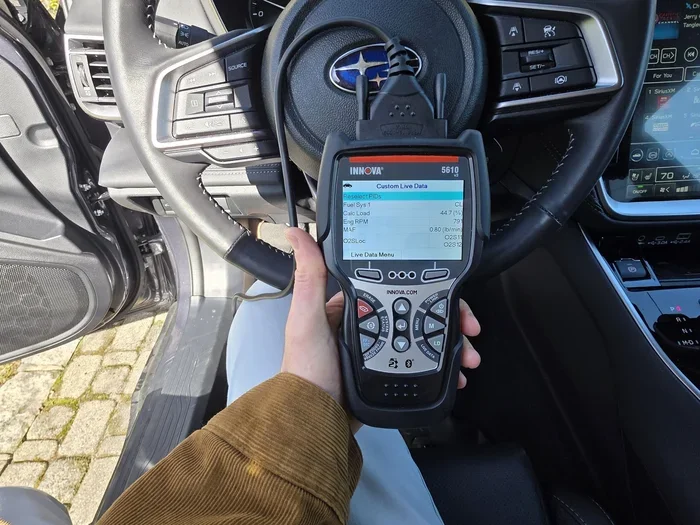
Basic OBD2 scanners are handheld devices that plug directly into the port. They have a small screen that displays live data and diagnostic codes. These are affordable and work well for basic diagnostics.
Bluetooth or Wi-Fi adapters are small dongles that plug into the OBD2 port and connect wirelessly to your smartphone or tablet. You pair the adapter with an app, and your phone becomes the display. These are popular because they are portable and often come with free or low-cost apps.
Professional-grade scan tools are used by mechanics and serious enthusiasts. They offer deeper access to live data, advanced graphing capabilities, and manufacturer-specific PIDs. These tools cost more but provide the most comprehensive diagnostic experience.
Step 3: Connect and Start Reading
Once you have your tool, the process is straightforward. Plug the scanner or adapter into the OBD2 port. Turn the ignition to the “on” position without starting the engine. Wait for the device to establish a connection with the vehicle’s ECU. Open the corresponding app or software if needed. You should see live data streaming in within seconds.
Here are some quick tips to get started:
- Always turn the ignition to “on” before connecting your scanner
- Wait for the device to fully pair with the vehicle
- Start with basic PIDs like RPM and coolant temperature
- Save your readings if you want to track changes over time
What Live Data Can You See?
The range of live data available through OBD2 is impressive. Your vehicle’s computer monitors dozens of parameters at all times. Here are the most common and useful ones you can access.
Engine and Performance Data
The most popular live data parameters relate to engine performance. These include:
- Engine RPM – Shows how fast the engine is spinning
- Vehicle Speed – Your current speed in miles per hour or kilometers per hour
- Coolant Temperature – How hot the engine coolant is
- Engine Load – The percentage of the engine’s capacity currently being used
- Intake Air Temperature – The temperature of air entering the engine
- Throttle Position – How far the throttle valve is open
Fuel System Data
Fuel system live data helps you understand how efficiently your engine is burning fuel. Key parameters include:
- Short Term Fuel Trim – Adjustments the ECU makes to the fuel mixture in real time
- Long Term Fuel Trim – Longer-term fuel adjustments based on driving patterns
- Fuel Pressure – The pressure of fuel in the fuel rail
- Oxygen Sensor Readings – Data from the sensors that monitor exhaust gas oxygen levels
Emission and Diagnostic Data
OBD2 live data also covers emission-related parameters. These are important for passing emissions tests and keeping your vehicle environmentally friendly:
- Catalyst Efficiency – How well the catalytic converter is working
- Evaporative Emission System Status – Whether the EVAP system is functioning properly
- Diagnostic Trouble Codes (DTCs) – Stored fault codes that indicate problems
- Readiness Monitors – Status of emission system self-tests
Why OBD2 Live Data Matters for Your Vehicle
Understanding why OBD2 live data matters is just as important as knowing how to access it. This information gives you real power as a vehicle owner.
Early Problem Detection
The biggest benefit of live data is early detection. Your check engine light might not come on until a problem has been developing for a while. But live data can show you subtle changes long before a warning light appears. For example, if your fuel trim numbers start drifting away from normal range, that could indicate a developing fuel system issue. Catching these early signs can save you hundreds of dollars in repairs.
Smarter Repairs and Diagnostics
When something goes wrong with your car, live data helps you and your mechanic pinpoint the issue faster. Instead of replacing parts blindly, you can look at the actual sensor readings to identify the root cause. This saves time, money, and frustration. Many mechanics also use live data during repairs to verify that fixes are working correctly.
Tracking Vehicle Health Over Time
Many OBD2 apps let you log and save live data readings over time. This creates a history of your vehicle’s performance. You can spot trends that might indicate a developing problem. For instance, if your coolant temperature readings slowly creep upward over several weeks, that could signal a cooling system issue before it becomes a breakdown on the highway.
Common Mistakes When Reading OBD2 Live Data
Even though getting live data is straightforward, there are some common mistakes that can lead to confusion or incorrect readings. Here is what to watch out for.
Ignoring the Freeze Frame Data
When your check engine light triggers a fault code, the ECU often stores freeze frame data. This is a snapshot of all the live data parameters at the exact moment the fault occurred. Many people skip this and only look at the code itself. But the freeze frame data can tell you exactly what conditions caused the problem, making diagnosis much easier.
Misinterpreting Normal Fluctuations
Live data is not static. Sensor readings naturally fluctuate based on driving conditions. If you see your short term fuel trim moving between -5% and +5%, that is normal. But if you see it swinging between -20% and +20%, that is a problem. Learn what normal ranges look like for each parameter before you start diagnosing issues.
Using Cheap or Incompatible Scanners
Not all OBD2 scanners are created equal. Cheap Bluetooth adapters may only support basic PIDs and might not work with all vehicle makes and models. Before buying a scanner, check that it supports your vehicle year, make, and model. Investing in a quality tool pays off in reliability and data accuracy.
Quick Tips for Getting the Most Out of OBD2 Live Data
Want to level up your OBD2 live data game? Here are some practical tips that make a big difference.
- Start with the basics. Learn what RPM, coolant temp, and fuel trim mean before diving into advanced PIDs.
- Use graphing features. Many apps let you graph live data in real time. Visual trends are much easier to spot than numbers on a screen.
- Compare readings at different temperatures. Cold engine data looks different from warm engine data. Always compare readings when the engine is at normal operating temperature.
- Clear codes and re-check. After fixing a problem, clear the codes and monitor live data to confirm the repair worked.
- Keep a log. Save your readings regularly. A running log helps you spot slow-developing problems before they become serious.
Expert Insights on OBD2 Live Data
Professional automotive technicians rely on OBD2 live data every single day. The data has become an essential part of modern vehicle diagnostics. Here is what the experts want you to know.
Your vehicle’s computer system is incredibly sophisticated. It constantly adjusts fuel injection timing, ignition timing, idle speed, and emission controls based on live sensor inputs. When something goes wrong, the ECU often compensates before the problem becomes obvious to the driver. That is why live data is so valuable. It reveals what the driver cannot feel or see.
Many modern vehicles have over 100 sensors feeding data to the ECU at any given time. The OBD2 system gives you access to a meaningful subset of that data. Even with just the standard PIDs, you can diagnose a wide range of issues including misfires, fuel system problems, sensor failures, and emission system faults.
The key is knowing what to look for and how to interpret the numbers. This is where experience and a good reference guide come in handy. Start with the basics, build your knowledge over time, and you will be amazed at what you can diagnose on your own.
Conclusion
So, can you get live data on OBD2? Absolutely. The live data feature of OBD2 is one of the most useful tools available to vehicle owners today. It gives you a real-time view into your car’s health, helps you catch problems early, and can save you significant money on repairs. With the right scanner or adapter and a compatible app, you can access this data in minutes.
Whether you are a DIY mechanic troubleshooting a check engine light or simply someone who wants to understand your vehicle better, OBD2 live data is an invaluable resource. Start with the basics, explore the different parameters, and build your knowledge over time. Your car has been talking to you all along. Now you can finally listen.
The next time you see a warning light or notice something feels off, do not wait. Plug in your OBD2 scanner and check the live data. You might be surprised at how much you can learn. And more importantly, you might catch a small problem before it turns into a big expense. That is the real power of OBD2 live data.
Frequently Asked Questions
Do I need special equipment to read OBD2 live data?
You need an OBD2 scanner or adapter that supports live data streaming. Basic code readers may only show fault codes and not live data. Bluetooth OBD2 adapters paired with a smartphone app are a popular and affordable option. Make sure your tool supports the PIDs you want to read.
Is OBD2 live data the same for all vehicles?
The OBD2 standard is the same across all vehicles sold in the US since 1996. However, the specific PIDs available can vary by manufacturer, model, and year. Some vehicles support more live data parameters than others. Premium and European vehicles often have additional manufacturer-specific PIDs available.
Can OBD2 live data help me pass an emissions test?
Yes, OBD2 live data can help you identify emission-related issues before a test. You can check catalyst efficiency, oxygen sensor readings, and readiness monitor status. Fixing any issues revealed by the live data before your test increases your chances of passing.
Is it safe to use an OBD2 scanner while driving?
It is generally safe to view live data while driving as long as your scanner is securely connected and does not distract you. Many drivers prefer to check data when parked or at stoplights. Always prioritize safe driving over checking readings.
What does a P0301 code mean in live data?
A P0301 code indicates a misfire in cylinder 1. When you view live data, you can check the misfire counter for that cylinder, fuel trim values, and ignition timing to help diagnose the root cause. Common causes include spark plugs, ignition coils, or fuel injector issues in that cylinder.
How often should I check my OBD2 live data?
There is no set schedule, but checking live data during routine maintenance or when you notice any changes in vehicle performance is a good practice. Regular monitoring helps you spot slow-developing issues early. Many car owners check their live data once a month as part of a vehicle health routine.
=== INTERNAL LINKING ===
- Motherboard Components: For more information on how your vehicle’s computer system connects to internal components, check out our guide on 5 Components That Are Found On The Motherboard.
- Vehicle Diagnostics: Understanding how diagnostic tools communicate with your car’s systems is essential. Learn more about the key components on your motherboard that process OBD2 data.
- ECU and Computer Systems: The ECU relies on motherboard components to process live sensor data. Explore the components found on the motherboard to understand your vehicle’s diagnostic architecture better.